
1. ບົດແນະນຳ
The ThermoPro TP200B is a digital indoor/outdoor thermometer designed to monitor temperature and humidity levels in your environment. This manual provides detailed instructions for setting up, operating, and maintaining your device to ensure accurate readings and optimal performance.
2. ເນື້ອໃນຊຸດ
- 1 x ThermoPro TP200B Main Unit (Indoor Display)
- 1 x Outdoor Temperature Sensor (Wireless)
- ແບດເຕີຣີ້ AAA 5 x (ລວມ)
- 1 x ຄູ່ມືຜູ້ໃຊ້
3. ຄຸນນະສົມບັດທີ່ສໍາຄັນ
- Large Backlit Display with Large Digits: Features a 3.3-inch LCD display with large digits for easy readability, even in low light conditions.
- ບັນທຶກສູງສຸດ/ນາທີ: Stores and displays maximum and minimum temperature and humidity records for the past 24 hours.
- Color Air Comfort Indicator: A visual indicator with an arrow shows current air conditions (Dry/Comfort/Wet), allowing for environmental adjustments.
- ການອ່ານທີ່ຖືກຕ້ອງສູງ: Equipped with a premium sensor for precise temperature and humidity measurements, accurate to ±2°F and ±2-3%RH.
- ການອອກແບບທີ່ເປັນມິດກັບຜູ້ໃຊ້: Easily adjust settings with three front-facing buttons.
- ຕົວເລືອກການຈັດວາງຫຼາຍອັນ: Can be wall-mounted, placed on a tabletop, or attached via magnetic back.
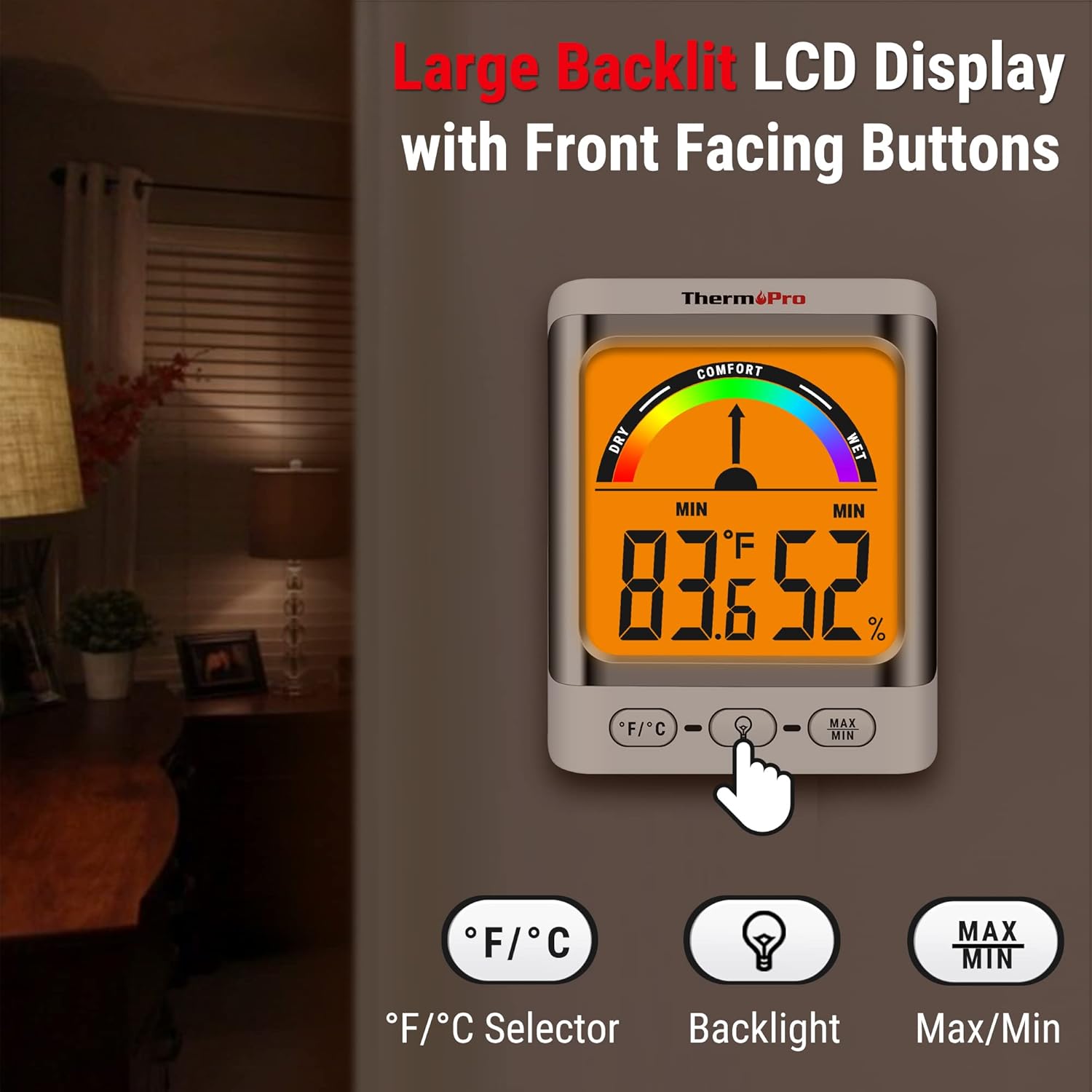
Image: The ThermoPro TP200B main unit display, highlighting the large digits, comfort indicator, and the three control buttons: °F/°C selector, Backlight, and Max/Min.
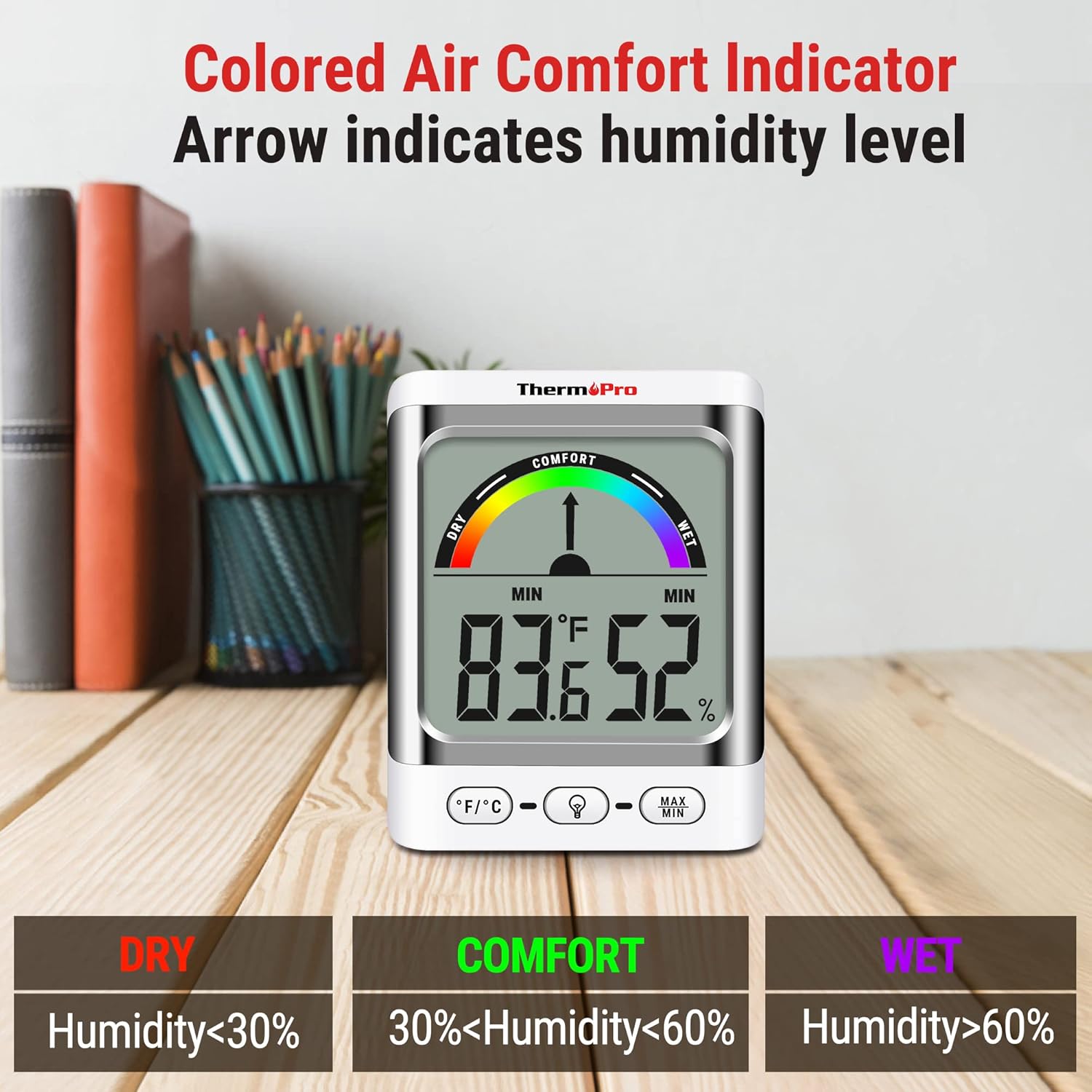
Image: A close-up of the ThermoPro TP200B display, illustrating the colored comfort indicator that visually represents dry (humidity <30%), comfort (30% < humidity < 60%), and wet (humidity >60%) conditions.
4. ຕັ້ງຄ່າ
- ການຕິດຕັ້ງຫມໍ້ໄຟ:
- Open the battery compartment on the back of both the main unit and the outdoor sensor.
- ໃສ່ແບັດເຕີຣີ AAA ທີ່ມີໃຫ້, ຮັບປະກັນວ່າຂົ້ວທີ່ຖືກຕ້ອງ (+/-).
- ປິດຊ່ອງໃສ່ຫມໍ້ໄຟຢ່າງປອດໄພ.
- ການຈັດວາງເຊັນເຊີ:
- Place the outdoor sensor in a location that is protected from direct sunlight and precipitation for accurate readings.
- Ensure the sensor is within the 500ft wireless range of the main unit.
- ຕຳແໜ່ງຂອງໜ່ວຍຫຼັກ:
- The main unit can be placed on a tabletop using its integrated stand, mounted on a wall, or attached to a metallic surface via its magnetic back.
- Position the main unit in a central location indoors for optimal signal reception from the outdoor sensor.

ຮູບພາບ: Examples of flexible placement options for the ThermoPro TP200B, including wall mounting, magnetic attachment to a refrigerator, and freestanding on a countertop.
5. ຄໍາແນະນໍາການດໍາເນີນງານ
5.1 ການສະແດງຜົນເກີນview
The large LCD display shows indoor temperature, humidity, and the comfort level indicator. The outdoor temperature is displayed from the wireless sensor.
5.2 ການທໍາງານຂອງປຸ່ມ
- ປຸ່ມ° F/° C: Press to switch between Fahrenheit and Celsius temperature units.
- ປຸ່ມ Backlight: Press to activate the backlight for 15 seconds, improving visibility in dim conditions.
- ປຸ່ມ MAX/MIN: ກົດເພື່ອ view the maximum and minimum temperature and humidity recorded over the past 24 hours. Press again to cycle through current, MAX, and MIN readings. Hold to reset MAX/MIN records.

Image: The ThermoPro TP200B displaying maximum and minimum temperature and humidity values, accompanied by a conceptual graph showing how these values fluctuate over a 24-hour period.
6. ບໍາລຸງຮັກສາ
- ທໍາຄວາມສະອາດ: ເຊັດຫນ່ວຍແລະເຊັນເຊີດ້ວຍອ່ອນ, damp ຜ້າ. ຢ່າໃຊ້ເຄື່ອງເຮັດຄວາມສະອາດຂັດຫຼືແຊ່ນ້ໍາ.
- ການປ່ຽນແບັດເຕີຣີ: Replace batteries when the low battery indicator appears on the display. Ensure to use fresh AAA batteries.
- ການເກັບຮັກສາ: ຖ້າເກັບຮັກສາອຸປະກອນໄວ້ເປັນເວລາດົນ, ໃຫ້ຖອດແບັດເຕີຣີອອກເພື່ອປ້ອງກັນການຮົ່ວໄຫຼ.
7. ການແກ້ໄຂບັນຫາ
- ບໍ່ມີຈໍສະແດງຜົນ/ຕົວຊີ້ບອກແບັດເຕີຣີຕໍ່າ: Replace all batteries in both the main unit and the outdoor sensor.
- ການອ່ານທີ່ບໍ່ຖືກຕ້ອງ:
- ໃຫ້ແນ່ໃຈວ່າເຊັນເຊີກາງແຈ້ງບໍ່ໄດ້ຢູ່ໃນແສງແດດໂດຍກົງ ຫຼື ສຳຜັດກັບສະພາບອາກາດທີ່ຮຸນແຮງ.
- Verify the main unit and sensor are within effective range and not obstructed by thick walls or electronic interference.
- Allow both units to stabilize for 30 minutes after initial setup or battery replacement.
- No Signal from Outdoor Sensor:
- Relocate the main unit or sensor closer to each other.
- Check batteries in both units.
- Reset the connection by removing batteries from both units, waiting a few minutes, then reinserting them.
8. ຂໍ້ມູນຈໍາເພາະ
| ຄຸນສົມບັດ | ລາຍລະອຽດ |
|---|---|
| ຊື່ຕົວແບບ | TP200B |
| ຍີ່ຫໍ້ | ThermoPro |
| ຄຸນນະສົມບັດພິເສດ | ຄວາມຖືກຕ້ອງສູງ |
| ສີ | ສີຂາວ |
| ປະເພດການສະແດງ | ດິຈິຕອລ |
| ແຫຼ່ງພະລັງງານ | ສາກແບັດເຕີລີ່ (ມີແບັດ AAA 5 ອັນ) |
| ຄວາມຖືກຕ້ອງຂອງອຸນຫະພູມ | ± 2 ° F (± 1.1 ° C) |
| ຄວາມຖືກຕ້ອງຂອງຄວາມຊຸ່ມຊື່ນ | ±2% from 30% to 80% RH; ±3% outside this range |
| ເວລາຕອບສະຫນອງ | 0.5 ວິນາທີ |
| ນ້ໍາຫນັກລາຍການ | 4.2 ອອນ |
| ຄວາມຍາວລາຍການ | 3.9 ນິ້ວ |

Image: Multiple ThermoPro TP200B units demonstrating consistent temperature and humidity readings, highlighting the specified accuracy tolerances of ±2°F (±1.1°C) for temperature and ±2% RH (30-80% range) for humidity.

Image: A visual comparison showcasing the large, compact display of the ThermoPro TP200B (3.3 inches) next to a smaller, generic thermometer (1.7 inches), emphasizing its enhanced readability.
9. ການຮັບປະກັນແລະການສະຫນັບສະຫນູນ
ThermoPro ໃຫ້ການຮັບປະກັນສຳລັບຜະລິດຕະພັນນີ້ຕໍ່ກັບຂໍ້ບົກຜ່ອງດ້ານວັດສະດຸ ແລະ ຝີມືແຮງງານ. ສຳລັບຂໍ້ມູນການຮັບປະກັນລະອຽດ, ການລົງທະບຽນຜະລິດຕະພັນ, ຫຼື ການຊ່ວຍເຫຼືອດ້ານເຕັກນິກ, ກະລຸນາເຂົ້າເບິ່ງ ThermoPro ຢ່າງເປັນທາງການ webເວັບໄຊ ຫຼືຕິດຕໍ່ບໍລິການລູກຄ້າຂອງເຂົາເຈົ້າ. ຮັກສາໃບຮັບເງິນການຊື້ຂອງທ່ານໄວ້ເປັນຫຼັກຖານການຊື້.
Official ThermoPro Webເວັບໄຊ: www.thermopro.com