
Amazon Basics BM1349-UL-B
Amazon Basics Programmable Bread Maker Instruction Manual
Model: BM1349-UL-B
ແນະນຳ

Figure 1: Amazon Basics Programmable Bread Maker. This image shows the black bread maker from an angled front view, highlighting its compact design, control panel with LCD display, and program settings listed on the top surface.
ຂອບໃຈສໍາລັບການຊື້asing the Amazon Basics Programmable Bread Maker. This appliance is designed to simplify the process of making fresh bread, doughs, and jams at home. Please read this instruction manual thoroughly before first use to ensure safe operation and optimal performance. Keep this manual for future reference.
ຄໍາແນະນໍາຄວາມປອດໄພທີ່ສໍາຄັນ
- ອ່ານຄໍາແນະນໍາທັງຫມົດກ່ອນທີ່ຈະໃຊ້ເຄື່ອງໃຊ້.
- ຢ່າແຕະພື້ນຜິວທີ່ຮ້ອນ. ໃຊ້ດ້າມຈັບ ຫຼື ບິດ.
- ເພື່ອປ້ອງກັນການຊ໊ອກໄຟຟ້າ, ຢ່າເອົາສາຍໄຟ, ປລັກສຽບ, ຫຼືເຄື່ອງໃຊ້ໃນນໍ້າ ຫຼືຂອງແຫຼວອື່ນໆ.
- ການເບິ່ງແຍງຢ່າງໃກ້ຊິດແມ່ນມີຄວາມຈໍາເປັນໃນເວລາທີ່ອຸປະກອນໃດໆຖືກນໍາໃຊ້ໂດຍຫຼືຢູ່ໃກ້ກັບເດັກນ້ອຍ.
- ຖອດປລັກອອກຈາກປລັກສຽບໃນເວລາທີ່ບໍ່ໄດ້ໃຊ້ແລະກ່ອນທີ່ຈະເຮັດຄວາມສະອາດ. ປ່ອຍໃຫ້ເຢັນກ່ອນທີ່ຈະໃສ່ຫຼືເອົາຊິ້ນສ່ວນ.
- ຫ້າມນຳໃຊ້ເຄື່ອງໃຊ້ທີ່ມີສາຍໄຟ ຫຼື ປລັກສຽບທີ່ເສຍຫາຍ, ຫຼື ຫຼັງຈາກເຄື່ອງໃຊ້ຜິດປົກກະຕິ ຫຼືໄດ້ຮັບຄວາມເສຍຫາຍໃນທຸກຮູບແບບ.
- ການນໍາໃຊ້ອຸປະກອນເສີມທີ່ບໍ່ແນະນໍາໂດຍຜູ້ຜະລິດເຄື່ອງໃຊ້ອາດຈະເຮັດໃຫ້ເກີດການບາດເຈັບ.
- ຢ່າໃຊ້ນອກ.
- ຢ່າປ່ອຍໃຫ້ສາຍໄຟແຂວນໃສ່ຂອບໂຕະ ຫຼືໂຕະ, ຫຼືແຕະພື້ນຜິວທີ່ຮ້ອນ.
- ຢ່າວາງໃສ່ ຫຼືຢູ່ໃກ້ກັບເຕົາແກ໊ສຮ້ອນ ຫຼືເຕົາໄຟຟ້າ, ຫຼືໃນເຕົາອົບທີ່ມີຄວາມຮ້ອນ.
- ຕ້ອງໃຊ້ຄວາມລະມັດລະວັງເປັນຢ່າງຍິ່ງໃນເວລາເຄື່ອນຍ້າຍເຄື່ອງທີ່ບັນຈຸນ້ຳມັນຮ້ອນ ຫຼືຂອງແຫຼວຮ້ອນອື່ນໆ.
- ເພື່ອຕັດການເຊື່ອມຕໍ່, ເຮັດໃຫ້ການຄວບຄຸມໃດໆ "ປິດ", ຫຼັງຈາກນັ້ນເອົາປລັກອອກຈາກເຕົ້າສຽບຝາ.
- ຢ່າໃຊ້ເຄື່ອງໃຊ້ອື່ນນອກເໜືອໄປຈາກການໃຊ້ທີ່ຕັ້ງໃຈ.
ສ່ວນປະກອບຂອງຜະລິດຕະພັນ
Familiarize yourself with the parts of your bread maker before operation.

ຮູບ 2: ລວມອຸປະກອນເສີມ. This image displays the bread pan with handle, a clear plastic measuring cup, a black kneading blade, a white double-sided measuring spoon (teaspoon/tablespoon), and a metal hook for removing the kneading blade.
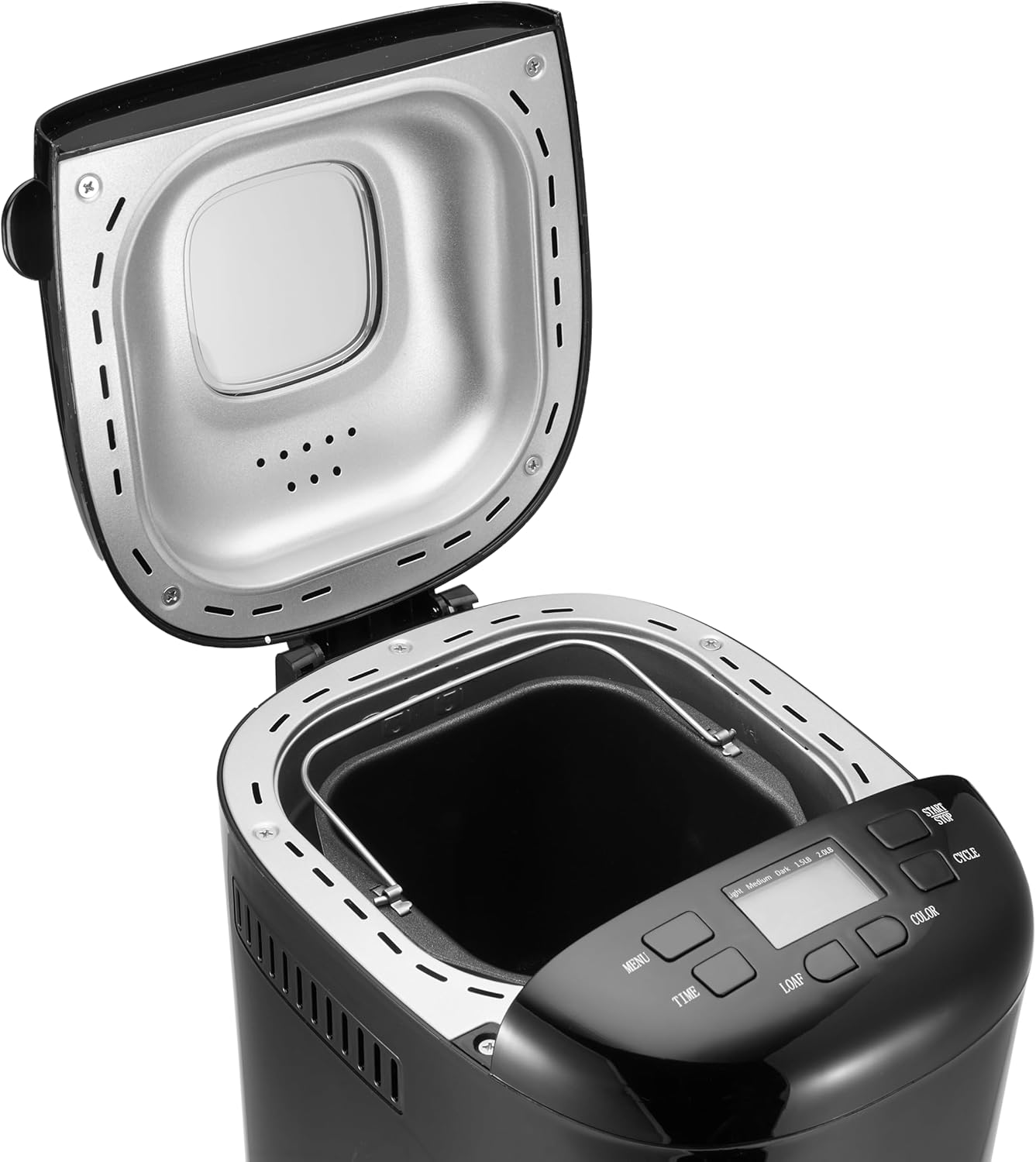
Figure 3: Bread Maker Interior. This image shows the bread maker with its lid open, revealing the heating element and the space where the bread pan is inserted. The control panel with its LCD display and buttons is visible at the front.
- ຫົວໜ່ວຍຫຼັກ: ທີ່ຢູ່ອາໄສຫຼັກຂອງເຄື່ອງເຮັດເຂົ້າຈີ່.
- ກະດານຄວບຄຸມ: Features an LCD display and buttons for program selection, time, loaf size, and crust color.
- ຝາປິດ: Covers the baking chamber, often with a viewຢູ່ໃນປ່ອງຢ້ຽມ.
- ກະທະເຂົ້າຈີ່: Non-stick baking pan where ingredients are placed and bread is baked.
- Kneading Blade: ຕິດກັບແກນພາຍໃນຖາດເຂົ້າຈີ່ ເພື່ອປະສົມ ແລະ ນວດແປ້ງ.
- ຈອກວັດແທກ: For liquid and dry ingredients.
- ບ່ວງວັດແທກ: For smaller measurements (teaspoon/tablespoon).
- Hook: Used to remove the kneading blade from the baked loaf.
ການຕັ້ງຄ່າແລະການນໍາໃຊ້ຄັ້ງທໍາອິດ
- ການຫຸ້ມຫໍ່: ລະມັດລະວັງເອົາເຄື່ອງເຮັດເຂົ້າຈີ່ແລະອຸປະກອນເສີມທັງຫມົດອອກຈາກເຄື່ອງຫຸ້ມຫໍ່. ຮັກສາການຫຸ້ມຫໍ່ສໍາລັບການເກັບຮັກສາຫຼືການຂົນສົ່ງໃນອະນາຄົດ.
- ທໍາຄວາມສະອາດ: Before first use, wash the bread pan and kneading blade with warm, soapy water. Rinse thoroughly and dry completely. Wipe the exterior of the bread maker with a damp ຜ້າ. ຢ່າເອົາຫົວຫນ່ວຍຫຼັກຢູ່ໃນນ້ໍາ.
- ການເຜົາໄຫມ້ເບື້ອງຕົ້ນ: It is recommended to run the bread maker empty for approximately 10 minutes on a "Bake" cycle (if available, or a short custom bake cycle) to burn off any manufacturing oils. Some smoke or odor may be present; this is normal. Ensure adequate ventilation. After this, allow the unit to cool completely and clean the interior again.
- ການຈັດວາງ: ວາງເຄື່ອງເຮັດເຂົ້າຈີ່ຢູ່ເທິງພື້ນຜິວທີ່ຫມັ້ນຄົງ, ຮາບພຽງ, ທົນທານຕໍ່ຄວາມຮ້ອນ, ຫ່າງຈາກແສງແດດໂດຍກົງແລະແຫຼ່ງຄວາມຮ້ອນ. ໃຫ້ແນ່ໃຈວ່າມີການລະບາຍອາກາດທີ່ພຽງພໍຢູ່ອ້ອມຮອບເຄື່ອງໃຊ້.
- ການເຊື່ອມຕໍ່ພະລັງງານ: ສຽບສາຍໄຟເຂົ້າກັບປລັກໄຟຟ້າທີ່ມີສາຍດິນ. ໜ້າຈໍຈະສະຫວ່າງຂຶ້ນ, ຊີ້ບອກວ່າເຄື່ອງພ້ອມໃຊ້ງານແລ້ວ.
ຄໍາແນະນໍາການດໍາເນີນງານ
This section guides you through the process of making bread with your appliance.
ແຜງຄວບຄຸມຜ່ານview
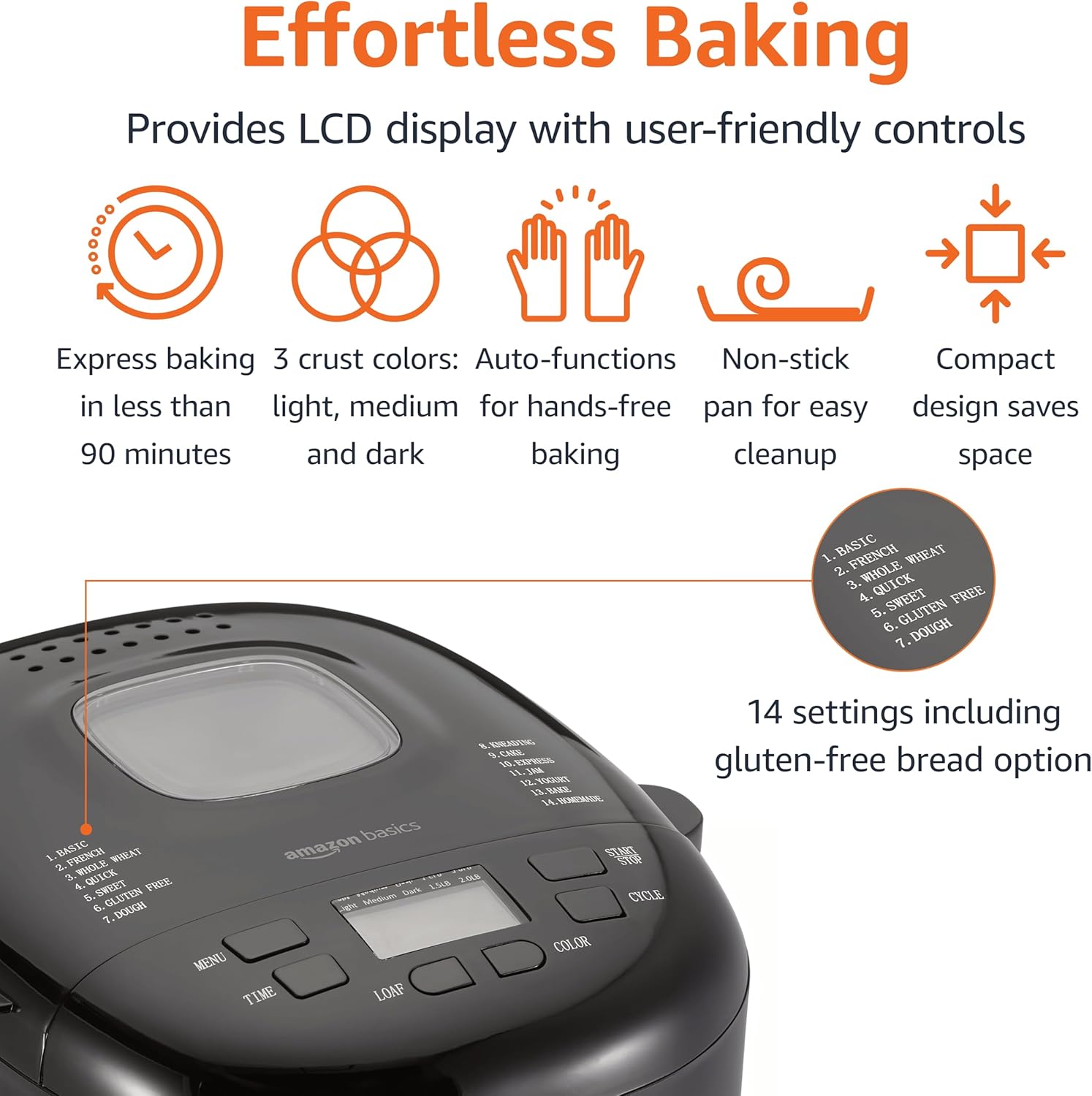
ຮູບທີ 4: ແຜງຄວບຄຸມ. This image highlights the bread maker's control panel, featuring an LCD screen that displays program information. Buttons for 'MENU', 'TIME', 'LOAF', 'COLOR', and 'CYCLE' are clearly visible, along with a list of 14 program settings.
- ປຸ່ມເມນູ: Selects one of the 14 available programs (e.g., Basic, French, Whole Wheat, Sweet, Gluten Free, Dough, Jam).
- TIME Buttons (+/-): Adjusts the delay timer for delayed baking.
- ປຸ່ມ LOAF: Selects the loaf size (e.g., 1.5 lb or 2 lb).
- ປຸ່ມສີ: Selects the crust darkness (Light, Medium, Dark).
- CYCLE (Start/Stop) Button: Starts or stops the selected program.
- ຈໍ LCD: Shows the selected program, time remaining, loaf size, and crust color.
ຂັ້ນຕອນການເຮັດເຂົ້າຈີ່ພື້ນຖານ
- ໃສ່ແຜ່ນໃບຄ້າຍຄື Kneading: ວາງໃບນວດເຂົ້າໜົມລົງເທິງກ້ານພາຍໃນຖາດເຂົ້າຈີ່.
- ເພີ່ມສ່ວນປະກອບ: ຕື່ມສ່ວນປະກອບໃສ່ຖາດເຂົ້າຈີ່ຕາມລຳດັບທີ່ລະບຸໄວ້ໃນສູດອາຫານຂອງທ່ານ (ໂດຍປົກກະຕິແລ້ວແມ່ນຂອງແຫຼວກ່ອນ, ຈາກນັ້ນສ່ວນປະກອບແຫ້ງ, ໂດຍມີເຊື້ອລາສຸດທ້າຍ ແລະ ແຍກອອກຈາກຂອງແຫຼວ/ເກືອ). ໃຫ້ແນ່ໃຈວ່າການວັດແທກແມ່ນຖືກຕ້ອງ.
- ວາງກະທະເຂົ້າຈີ່: Insert the bread pan into the bread maker, ensuring it is securely locked in place. Close the lid.
- ເລືອກໂຄງການ: ກົດ ເມນູ button to choose the desired program (e.g., "Basic" for white bread).
- ເລືອກຂະຫນາດ Loaf: ກົດ LOAF button to select the appropriate loaf size (1.5 lb or 2 lb).
- ເລືອກສີ Crust: ກົດ ສີ ເພື່ອເລືອກຄວາມມືດຂອງເປືອກທີ່ທ່ານຕ້ອງການ (ອ່ອນ, ກາງ, ຫຼື ເຂັ້ມ).
- ເລີ່ມໂປຣແກຣມ: ກົດ ວົງຈອນ button to start the program. The machine will begin mixing.
- ການຕິດຕາມ: During the kneading cycles, you may check the dough consistency by opening the lid briefly. If the dough is too dry, add a small amount of liquid; if too wet, add a small amount of flour.
- ສໍາເລັດ: Once the program is complete, the bread maker will usually beep and switch to a "Keep Warm" cycle. Press the ວົງຈອນ ປຸ່ມເພື່ອຢຸດເຄື່ອງ.
- ເອົາເຂົ້າຈີ່ອອກ: Using oven mitts, carefully remove the hot bread pan from the machine. Invert the pan onto a wire rack to release the bread. If the kneading blade remains in the loaf, use the provided hook to carefully remove it.
- ຄວາມເຢັນ: Allow the bread to cool on a wire rack for at least 20-30 minutes before slicing. This allows the internal structure to set.
ຟັງຊັນໂມງຈັບເວລາຊັກຊ້າ
The delay timer allows you to program the bread maker to finish baking at a later time, up to 13 hours. This is useful for having fresh bread ready in the morning.
- After selecting your program, loaf size, and crust color, press the TIME buttons to set the desired delay time. The displayed time includes the baking cycle duration.
- ກົດ ວົງຈອນ button. The timer will count down, and the machine will start automatically when the delay time expires.
- ຂໍ້ຄວນລະວັງ: Do not use the delay timer with recipes containing highly perishable ingredients like milk, eggs, or fresh fruit, as they may spoil before baking begins.
ການແນະນຳສູດ
The Amazon Basics Bread Maker offers 14 settings for various types of baked goods. For best results, always use recipes specifically designed for bread makers and ensure accurate measurement of ingredients.
- Bread Programs: Basic, French, Whole Wheat, Sweet, Gluten-Free, ExpressBake.
- Dough Programs: For pizza dough, pasta dough, or rolls.
- Specialty Programs: Jam, Cake, Yogurt.
Refer to the recipe book that came with your bread maker or reliable bread machine recipe sources for ingredient quantities and specific instructions for each program.
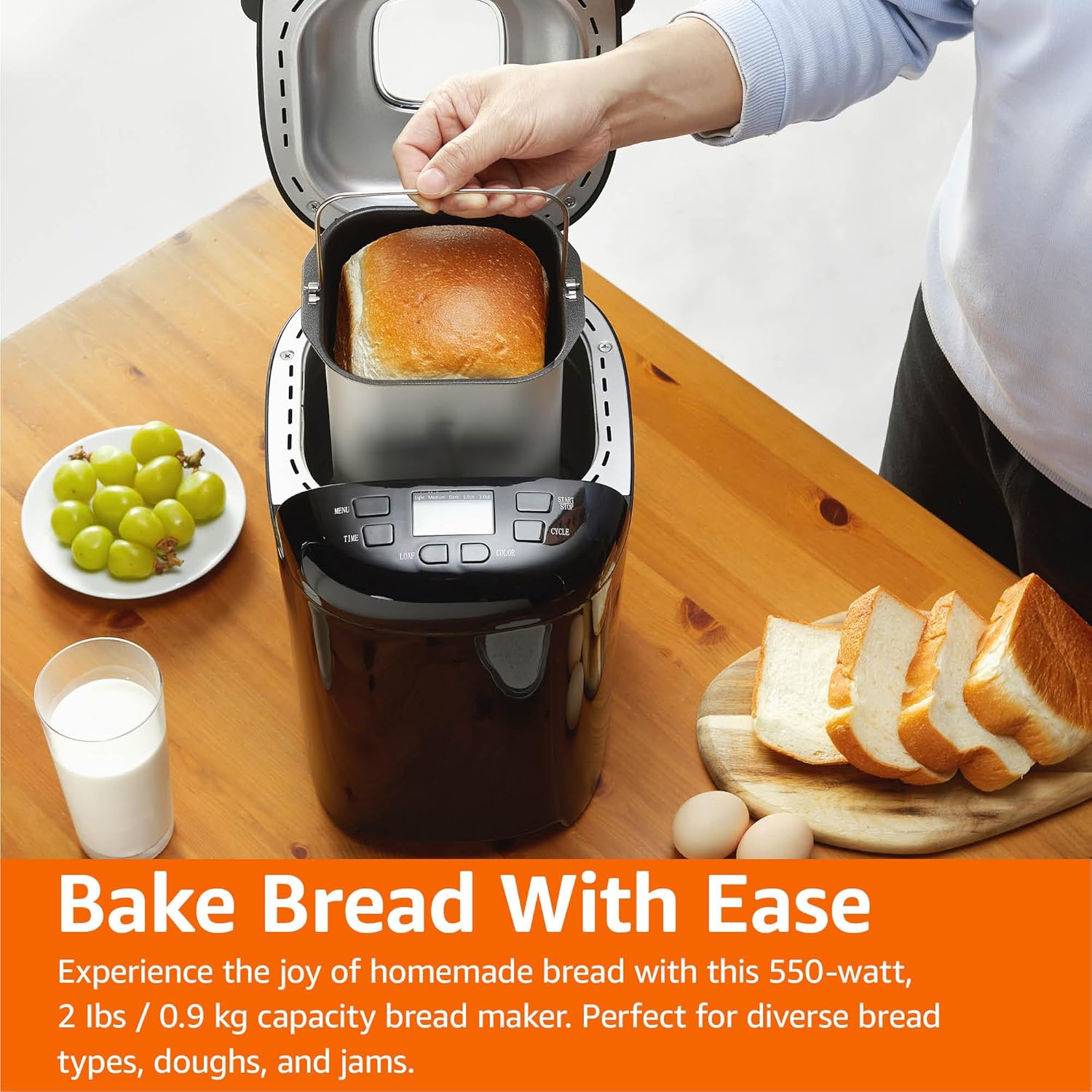
Figure 5: Freshly Baked Bread. This image shows a person carefully lifting the bread pan, containing a golden-brown loaf, out of the bread maker. Surrounding the machine are fresh grapes, a glass of milk, and slices of bread, illustrating the end result of the baking process.
ການດູແລແລະບໍາລຸງຮັກສາ
Proper cleaning and maintenance will extend the life of your bread maker.
- ຖອດປລັກ: ຖອດປລັກເຄື່ອງອອກຈາກປລັກສຽບໄຟຢູ່ສະເໝີ ແລະປ່ອຍໃຫ້ມັນເຢັນໝົດກ່ອນທຳຄວາມສະອາດ.
- ຖາດເຂົ້າຈີ່ແລະແຜ່ນໃບຄ້າຍຄື: Wash the bread pan and kneading blade with warm, soapy water. Do not use abrasive cleaners or metal scouring pads, as this can damage the non-stick coating. Rinse thoroughly and dry completely.
- ພາຍນອກ: ເຊັດດ້ານນອກຂອງເຄື່ອງເຮັດເຂົ້າຈີ່ດ້ວຍຄວາມອ່ອນໂຍນ, ງamp ຜ້າ. ຢ່າໃຊ້ສານເຄມີທີ່ຮຸນແຮງຫຼືເຄື່ອງເຮັດຄວາມສະອາດຂັດ.
- ພາຍໃນ: ທຳຄວາມສະອາດພາຍໃນຫ້ອງອົບດ້ວຍໂຄສະນາamp ຜ້າ. ເອົາເສດເຂົ້າ ຫຼື ສິ່ງເສດເຫຼືອອອກ.
- ການເກັບຮັກສາ: Store the bread maker in a clean, dry place. Ensure the bread pan and kneading blade are clean and dry before storing.
ຄູ່ມືແກ້ໄຂບັນຫາ
If you encounter issues with your bread maker, refer to the following common problems and solutions.
| ບັນຫາ | ສາເຫດທີ່ເປັນໄປໄດ້ | ການແກ້ໄຂ |
|---|---|---|
| ເຂົ້າຈີ່ບໍ່ລຸກຂຶ້ນ. | Expired or inactive yeast, incorrect water temperature, too much salt, not enough sugar. | ກວດເບິ່ງວັນທີຫມົດອາຍຸຂອງເຊື້ອລາ. ໃຊ້ນ້ໍາອຸ່ນ (105-115°F / 40-46°C). ຮັບປະກັນການວັດແທກສ່ວນປະກອບທີ່ຖືກຕ້ອງ. |
| ເຂົ້າຈີ່ມີຄວາມຫນາແຫນ້ນຫຼືຫນັກເກີນໄປ. | Too much flour, not enough liquid, incorrect yeast amount, high humidity. | Measure ingredients accurately, especially flour (use a scale if possible). Adjust liquid slightly in humid conditions. |
| ເຂົ້າຈີ່ລົ້ມລົງໃນລະຫວ່າງການອົບ. | Too much liquid, too much yeast, high altitude, opening lid too often. | Reduce liquid slightly. Ensure correct yeast amount. Avoid opening the lid during baking. |
| Kneading ແຜ່ນຕິດຢູ່ໃນເຂົ້າຈີ່. | ປະກົດການທົ່ວໄປ. | Use the provided hook to carefully remove the blade after the bread has cooled slightly. |
| ເຄື່ອງບໍ່ເລີ່ມຕົ້ນ. | ບໍ່ໄດ້ສຽບ, ສຽບໄຟtagອ, ຝາປິດບໍ່ໄດ້ປິດຢ່າງຖືກຕ້ອງ, ບໍ່ໄດ້ເລືອກໂປຣແກຣມ. | Check power connection. Ensure lid is fully closed. Select a program and press START. |
ຂໍ້ມູນຈໍາເພາະຂອງຜະລິດຕະພັນ
Technical details for the Amazon Basics Programmable Bread Maker.
- ໝາຍເລກຕົວແບບ: BM1349-UL-B
- ຍີ່ຫໍ້: ພື້ນຖານ Amazon
- ສີ: ດຳ
- ພະລັງງານ: 550 ວັດ
- ຄວາມອາດສາມາດ loaf: ເຖິງ 2 ປອນ
- ຈໍານວນໂຄງການ: 14
- ຂະໜາດຜະລິດຕະພັນ: 11.6"D x 8.8"W x 11.4"H
- ນ້ໍາຫນັກລາຍການ: 8 ປອນ
- ຜູ້ຜະລິດ: Amazon
- ຄໍາແນະນໍາການດູແລ: ເຊັດອອກດ້ວຍຜ້າແຫ້ງ (ສຳລັບພາຍນອກ)
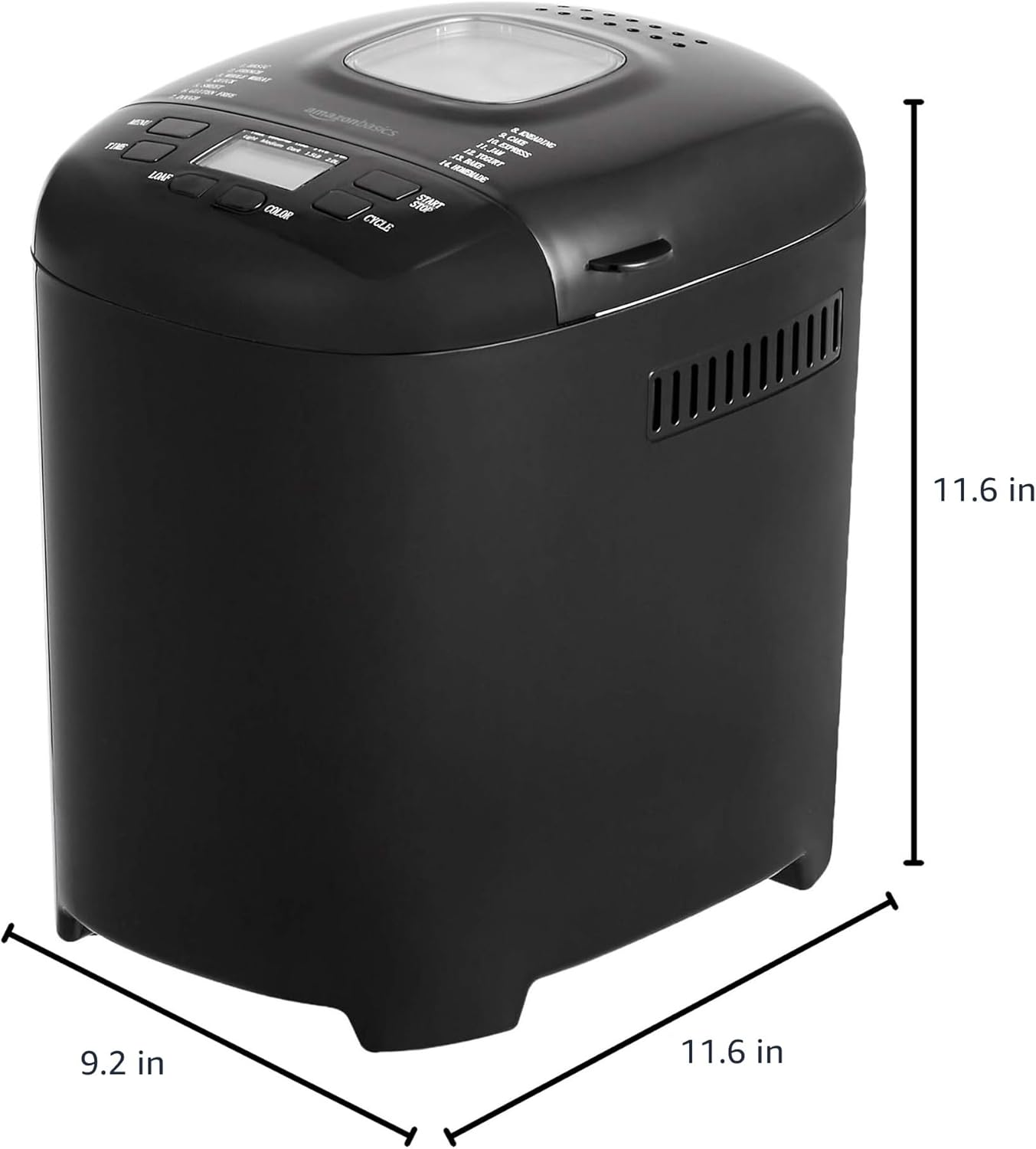
ຮູບທີ 6: ຂະໜາດຜະລິດຕະພັນ. This image provides a visual representation of the bread maker's dimensions, indicating a depth of 11.6 inches, a width of 9.2 inches, and a height of 11.6 inches.
ຂໍ້ມູນການຮັບປະກັນ
For detailed warranty information, please refer to the warranty card included with your product packaging or visit the official Amazon Basics webເວັບໄຊ. ການຮັບປະກັນໂດຍທົ່ວໄປກວມເອົາຂໍ້ບົກພ່ອງຂອງວັດສະດຸແລະຝີມືພາຍໃຕ້ການນໍາໃຊ້ປົກກະຕິ.
ການຊ່ວຍເຫຼືອລູກຄ້າ
If you have any questions, require assistance, or need to report an issue with your Amazon Basics Bread Maker, please contact Amazon Basics Customer Service. You can typically find contact information on the Amazon website under the "Help" or "Customer Service" sections, or through your order details.
ສໍາລັບການຊ່ວຍເຫຼືອອອນໄລນ໌, ໄປຢ້ຽມຢາມ: ບໍລິການລູກຄ້າ Amazon
Ask a question about this manual
Ask about setup, troubleshooting, compatibility, parts, safety, or missing instructions. Manuals+ will review the question and use this page’s manual context to help answer it.