
1. ບົດແນະນຳ
The Dual DAB 3A Digital Radio Adapter is designed to upgrade your existing audio system with modern digital radio reception and Bluetooth streaming capabilities. This adapter allows you to enjoy DAB+ and FM radio broadcasts with clear digital quality and stream audio wirelessly from compatible devices. Its user-friendly interface and remote control ensure convenient operation.
2. ຂໍ້ມູນຄວາມປອດໄພ
- ການສະຫນອງພະລັງງານ: Use only the provided AC power adapter. Ensure the voltage ກົງກັບຂໍ້ກຳນົດທີ່ລະບຸໄວ້ໃນອະແດບເຕີ.
- ນ້ໍາແລະຄວາມຊຸ່ມ: Do not expose the device to rain, moisture, or dripping/splashing liquids. Keep it away from water sources.
- ການລະບາຍອາກາດ: Ensure adequate ventilation around the unit. Do not block ventilation openings. Avoid placing the device on soft surfaces that may obstruct airflow.
- ແຫຼ່ງຄວາມຮ້ອນ: ເກັບຮັກສາອຸປະກອນໃຫ້ຫ່າງຈາກແຫຼ່ງຄວາມຮ້ອນ ເຊັ່ນ: ໝໍ້ນ້ຳ, ເຄື່ອງບັນທຶກຄວາມຮ້ອນ, ເຕົາໄຟ ຫຼື ເຄື່ອງໃຊ້ໄຟຟ້າທີ່ຜະລິດຄວາມຮ້ອນອື່ນໆ.
- ທໍາຄວາມສະອາດ: Disconnect the power before cleaning. Use a soft, dry cloth. Do not use liquid cleaners or aerosol sprays.
- ການບໍລິການ: ຢ່າພະຍາຍາມບໍລິການຜະລິດຕະພັນນີ້ດ້ວຍຕົນເອງ. ອ້າງເຖິງການບໍລິການທັງtoົດໃຫ້ກັບພະນັກງານບໍລິການທີ່ມີຄຸນວຸດທິ.
3. ເນື້ອໃນຊຸດ
ກະລຸນາກວດສອບວ່າລາຍການທັງຫມົດທີ່ລະບຸໄວ້ຂ້າງລຸ່ມນີ້ແມ່ນລວມຢູ່ໃນຊຸດຂອງທ່ານ:
- Dual DAB 3A Digital Radio Adapter
- ເຄື່ອງປັບໄຟຟ້າ AC
- ການຄວບຄຸມໄລຍະໄກ
- ຄູ່ມືເຈົ້າຂອງ
- External Wire Antenna
4. ຜະລິດຕະພັນເກີນview
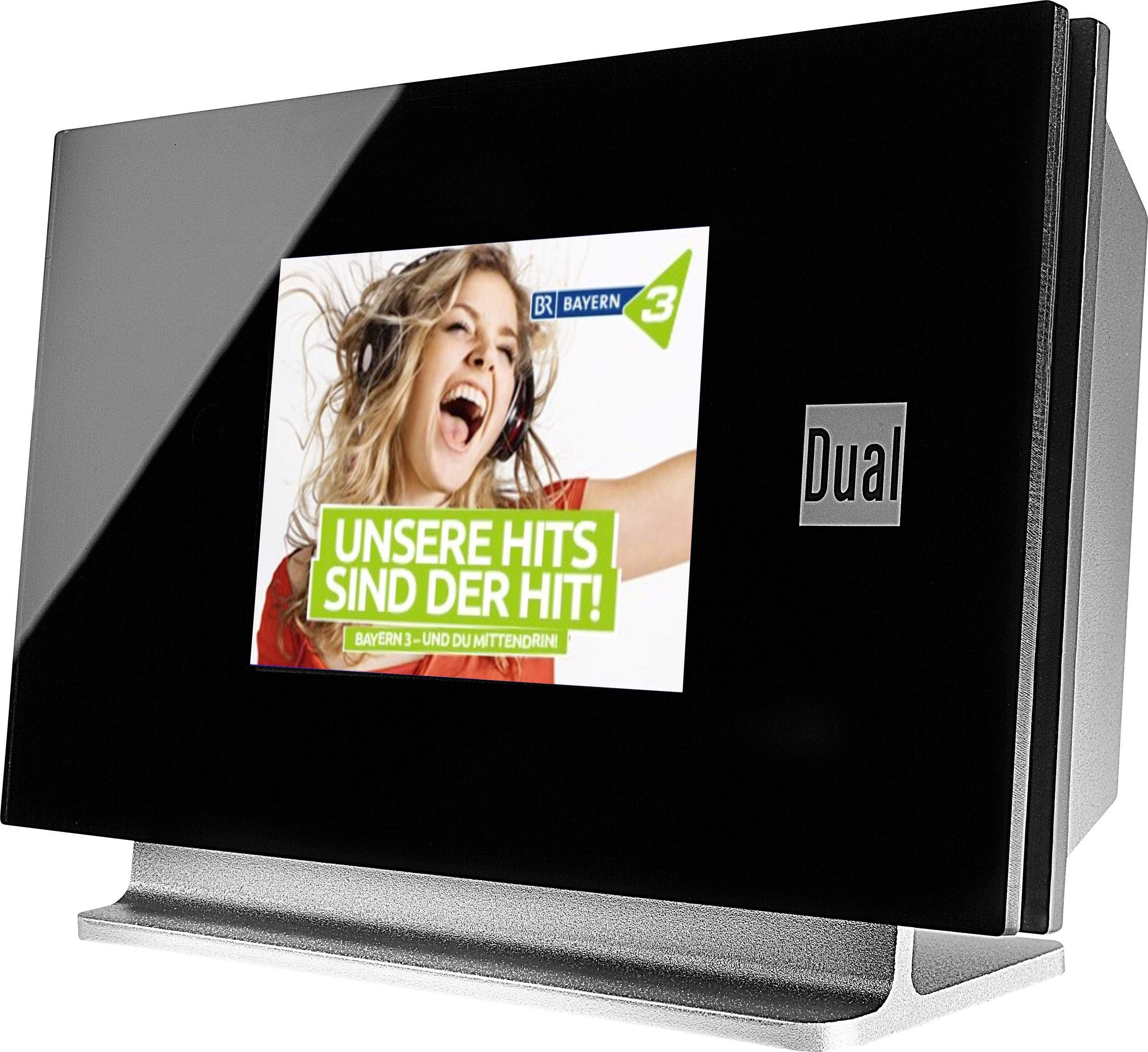
This image displays the Dual DAB 3A Digital Radio Adapter from a front-side angle. The front features a large, black TFT color display showing a radio station's album art and text. The side view indicates the product dimensions: 15 cm (width), 6 cm (depth), and 10.49 cm (height).
ແຜງໜ້າ
- TFT Color Display: Shows station information, track details, album art, and menu options.
ການເຊື່ອມຕໍ່ແຜງດ້ານຫລັງ
- ການປ້ອນຂໍ້ມູນເສົາອາກາດ: For connecting the external wire antenna or a commercially available antenna.
- AUX-Out: Audio output for connecting to an external amplifier ຫຼືລະບົບສຽງ.
- ການປ້ອນຂໍ້ມູນພະລັງງານ: ສໍາລັບການເຊື່ອມຕໍ່ອະແດບເຕີໄຟຟ້າ AC.
ການຄວບຄຸມໄລຍະໄກ
The included remote control provides full functionality for navigating menus, changing stations, adjusting volume, and selecting input modes.
5. ຕັ້ງຄ່າ
- ເຊື່ອມຕໍ່ເສົາອາກາດ: Connect the supplied external wire antenna to the antenna input on the rear panel of the DAB 3A adapter. For optimal reception, extend the antenna fully.
- ເຊື່ອມຕໍ່ກັບລະບົບສຽງ: Use an appropriate audio cable (not included) to connect the AUX-OUT port on the rear of the DAB 3A to an available audio input (e.g., AUX-IN, Line-IN) on your existing amplifier ຫຼືລະບົບ stereo.
- ເຊື່ອມຕໍ່ພະລັງງານ: Plug the AC power adapter into the power input on the rear of the DAB 3A, then plug the adapter into a wall outlet.
- ເປີດ: Press the Power button on the unit or the remote control to turn on the adapter. The display will illuminate.
- Initial Scan (DAB+): Upon first power-on, the unit may automatically perform a scan for available DAB+ stations. Allow this process to complete.
6. ການເຮັດວຽກ
ເປີດ/ປິດ
- ກົດ ພະລັງງານ button on the unit or remote control to turn the device on or off.
DAB+ Radio Mode
- ກົດ ໂໝດ button on the remote control until DAB+ mode is selected.
- If no stations are found or you wish to rescan, navigate to the 'Full Scan' option in the menu and confirm. The adapter will search for available DAB+ stations.
- ໃຊ້ ຂຶ້ນ/ລົງ navigation buttons on the remote to browse through the list of available stations.
- ກົດ ຕົກລົງ/ເຂົ້າ ໃນການເລືອກສະຖານີ.
- The TFT display will show station name, program information, and potentially album art or weather data.
ໂຫມດວິທະຍຸ FM
- ກົດ ໂໝດ button on the remote control until FM mode is selected.
- ເພື່ອສະແກນຫາສະຖານີໂດຍອັດຕະໂນມັດ, ກົດປຸ່ມຄ້າງໄວ້ ສະແກນ button (or equivalent on remote). The adapter will tune to the next strong station.
- ເພື່ອປັບແຕ່ງດ້ວຍຕົນເອງ, ໃຫ້ໃຊ້ ຂຶ້ນ/ລົງ navigation buttons to adjust the frequency.
ແບບ Bluetooth
- ກົດ ໂໝດ button on the remote control until Bluetooth mode is selected. The display will show 'Bluetooth Pairing' or similar.
- ໃນສະມາດໂຟນ ຫຼືແທັບເລັດຂອງທ່ານ, ເປີດໃຊ້ Bluetooth ແລະຊອກຫາອຸປະກອນທີ່ມີຢູ່.
- Select 'Dual DAB 3A' from the list of devices to pair.
- Once paired, you can stream audio from your device to the DAB 3A adapter.
ໂໝດ AUX-IN
- Connect an external audio source (e.g., MP3 player, CD player) to the AUX-IN port on the rear of the DAB 3A using a 3.5mm audio cable (not included).
- ກົດ ໂໝດ button on the remote control until AUX-IN mode is selected.
- Audio from the connected external device will now play through your audio system.
7. ບໍາລຸງຮັກສາ
- ທໍາຄວາມສະອາດຫນ່ວຍບໍລິການ: Disconnect the power adapter before cleaning. Use a soft, dry, lint-free cloth to wipe the surface of the unit. Do not use abrasive cleaners, waxes, or solvents.
- ທໍາຄວາມສະອາດສະແດງຜົນ: Gently wipe the TFT display with a soft, dry microfiber cloth. Avoid pressing hard on the screen.
- ການເກັບຮັກສາ: ຖ້າເກັບຮັກສາເຄື່ອງເປັນເວລາດົນນານ, ໃຫ້ຖອດສາຍອອກຈາກແຫຼ່ງຈ່າຍໄຟ ແລະ ເກັບຮັກສາໄວ້ໃນບ່ອນທີ່ເຢັນ, ແຫ້ງ, ຫ່າງຈາກແສງແດດໂດຍກົງ ແລະ ອຸນຫະພູມສູງສຸດ.
8. ການແກ້ໄຂບັນຫາ
| ບັນຫາ | ສາເຫດທີ່ເປັນໄປໄດ້ | ການແກ້ໄຂ |
|---|---|---|
| ບໍ່ມີພະລັງງານ | ອະແດບເຕີໄຟບໍ່ໄດ້ເຊື່ອມຕໍ່ ຫຼືປລັກສຽບເກີດຄວາມຜິດພາດ. | ໃຫ້ແນ່ໃຈວ່າອະແດບເຕີໄຟຟ້າໄດ້ເຊື່ອມຕໍ່ກັບເຄື່ອງຢ່າງແໜ້ນໜາ ແລະ ປລັກໄຟທີ່ໃຊ້ໄດ້. |
| ການຮັບສັນຍານ DAB+/FM ບໍ່ດີ | Antenna not properly connected or poor signal strength. | Ensure the antenna is fully extended and properly connected. Try repositioning the antenna or the unit. Consider using a stronger external antenna if available. |
| ການຈັບຄູ່ Bluetooth ລົ້ມເຫລວ | Bluetooth not enabled on source device or adapter is not in pairing mode. | Ensure Bluetooth is enabled on your smartphone/tablet and the DAB 3A is in Bluetooth mode. Try restarting both devices. |
| ບໍ່ມີສຽງ | Volume too low, incorrect input selected on amplifier, or audio cable issue. | Increase the volume on both the DAB 3A and your ampຕົວຊ່ວຍ. ຮັບປະກັນຂອງທ່ານ amplifier is set to the correct input (e.g., AUX-IN). Check the audio cable connections. |
9. ຂໍ້ມູນຈໍາເພາະ
- ຕົວແບບ: 75862
- ເທັກໂນໂລຍີ Tuner: DAB Plus, FM
- ການເຊື່ອມຕໍ່: Bluetooth
- ແຖບວິທະຍຸທີ່ຮອງຮັບ: FM, DAB+
- ປະເພດການສະແດງ: ຈໍສະແດງຜົນສີ
- ແຫຼ່ງພະລັງງານ: ອະແດບເຕີ AC
- ການໂຕ້ຕອບຮາດແວ: Bluetooth
- ອຸປະກອນທີ່ເຂົ້າກັນໄດ້: ໂທລະສັບສະຫຼາດ, ຄອມພິວເຕີໂນດບຸກ
- ຄຸນນະສົມບັດພິເສດ: Bluetooth, Remote Control
- ຂະໜາດຜະລິດຕະພັນ: 15 x 6 x 10.5 cm
- ນ້ໍາຫນັກລາຍການ: 540 g
10. ການຮັບປະກັນແລະການສະຫນັບສະຫນູນ
This product comes with a standard manufacturer's warranty. For detailed warranty information, please refer to the warranty card included in your package or visit the official Dual website. For technical support, troubleshooting assistance, or service inquiries, please contact Dual customer support through their official channels.