
1. ບົດແນະນຳ
Thank you for choosing the Greadio Retro Bluetooth Speaker and Vintage FM Radio. This manual provides essential information for the safe and efficient operation of your device. Please read it thoroughly before use and retain it for future reference.
2. ຂໍ້ມູນຄວາມປອດໄພ
- ຢ່າປ່ອຍໃຫ້ອຸປະກອນຖືກນໍ້າ, ຄວາມຊຸ່ມຊື່ນ, ຫຼືອຸນຫະພູມທີ່ຮຸນແຮງ.
- ຫຼີກລ້ຽງການຫຼຸດລົງຫຼືການອຸປະກອນທີ່ມີຜົນກະທົບທີ່ເຂັ້ມແຂງ.
- ຢ່າພະຍາຍາມຖອດປະກອບ ຫຼືສ້ອມແປງອຸປະກອນດ້ວຍຕົນເອງ. ຕິດຕໍ່ພະນັກງານບໍລິການທີ່ມີຄຸນວຸດທິ.
- ຮັກສາໃຫ້ໄກຈາກເດັກນ້ອຍ.
- ໃຊ້ພຽງແຕ່ສາຍສາກທີ່ໃຫ້ມາ.
3. ເນື້ອໃນຊຸດ
ກວດສອບວ່າລາຍການທັງຫມົດແມ່ນມີຢູ່ໃນຊຸດ:
- Greadio Retro Bluetooth Speaker (Model GR919P)
- ສາຍສາກ USB
- ສາຍ AUX
- ຄູ່ມືຜູ້ໃຊ້

Image: Greadio Retro Bluetooth Speaker (Pink) with its charging cable, AUX cable, and user manual.
4. ຜະລິດຕະພັນເກີນview
Familiarize yourself with the main components and controls of your Greadio Retro Bluetooth Speaker.

Image: Front panel of the speaker, showing the speaker, frequency scale, tuning knob, volume knob, and ON/OFF & Function knob.

Image: Rear panel of the speaker, showing the Micro USB port, TF card socket, Play/Pause button, and Previous/Next buttons.
ຄຸນນະສົມບັດທີ່ສໍາຄັນ:
- ຂະໜາດກະທັດຮັດ: Measures 4.4 x 2.7 x 2 inches, making it highly portable.
- ລະດັບສຽງດັງ: Equipped with a five-watt amplifier for rich and clear audio.
- Bluetooth 5.0: Advanced wireless connectivity for quick pairing.
- ການຫຼິ້ນຫຼາຍໂໝດ: Supports FM Radio, Bluetooth, TF Card, and AUX input.
- ແບັດເຕີຣີທີ່ສາມາດສາກໄດ້ໃນຕົວ: Provides up to 9 hours of playtime.
5. ຕັ້ງຄ່າ
5.1 ການສາກໄຟເບື້ອງຕົ້ນ
Before first use, fully charge the speaker. Connect the provided USB charging cable to the Micro USB port on the back of the speaker and plug the other end into a USB power adapter (not included) or a computer's USB port. The charging indicator light will illuminate during charging and turn off when fully charged.
5.2 ເປີດ/ປິດ
To power on the speaker, rotate the ON/OFF & Function knob clockwise until you hear a click and the display lights up. To power off, rotate the knob counter-clockwise until it clicks off.
6. ຮູບແບບການເຮັດວຽກ
The Greadio Retro Bluetooth Speaker supports multiple playback modes. Rotate the ON/OFF & Function knob to switch between modes.
6.1 ແບບບູທູດ
In Bluetooth mode, the speaker can connect wirelessly to your smartphone, tablet, or other Bluetooth-enabled devices.
- Turn on the speaker and switch to Bluetooth mode. The display will show a blue light, indicating it's ready for pairing.
- On your device, enable Bluetooth and search for "Greadio" or "R919".
- ເລືອກລຳໂພງຈາກລາຍຊື່ເພື່ອຈັບຄູ່. ສຽງຢືນຢັນຈະຊີ້ບອກການຈັບຄູ່ສຳເລັດຜົນ.
- ດຽວນີ້ທ່ານສາມາດຫຼິ້ນສຽງຈາກອຸປະກອນຂອງທ່ານຜ່ານລຳໂພງໄດ້.

Image: The speaker's dial illuminated in blue, signifying Bluetooth mode is active.
Video: Demonstrates how to connect the Greadio Bluetooth Speaker to a smartphone via Bluetooth, showing the pairing process and audio playback.
ໂໝດວິທະຍຸ 6.2 FM
Enjoy your favorite FM radio stations with the vintage-style tuner.
- Turn on the speaker and switch to FM Radio mode. The display will show an orange light.
- Rotate the Tuning Knob (large central knob) to scan for available FM stations.
- Adjust the Volume Knob (smaller knob) to your desired listening level.

Image: The speaker's dial illuminated in orange, signifying FM radio mode is active.
ໂໝດບັດ 6.3 TF
Play music directly from a TF (MicroSD) card.
- Insert a TF card (up to 32GB, not included) with MP3 audio files into the TF card socket on the back of the speaker.
- The speaker will automatically switch to TF Card mode and begin playback.
- Use the Play/Pause button and Previous/Next buttons on the back to control playback.

Image: The TF card slot located on the rear of the speaker for direct music playback.
6.4 ໂຫມດ AUX
ເຊື່ອມຕໍ່ອຸປະກອນສຽງພາຍນອກໂດຍໃຊ້ສາຍ AUX.
- Connect one end of the provided AUX cable to the AUX port on the back of the speaker.
- ເຊື່ອມຕໍ່ປາຍອີກດ້ານໜຶ່ງເຂົ້າກັບສັນຍານສຽງຂອງອຸປະກອນພາຍນອກຂອງທ່ານ (ເຊັ່ນ: ເຄື່ອງຫຼິ້ນ MP3, ຄອມພິວເຕີ).
- The speaker will automatically switch to AUX mode. Play audio from your external device.

Image: The AUX port on the rear of the speaker for wired audio connections.
7. ການສາກໄຟ
The speaker features a built-in 1100mAh rechargeable Lithium Ion battery. When the battery is low, the speaker will indicate this (e.g., voice prompt). Connect the Micro USB charging cable to a 5V/1A USB power source to recharge. A full charge typically takes 3-4 hours and provides up to 9 hours of playback time, depending on volume and mode.
8. ບໍາລຸງຮັກສາ
- ເຮັດຄວາມສະອາດລໍາໂພງດ້ວຍຜ້າອ່ອນໆ, ແຫ້ງ. ຢ່າໃຊ້ເຄື່ອງເຮັດຄວາມສະອາດຂັດຫຼືສານລະລາຍ.
- ເກັບຮັກສາລຳໂພງໄວ້ໃນບ່ອນທີ່ເຢັນ, ແຫ້ງ, ຫ່າງຈາກແສງແດດໂດຍກົງ ແລະ ອຸນຫະພູມທີ່ຮ້າຍກາດ.
- If not used for extended periods, charge the battery at least once every three months to prolong its lifespan.
9. ການແກ້ໄຂບັນຫາ
| ບັນຫາ | ສາເຫດທີ່ເປັນໄປໄດ້ | ການແກ້ໄຂ |
|---|---|---|
| ລຳໂພງບໍ່ເປີດ. | ແບັດເຕີຣີຕໍ່າ. | ສາກລຳໂພງໃຫ້ເຕັມ. |
| ບໍ່ມີສຽງຢູ່ໃນໂໝດ Bluetooth. | Not paired or volume too low. | Ensure device is paired and volume is up on both speaker and source device. |
| ການຮັບວິທະຍຸ FM ບໍ່ດີ. | ສັນຍານອ່ອນຫຼືການແຊກແຊງ. | Adjust the speaker's position or rotate for better reception. The charging cable can act as an antenna. |
| ບັດ TF ບໍ່ສາມາດຫຼິ້ນໄດ້. | Card not inserted correctly or unsupported file ຮູບແບບ. | Reinsert TF card. Ensure files ແມ່ນຢູ່ໃນຮູບແບບ MP3. |
10. ຂໍ້ມູນຈໍາເພາະ
- ໝາຍເລກຕົວແບບ: GR919P
- ຂະໜາດຜະລິດຕະພັນ: 4.4 x 2.7 x 2 ນິ້ວ
- ນ້ໍາຫນັກລາຍການ: 7.7 ອອນ
- ເຕັກໂນໂລຍີການເຊື່ອມຕໍ່: Bluetooth 5.0
- ເທັກໂນໂລຍີ Tuner: FM
- ແຫຼ່ງພະລັງງານ: ແບດເຕີຣີ້ໃຊ້ພະລັງງານ (ມີຫມໍ້ໄຟ Lithium Ion 1 ໜ່ວຍ)
- ຄຸນນະສົມບັດພິເສດ: ສາມາດສາກໄຟໄດ້
- ຜູ້ຜະລິດ: ເກຣດີໂອ
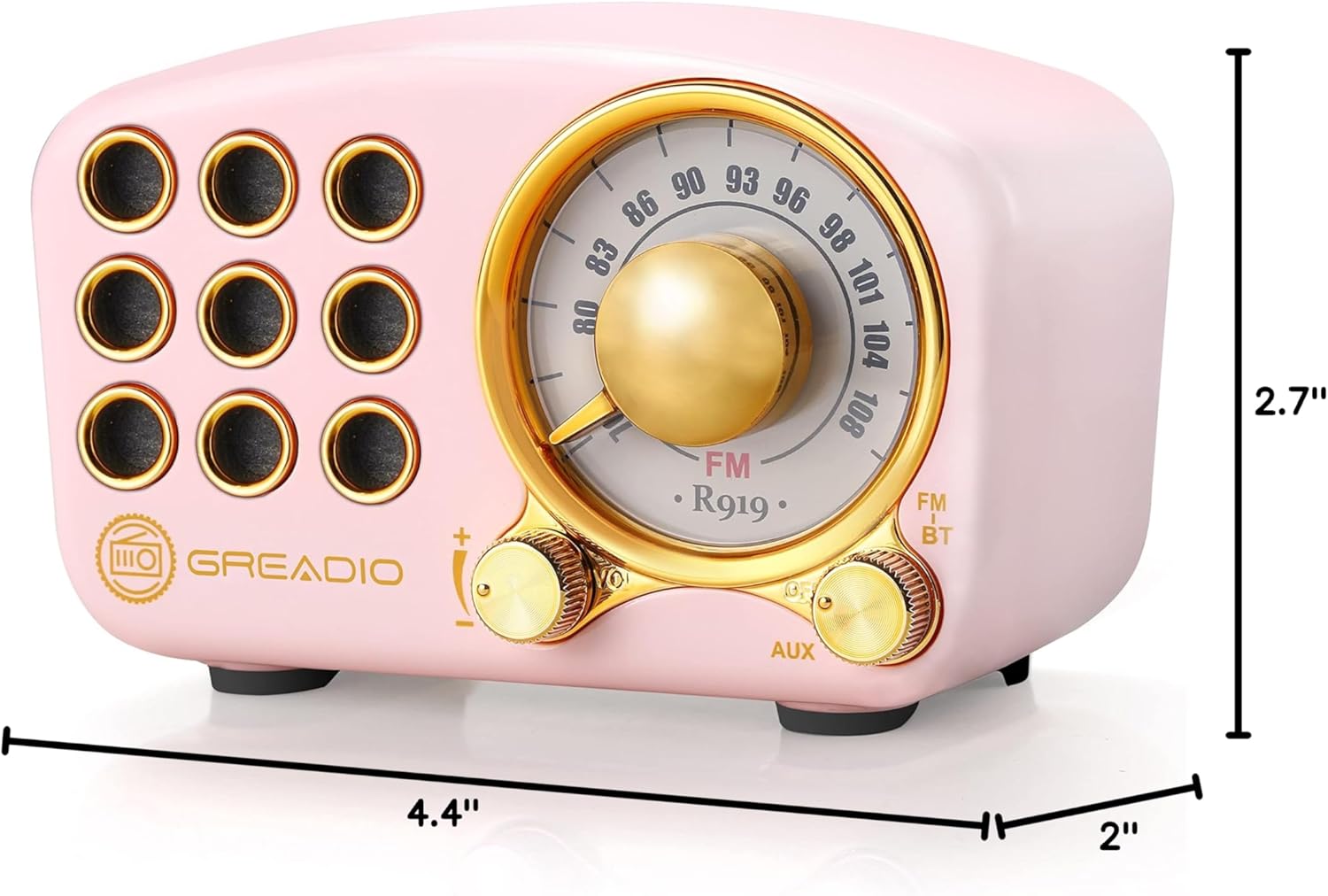
Image: Dimensions of the Greadio Retro Bluetooth Speaker.
11. ການຮັບປະກັນແລະການສະຫນັບສະຫນູນ
Greadio products are designed for reliability and performance. For warranty information or technical support, please refer to the contact details provided on the product packaging or visit the official Greadio webເວັບໄຊ. ຮັກສາໃບຮັບເງິນການຊື້ຂອງທ່ານໄວ້ເປັນຫຼັກຖານການຊື້.