
ແນະນຳ
This manual provides essential instructions for the safe and efficient use of your LitezAll Motion Activated LED Spotlight, Model 23085. Please read this manual thoroughly before installation and operation, and retain it for future reference.

ຮູບພາບ: ທາງຫນ້າ view of the LitezAll Motion Activated LED Spotlight, showcasing its compact design with the LED light and motion sensor visible.
ຄຸນສົມບັດຜະລິດຕະພັນ
- ການເປີດໃຊ້ເຊັນເຊີການເຄື່ອນໄຫວ: Automatically illuminates when movement is detected.
- ໄຟ LED ສະຫວ່າງ: Provides focused and dependable light.
- ແບັດເຕີຣີເຮັດວຽກ: Requires no wiring or external power source.
- ການຕິດຕັ້ງໄຮ້ສາຍ: Flexible placement options for indoor or outdoor use.
- ການອອກແບບກະທັດຮັດ: Suitable for various locations such as walkways, closets, garages, and entryways.
ການຕິດຕັ້ງແລະການຕິດຕັ້ງ
1. ການຕິດຕັ້ງຫມໍ້ໄຟ
- Locate the battery compartment cover on the back of the spotlight.
- ບິດ ຫຼືເລື່ອນຝາປິດເພື່ອເປີດມັນ.
- ໃສ່ໝໍ້ໄຟ AA 2 ອັນ, ຮັບປະກັນຄວາມຂົ້ວທີ່ຖືກຕ້ອງ (+/-) ຕາມທີ່ລະບຸໄວ້ພາຍໃນຊ່ອງ.
- ປ່ຽນຝາປິດຊ່ອງໃສ່ຫມໍ້ໄຟໃຫ້ປອດໄພ.
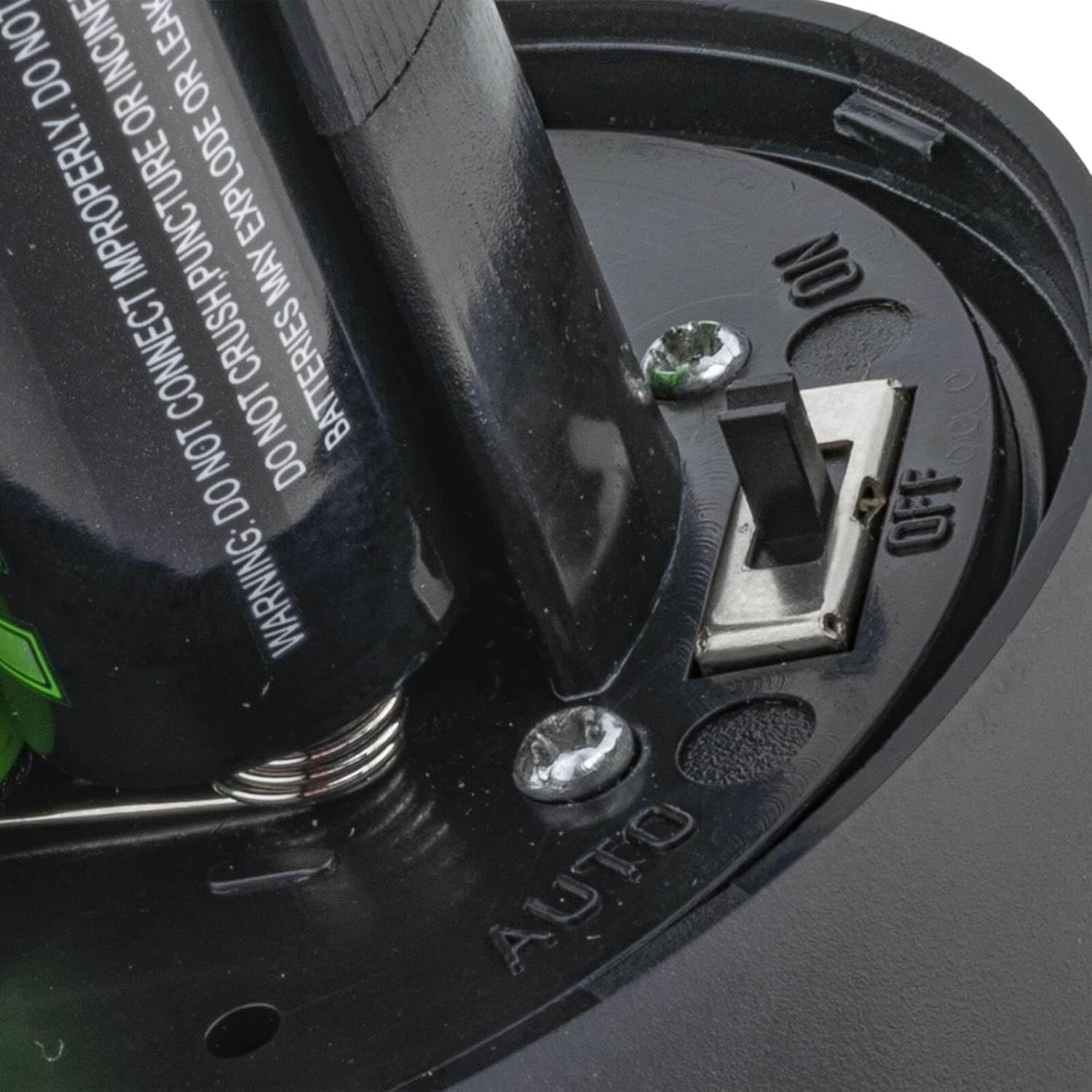
ຮູບພາບ: ໃກ້ຊິດ view of the battery compartment with batteries inserted and the ON/OFF/AUTO switch clearly visible.
2. ຕົວເລືອກການຕິດຕັ້ງ
The spotlight can be mounted using screws or adhesive (not included). For optimal performance, choose a location where the motion sensor has an unobstructed view ຂອງເຂດທີ່ຈະໄດ້ຮັບການຕິດຕາມ.
- Screw Mounting:
- Identify a suitable mounting surface.
- Use the base of the spotlight as a template to mark the screw holes.
- ເຈາະຮູທົດລອງຖ້າຈໍາເປັນ.
- Secure the spotlight to the surface using appropriate screws.
- ການຕິດຕັ້ງກາວ:
- ໃຫ້ແນ່ໃຈວ່າຫນ້າດິນສະອາດ, ແຫ້ງ, ແລະລຽບ.
- Apply a strong, weather-resistant adhesive tape (not included) to the base of the spotlight.
- Press the spotlight firmly onto the desired surface for several seconds.
- ໝາຍເຫດ: For outdoor or high-traffic areas, screw mounting is recommended for greater security and durability.
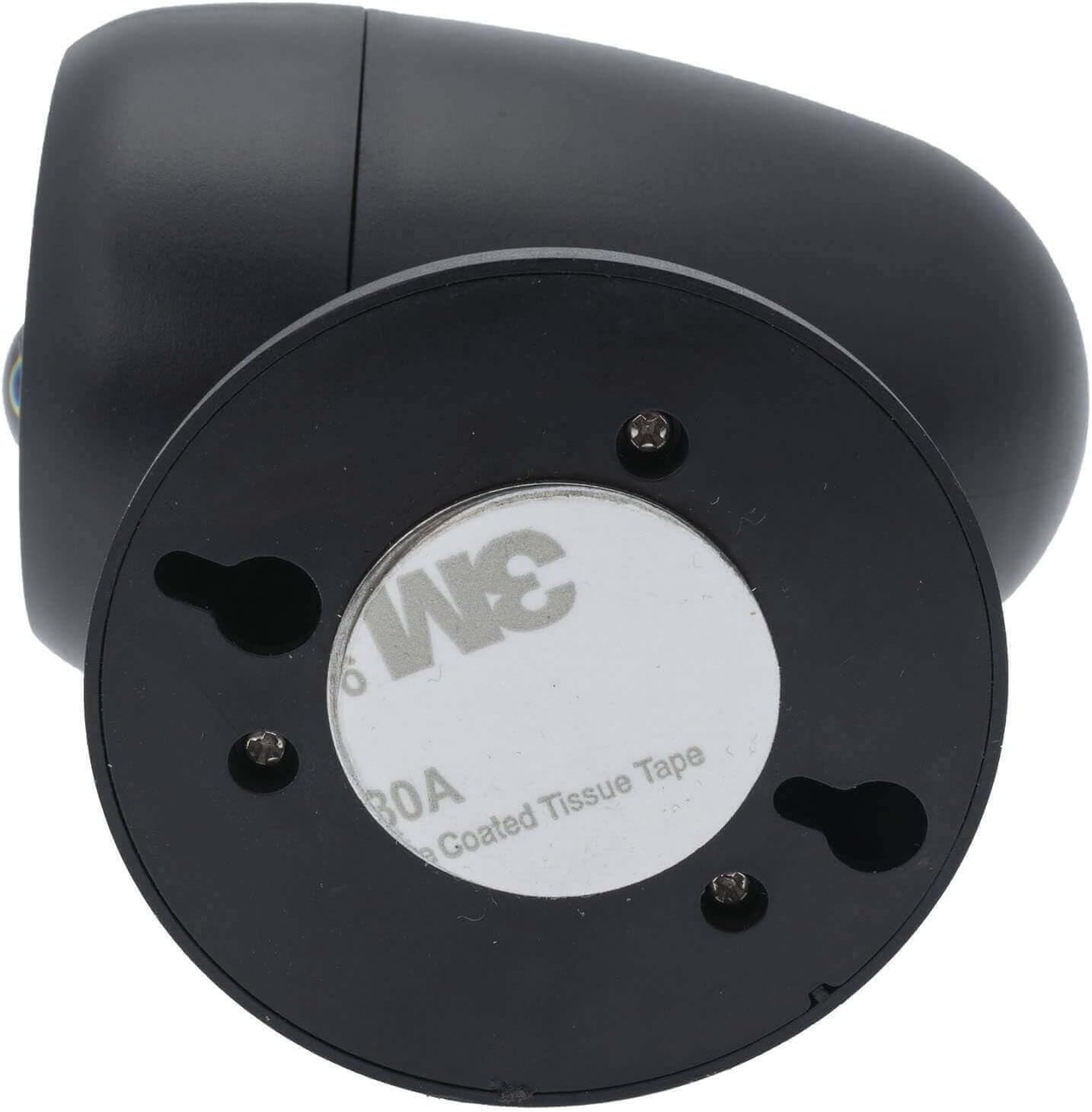
ຮູບພາບ: ລຸ່ມ view of the LitezAll spotlight, illustrating the keyhole slots for screw mounting and the circular adhesive pad for alternative installation.
ຄໍາແນະນໍາການດໍາເນີນງານ
ການເລືອກໂໝດ
After battery installation, locate the switch inside the battery compartment (refer to Battery Installation image). This switch allows you to select the operating mode:
- ປິດ: The spotlight is turned off and will not activate.
- ເປີດ: The spotlight will remain continuously on.
- ອັດຕະໂນມັດ: The spotlight will activate automatically when motion is detected in low-light conditions.
ຟັງຊັນເຊັນເຊີການເຄື່ອນໄຫວ
In AUTO mode, the integrated motion sensor detects movement up to 10 feet away. The light will turn on when motion is sensed and will remain on for a short duration after motion ceases, then turn off automatically to conserve battery life. For optimal performance, ensure the sensor is not obstructed.

Image: Diagram showing a person walking and the LitezAll spotlight detecting motion up to 10 feet away, indicating its activation range.
ບໍາລຸງຮັກສາ
ການປ່ຽນແບັດ
When the light output diminishes or the spotlight fails to activate, it is time to replace the batteries. Follow the Battery Installation steps in the Setup section to replace the 2 AA batteries. Always use fresh batteries and dispose of old batteries responsibly.
ທໍາຄວາມສະອາດ
To clean the spotlight, wipe the exterior with a soft, damp cloth. Do not use abrasive cleaners or immerse the unit in water. Ensure the motion sensor lens is kept clean for accurate detection.
ການແກ້ໄຂບັນຫາ
| ບັນຫາ | ສາເຫດທີ່ເປັນໄປໄດ້ | ການແກ້ໄຂ |
|---|---|---|
| ແສງບໍ່ໄດ້ເປີດ. |
|
|
| Light does not detect motion reliably. |
|
|
| Spotlight falls off mounting surface. |
|
|
ຂໍ້ມູນຈໍາເພາະ
- ຍີ່ຫໍ້: LitezAll
- ຕົວແບບ: 23085
- ນ້ໍາຫນັກລາຍການ: 8.8 ອອນ
- ຂະໜາດຜະລິດຕະພັນ: 6.75 x 4 x 9.5 ນິ້ວ
- ແບັດເຕີຣີ: ໝໍ້ໄຟ AA 2 ໜ່ວຍ (ລວມ)
- ປະເພດດອກໄຟ: LED
- ຄຸນນະສົມບັດພິເສດ: ເຊັນເຊີການເຄື່ອນໄຫວ
- ສະບັບtage: 6 ໂວນ
- ວັດtage: 3.75
- ທໍາອິດທີ່ມີຢູ່: ວັນທີ 14 ມິຖຸນາ 2019
ຂໍ້ມູນຄວາມປອດໄພ
- ຢ່າປະສົມແບັດເກົ່າ ແລະ ໃໝ່.
- ຢ່າປະສົມແບັດເຕີລີ່ທີ່ເປັນດ່າງ, ມາດຕະຖານ (ຄາບອນ-ສັງກະສີ), ຫຼືສາກໄຟໄດ້ (nickel-cadmium).
- ຖອດແບດເຕີຣີອອກຖ້າຜະລິດຕະພັນບໍ່ໄດ້ໃຊ້ເປັນໄລຍະເວລາທີ່ຍາວນານ.
- ຮັກສາໃຫ້ໄກຈາກເດັກນ້ອຍ.
- ຢ່າແນມເບິ່ງໄຟ LED ໂດຍກົງ.