
1. ບົດແນະນຳ
This manual provides essential instructions for the safe and effective use of your DT321B Digital Multimeter. This portable device is designed for measuring AC/DC voltage, DC current, resistance, and includes features for diode testing, continuity, battery testing, and transistor (hFE) measurements. Please read this manual thoroughly before operation and retain it for future reference.
2. ຂໍ້ມູນຄວາມປອດໄພ
Always observe basic safety precautions when using this multimeter to reduce the risk of fire, electric shock, or personal injury.
- ຢ່າໃຊ້ voltage or current that exceeds the maximum specified limits for the multimeter.
- Ensure the test leads are in good condition and properly connected before making any measurements.
- Never use the multimeter if it appears damaged or if the test leads are damaged.
- ຈົ່ງລະມັດລະວັງໃນເວລາເຮັດວຽກກັບ voltages ຂ້າງເທິງ 30V AC RMS, ສູງສຸດ 42V, ຫຼື 60V DC. vol ເຫຼົ່ານີ້tages ເຮັດໃຫ້ເກີດອັນຕະລາຍຊ໊ອກ.
- Always disconnect power to the circuit under test before measuring resistance or continuity.
- Do not operate the multimeter in explosive atmospheres.
- ປ່ຽນແບັດເຕີຣີເມື່ອໄຟສະແດງແບັດເຕີຣີຕໍ່າປະກົດຂຶ້ນເພື່ອຮັບປະກັນການອ່ານທີ່ຖືກຕ້ອງ.
3. ຜະລິດຕະພັນເກີນview
The DT321B Digital Multimeter features a clear LCD display and a rotary switch for selecting various measurement functions. Input jacks are provided for connecting test leads.

ຮູບ 3.1: ດ້ານຫນ້າ view of the DT321B Digital Multimeter with key components labeled. The display shows numerical readings, the hold button freezes the current reading, and the rotary switch selects measurement functions. The '10A' jack is for high current measurements, 'COM' is the common ground, and 'VΩmA' is for voltage, ຄວາມຕ້ານທານ, ແລະ ການວັດແທກກະແສໄຟຟ້າຕໍ່າ.
The multimeter includes a blue backlight for improved visibility in low-light conditions and a data hold function to freeze the displayed reading.
4. ຕັ້ງຄ່າ
4.1 ການຕິດຕັ້ງຫມໍ້ໄຟ
The DT321B Digital Multimeter requires two 1.5V batteries (Type 7, typically AAA) for operation. To install or replace batteries:
- ກວດໃຫ້ແນ່ໃຈວ່າມັລຕິມິເຕີຖືກປິດໄວ້.
- ຊອກຫາຝາປິດຊ່ອງໃສ່ຫມໍ້ໄຟຢູ່ດ້ານຫຼັງຂອງໜ່ວຍ.
- ໝຸນສະກູອອກ ແລະ ເອົາຝາປິດອອກ.
- Insert the two 1.5V batteries, observing the correct polarity (+ and -) as indicated inside the compartment.
- ປ່ຽນຝາປິດຊ່ອງໃສ່ໝໍ້ໄຟ ແລະຍຶດມັນດ້ວຍສະກູ.
5. ຄໍາແນະນໍາການດໍາເນີນງານ
ກ່ອນທີ່ຈະເຮັດການວັດແທກໃດໆ, ໃຫ້ແນ່ໃຈວ່າສາຍທົດສອບໄດ້ຖືກສຽບເຂົ້າກັບຊ່ອງສຽບຂາເຂົ້າທີ່ຖືກຕ້ອງຢ່າງແໜ້ນໜາແລ້ວ.

Figure 5.1: The DT321B Multimeter with test probes connected. The black probe is connected to the 'COM' (common) jack, and the red probe is connected to the 'VΩmA' jack for most voltage, ຄວາມຕ້ານທານ, ແລະ ການວັດແທກກະແສໄຟຟ້າຕໍ່າ.
5.1 ການວັດແທກ DC Voltagອີ (ວີ–)
- ໃສ່ສາຍທົດສອບສີແດງເຂົ້າໄປໃນຊ່ອງສຽບ 'VΩmA' ແລະສາຍທົດສອບສີດຳເຂົ້າໄປໃນຊ່ອງສຽບ 'COM'.
- ຕັ້ງສະວິດ rotary ເປັນ DC Vol ທີ່ຕ້ອງການtagລະດັບ e (V–) (ຕົວຢ່າງ, 200m, 2, 20, 200, 1000V). ຖ້າແຮງດັນtage ແມ່ນບໍ່ຮູ້, ເລີ່ມຕົ້ນດ້ວຍຂອບເຂດສູງສຸດ ແລະ ເຮັດວຽກລົງມາ.
- ເຊື່ອມຕໍ່ໂພຣບທົດສອບຜ່ານອົງປະກອບ ຫຼື ວົງຈອນທີ່ຈະວັດແທກ.
- ອ່ານ voltage ມູນຄ່າຢູ່ໃນຈໍສະແດງຜົນ LCD.
5.2 ການວັດແທກ AC Voltagອີ (ວີ∼)
- ໃສ່ສາຍທົດສອບສີແດງເຂົ້າໄປໃນຊ່ອງສຽບ 'VΩmA' ແລະສາຍທົດສອບສີດຳເຂົ້າໄປໃນຊ່ອງສຽບ 'COM'.
- ຕັ້ງຄ່າສະຫຼັບ rotary ກັບ AC Vol ທີ່ຕ້ອງການtage (V∼) range (e.g., 200, 750V).
- ເຊື່ອມຕໍ່ໂພຣບທົດສອບຜ່ານອົງປະກອບ ຫຼື ວົງຈອນທີ່ຈະວັດແທກ.
- ອ່ານ voltage ມູນຄ່າຢູ່ໃນຈໍສະແດງຜົນ LCD.
5.3 Measuring DC Current (A–)
ຂໍ້ຄວນລະວັງ: To avoid damage to the multimeter or the circuit, never connect the test leads in parallel across a voltage source when measuring current. Always connect in series.
- For currents up to 200mA, insert the red test lead into the 'VΩmA' jack. For currents up to 10A, insert the red test lead into the '10A MAX' jack. The black test lead always goes into the 'COM' jack.
- Set the rotary switch to the desired DC Current (A–) range (e.g., 200u, 2m, 20m, 200m, 10A).
- Open the circuit where current is to be measured and connect the multimeter in series with the circuit.
- ອ່ານຄ່າປັດຈຸບັນຢູ່ໃນຈໍສະແດງຜົນ LCD.
5.4 ການວັດແທກຄວາມຕ້ານທານ (Ω)
ຂໍ້ຄວນລະວັງ: Ensure the circuit under test is completely de-energized before measuring resistance.
- ໃສ່ສາຍທົດສອບສີແດງເຂົ້າໄປໃນຊ່ອງສຽບ 'VΩmA' ແລະສາຍທົດສອບສີດຳເຂົ້າໄປໃນຊ່ອງສຽບ 'COM'.
- Set the rotary switch to the desired Resistance (Ω) range (e.g., 200, 2k, 20k, 200k, 2M).
- ເຊື່ອມຕໍ່ໂພຣບທົດສອບຜ່ານອົງປະກອບທີ່ຈະວັດແທກ.
- ອ່ານຄ່າຄວາມຕ້ານທານໃນຈໍສະແດງຜົນ LCD.
5.5 ທົດສອບ Diode
- ໃສ່ສາຍທົດສອບສີແດງເຂົ້າໄປໃນຊ່ອງສຽບ 'VΩmA' ແລະສາຍທົດສອບສີດຳເຂົ້າໄປໃນຊ່ອງສຽບ 'COM'.
- Set the rotary switch to the diode symbol (→|).
- ເຊື່ອມຕໍ່ probe ສີແດງກັບ anode ແລະ probe ສີດໍາກັບ cathode ຂອງ diode ໄດ້. ຈໍສະແດງຜົນຈະສະແດງການສົ່ງຕໍ່ voltage ຫຼຸດລົງ.
- Reverse the probes. The display should show 'OL' (open loop) for a good diode.
5.6 ການທົດສອບຄວາມຕໍ່ເນື່ອງ
- ໃສ່ສາຍທົດສອບສີແດງເຂົ້າໄປໃນຊ່ອງສຽບ 'VΩmA' ແລະສາຍທົດສອບສີດຳເຂົ້າໄປໃນຊ່ອງສຽບ 'COM'.
- Set the rotary switch to the continuity symbol (♫).
- Connect the test probes across the circuit or component. If continuity exists (resistance below a certain threshold), the buzzer will sound.
5.7 Battery Testing (1.5V / 9V)
- ໃສ່ສາຍທົດສອບສີແດງເຂົ້າໄປໃນຊ່ອງສຽບ 'VΩmA' ແລະສາຍທົດສອບສີດຳເຂົ້າໄປໃນຊ່ອງສຽບ 'COM'.
- Set the rotary switch to the '1.5V BATT' or '9V BATT' position.
- Connect the red probe to the positive terminal and the black probe to the negative terminal of the battery.
- ອ່ານຫມໍ້ໄຟ voltage ໃນຈໍສະແດງຜົນ.
5.8 Transistor (hFE) Test
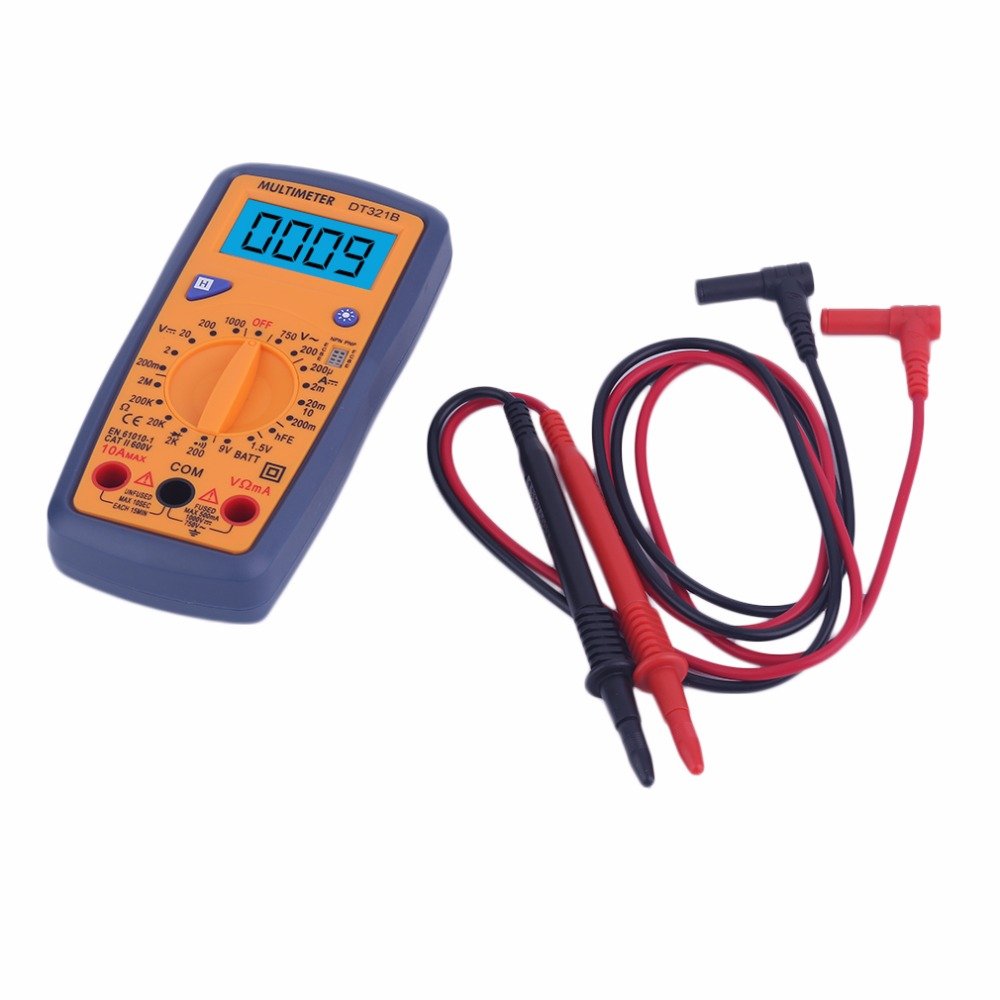
Figure 5.2: The DT321B Multimeter in use, with an inset showing a transistor being tested. The multimeter can measure the hFE (current gain) of NPN and PNP transistors.
- Set the rotary switch to the 'hFE' position.
- Identify the NPN or PNP type of the transistor.
- Insert the transistor leads (Emitter, Base, Collector) into the corresponding sockets in the 'hFE' test socket on the multimeter.
- Read the hFE value on the LCD display.
5.9 ຟັງຊັນການຖືຂໍ້ມູນ
Press the 'Hold' button to freeze the current reading on the display. Press it again to release the hold function and resume live readings.
5.10 ຟັງຊັນ Backlight
The multimeter features a blue backlight. Press the backlight button (often integrated with the 'Hold' button or a separate button with a light symbol) to turn the backlight on or off for improved visibility.
6. ບໍາລຸງຮັກສາ
6.1 ການທໍາຄວາມສະອາດ
ເຊັດກໍລະນີທີ່ມີໂຄສະນາamp ຜ້າ ແລະ ຜົງຊັກຟອກອ່ອນໆ. ຢ່າໃຊ້ສານຂັດ ຫຼື ຕົວລະລາຍ. ຮັບປະກັນວ່າມັນຕິມີເຕີແຫ້ງໝົດກ່ອນການນຳໃຊ້.
6.2 ການທົດແທນຫມໍ້ໄຟ
When the low battery symbol appears on the display, replace the batteries as described in Section 4.1. Remove batteries if the multimeter is not used for extended periods to prevent leakage.
7. ການແກ້ໄຂບັນຫາ
- ບໍ່ມີການສະແດງໃຫ້ເຫັນຫຼືແຈ້ງການ: ກວດສອບການຕິດຕັ້ງແບັດເຕີຣີ ແລະ ການສາກໄຟ. ປ່ຽນແບັດເຕີຣີຖ້າຈຳເປັນ.
- ການອ່ານບໍ່ຖືກຕ້ອງ: Ensure the rotary switch is set to the correct function and range. Check test lead connections. Verify the circuit under test is properly prepared (e.g., de-energized for resistance).
- 'OL' (ໂອເວີໂຫຼດ) ສະແດງ: The measured value exceeds the selected range. Switch to a higher range or check for an open circuit.
- No continuity buzzer: Ensure the multimeter is in continuity mode and the circuit is closed.
8. ຂໍ້ມູນຈໍາເພາະ
| ການວັດແທກ | ຊ່ວງ | ຄວາມຖືກຕ້ອງ |
|---|---|---|
| ຊິງຕັນດີຊີ Voltage | 200mV, 2V, 20V, 200V, 1000V | ±0.5% |
| AC Voltage | 200V, 750V | ±1.0% |
| ກະແສໄຟຟ້າ DC | 200uA, 2mA, 20mA, 200mA, 10A | ±1.8% |
| ການຕໍ່ຕ້ານ | 200Ω, 2kΩ, 20kΩ, 200kΩ, 2MΩ | ±1.0% |
ຂໍ້ມູນຈໍາເພາະທົ່ວໄປ:
- ຂະໜາດໜ້າຈໍ LCD: 45x23ມມ
- ຂະໜາດຜະລິດຕະພັນ: 160x76x32ມມ
- ການສະຫນອງພະລັງງານ: 2 x 1.5V batteries (Type 7 / AAA)
- ຕ່ ຳtage Symbol Display: ແມ່ນແລ້ວ
- ການປ້ອງກັນການໂຫຼດເກີນ: ແມ່ນແລ້ວ
- Diode Detection: ແມ່ນແລ້ວ
- On-off Detection & Buzzer: ແມ່ນແລ້ວ
- ການກວດຫາຄວາມຈຸແບັດເຕີຣີ: 1.5V / 9V
- Transistor Detection (hFE): ແມ່ນແລ້ວ
- ການເກັບຮັກສາຂໍ້ມູນ: ແມ່ນແລ້ວ
- ຈໍສະແດງຜົນ Backlight: ແມ່ນແລ້ວ
9. ການຮັບປະກັນແລະການສະຫນັບສະຫນູນ
Specific warranty and support information for the DT321B Digital Multimeter is not available in the provided product details. Please refer to the retailer or manufacturer's website for any applicable warranty terms or customer support contacts.