
Amazon Basics ABMT1000
Amazon Basics Line Interactive UPS 1000VA/550W User Manual
Model: ABMT1000
ແນະນຳ
This manual provides essential information for the safe and efficient operation of your Amazon Basics Line Interactive Uninterruptible Power Supply (UPS) 1000VA/550W. A UPS provides battery backup power and surge protection for connected electronic devices, safeguarding against power outages, surges, and fluctuations. Please read this manual thoroughly before installation and use, and retain it for future reference.

Image: The Amazon Basics Line Interactive UPS 1000VA/550W positioned on a desk, providing power protection for a computer setup.
ຄໍາແນະນໍາຄວາມປອດໄພທີ່ສໍາຄັນ
Please adhere to these safety guidelines to prevent injury or damage to the UPS and connected equipment:
- This UPS is designed for indoor use only.
- Do not install the UPS in direct sunlight, near heat-emitting appliances, or in areas with excessive humidity or dust.
- ກວດໃຫ້ແນ່ໃຈວ່າ UPS ເຊື່ອມຕໍ່ກັບປລັກສຽບໄຟ AC ທີ່ມີສາຍດິນ.
- ຫ້າມເປີດ UPS ຄasing. ບໍ່ມີສ່ວນທີ່ຜູ້ໃຊ້ບໍລິການພາຍໃນ. ອ້າງອີງການບໍລິການທັງໝົດໃຫ້ກັບພະນັກງານບໍລິການທີ່ມີຄຸນວຸດທິ.
- Risk of electric shock. Do not connect or disconnect the UPS during a thunderstorm.
- The battery inside the UPS is not user-replaceable. Attempting to replace the battery yourself may void the warranty and pose a safety risk.
- In case of fire, use a dry chemical fire extinguisher. Water may cause electrical hazards.
ເນື້ອໃນຊຸດ
ກວດສອບວ່າລາຍການທັງຫມົດແມ່ນມີຢູ່ໃນຊຸດຂອງທ່ານ:
- Amazon Basics Line Interactive UPS 1000VA/550W Unit
- ສາຍການສື່ສານ USB
- ຄູ່ມືຜູ້ໃຊ້ (ເອກະສານນີ້)

Image: USB Communication Cable included with the UPS.
ສິນຄ້າເກີນview
ແຜງໜ້າ

ຮູບພາບ: ທາງຫນ້າ view of the Amazon Basics Line Interactive UPS 1000VA/550W, showing the power button, mute button, and LED indicators.
- ປຸ່ມເປີດປິດ: Press to turn the UPS ON or OFF.
- ປິດສຽງ: Press to silence audible alarms.
- ຕົວຊີ້ວັດ LED:
- ອອນລາຍ: Illuminates when the UPS is providing utility power to connected devices.
- ຢູ່ໃນຫມໍ້ໄຟ: Illuminates when the UPS is operating on battery power.
- AVR (ອັດຕະໂນມັດ Voltage ລະບຽບການ): Illuminates when the UPS is correcting minor voltage fluctuations without switching to battery power.
- ເກີນ: Illuminates if connected equipment exceeds the UPS's capacity.
ແຜງດ້ານຫລັງ
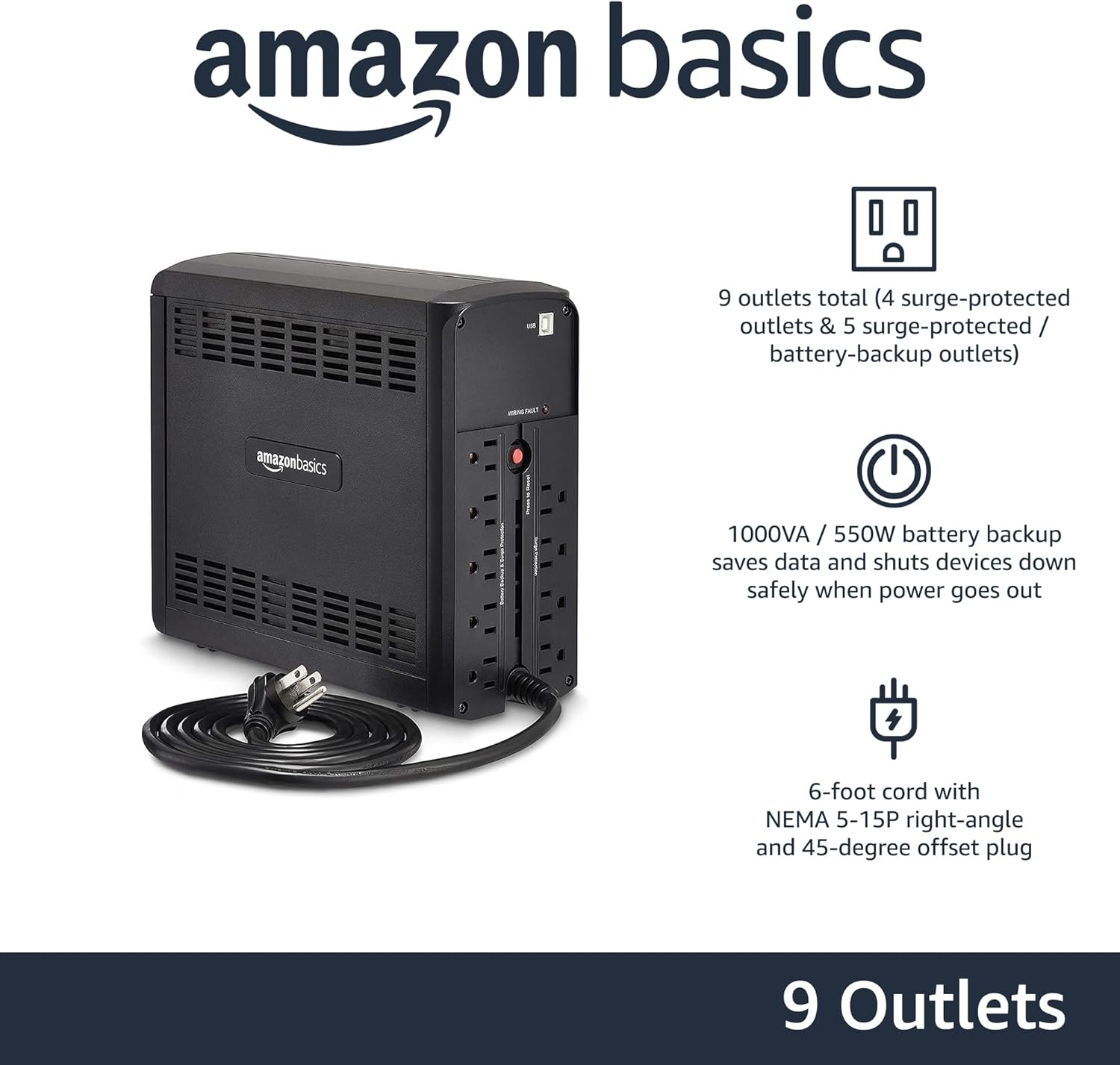
ຮູບພາບ: ດ້ານຫລັງ view of the Amazon Basics Line Interactive UPS 1000VA/550W, displaying the power cord, battery backup outlets, and surge-only outlets.
- ປ່ຽງແບັດສຳຮອງ ແລະປລັກສຽບໄຟປ້ອງກັນໄຟ (5 ປ່ຽງ): These outlets provide both battery backup power during outages and surge protection. Connect critical devices such as computers, monitors, and network equipment here.
- Surge Protected Outlets (4 outlets): These outlets provide surge protection only. Connect non-critical devices like printers or scanners here.
- ພອດການສື່ສານ USB: Connects to a computer for power management software (e.g., CyberPower PowerPanel Personal).
- ສາຍໄຟ AC Input: ເຊື່ອມຕໍ່ UPS ກັບເຕົ້າສຽບໃສ່ຝາ.
ຕັ້ງຄ່າ
- ຖອດຫໍ່ແລະກວດກາ: Carefully remove the UPS from its packaging. Inspect for any shipping damage. If damage is found, do not use the unit and contact customer support.
- ການສາກແບັດເຕີຣີເບື້ອງຕົ້ນ: Before initial use, connect the UPS to a standard wall outlet and allow it to charge for at least 8 hours. This ensures the battery is fully charged and ready to provide optimal backup power. The UPS will charge whether it is turned ON or OFF.
- ເຊື່ອມຕໍ່ອຸປະກອນ:
- Plug critical equipment (e.g., computer, monitor, router) into the ແບດເຕີຣີ Backup & Surge Protected Outlets.
- Plug non-critical equipment (e.g., printer, desk lamp) ເຂົ້າໄປໃນ ຊ່ອງສຽບປ້ອງກັນໄຟແຮງ.
- ຂໍ້ຄວນລະວັງ: Do not plug laser printers into battery backup outlets, as their high power draw can overload the UPS.
- ເຊື່ອມຕໍ່ກັບຄອມພິວເຕີ (ທາງເລືອກ): Use the provided USB cable to connect the UPS's USB port to your computer's USB port. This allows for power management software installation, enabling features like automatic shutdown during extended power outages.
- ເປີດ: Press and hold the Power Button on the front panel for approximately 2 seconds until you hear a beep and the UPS powers on.
ຄໍາແນະນໍາການດໍາເນີນງານ
Turning the UPS On/Off
- ເພື່ອເປີດ: Press and hold the Power Button for 2 seconds. The UPS will beep, and the ONLINE LED will illuminate.
- ປິດ: Press and hold the Power Button for 2 seconds. The UPS will beep, and all LEDs will turn off.
Understanding LED Indicators and Alarms
- ONLINE (Green LED): Solid green indicates the UPS is receiving utility power and providing it to connected devices.
- ON BATTERY (Yellow LED): Solid yellow indicates the UPS is supplying battery power. An audible alarm will sound (beeping every 10 seconds).
- AVR (Yellow LED): Solid yellow indicates the UPS is automatically regulating input voltage ໂດຍບໍ່ໃຊ້ພະລັງງານແບັດເຕີຣີ.
- OVERLOAD (Red LED): Solid red indicates that the connected load exceeds the UPS's capacity. An audible alarm will sound continuously. Immediately disconnect non-essential equipment from the battery backup outlets until the alarm stops.
- ແບັດເຕີຣີຕໍ່າ: When the UPS is on battery power and the battery level is low, the ON BATTERY LED will flash, and the alarm will beep more frequently (every 1 second).
- ປິດສຽງໂມງປຸກ: Press the Mute Button to silence audible alarms. The alarm will reactivate if the condition changes (e.g., low battery).
ເວລາແລ່ນຫມໍ້ໄຟ
The battery runtime depends on the power consumption of the connected devices. For this 1000VA/550W model:
- At half load (500VA/275W), the UPS provides approximately 7 ນາທີ of backup power.
- At full load (1000VA/550W), the UPS provides approximately 1 ນາທີ of backup power.
It is recommended to save your work and safely shut down your computer during a power outage ເພື່ອປ້ອງກັນການສູນເສຍຂໍ້ມູນ.
ບໍາລຸງຮັກສາ
ການດູແລຫມໍ້ໄຟ
- To maintain optimal battery life, keep the UPS connected to an AC outlet at all times.
- ຖ້າ UPS ຖືກເກັບໄວ້ເປັນເວລາດົນ, ໃຫ້ສາກແບັດເຕີຣີຄືນທຸກໆສາມເດືອນຢ່າງໜ້ອຍ 8 ຊົ່ວໂມງເພື່ອປ້ອງກັນການເສື່ອມສະພາບຂອງແບັດເຕີຣີ.
- Batteries have a finite lifespan and will eventually require replacement. If you notice a significant decrease in runtime, contact Amazon Basics customer support for guidance on battery replacement options.
ທໍາຄວາມສະອາດ
- Always unplug the UPS from the wall outlet before cleaning.
- Use a soft, dry cloth to wipe the exterior surfaces of the UPS.
- Do not use liquid or aerosol cleaners, as they may contain flammable substances or cause electrical shock.
ການແກ້ໄຂບັນຫາ
| ບັນຫາ | ສາເຫດທີ່ເປັນໄປໄດ້ | ການແກ້ໄຂ |
|---|---|---|
| UPS ບໍ່ເປີດ. | ແບັດເຕີຣີໝົດ ຫຼືບໍ່ໄດ້ເຊື່ອມຕໍ່. | Connect the UPS to an AC outlet and allow it to charge for 8 hours. Ensure the power cord is securely plugged in. |
| UPS is beeping continuously and OVERLOAD LED is on. | Too many devices connected to battery backup outlets. | Disconnect non-essential equipment from the battery backup outlets until the alarm stops. Ensure total load does not exceed 550W. |
| UPS ປ່ຽນເປັນໂໝດແບັດເຕີຣີເລື້ອຍໆ. | Unstable utility power or voltage ການເຫນັງຕີງ. | This is normal operation for a line interactive UPS. The AVR function is working. If it happens excessively, consult an electrician about your home's wiring. |
| ເວລາແລ່ນຫມໍ້ໄຟສັ້ນ. | ແບັດເຕີຣີເກົ່າ ຫຼືບໍ່ໄດ້ສາກເຕັມ. | Ensure the battery is fully charged (8 hours). If the battery is several years old, it may need replacement. Contact Amazon Basics support. |
| UPS ບໍ່ໄດ້ສະໜອງພະລັງງານໃຫ້ກັບອຸປະກອນທີ່ເຊື່ອມຕໍ່. | UPS is off, or outlets are surge-only. | Ensure the UPS is turned on. Verify devices are plugged into the correct battery backup outlets. |
ຂໍ້ມູນຈໍາເພາະ
| ຄຸນສົມບັດ | ລາຍລະອຽດ |
|---|---|
| ໝາຍເລກຕົວແບບ | ABMT1000 |
| ຄວາມອາດສາມາດ | 1000VA / 550W |
| ການປ້ອນຂໍ້ມູນ Voltage | 120 វ៉ុល AC |
| ຮ້ານຄ້າ | 9 total (5 Battery Backup & Surge Protected, 4 Surge Protected) |
| ປະເພດຫມໍ້ໄຟ | ອາຊິດ Lead ຜະນຶກເຂົ້າກັນ |
| ເວລາເຕີມເງິນປົກກະຕິ | ຄວາມຈຸ 8 ຊົ່ວໂມງເຖິງ 90% |
| ຂະ ໜາດ (D x W x H) | 10.2 x 3.9 x 9 ນິ້ວ (25.91 x 9.91 x 22.86 cm) |
| ນ້ຳໜັກ | 15 ປອນ (6.8 ກິໂລ) |
| ສີ | ດຳ |

Image: Diagram showing the dimensions of the Amazon Basics Line Interactive UPS 1000VA/550W.
ການຮັບປະກັນແລະການສະຫນັບສະຫນູນ
This Amazon Basics UPS is backed by a limited 1-year warranty, which includes the battery. For warranty claims, technical support, or questions regarding battery replacement, please contact Amazon Basics customer support through the Amazon webເວັບໄຊ ຫຼືເວທີການຊື້ຂອງທ່ານ.
For the most up-to-date support information, please visit the official Amazon Basics support page or refer to your purchase documentation.
Ask a question about this manual
Ask about setup, troubleshooting, compatibility, parts, safety, or missing instructions. Manuals+ will review the question and use this page’s manual context to help answer it.