
ແນະນຳ
This manual provides detailed instructions for the installation, operation, and maintenance of your LoraTap WIFI Smart Roller Shutter Timer. Please read this manual carefully before installation and use to ensure proper function and safety.
ຂໍ້ມູນຄວາມປອດໄພ
- ໃຫ້ແນ່ໃຈວ່າແຫຼ່ງຈ່າຍໄຟໄດ້ຖືກຕັດການເຊື່ອມຕໍ່ກ່ອນການຕິດຕັ້ງ ຫຼື ການບຳລຸງຮັກສາເພື່ອປ້ອງກັນໄຟຟ້າຊັອດ.
- ການຕິດຕັ້ງຄວນໄດ້ຮັບການປະຕິບັດໂດຍຊ່າງໄຟຟ້າທີ່ມີຄຸນວຸດທິຫຼືສອດຄ່ອງກັບລະຫັດໄຟຟ້າທ້ອງຖິ່ນ.
- ຢ່າປະຕິບັດອຸປະກອນດ້ວຍມືປຽກ.
- ຮັກສາອຸປະກອນໃຫ້ຫ່າງຈາກນໍ້າ ແລະສະພາບແວດລ້ອມທີ່ມີຄວາມຊຸ່ມຊື່ນສູງ.
- ຢ່າພະຍາຍາມຖອດປະກອບ ຫຼືສ້ອມແປງອຸປະກອນດ້ວຍຕົນເອງ. ຕິດຕໍ່ຝ່າຍຊ່ວຍເຫຼືອຖ້າມີບັນຫາເກີດຂຶ້ນ.
- ອຸປະກອນນີ້ຖືກອອກແບບມາສໍາລັບການນໍາໃຊ້ພາຍໃນເຮືອນເທົ່ານັ້ນ.
ຄຸນສົມບັດຜະລິດຕະພັນ
- ການຄວບຄຸມອັດສະລິຍະ: Upgrade traditional electric roller shutters or awnings for smart control via smartphone app or voice commands.
- Remote Access & Scheduling: Control your blinds from anywhere and set custom schedules for automatic opening and closing.
- Group Control & Family Sharing: Group multiple roller shutters for simultaneous control and share access with family members.
- ການອອກແບບທົນທານ: Features a scratch-resistant tempered crystal glass panel, safe to touch with wet hands and easy to clean.
- Adjustable Motor Run Time: Configure the motor's operating time for precise control over shutter position (e.g., 50% open/close).
- ຄວາມເຂົ້າກັນໄດ້ຂອງການຄວບຄຸມດ້ວຍສຽງ: Works with Google Home and Amazon Alexa for hands-free operation.
ເນື້ອໃນຊຸດ
ກວດສອບວ່າລາຍການທັງຫມົດແມ່ນມີຢູ່ໃນຊຸດ:
- 1 x LoraTap WIFI Smart Roller Shutter Timer
- 1 x User Manual (German/English)
- 1 x screwdriver
- 4 x screws
- 1 x Wiring Clamp
ຂໍ້ມູນຈໍາເພາະ
| ພາລາມິເຕີ | ມູນຄ່າ |
|---|---|
| ຂະໜາດ | 86 x 86 x 34 mm (with cover frame) |
| ວັດສະດຸກະດານ | Tempered Crystal Glass |
| ວັດສະດຸລຸ່ມ | Fire-retardant Polycarbonate (Plastic) |
| ການດໍາເນີນງານ Voltage | AC 100-250V 50/60Hz |
| Rated/Maximum Current | 3A / 10A |
| Power per Speed | 300 ວ |
| ມາດຕະຖານ Wi-Fi | 2.4 GHz, 802.11b/g/n |
| ກະແສສະແຕນບາຍ | 0.001 ກ |
| ການບໍລິໂພກແບບສະແຕນບາຍ | 0.25 ວ |
| ວິທີການຕິດຕັ້ງ | Screw-mounted, fits standard 60mm flush-mounted box |
| ຊອບແວທີ່ເຂົ້າກັນໄດ້ | Smart Life App (Android 4.4+, iOS 8+) |
| ການຢັ້ງຢືນ | CE |
ການຕິດຕັ້ງແລະການຕິດຕັ້ງ
1. ແຜນວາດສາຍໄຟ
The smart roller shutter timer requires a neutral conductor for proper operation. Ensure your existing wiring includes a neutral wire. This switch is suitable for already motorized roller shutters.

Image: Detailed wiring diagram showing connections for Live (L), Neutral (N), and motor control wires (L1 for Up, L2 for Down). The diagram also indicates the input voltage ຊ່ວງ 100-250VAC.
- ປ້ອນຂໍ້ມູນ: Connect the Neutral (N) and Live (L) wires from your power supply to the corresponding terminals on the switch.
- Output to Motor: Connect the motor's Neutral (N), Up (L1), and Down (L2) wires to the respective terminals on the switch.
- ໝາຍເຫດສຳຄັນ: A neutral conductor must be present.
2. ການຕິດຕັ້ງທາງດ້ານຮ່າງກາຍ
- ຕັດການເຊື່ອມຕໍ່ພະລັງງານ: Before starting, turn off the main power supply to the circuit where you will install the switch.
- Prepare Mounting Box: The switch fits a standard 60mm diameter flush-mounted box.
- ເຊື່ອມຕໍ່ສາຍ: Follow the wiring diagram carefully. Use the provided wiring clamp ຖ້າຈໍາເປັນ.
- ຕິດສະວິດ: Secure the switch into the flush-mounted box using the two provided screws (one on the left, one on the right).
- Attach Panel: Carefully attach the crystal glass panel to the switch module.
- ຟື້ນຟູພະລັງງານ: Once installation is complete and secure, restore power to the circuit.
3. ການຕິດຕັ້ງແອັບ ແລະ ການຈັບຄູ່
- ດາວໂຫລດແອັບ:: Download the "Smart Life" application from the App Store (iOS 8 or higher) or Google Play Store (Android 4.4 or higher).
- ລົງທະບຽນ/ເຂົ້າສູ່ລະບົບ: ເປີດແອັບ ແລະລົງທະບຽນບັນຊີໃໝ່ ຫຼືເຂົ້າສູ່ລະບົບດ້ວຍບັນຊີທີ່ມີຢູ່ແລ້ວ.
- ເພີ່ມອຸປະກອນ: In the Smart Life app, tap the "+" icon to add a new device. Select "Curtain Switch" or a similar category.
- ໃສ່ລາຍລະອຽດ Wi-Fi: Follow the on-screen instructions to connect the switch to your 2.4 GHz Wi-Fi network. Ensure your phone is connected to the same 2.4 GHz network during pairing.
- ການຢືນຢັນ: Once successfully paired, the device will appear in your app, ready for control.
ຄໍາແນະນໍາການດໍາເນີນງານ
1. ການຄວບຄຸມດ້ວຍມື
The touch panel allows for direct control of your roller shutters:
- ລູກສອນຂຶ້ນ: Tap to open the roller shutter.
- ລູກສອນລົງ: Tap to close the roller shutter.
- Stop Button (Circle): Tap to pause the roller shutter at its current position.

ຮູບພາບ: ທາງຫນ້າ view of the LoraTap Smart Roller Shutter Timer showing the touch-sensitive Up, Stop, and Down buttons. Also displays product dimensions (86x86x34mm) and a detailed wiring diagram on the back of the unit.
2. App Control (Smart Life)
After successful pairing, you can control your roller shutters via the Smart Life app:
- ເປີດ/ປິດ: Use the virtual buttons in the app to open, close, or stop the roller shutter.
- Set Motor Run Time: The latest version of the switch allows you to set the motor's operating time. This enables partial opening or closing (e.g., 50%).

Image: Screenshot of the Smart Life app interface demonstrating the new function to set the motor's operating time in seconds (e.g., 10s, 120s) for precise control of roller shutter position.
3. ການກຳນົດເວລາ ແລະ ໂມງຈັບເວລາ
Set up automated schedules for your roller shutters:
- In the Smart Life app, navigate to the device settings and select "Schedule" or "Timer."
- Add new schedules by specifying the time, action (open/close), and repetition days.
- This feature allows for automatic operation, such as opening blinds in the morning.

Image: Demonstrates the Smart Life app's scheduling feature with various set times for opening and closing. Also highlights voice control compatibility with Amazon Alexa and Google Assistant.
4. ການຄວບຄຸມສຽງ
Integrate your LoraTap switch with voice assistants:
- Amazon Alexa: Enable the "Smart Life" skill in the Alexa app and link your account. You can then use commands like "Alexa, open the roller shutter" or "Alexa, close the roller shutter."
- Google Home: Link your Smart Life account in the Google Home app. Use commands such as "Hey Google, open the blinds" or "Hey Google, close the blinds."
5. Group Control and Family Sharing
- ການຄວບຄຸມກຸ່ມ: In the Smart Life app, you can create groups of multiple LoraTap roller shutter timers to control them simultaneously with a single command.
- ການແບ່ງປັນຄອບຄົວ: Share control of your devices with family members through the Smart Life app, allowing everyone in the household to manage the roller shutters.
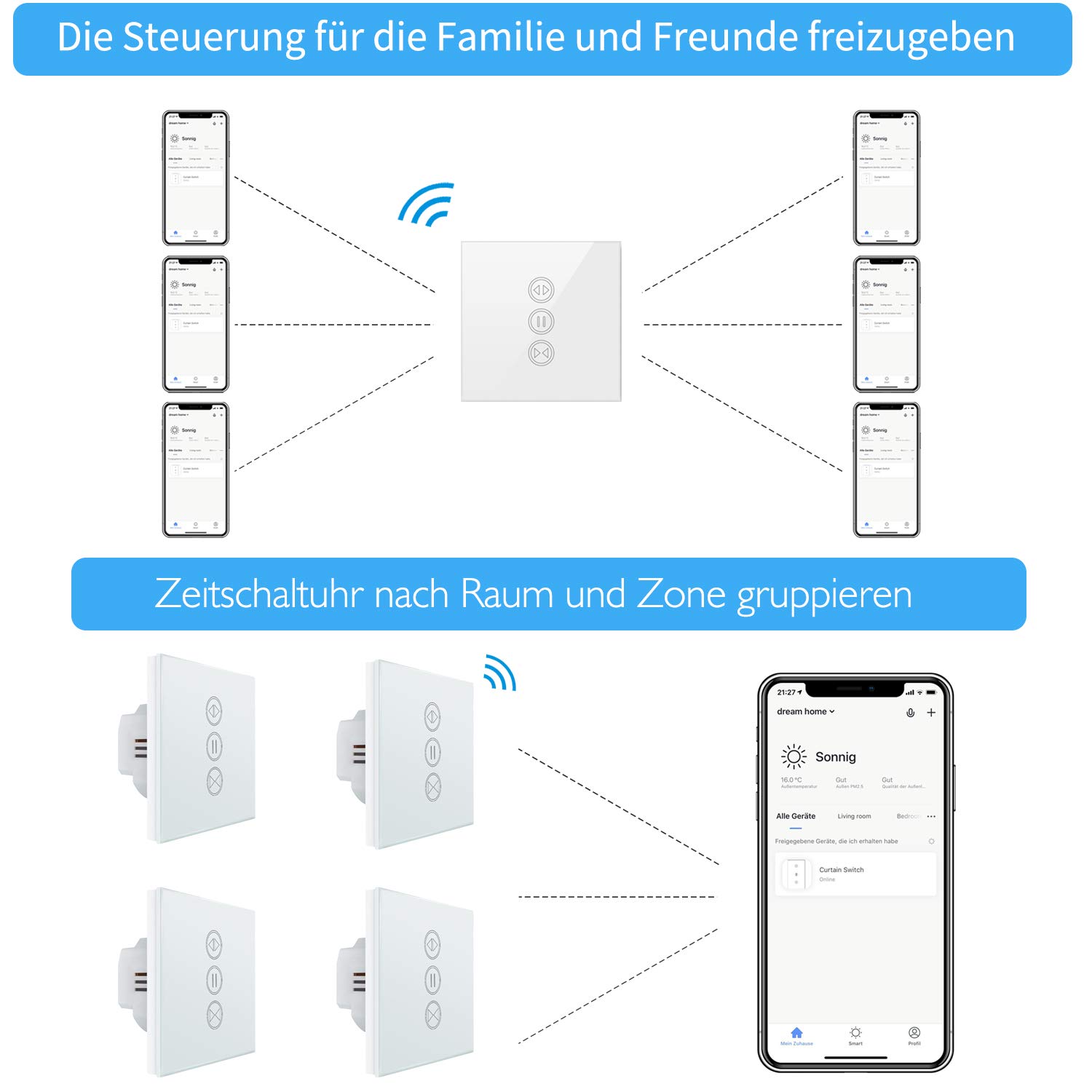
Image: Illustration of how multiple users can control the LoraTap Smart Roller Shutter Timer via the Smart Life app, demonstrating family sharing and the ability to group devices by room or zone for unified control.
ບໍາລຸງຮັກສາ
- ທໍາຄວາມສະອາດ: The crystal glass panel is easy to clean. Use a soft, damp cloth to wipe the surface. Avoid abrasive cleaners or harsh chemicals.
- ກວດກາປົກກະຕິ: ກວດເບິ່ງການເຊື່ອມຕໍ່ສາຍໄຟເປັນໄລຍະເພື່ອຮັບປະກັນວ່າພວກມັນປອດໄພ.
ການແກ້ໄຂບັນຫາ
- ອຸປະກອນບໍ່ຕອບສະໜອງ:
- ກວດເບິ່ງວ່າການສະຫນອງພະລັງງານໃຫ້ກັບສະວິດແມ່ນເຮັດວຽກ.
- Ensure the switch is properly connected to your Wi-Fi network (2.4 GHz only).
- ຣີສະຕາດສະວິດໂດຍການປິດ ແລະເປີດເຄື່ອງຕັດວົງຈອນ.
- Verify that the Smart Life app is up to date.
- Roller Shutter Not Moving:
- Confirm that the motor is receiving power and is functioning correctly.
- Check the motor wiring connections to the switch.
- Ensure the motor run time is correctly configured in the app if using partial open/close functions.
- ການຄວບຄຸມດ້ວຍສຽງບໍ່ເຮັດວຽກ:
- Ensure your Smart Life account is correctly linked to Alexa or Google Home.
- ກວດເບິ່ງການເຊື່ອມຕໍ່ອິນເຕີເນັດຂອງທ່ານແລະສະຖານະຂອງອຸປະກອນຜູ້ຊ່ວຍສຽງຂອງທ່ານ.
- Try re-discovering devices in the Alexa or Google Home app.
- Automatic Stop Issue: This issue has been resolved in newer versions. If you experience unexpected stops, ensure your device firmware is updated via the Smart Life app.
ການຮັບປະກັນແລະການສະຫນັບສະຫນູນ
LoraTap specializes in the research, development, and manufacturing of wireless switches. All LoraTap products are CE certified, ensuring compliance with European safety, health, and environmental protection requirements.
For technical support or warranty inquiries, please contact your retailer or visit the official LoraTap website for further assistance. Please have your product model number (5d4cddd3-8a52-4746-8937-9fbf21a20273) ready when contacting support.