
1. ບົດແນະນຳ
The AMTAST AMT599 Colorimeter is a precise digital instrument designed for accurate color difference measurement. It is widely used in various industries for quality control and analysis of color in coatings, printing, and other materials. This manual provides essential information for the proper setup, operation, maintenance, and troubleshooting of your AMT599 Colorimeter.
The device features a high-accuracy sensor and stable signal processing, ensuring reliable measurement results. It supports multiple color space displays and offers quick measurement times.
2. ຕັ້ງຄ່າ
2.1 ການຫຸ້ມຫໍ່
Carefully remove the AMT599 Colorimeter and all accessories from its packaging. Verify that all components are present and undamaged.
2.2 Power Supply and Battery Installation
The AMT599 Colorimeter can be powered by four AA 1.5V alkaline batteries, nickel-metal hydride (Ni-MH) rechargeable batteries, or a DC5V adapter.
- ຊອກຫາຊ່ອງໃສ່ຫມໍ້ໄຟໃນອຸປະກອນ.
- Insert four AA 1.5V batteries, ensuring correct polarity (+/-).
- Alternatively, connect the DC5V adapter to the power input port on the device and to a suitable power outlet.
2.3 ການເປີດເຄື່ອງເບື້ອງຕົ້ນ
Press and hold the power button until the display illuminates. The device will perform a self-check before entering the measurement interface.
2.4 ການປັບທຽບ
Before first use and periodically thereafter, calibrate the device using the provided white calibration board to ensure measurement accuracy.
- Ensure the device is powered on and in measurement mode.
- Place the measurement port firmly against the white calibration board.
- Follow the on-screen prompts to initiate and complete the calibration process.
3. ຄໍາແນະນໍາການດໍາເນີນງານ
3.1 ການວັດແທກພື້ນຖານ
To perform a color measurement:
- ໃຫ້ແນ່ໃຈວ່າອຸປະກອນໄດ້ຮັບການປັບທຽບແລ້ວ.
- Place the measurement port (8mm diameter) firmly and flat against the surface of the sampທີ່ຈະໄດ້ຮັບການວັດແທກ.
- Press the measurement button. The measurement will typically complete in about 0.5 seconds.
- ຜົນໄດ້ຮັບການວັດແທກຈະສະແດງຢູ່ໃນຫນ້າຈໍ.

Figure 1: The AMTAST AMT599 Colorimeter displaying various color measurement parameters such as Reflectance, CIE-Lab, CIE-LCh, HunterLab, CIE Luv, XYZ, Yxy, RGB, Color difference (ΔE*ab, ΔE*cmc, ΔE*94, ΔE*00), WI (ASTM E313-00, ASTM E313-73, CIE, ISO2470/R457, AATCC), Hunter, Taube Berger Stensby, YI (ASTM D1925, ASTM E313-00, ASTM E313-73), Blackness (My,dM), and Color Fastness.
3.2 ຮູບແບບການວັດແທກ
The device supports multiple color space display values including L*a*b, L*c*h, and Yxy. Navigate through the menu to select the desired measurement mode for your application.
3.3 Data Storage and Management
The AMT599 Colorimeter can store up to 10 sets of standard samples, with up to 100 measurements under each standard sample. Use the device's menu to save, recall, and manage your measurement data.
For advanced data management, the device can be connected to a computer via its USB2.0 port. Free management software is available to help control and convert color data.
3.4 ການຕັ້ງຄ່າພາສາ
The device supports multiple languages, including Chinese and English. Access the system settings to change the display language as needed.
4. ຄຸນນະສົມບັດທີ່ສໍາຄັນ
- Dual Optical Path Design: Improves repeatability accuracy with a ΔE*ab ≤ 0.03.
- Innovative Optics: Features 5-micron thick nano-integrated optics.
- Evaluation Light Sources: Capable of evaluating color under nearly 40 different light sources.
- SCI Measurement Mode: Contains SCI measurement mode for precise readings.
- UV Fluorescent Color Measurement: Includes UV for fluorescent color measurement.
- Robust Calibration: Calibration base and zirconium reference with a Mohs hardness of 9 ensure long-term stability.
- ກ້ອງຖ່າຍຮູບ HD ໃນຕົວ: Provides clear observation of the measured area.
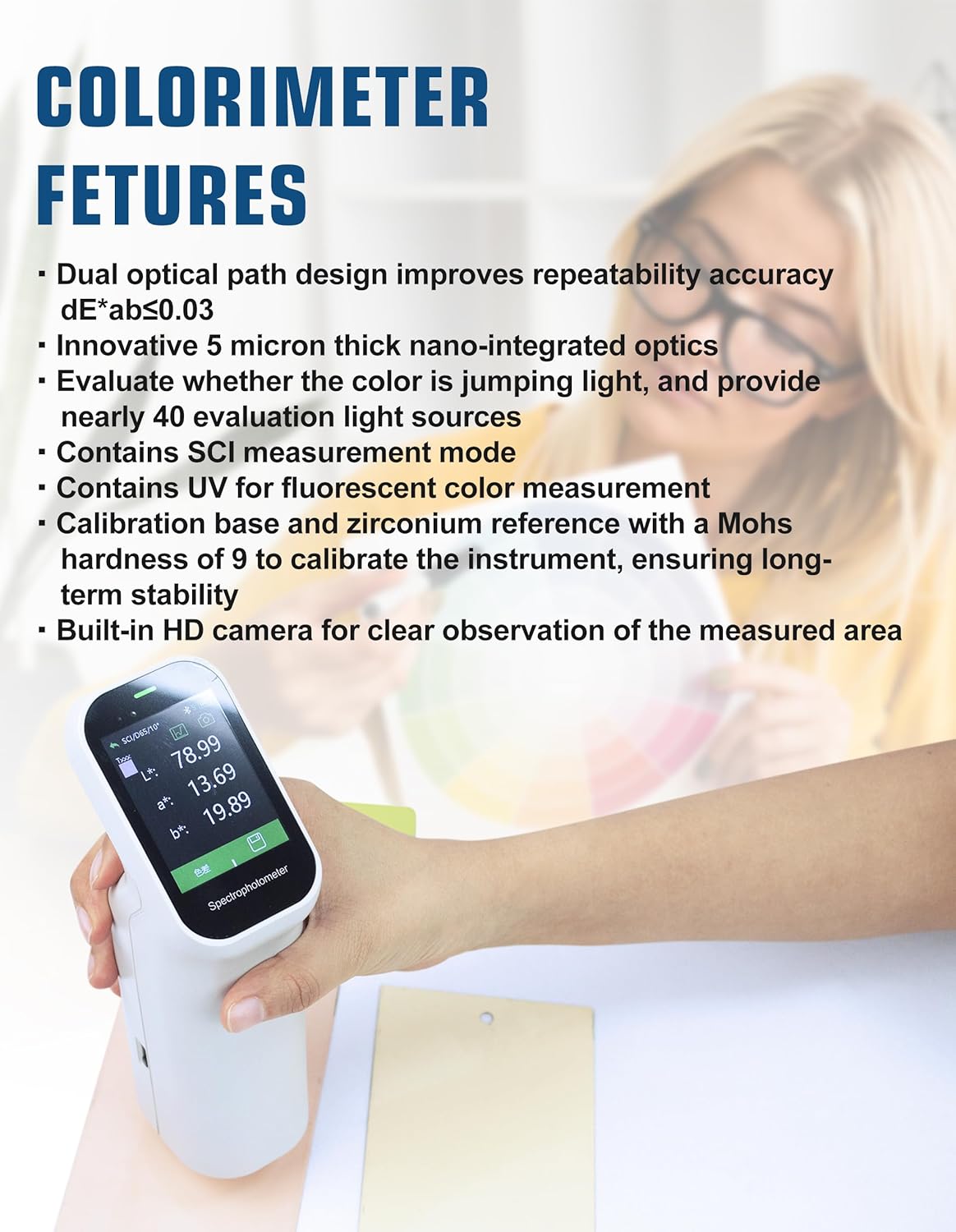
Figure 2: The AMTAST AMT599 Colorimeter in use, demonstrating its display and highlighting key features such as dual optical path design and innovative optics.
5. ບໍາລຸງຮັກສາ
5.1 ການທໍາຄວາມສະອາດ
To maintain optimal performance and accuracy:
- Gently wipe the exterior of the device with a soft, dry cloth.
- Keep the measurement port clean and free of dust or debris. Use a soft brush or lens cloth if necessary.
- ຢ່າໃຊ້ນໍ້າຢາທໍາຄວາມສະອາດທີ່ມີສີຂັດ ຫຼື ສານລະລາຍ, ເພາະວ່າສິ່ງເຫຼົ່ານີ້ສາມາດທໍາລາຍອຸປະກອນໄດ້.
5.2 ການເກັບຮັກສາ
When not in use, store the AMT599 Colorimeter in a clean, dry environment, away from direct sunlight, extreme temperatures, and high humidity. Remove batteries if the device will not be used for an extended period to prevent leakage.

Figure 3: The AMTAST AMT599 Colorimeter, emphasizing its durability with a life of 10 years and 1 million cycles, and a storage capacity of 10,000 data points.
6. ການແກ້ໄຂບັນຫາ
| ບັນຫາ | ສາເຫດທີ່ເປັນໄປໄດ້ | ການແກ້ໄຂ |
|---|---|---|
| ອຸປະກອນບໍ່ເປີດ | Low or dead batteries; Power adapter not connected properly | Replace batteries or ensure power adapter is securely connected. |
| ການອ່ານບໍ່ຖືກຕ້ອງ | Device not calibrated; Measurement port dirty; Sample surface uneven | Perform calibration; Clean measurement port; Ensure sample surface is flat and clean. |
| Display issues (e.g., blank screen, flickering) | Software glitch; Battery issue | Restart the device; Check battery level or try using the DC adapter. |
| ບໍ່ສາມາດເຊື່ອມຕໍ່ກັບ PC ໄດ້ | USB cable faulty; Driver not installed; Software not running | Try a different USB cable; Install necessary drivers; Ensure data management software is open. |
7. ຂໍ້ມູນຈໍາເພາະ

Figure 4: The AMTAST AMT599 Colorimeter displaying its technical specifications on the screen.
- ຕົວແບບ: AMT599
- ລະບົບໄຟສາຍ: 8/d (8°/diffused illumination) SCI
- Testing Port Diameter: ປະມານ 8 ມມ
- Measuring Conditions: CIE 10° standard observer; CIE D65 light source
- ໄລຍະການວັດແທກ: L*: 1-100
- ການເຮັດຊ້ຳ: Standard deviation within ΔE*ab*, below 0.1 (testing condition: measure the white calibration board for average)
- ການເກັບຮັກສາ: 10 sets of standard samples; up to 100 under each standard sample
- ເວລາວັດ: ປະມານ 0.5 ວິນາທີ
- Measuring Light Source: LED
- ພາສາ: ຈີນ, ອັງກິດ
- ພະລັງງານ: Four AA 1.5V Alkaline battery or nickel-metal hydride battery; or DC5V adapter
- ພອດ: USB2.0 (for printer/PC connection)
- ນ້ໍາຫນັກລາຍການ: ປະມານ 2.09 ປອນ (0.95 ກິໂລ)
- Neck Diameter: 8ມມ
- ຄວາມຖືກຕ້ອງຂອງການສະແດງຜົນ: 0.01
- ການວັດແທກຮູຮັບແສງ: Φ8mm (also mentioned Φ11mm, Φ6mm, ▽11mm, ▽6mm in image, but 8mm is consistent with description)
- Source Condition: A, B, C, D50, D55, D65, D75, F1-F12, CWF, U30, U35, DLF, NBF, TL83, TL84, ID50, ID65, LED-B1, LED-B2, LED-B3, LED-B4, LED-B5, LED-BH1, LED-RGB1, LED-V1, LED-V2
- ຜູ້ສັງເກດການ: 2°, 10°
- Integrating Sphere Diameter: 40ມມ
- ມາດຕະຖານ: CIE No.15, GB/T 3978, GB 2893, GB/T 18833, ISO7724-1, ASTM E1164, DIN5033 Teil7
- ໄລຍະຫ່າງລະຫວ່າງຄື້ນ: 10nm
- ຊ່ວງຄື້ນ: 400–700nm
- Reflectance Determination Range: 0–200%
- Reflectance Resolution: 0.01%
- ວິທີການວັດແທກ: ການວັດແທກດຽວ, ການວັດແທກສະເລ່ຍ (2 ຫາ 99 ການວັດແທກ)
- Life of Light Source: 10 years / 1 million cycles
- ຄວາມອາດສາມາດເກັບຮັກສາຂໍ້ມູນ: 10,000 ຈຸດຂໍ້ມູນ
8. ການຮັບປະກັນ
AMTAST products are manufactured to high-quality standards. This product is covered by a limited warranty against defects in materials and workmanship. Please refer to the warranty card included with your product or visit the official AMTAST webເວັບໄຊສໍາລັບເງື່ອນໄຂການຮັບປະກັນລາຍລະອຽດ.
9. ການຊ່ວຍເຫຼືອລູກຄ້າ
For technical assistance, troubleshooting, or service inquiries, please contact AMTAST customer support:
- ອີເມວ: support@amtast.com
- Webເວັບໄຊ: www.amtast.com/support
Please have your model number (AMT599) and purchase information ready when contacting support.