
ASUS XG49VQ
ASUS ROG Strix XG49VQ 49-inch Curved Gaming Monitor User Manual
1. ບົດແນະນຳ
The ASUS ROG Strix XG49VQ is a super ultra-wide 49-inch Dual Full HD (3840 x 1080) 1800R curved gaming monitor designed to provide an immersive and smooth gaming experience. It features a 144Hz refresh rate, Radeon FreeSync 2 HDR technology, DCI-P3 90% professional color gamut coverage, and DisplayHDR 400 certification. This manual provides essential information for setting up, operating, maintaining, and troubleshooting your monitor.
2. ສິ່ງທີ່ຢູ່ໃນກ່ອງ
ກວດສອບວ່າທຸກລາຍການດັ່ງຕໍ່ໄປນີ້ແມ່ນລວມຢູ່ໃນຊຸດຂອງທ່ານ:
- ASUS ROG Strix XG49VQ Monitor
- ສາຍ DisplayPort
- ສາຍ HDMI
- ອະແດັບເຕີພະລັງງານ
- ຄູ່ມືເລີ່ມຕົ້ນໄວ
- ຊຸດຕິດຕັ້ງ VESA
3. ຕັ້ງຄ່າ
3.1 Monitor Assembly
Carefully remove the monitor and its components from the packaging. Attach the stand base to the monitor arm, then secure the assembled stand to the monitor. Ensure all connections are firm.
3.2 ສາຍເຊື່ອມຕໍ່
Connect the power adapter to the monitor and a power outlet. Use the provided DisplayPort or HDMI cable to connect your computer or gaming console to the monitor. The monitor features multiple input ports for versatile connectivity.
ຮູບພາບ: ດ້ານຫລັງ view of the monitor highlighting accessible I/O ports and smart cable management for a tidy setup.
3.3 ການປັບຕົວ
The monitor offers ergonomic adjustments for optimal viewຄວາມສະດວກສະບາຍ:
- ອຽງ: ປັບມຸມໜ້າຈໍຈາກ +20° ຫາ -5°.
- ໝູນ: ໝຸນໜ້າຈໍຕາມລວງນອນຈາກ +16° ຫາ -16°.
- ການປັບຄວາມສູງ: Adjust the screen height up to 120mm.

ຮູບພາບ: ຈໍສະແດງຜົນasing its ergonomic design with arrows indicating available tilt, swivel, and height adjustment ranges.
4. ການດໍາເນີນງານຂອງ Monitor
4.1 ເປີດ/ປິດ
ກົດປຸ່ມເປີດປິດຢູ່ໃນຈໍສະແດງຜົນເພື່ອເປີດຫຼືປິດມັນ.
4.2 ຄຸນສົມບັດການສະແດງ
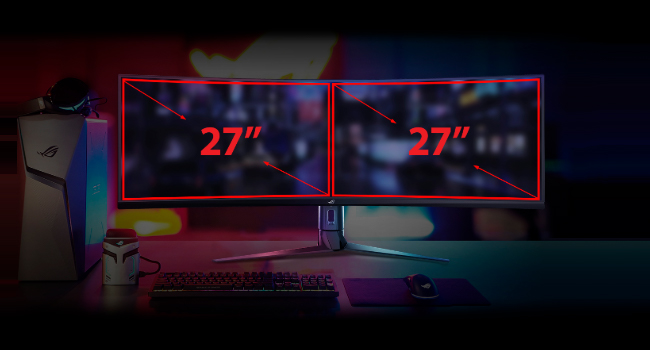
- Super Ultra-wide Display: The 49-inch curved screen provides an expansive view, equivalent to two 27-inch monitors side-by-side.
- ອັດຕາການສົດຊື່ນ 144Hz: Experience smooth, lag-free visuals, crucial for fast-paced gaming.
- Radeon FreeSync 2 HDR: Synchronizes the monitor's refresh rate with your GPU's frame rate to eliminate screen tearing and stuttering, especially with HDR content.
- DisplayHDR 400 & DCI-P3 90%: Ensures high color contrast and cinematic color performance for vibrant and realistic visuals.

Image: Visual representation of the 49-inch super ultra-wide display, showing its equivalence to two 27-inch monitors for an expansive workspace.

Image: A split-screen comparison demonstrating the enhanced visual quality with High Dynamic Range (HDR) enabled, highlighting DCI-P3 90% and DisplayHDR 400 certification.

Image: A split-screen comparison illustrating the difference in gameplay smoothness with Radeon FreeSync 2 HDR turned 'On' versus 'Off'.
4.3 ເທັກໂນໂລຢີ ASUS Eye Care
ASUS Eye Care technology is integrated to minimize eye fatigue during extended use. This includes flicker-free backlighting and blue light filters, certified by TÜV Rheinland, to protect your eyes.
4.4 GamePlus and GameVisual
Utilize exclusive GamePlus and GameVisual overlays and color modes to optimize your gaming experience. These features provide in-game enhancements and display adjustments tailored for various game genres.
4.5 Picture-by-Picture (PBP) Functionality
The ultra-wide display supports Picture-by-Picture (PBP) mode, allowing you to view content from multiple input sources simultaneously, effectively acting as multiple monitors on a single screen.
Video: Official ASUS ROG Strix XG49VQ product overview, demonstrating key features like the ultra-wide display, high refresh rate, HDR, and various gaming enhancements.
Video: A merchant's overview of the ASUS ROG Strix XG49VQ, highlighting its curved design, FreeSync technology, and eye care features.
5. ບໍາລຸງຮັກສາ
5.1 ການທໍາຄວາມສະອາດ Monitor
ເພື່ອອະນາໄມໜ້າຈໍຈໍສະແດງຜົນ, ຄ່ອຍໆເຊັດມັນດ້ວຍຜ້າອ່ອນໆ, ທີ່ບໍ່ມີຜ້າປູ. ສໍາລັບຮອຍແຂງ, ເບົາບາງ dampen the cloth with water or a mild, non-abrasive screen cleaner. Avoid using harsh chemicals or abrasive materials that could damage the screen surface.
5.2 ການເບິ່ງແຍງທົ່ວໄປ
Keep the monitor in a well-ventilated area. Avoid exposing it to direct sunlight, high humidity, or extreme temperatures. Do not block the ventilation openings on the monitor casing.
6. ການແກ້ໄຂບັນຫາ
6.1 ບໍ່ມີຈໍສະແດງຜົນ / ສີດໍາ
- ກວດໃຫ້ແນ່ໃຈວ່າສາຍໄຟຖືກເຊື່ອມຕໍ່ຢ່າງປອດໄພກັບທັງຈໍພາບ ແລະປລັກສຽບໄຟ.
- Verify that the video cable (DisplayPort/HDMI) is firmly connected to both the monitor and your computer/console.
- Check if the correct input source is selected on the monitor's OSD (On-Screen Display) menu.
6.2 Image Quality Issues (e.g., Washed Out, Red Dot)
- If the display appears washed out or has unusual artifacts (like a red dot), try performing a "Reset All" from the monitor's OSD menu.
- Consider disabling HDR in your operating system or monitor settings if you experience poor image quality, as some content or system configurations may not fully support HDR effectively.
- Adjust brightness, contrast, and color settings via the OSD menu to suit your preferences.
6.3 Flickering or Stuttering
- ໃຫ້ແນ່ໃຈວ່າໄດເວີກາດກຣາຟິກຂອງທ່ານອັບເດດແລ້ວ.
- Verify that Radeon FreeSync 2 HDR is enabled in both your monitor settings and graphics card control panel.
- ກວດເບິ່ງສາຍວິດີໂອສໍາລັບຄວາມເສຍຫາຍຫຼືການເຊື່ອມຕໍ່ວ່າງ.
7. ຂໍ້ມູນຈໍາເພາະ
| ຄຸນສົມບັດ | ຂໍ້ມູນຈໍາເພາະ |
|---|---|
| ຂະຫນາດຈໍສະແດງຜົນຢືນ | 49 ນິ້ວ |
| ຄວາມລະອຽດໜ້າຈໍ | 3840x1080 |
| ຄວາມລະອຽດໜ້າຈໍສູງສຸດ | 3840 x 1080 ພິກເຊລ |
| ຍີ່ຫໍ້ | ASUS |
| ຊຸດ | XG49VQ |
| ໝາຍເລກຕົວແບບ | XG49VQ |
| ນ້ໍາຫນັກລາຍການ | 21.4 ປອນ |
| ຂະໜາດສິນຄ້າ | 46.98 x 20.83 x 13.57 ນິ້ວ |
| ສີ | ດຳ |
| ສະບັບtage | 100-240 ໂວນ |
| ຈຳນວນຂອງ USB 2.0 Ports | 1 |
| ຈຳນວນຂອງ USB 3.0 Ports | 2 |
| ອັດຕາສ່ວນ | 32:9 |
| ລາຍລະອຽດຫນ້າຈໍ | Matte |
8. ການຮັບປະກັນແລະການສະຫນັບສະຫນູນ
ສໍາລັບຂໍ້ມູນການຮັບປະກັນລາຍລະອຽດ ແລະການຊ່ວຍເຫຼືອດ້ານວິຊາການ, ກະລຸນາອ້າງອີງເຖິງ ASUS ຢ່າງເປັນທາງການ webເວັບໄຊທ໌ ຫຼື ບັດຮັບປະກັນທີ່ມາພ້ອມກັບຜະລິດຕະພັນຂອງທ່ານ. ເກັບໃບຮັບເງິນຊື້ຂອງທ່ານໄວ້ສຳລັບການຮຽກຮ້ອງການຮັບປະກັນ.
Ask a question about this manual
Ask about setup, troubleshooting, compatibility, parts, safety, or missing instructions. Manuals+ will review the question and use this page’s manual context to help answer it.