
1. ບົດແນະນຳ
Thank you for choosing the Hoco E30 Wireless Earphone. This manual provides essential information for setting up, operating, and maintaining your earphone. Please read it carefully before use to ensure optimal performance and longevity of your device.
2. ຂໍ້ມູນຄວາມປອດໄພ
To prevent damage to your device or injury to yourself and others, please observe the following safety precautions:
- ຫຼີກເວັ້ນການສໍາຜັດກັບລະດັບສຽງສູງເປັນເວລາດົນນານເພື່ອປ້ອງກັນຄວາມເສຍຫາຍຂອງການໄດ້ຍິນ.
- Do not use the earphone while driving or in situations where you need to be aware of your surroundings.
- ຮັກສາອຸປະກອນໃຫ້ຫ່າງຈາກນ້ໍາ, ຄວາມຊຸ່ມຊື່ນ, ແລະອຸນຫະພູມທີ່ສຸດ.
- Do not attempt to disassemble, repair, or modify the earphone. This will void the warranty.
- ໃຊ້ພຽງແຕ່ສາຍສາກ ແລະອະແດັບເຕີທີ່ສະໜອງໃຫ້ ຫຼືໄດ້ຮັບການຮັບຮອງເທົ່ານັ້ນ.
- ຮັກສາໃຫ້ໄກຈາກເດັກນ້ອຍ ແລະສັດລ້ຽງ.
3. ເນື້ອໃນຊຸດ
ກະລຸນາກວດເບິ່ງກ່ອງສໍາລັບລາຍການຕໍ່ໄປນີ້:
- Hoco E30 Wireless Earphone
- ສາຍສາກ USB
- ຄູ່ມືຜູ້ໃຊ້
4. ຜະລິດຕະພັນເກີນview
Familiarize yourself with the components of your Hoco E30 Wireless Earphone:

ຮູບທີ 4.1: ຂ້າງ view of the Hoco E30 Wireless Earphone, highlighting its sleek design and ear hook.

ຮູບທີ 4.2: The Hoco E30 Wireless Earphone positioned next to a smartphone, illustrating its compact size and wireless connectivity.
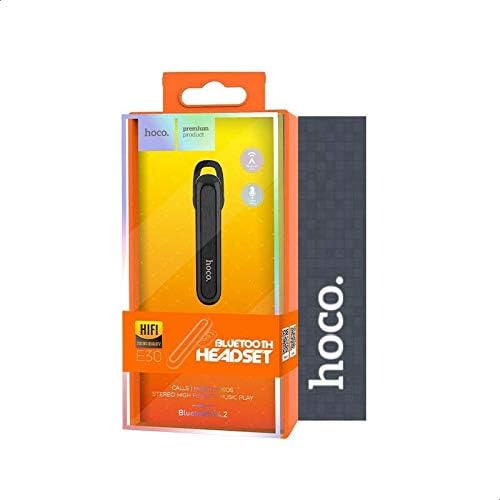
ຮູບທີ 4.3: The retail packaging for the Hoco E30 Wireless Earphone, displaying branding and key features.
5. ຕັ້ງຄ່າ
5.1 ການສາກຫູຟັງ
Before first use, fully charge your Hoco E30 earphone.
- Connect the provided USB charging cable to the charging port on the earphone.
- ເຊື່ອມຕໍ່ປາຍອີກດ້ານໜຶ່ງຂອງສາຍ USB ເຂົ້າກັບແຫຼ່ງພະລັງງານ DC 5V (ເຊັ່ນ: ອະແດບເຕີຕິດຝາ USB ຫຼື ພອດ USB ຂອງຄອມພິວເຕີ).
- ໄຟຕົວຊີ້ວັດການສາກໄຟຈະສະຫວ່າງ.
- Charging typically takes approximately 2 hours. The indicator light will change or turn off once charging is complete.
5.2 ການຈັບຄູ່ກັບອຸປະກອນ
To connect your Hoco E30 earphone to your smartphone or other Bluetooth-enabled device:
- Ensure the earphone is fully charged and turned off.
- ກົດປຸ່ມຫຼາຍໜ້າທີ່ຢູ່ເທິງຫູຟັງຄ້າງໄວ້ຈົນກວ່າໄຟສະແດງສັນຍານຈະກະພິບສີແດງ ແລະ ສີຟ້າສະຫຼັບກັນ, ເຊິ່ງຊີ້ບອກວ່າມັນຢູ່ໃນໂໝດຈັບຄູ່.
- ໃນອຸປະກອນຂອງທ່ານ, ເປີດໃຊ້ Bluetooth ແລະຊອກຫາອຸປະກອນທີ່ມີຢູ່.
- ເລືອກ "Hoco E30" ຈາກລາຍຊື່ອຸປະກອນທີ່ພົບ.
- Once paired, the indicator light on the earphone will flash blue slowly, and you will hear a confirmation tone.
- The earphone has a transmission range of up to 10 meters (33 feet).
6. ຄໍາແນະນໍາການດໍາເນີນງານ
6.1 ເປີດ/ປິດ
- ເປີດ: Press and hold the multi-function button for approximately 3 seconds until the blue indicator light flashes and you hear a power-on tone.
- ປິດພະລັງງານ: Press and hold the multi-function button for approximately 5 seconds until the red indicator light flashes and you hear a power-off tone.
6.2 ການຄຸ້ມຄອງການໂທ
- ຮັບສາຍ: Briefly press the multi-function button when an incoming call rings.
- ສິ້ນສຸດການໂທ: Briefly press the multi-function button during a call.
- ປະຕິເສດການໂທ: ກົດປຸ່ມຫຼາຍໜ້າທີ່ຄ້າງໄວ້ເປັນເວລາ 2 ວິນາທີເມື່ອມີສາຍໂທເຂົ້າດັງຂຶ້ນ.
- ໂທຫາເບີສຸດທ້າຍ: ກົດປຸ່ມຫຼາຍໜ້າທີ່ສອງຄັ້ງເມື່ອບໍ່ໄດ້ໃຊ້ສາຍ.
6.3 ການຫລີ້ນດົນຕີ
- ຫຼິ້ນ/ຢຸດ: Briefly press the multi-function button to play or pause music.
- ເພງຕໍ່ໄປ: Press and hold the multi-function button for 2 seconds to skip to the next track.
- ຕິດຕາມກ່ອນ ໜ້າ ນີ້: Press and hold the multi-function button for 2 seconds (during playback) to go to the previous track.
Note: The Hoco E30 supports A2DP and AVRCP protocols for high-quality audio streaming and remote control. Volume control is typically managed via the connected device.
6.4 ສະແດງສະຖານະແບັດເຕີຣີ
The Hoco E30 earphone supports battery level display on compatible Apple iOS devices and some Android smartphones. Check your device's notification bar or Bluetooth settings for this feature.
7. ບໍາລຸງຮັກສາ
- ທໍາຄວາມສະອາດ: ໃຊ້ຜ້າອ່ອນໆແຫ້ງເພື່ອທຳຄວາມສະອາດຫູຟັງ. ຢ່າໃຊ້ສານເຄມີທີ່ຮຸນແຮງ ຫຼື ວັດສະດຸທີ່ມີສີຂັດ.
- ການເກັບຮັກສາ: ເກັບຮັກສາຫູຟັງໄວ້ໃນບ່ອນທີ່ເຢັນ, ແຫ້ງ ແລະ ຫ່າງຈາກແສງແດດໂດຍກົງ ແລະ ອຸນຫະພູມສູງສຸດ.
- ການດູແລຫມໍ້ໄຟ: ເພື່ອຍືດອາຍຸການໃຊ້ງານຂອງແບັດເຕີຣີ, ໃຫ້ຫຼີກລ່ຽງການສາກຫູຟັງຈົນໝົດເລື້ອຍໆ. ໃຫ້ສາກໄຟເປັນປະຈຳ, ເຖິງແມ່ນວ່າຈະບໍ່ໄດ້ໃຊ້ເປັນເວລາດົນກໍຕາມ.
8. ການແກ້ໄຂບັນຫາ
If you encounter issues with your Hoco E30 earphone, try the following solutions:
| ບັນຫາ | ການແກ້ໄຂ |
|---|---|
| ຫູຟັງເປີດບໍ່ໄດ້. | Ensure the earphone is fully charged. Connect it to a power source and try again. |
| ບໍ່ສາມາດຈັບຄູ່ກັບອຸປະກອນໄດ້. |
|
| ບໍ່ມີສຽງຫຼືຄຸນນະພາບສຽງທີ່ບໍ່ດີ. |
|
| ການສາກໄຟບໍ່ເຮັດວຽກ. |
|
9. ຂໍ້ມູນຈໍາເພາະ
| ຄຸນສົມບັດ | ລາຍລະອຽດ |
|---|---|
| ຕົວແບບ | E30 |
| ລຸ້ນ Bluetooth | V4.2 WT |
| ອະນຸສັນຍາທີ່ຮອງຮັບ | ຊຸດຫູຟັງ, ແຮນຟຣີ, A2DP, AVRCP |
| ລະບົບສາຍສົ່ງ | 10 ແມັດ (33 ຟຸດ) |
| ຄວາມຖີ່ຂອງສາຍສົ່ງ | 2.4 GHz |
| ກຳ ລັງສາກໄຟtage | DC 5V |
| ເວລາສາກໄຟ | ປະມານ. 2 ຊົ່ວໂມງ |
| ຄວາມອາດສາມາດຫມໍ້ໄຟ | 60 mAh |
| ເວລາສົນທະນາ | ປະມານ. 3.5 ຊົ່ວໂມງ |
| ເວລາການຫຼີ້ນດົນຕີ | ປະມານ. 3.5 ຊົ່ວໂມງ |
| ເວລາສະແຕນບາຍ | ປະມານ. 110 ຊົ່ວໂມງ |
| ນ້ຳໜັກສິນຄ້າສຸດທິ | 6 ກຣາມ |
| ຂະໜາດ (L x W x H) | 58mm x 14mm x 25mm |
| ວັດສະດຸ | ພາດສະຕິກ |
| ວິທີການຄວບຄຸມ | ແຕະ |
| ສີ | ສີດຳ ແລະເງິນ |
10. ການຮັບປະກັນແລະການສະຫນັບສະຫນູນ
Hoco products are designed and manufactured to the highest quality standards. This product is covered by a limited warranty from the date of purchase. Please refer to the warranty card included in your package for specific terms and conditions.
For technical support or warranty claims, please contact your local Hoco distributor or visit the official Hoco webເວັບໄຊທ for ສໍາລັບຂໍ້ມູນເພີ່ມເຕີມ.