
1. ເກີນview
The Apple iPad Mini (2019) is a compact and powerful tablet designed for portability and performance. It features a 7.9-inch Retina Display with True Tone technology, providing vibrant colors and comfortable viewing. Powered by the A12 Bionic chip, it offers fast and efficient performance for various tasks, from browsing to gaming.
ຄຸນນະສົມບັດທີ່ສໍາຄັນປະກອບມີ:
- 7.9-inch Retina Display with True Tone and wide Color
- A12 Bionic chip with Neural Engine
- Touch ID fingerprint sensor for secure authentication
- 8MP back camera and 7MP FaceTime HD front camera
- Stereo speakers for immersive audio
- 802.11ac Wi-Fi connectivity
- ເຖິງ 10 ຊົ່ວໂມງຂອງອາຍຸຫມໍ້ໄຟ
- Lightning connector for charging and accessories
- Support for Apple Pencil (1st Generation)
- iPadOS 14 for enhanced tablet experience

Image 1.1: The Apple iPad Mini (2019) in Space Gray, showcasinການອອກແບບ ແລະ ຈໍສະແດງຜົນທີ່ກະທັດຮັດຂອງມັນ.
2. ສິ່ງທີ່ຢູ່ໃນກ່ອງ
Upon opening your iPad Mini package, ensure all the following items are present:
- iPad mini (2019)
- ຟ້າຜ່າກັບສາຍ USB
- ຜູ້ດັດແປງພະລັງງານ USB
3. ຕັ້ງຄ່າ
3.1. ຄ່າບໍລິການເບື້ອງຕົ້ນ
Before first use, it is recommended to fully charge your iPad Mini. Connect the Lightning to USB Cable to the iPad's Lightning port and the USB Power Adapter, then plug the adapter into a power outlet.
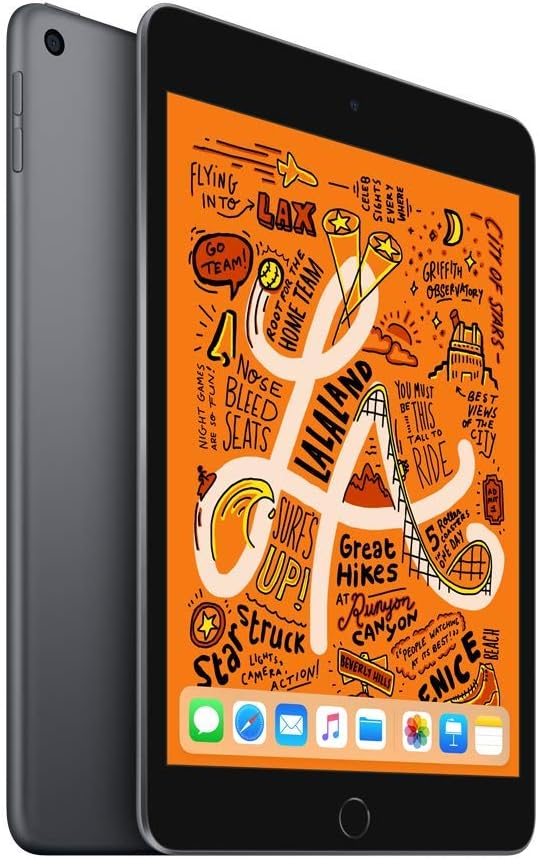
ຮູບພາບ 3.1: ດ້ານຫນ້າ view of the iPad Mini, ready for initial setup.
3.2. ເປີດເຄື່ອງ ແລະ ການຕັ້ງຄ່າພື້ນຖານ
- ກົດຄ້າງໄວ້ ປຸ່ມດ້ານເທິງ until the Apple logo appears.
- ປະຕິບັດຕາມຄໍາແນະນໍາໃນຫນ້າຈໍເພື່ອເລືອກພາສາແລະພາກພື້ນຂອງທ່ານ.
- ເຊື່ອມຕໍ່ກັບເຄືອຂ່າຍ Wi-Fi.
- ຕັ້ງຄ່າ ແຕະ ID by following the prompts to register your fingerprint.
- ສ້າງລະຫັດ.
- Restore from an iCloud or computer backup, or set up as a new iPad.
- ເຂົ້າສູ່ລະບົບດ້ວຍ Apple ID ຂອງທ່ານ ຫຼືສ້າງອັນໃໝ່.
- Enable or disable location services, Siri, and other features as desired.
4. ການປະຕິບັດ iPad Mini ຂອງທ່ານ
4.1. ການນໍາທາງພື້ນຖານ
- ປຸ່ມຫນ້າທໍາອິດ: Press once to return to the Home screen. Double-press to open the App Switcher. Press and hold to activate Siri.
- ທ່າທາງ: Swipe down from the top-right corner for Control Center. Swipe down from the middle of the screen for Search. Swipe up from the bottom to go home (if using gestures instead of Home button).

Image 4.1: The iPad Mini display showing a vibrant interface.
4.2. ການເຊື່ອມຕໍ່ Wi-Fi
- ໄປທີ່ ການຕັ້ງຄ່າ > Wi-Fi.
- ເປີດ Wi-Fi.
- ເລືອກເຄືອຂ່າຍທີ່ທ່ານຕ້ອງການຈາກບັນຊີລາຍຊື່.
- ໃສ່ລະຫັດຜ່ານຖ້າຖືກຖາມ, ຈາກນັ້ນແຕະ ເຂົ້າຮ່ວມ.
4.3. ການນໍາໃຊ້ກ້ອງຖ່າຍຮູບ
ເປີດ ກ້ອງຖ່າຍຮູບ app from the Home screen. Tap the shutter button to take a photo. Swipe left or right to switch between photo, video, panorama, and other modes. Tap the camera icon to switch between the front and back cameras.

ຮູບພາບ 4.2: ດ້ານຫລັງ view of the iPad Mini, highlighting the back camera.
4.4. Apple Pencil (1st Generation)
The iPad Mini (2019) supports the first-generation Apple Pencil. To pair, remove the cap from your Apple Pencil and plug it into the Lightning connector on your iPad. Tap ຄູ່ when the Bluetooth Pairing Request appears. Once paired, you can use it for drawing, note-taking, and more.
5. ບໍາລຸງຮັກສາ
5.1. Cleaning Your iPad Mini
To clean your iPad Mini, use a soft, lint-free cloth. Avoid abrasive cloths, towels, paper towels, or similar items that could scratch the screen. Do not use aerosol sprays, solvents, or abrasives. Unplug all cables and power off the device before cleaning.
5.2. ການປັບປຸງຊອບແວ
Keep your iPad Mini's software up to date to ensure optimal performance and security. Go to ການຕັ້ງຄ່າ > ທົ່ວໄປ > ອັບເດດຊອບແວຖ້າມີການອັບເດດ, ໃຫ້ປະຕິບັດຕາມຄໍາແນະນໍາໃນໜ້າຈໍເພື່ອດາວໂຫຼດ ແລະ ຕິດຕັ້ງມັນ.
5.3. ການດູແລຫມໍ້ໄຟ
To maximize battery lifespan, avoid exposing your iPad to extreme temperatures. For long-term storage, charge the device to about 50% and power it off. Recharge it to 50% every six months.
5.4. ການຄຸ້ມຄອງການເກັບຮັກສາ
To check and manage your storage, go to ການຕັ້ງຄ່າ > ທົ່ວໄປ > ບ່ອນເກັບຂໍ້ມູນ iPadທ່ານສາມາດລຶບແອັບທີ່ບໍ່ໄດ້ໃຊ້ອອກ, ລຶບແອັບຂະໜາດໃຫຍ່ອອກໄດ້ files, or move photos and videos to iCloud to free up space.
6. ການແກ້ໄຂບັນຫາ
6.1. ອຸປະກອນບໍ່ຕອບສະໜອງ
If your iPad Mini is unresponsive, try a force restart:
- ກົດແລະຖືທັງສອງ ປຸ່ມດ້ານເທິງ ແລະ ປຸ່ມຫນ້າທໍາອິດ ພ້ອມໆກັນ.
- Continue holding until you see the Apple logo.
- Release both buttons and allow the iPad to restart.
6.2. ບັນຫາການເຊື່ອມຕໍ່ Wi-Fi
If you are experiencing Wi-Fi connectivity problems:
- ກວດໃຫ້ແນ່ໃຈວ່າ Wi-Fi ເປີດຢູ່ໃນ ການຕັ້ງຄ່າ > Wi-Fi.
- ຣີສະຕາດເຣົາເຕີ Wi-Fi ຂອງທ່ານ.
- ລືມເຄືອຂ່າຍ ແລະເຊື່ອມຕໍ່ຄືນໃໝ່: ໄປທີ່ ການຕັ້ງຄ່າ > Wi-Fi, ແຕະທີ່ ໄອຄອນຂໍ້ມູນ next to your network, then tap ລືມເຄືອຂ່າຍນີ້. Rejoin the network.
- Reset Network Settings: Go to ການຕັ້ງຄ່າ > ທົ່ວໄປ > ໂອນ ຫຼື ຕັ້ງຄ່າ iPad ຄືນໃໝ່ > ຣີເຊັດ > ຣີເຊັດການຕັ້ງຄ່າເຄືອຂ່າຍ. This will reset all network settings, including Wi-Fi passwords.
6.3. App Crashing or Freezing
If an app is not working correctly:
- Force quit the app: Double-press the Home button to open the App Switcher, then swipe up on the app's preview to close it. Reopen the app.
- Update the app: Check the App Store for updates to the problematic app.
- Reinstall the app: Delete the app from your iPad and then download it again from the App Store.
7. ຂໍ້ມູນຈໍາເພາະ
| ຊື່ຕົວແບບ | iPad mini |
| ໝາຍເລກຕົວແບບ | MUQW2LL/A |
| ຈໍສະແດງຜົນ | 7.9-inch Retina display with True Tone |
| ຄວາມລະອຽດການສະແດງ | 2048 x 1536 ພິກເຊລ |
| ຊິບ | A12 Bionic chip with Neural Engine |
| ຄວາມອາດສາມາດເກັບຮັກສາ | 64GB |
| ກ້ອງຫຼັງ | 8MP with HDR and 1080p HD video |
| ກ້ອງໜ້າ | 7MP FaceTime HD with Auto HDR |
| ຊີວິດຫມໍ້ໄຟ | Up to 10 hours (Wi-Fi browsing) |
| ຕົວເຊື່ອມຕໍ່ | ຟ້າຜ່າ |
| ຂະໜາດ (H x W x D) | 8 x 5.3 x 0.24 ນິ້ວ (203.2 x 134.8 x 6.1 ມມ) |
| ນ້ຳໜັກ | ຕົວແບບ Wi-Fi ຂະໜາດ 0.66 ປອນ (300.5 ກຣາມ). |
| ວັນທີປ່ອຍ | ວັນທີ 18 ມີນາ 2019 |
8. ການຮັບປະກັນແລະການສະຫນັບສະຫນູນ
8.1. ຂໍ້ມູນການຮັບປະກັນ
Your Apple iPad Mini (2019) is covered by Apple's standard limited warranty, which typically covers manufacturing defects for one year from the original purchase date. For detailed warranty terms and conditions, please refer to the official Apple warranty documentation included with your product or visit the Apple webເວັບໄຊ.
8.2. ການຊ່ວຍເຫຼືອລູກຄ້າ
ສໍາລັບການຊ່ວຍເຫຼືອເພີ່ມເຕີມ, ການຊ່ວຍເຫຼືອດ້ານວິຊາການ, ຫຼືການບໍລິການ, ກະລຸນາໄປຢ້ຽມຢາມຢ່າງເປັນທາງການ Apple Support webເວັບໄຊ:
You can find articles, troubleshooting guides, and contact options for Apple support specialists on their webເວັບໄຊ.


