
1. ບົດແນະນຳ
This manual provides detailed instructions for the installation, operation, and maintenance of your Time2 Oscar 2 Twin Pack Outdoor Security Cameras. The Oscar 2 cameras are designed for outdoor surveillance, offering 1080p Full HD video, night vision, motion and sound detection, and two-way audio communication. Please read this manual thoroughly before using the product to ensure proper setup and functionality.
2. ສິ່ງທີ່ຢູ່ໃນກ່ອງ
ຫຼັງຈາກການຍົກເລີກການຫຸ້ມຫໍ່, ກະລຸນາກວດສອບວ່າທັງຫມົດລາຍການດັ່ງຕໍ່ໄປນີ້ແມ່ນລວມ:
- 2 x Time2 Oscar WiFi Camera
- 2 x Power Adapter
- 2 x Wall Mounting Kit (screws and wall plugs)
- 1 x ຄູ່ມືເລີ່ມຕົ້ນດ່ວນ

Image: The Time2 Oscar 2 camera shown with its retail packaging, indicating the contents of the box.
3. ຄຸນລັກສະນະຂອງຜະລິດຕະພັນ
The Time2 Oscar 2 cameras are equipped with advanced features for comprehensive outdoor security:
- ວິດີໂອ 1080p Full HD: ຈັບ foo ທີ່ຊັດເຈນແລະລາຍລະອຽດtage ມື້ແລະກາງຄືນ.
- ການວິໄສທັດຕອນກາງຄືນທີ່ດີເລີດ: Automatic infrared night vision with IR cut for clear images in low light or darkness.
- 100° Field of View: Provides a wide coverage area for monitoring your property.
- Motion and Audio Detection: Advanced sensors detect unusual movement or sounds, sending instant alerts.
- ສຽງສອງທາງ: ໄມໂຄຣໂຟນ ແລະ ລຳໂພງໃນຕົວຊ່ວຍໃຫ້ສາມາດສື່ສານໄດ້ແບບທັນທີ.
- Local & Cloud Storage: Supports local storage via MicroSD card (up to 128GB, not included) and optional cloud storage via CLAN CLOUD subscription.
- ການອອກແບບກັນອາກາດ: IP65 rated for outdoor use, resistant to rain and dust.
- Mains Powered: Ensures continuous operation without battery recharging.
- ເຂດກິດຈະກໍາ: Customize detection areas to reduce false alerts.
- ການເຊື່ອມໂຍງ Alexa: Compatible with Amazon Alexa for voice control.
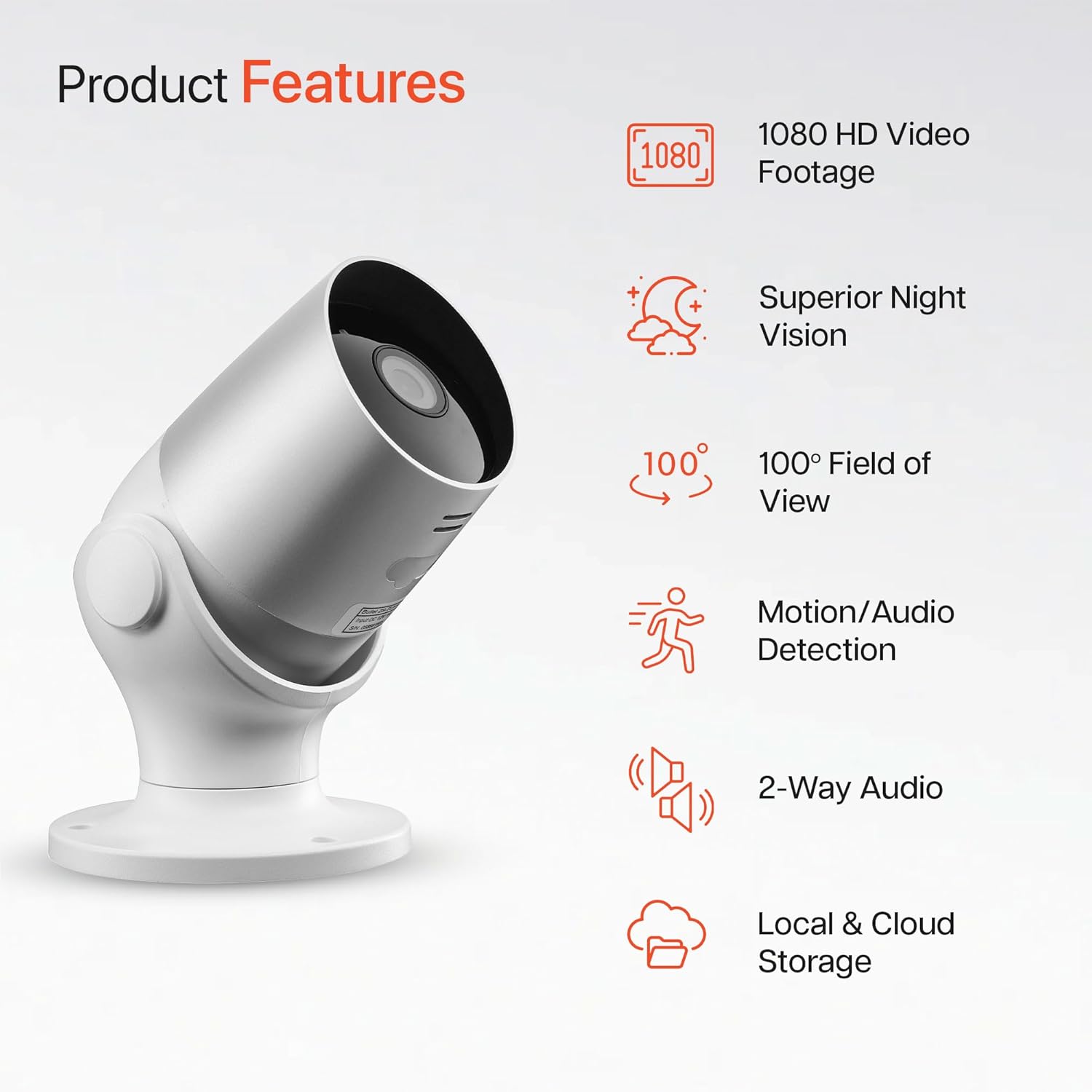
Image: An illustration highlighting the main features of the Oscar 2 camera, including 1080p HD video, night vision, 100° field of view, motion/audio detection, two-way audio, and storage options.
4. ຕັ້ງຄ່າ
4.1 ການດາວໂຫຼດແອັບ ແລະ ການສ້າງບັນຊີ
- Download the "CLAN" app from your smartphone's app store (iOS or Android).
- ເປີດ app ແລະປະຕິບັດຕາມຄໍາແນະນໍາໃນຫນ້າຈໍເພື່ອສ້າງບັນຊີໃຫມ່ຫຼືເຂົ້າສູ່ລະບົບຖ້າຫາກວ່າທ່ານມີແລ້ວ.
4.2 ການຕິດຕັ້ງກາດ MicroSD (ທາງເລືອກ)
For local video storage, you can install a MicroSD card (up to 128GB, not included) into the camera.
- Locate the MicroSD card slot on the camera (refer to the Quick Start Guide for exact location).
- ຄ່ອຍໆໃສ່ກາດ MicroSD ເຂົ້າໄປໃນຊ່ອງຈົນກວ່າມັນຈະຄລິກເຂົ້າທີ່.
- ໃຫ້ແນ່ໃຈວ່າກ້ອງຖ່າຍຮູບປິດຢູ່ກ່ອນທີ່ຈະໃສ່ ຫຼື ຖອດກາດ MicroSD.
4.3 Camera Installation and Power Connection
The Oscar 2 cameras are designed for wall mounting and require a mains power connection.
- ເລືອກສະຖານທີ່: ເລືອກສະຖານທີ່ກາງແຈ້ງທີ່ສະຫນອງຄວາມຕ້ອງການ viewing angle and is within reach of a power outlet. Consider the 100° field of view.
- ຕິດກ້ອງ: Use the provided wall mounting kit (screws and wall plugs) to securely attach the camera to a wall or suitable surface. The camera housing allows for rotation to adjust the lens angle.
- ເຊື່ອມຕໍ່ພະລັງງານ: Plug the power adapter into the camera and then into a mains power outlet. The camera will power on automatically.
4.4 Pairing with the CLAN App
- ໃຫ້ແນ່ໃຈວ່າໂທລະສັບສະຫຼາດຂອງທ່ານເຊື່ອມຕໍ່ກັບເຄືອຂ່າຍ Wi-Fi 2.4GHz (ເຄືອຂ່າຍ 5GHz ບໍ່ຮອງຮັບ).
- Open the CLAN app and tap the "+" icon to add a new device.
- Select "Oscar 2" from the list of devices.
- Follow the in-app instructions, which typically involve scanning a QR code displayed on your phone with the camera lens or listening for a sound prompt.
- Once paired, you can name your camera and begin configuring settings.
5. Operating Your Oscar 2 Camera
5.1 ດໍາລົງຊີວິດ View ແລະການຕິດຕາມ
From the CLAN app home screen, tap on your camera's name to access the live video feed. You can view multiple cameras simultaneously if you have more than one Oscar 2 device.

Image: A smartphone displaying the CLAN app interface, showing a live view from the Oscar 2 camera and various control options.
5.2 ການກວດຈັບການເຄື່ອນໄຫວ ແລະ ສຽງ
The Oscar 2 camera can detect movement and sound, sending instant alerts to your smartphone or tablet.
- ເປີດໃຊ້ການແຈ້ງເຕືອນ: Navigate to the camera settings in the CLAN app and enable motion and sound detection alerts.
- ປັບຄວາມອ່ອນໄຫວ: You can adjust the sensitivity level of both motion and sound detection to minimize false alarms.
- ກຳນົດເຂດກິດຈະກຳ: ກຳນົດພື້ນທີ່ສະເພາະພາຍໃນຂອບເຂດຂອງກ້ອງຖ່າຍຮູບ view where you want motion detection to be active. This helps focus on critical areas and ignore irrelevant movements.
5.3 ສຽງສອງທາງ
Utilize the built-in microphone and speaker for two-way communication.
- ໃນຂະນະທີ່ຢູ່ໃນຊີວິດ view, tap the microphone icon in the app to speak through the camera's speaker.
- ແຕະໄອຄອນລຳໂພງເພື່ອຟັງສຽງຈາກໄມໂຄຣໂຟນຂອງກ້ອງຖ່າຍຮູບ.
- This feature is useful for interacting with visitors or deterring intruders.
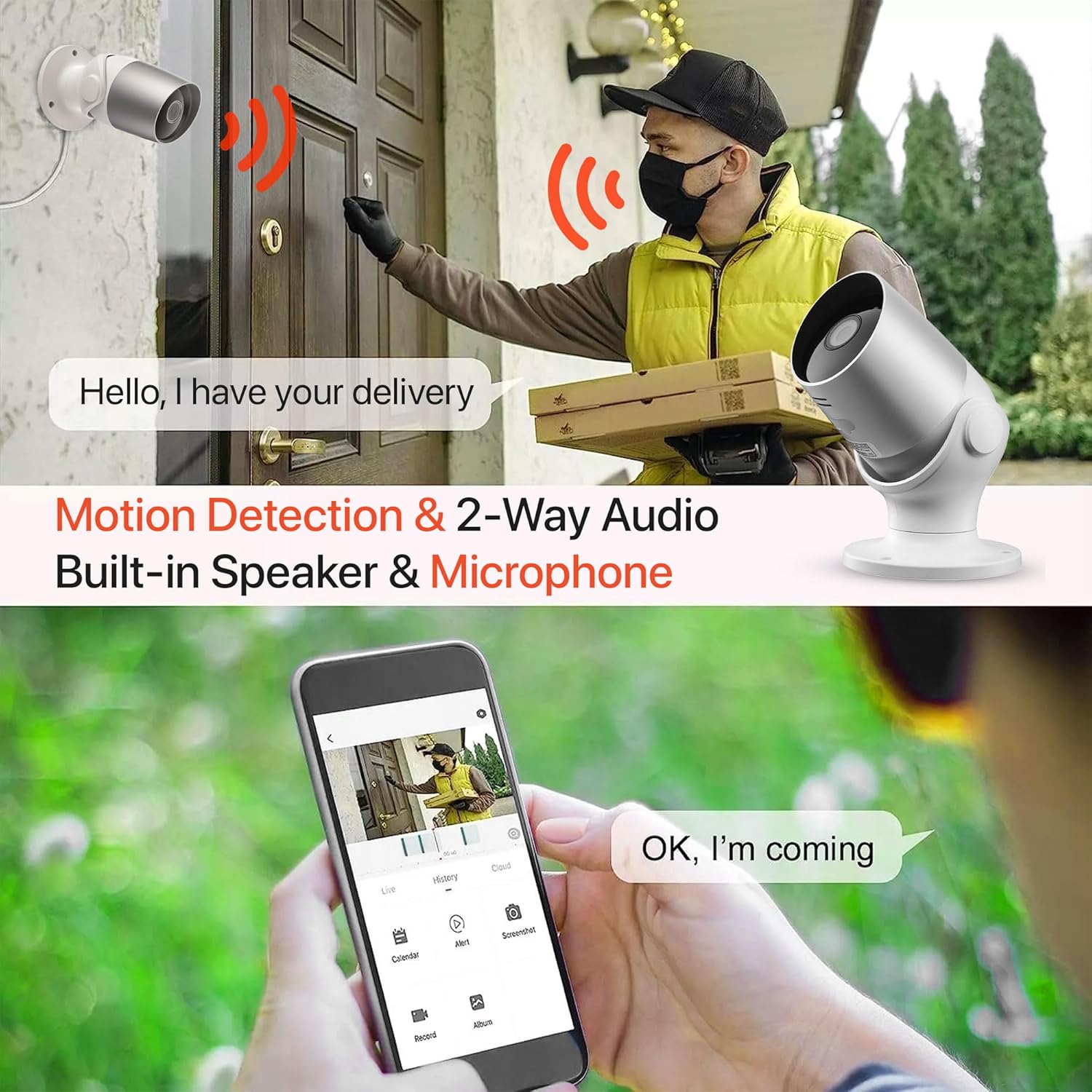
Image: An illustration demonstrating the two-way audio feature, showing a user communicating with a delivery person via the Oscar 2 camera and smartphone app.
5.4 ການບັນທຶກແລະການຫຼິ້ນ
The Oscar 2 cameras offer flexible recording options:
- ບັນທຶກຢ່າງຕໍ່ເນື່ອງ: If a MicroSD card is installed, the camera can record continuously for up to 21 days (with a 128GB card).
- ການບັນທຶກການເຄື່ອນໄຫວ: The camera can be set to record only when motion or sound is detected. Recordings include 5 seconds of pre-event footage.
- Local Storage (MicroSD): ການເຂົ້າເຖິງບັນທຶກ footage directly from the MicroSD card via the CLAN app.
- Cloud Storage (CLAN CLOUD): Subscribe to CLAN CLOUD for secure off-site storage of your recordings, accessible from anywhere.
- ຫຼິ້ນຄືນ: Use the playback feature in the CLAN app to review ເຫດການທີ່ບັນທຶກໄວ້.
5.5 ວິໄສທັດກາງຄືນ
The camera automatically switches to infrared night vision in low-light conditions, providing clear black and white images. The integrated IR cut filter ensures accurate color representation during the day.

Image: A visual representation of the camera's 24/7 monitoring capability, showing how the view changes from morning (color) to afternoon (color) to night (infrared night vision).
5.6 ການເຊື່ອມໂຍງ Alexa
The Oscar 2 cameras are compatible with Amazon Alexa. To enable this feature, link your CLAN account within the Alexa app. You can then use voice commands to view ກ້ອງຖ່າຍຮູບຂອງທ່ານຖ່າຍພາບໃນອຸປະກອນທີ່ເປີດໃຊ້ງານ Alexa ທີ່ເຂົ້າກັນໄດ້.
6. ບໍາລຸງຮັກສາ
- ທໍາຄວາມສະອາດ: ເຮັດຄວາມສະອາດເລນກ້ອງຖ່າຍຮູບເປັນໄລຍະໆ, ງamp cloth to ensure optimal image clarity. Do not use harsh chemicals or abrasive materials.
- ການອັບເດດເຟີມແວ: Ensure your camera's firmware is up to date. The CLAN app will typically notify you of available updates. Follow the in-app instructions to perform updates, which can improve performance and add new features.
- ວົງຈອນພະລັງງານ: If the camera experiences issues, try power cycling it by unplugging it from the power source for a few seconds and then plugging it back in.
7. ການແກ້ໄຂບັນຫາ
- ກ້ອງຖ່າຍຮູບບໍ່ໄດ້ເຊື່ອມຕໍ່ກັບ Wi-Fi:
- ໃຫ້ແນ່ໃຈວ່າເຄືອຂ່າຍ Wi-Fi ຂອງທ່ານແມ່ນ 2.4GHz. ກ້ອງຖ່າຍຮູບບໍ່ຮອງຮັບເຄືອຂ່າຍ 5GHz.
- ກວດສອບວ່າກ້ອງຖ່າຍຮູບຢູ່ພາຍໃນຂອບເຂດຂອງເຣົາເຕີ Wi-Fi ຂອງທ່ານ.
- ກວດສອບວ່າລະຫັດຜ່ານ Wi-Fi ຂອງທ່ານໄດ້ຖືກໃສ່ຢ່າງຖືກຕ້ອງໃນ app ໄດ້.
- ຣີສະຕາດ router ແລະກ້ອງຖ່າຍຮູບຂອງທ່ານ.
- Frequent Motion Detection Alerts:
- Adjust the motion detection sensitivity settings in the CLAN app to a lower level.
- Define specific activity zones to exclude areas with frequent irrelevant movement (e.g., trees swaying, busy roads).
- Environmental factors like heavy rain or snow can sometimes trigger alerts; consider adjusting sensitivity during adverse weather.
- ຄຸນນະພາບຮູບພາບທີ່ບໍ່ດີ:
- ເຮັດຄວາມສະອາດເລນກ້ອງຖ່າຍຮູບເພື່ອກຳຈັດຝຸ່ນ ຫຼື ຮອຍເປື້ອນຕ່າງໆ.
- ຮັບປະກັນວ່າບໍ່ມີສິ່ງກີດຂວາງໃນພື້ນທີ່ຂອງກ້ອງຖ່າຍຮູບ view.
- Check your internet connection speed; a slow connection can affect live stream quality.
- ບັນຫາສຽງສອງທາງ:
- Ensure your phone's volume is up and the app has microphone permissions.
- Check the camera's speaker and microphone settings in the app.
- ຫຼຸດຜ່ອນສຽງລົບກວນພື້ນຫຼັງໃຫ້ໜ້ອຍທີ່ສຸດເພື່ອການສື່ສານທີ່ຊັດເຈນກວ່າ.
- Recordings Not Saving:
- If using a MicroSD card, ensure it is correctly inserted and formatted within the app. Check if the card is full.
- If using cloud storage, verify your CLAN CLOUD subscription is active.
8. ຂໍ້ມູນຈໍາເພາະ
| ຄຸນສົມບັດ | ລາຍລະອຽດ |
|---|---|
| ຊື່ຕົວແບບ | Oscar 2 |
| ຂະໜາດສິນຄ້າ | 8.9 x 17.8 x 19.1 cm |
| ນ້ຳໜັກ | 720 ກຣາມ |
| ຜູ້ຜະລິດ | ເວລາ2 |
| ເຕັກໂນໂລຊີການເຊື່ອມຕໍ່ | ໄຮ້ສາຍ (Wi-Fi) |
| ຄຸນນະສົມບັດພິເສດ | ການແຈ້ງເຕືອນການເຄື່ອນໄຫວ ແລະສຽງ |
| ໃຊ້ພາຍໃນ/ນອກ | ກາງແຈ້ງ |
| ອຸປະກອນທີ່ເຂົ້າກັນໄດ້ | ຄອມພິວເຕີ, ໂທລະສັບສະຫຼາດ, ແທັບເລັດ |
| ແຫຼ່ງພະລັງງານ | Electric Cable (Mains Powered) |
| ປະເພດການຄວບຄຸມ | Amazon Alexa |
| ປະເພດການຕິດຕັ້ງ | ຕິດຝາ |
| ສີ | ສີຂາວ |
| ປັດໄຈແບບຟອມ | ລູກປືນ |
| ລະດັບຄວາມຕ້ານທານນ້ໍາ | ກັນນ້ ຳ (IP65) |
| ສະບັບtage | 12 ໂວນ |
| ວັດtage | 5 ວັດ |
| ຮູບແບບການຖ່າຍຮູບວິດີໂອ | MP4 |
| ຄວາມລະອຽດວິດີໂອທີ່ມີປະສິດທິພາບ | 1080 Pixels (1080p) |
| Viewໃນມຸມ | 100 ອົງສາ |
| ຈໍານວນລາຍການ | 2 (ຊຸດຄູ່) |
| UPC | 045912296356 |
9. ການຮັບປະກັນແລະການສະຫນັບສະຫນູນ
9.1 ຂໍ້ມູນການຮັບປະກັນ
Your Time2 Oscar 2 cameras come with a manufacturer's warranty. Please refer to the warranty card included in your product packaging or visit the official Time2 webເວັບໄຊສໍາລັບເງື່ອນໄຂການຮັບປະກັນລາຍລະອຽດ.
9.2 ສະຫນັບສະຫນູນລູກຄ້າ
If you encounter any issues or have questions not covered in this manual, please contact Time2 customer support. Contact details can typically be found on the Time2 webເວັບໄຊ ຫຼືໃນຄູ່ມືການເລີ່ມຕົ້ນດ່ວນທີ່ສະໜອງໃຫ້ກັບຜະລິດຕະພັນຂອງເຈົ້າ.
For the latest information, FAQs, and support resources, please visit the official Time2 webເວັບໄຊ.


