
1. ບົດແນະນຳ
This manual provides essential information for the proper installation, operation, and maintenance of the Red Lion CUB4L800 8-Digit Reflective Counter. Please read this manual thoroughly before attempting to install or operate the device to ensure safe and efficient use. Keep this manual for future reference.
2. ຂໍ້ມູນຄວາມປອດໄພ
Always observe standard safety precautions during installation and operation of this equipment. Failure to comply with safety warnings may result in injury or damage to the device.
- ອັນຕະລາຍໄຟຟ້າ: Disconnect all power before installing or servicing the unit.
- ບຸກຄະລາກອນທີ່ມີຄຸນວຸດທິ: ການຕິດຕັ້ງແລະການບໍາລຸງຮັກສາຄວນຈະຖືກປະຕິບັດໂດຍບຸກຄະລາກອນທີ່ມີຄຸນວຸດທິເທົ່ານັ້ນ.
- ເງື່ອນໄຂສິ່ງແວດລ້ອມ: Do not expose the unit to conditions outside its specified operating environment.
- ສາຍໄຟທີ່ຖືກຕ້ອງ: Ensure all wiring connections are secure and conform to local electrical codes.
3. ຜະລິດຕະພັນເກີນview
The Red Lion CUB4L800 is an 8-digit reflective LCD counter designed for industrial applications requiring reliable counting and display. Its reflective display offers excellent visibility in various lighting conditions. The unit features multiple input modes and a compact design for easy integration.
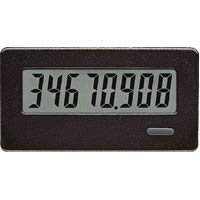
ຮູບ 1: ດ້ານຫນ້າ view of the Red Lion CUB4L800 8-Digit Reflective Counter, showing the display and control buttons.
4. ການຕິດຕັ້ງແລະການຕິດຕັ້ງ
Follow these steps for proper installation of your CUB4L800 counter:
- ການຕິດຕັ້ງ: The CUB4L800 is designed for panel mounting. Cut a panel opening of the specified dimensions (refer to the specifications section). Insert the counter into the opening and secure it using the provided mounting clips.
- ສາຍໄຟ: Refer to the wiring diagram provided with the unit or in the specifications section. Connect the power supply (typically 9-28 VDC) to the designated terminals. Connect the input signal (e.g., from a sensor or switch) to the appropriate input terminals. Ensure all connections are tight and correct.
- ເປີດ: Once all connections are verified, apply power to the unit. The display should illuminate, indicating the unit is operational.
5. ການດໍາເນີນງານ
The CUB4L800 counter is designed for straightforward operation. The reflective display shows the current count value.
- ການນັບ: The counter increments or decrements based on the input signals received. The counting mode (up, down, quadrature) is typically configured during initial setup or via internal jumpers/switches.
- Resetting the Count: A dedicated reset input or a front-panel button (if available on your model) can be used to reset the count to zero or a preset value. Consult the specific model's diagram for reset functionality.
- ຈໍສະແດງຜົນຄ້າງໄວ້: Some models may feature a display hold function, allowing the current count to be frozen on the display while counting continues internally.
6. ບໍາລຸງຮັກສາ
The CUB4L800 counter requires minimal maintenance to ensure long-term reliable operation.
- ທໍາຄວາມສະອາດ: Keep the display and front panel clean. Use a soft, damp cloth with a mild cleaning solution. Do not use abrasive cleaners or solvents, as these can damage the display or housing.
- ການກວດກາ: ກວດກາສາຍໄຟເປັນໄລຍະໆ ເພື່ອຄວາມແໜ້ນໜາ ແລະ ຮ່ອງຮອຍຂອງການສວມໃສ່ ຫຼື ການກັດກ່ອນ.
- ການຄວບຄຸມສິ່ງແວດລ້ອມ: ຮັບປະກັນວ່າສະພາບແວດລ້ອມການດຳເນີນງານຍັງຄົງຢູ່ພາຍໃນຂອບເຂດອຸນຫະພູມ ແລະ ຄວາມຊຸ່ມຊື່ນທີ່ກຳນົດໄວ້ເພື່ອປ້ອງກັນການລົ້ມເຫຼວກ່ອນໄວອັນຄວນ.
7. ການແກ້ໄຂບັນຫາ
If you encounter issues with your CUB4L800 counter, refer to the following common problems and solutions:
| ບັນຫາ | ສາເຫດທີ່ເປັນໄປໄດ້ | ການແກ້ໄຂ |
|---|---|---|
| ຈໍສະແດງຜົນແມ່ນຫວ່າງເປົ່າ | ບໍ່ມີໄຟຟ້າ, ສາຍໄຟບໍ່ຖືກຕ້ອງ, ຫຼື ເຄື່ອງມີບັນຫາ. | Check power supply connections. Verify input voltage. If issues persist, contact support. |
| Counter not incrementing/decrementing | No input signal, incorrect input wiring, or sensor malfunction. | Verify input signal presence and strength. Check input wiring for breaks or shorts. Test the sensor independently. |
| ຈຳນວນບໍ່ຖືກຕ້ອງ | Noise on input line, incorrect input mode, or fast input signals. | Ensure proper shielding for input cables. Verify input mode settings. Consider using a debouncing circuit for noisy signals. |
If these steps do not resolve the issue, please contact Red Lion technical support.
8. ຂໍ້ມູນຈໍາເພາະ
- ຕົວແບບ: CUB4L800
- ຈໍສະແດງຜົນ: 8-Digit Reflective LCD
- ການປ້ອນຂໍ້ມູນ Voltage: 9-28 VDC
- ປະເພດຂາເຂົ້າ: Various (e.g., NPN/PNP, contact closure) - Refer to specific model datasheet for details.
- ອຸນຫະພູມປະຕິບັດການ: -10°C ຫາ 50°C (14°F ຫາ 122°F)
- ອຸນຫະພູມການເກັບຮັກສາ: -40°C ຫາ 70°C (-40°F ຫາ 158°F)
- ຄວາມຊຸ່ມຊື່ນ: 85% RH ບໍ່ condensing
- ການຕິດຕັ້ງ: ກະດານ Mount
- ຂະໜາດ: ອ້າງອີງໃສ່ແຜ່ນຂໍ້ມູນຜະລິດຕະພັນສໍາລັບຂະຫນາດທີ່ແນ່ນອນ.
9. ການຮັບປະກັນແລະການສະຫນັບສະຫນູນ
Red Lion Controls products are warranted against defects in material and workmanship for a period of one year from the date of shipment. For full warranty details, please refer to the official Red Lion Controls webສະຖານທີ່ຫຼືຕິດຕໍ່ຜູ້ຈັດຈໍາຫນ່າຍທ້ອງຖິ່ນຂອງທ່ານ.
For technical assistance, troubleshooting, or service, please visit the Red Lion Controls Support page or contact their customer service department directly. When contacting support, please have your product model number (CUB4L800) and any relevant details about your application readily available.