
1. ບົດແນະນຳ
This manual provides instructions for the Zerone Universal Remote Control, designed as a replacement for various Haier TV models. It is compatible with Haier HTR-A18M, 55D3550, 40D3500M, and 48D3500 series televisions. This remote control offers direct access to digital TV functions without complex programming.

Image 1.1: The Zerone Universal Remote Control in use, demonstrating its compatibility with Haier HTR-A18M, 55D3550, 40D3500M, and 48D3500 TV models.
2. ຕັ້ງຄ່າ
2.1 ການຕິດຕັ້ງຫມໍ້ໄຟ
ການຄວບຄຸມໄລຍະໄກຕ້ອງການສອງ (2) ຫມໍ້ໄຟ AAA (ບໍ່ລວມ) ສໍາລັບການດໍາເນີນງານ. ປະຕິບັດຕາມຂັ້ນຕອນເຫຼົ່ານີ້ເພື່ອຕິດຕັ້ງຫມໍ້ໄຟ:
- ຊອກຫາຊ່ອງໃສ່ຫມໍ້ໄຟຢູ່ດ້ານຫຼັງຂອງການຄວບຄຸມໄລຍະໄກ.
- ກົດສະລັອກລົງ ແລະ ເລື່ອນຝາປິດແບັດເຕີຣີອອກ.
- ໃສ່ໝໍ້ໄຟ AAA ສອງໜ່ວຍ, ຮັບປະກັນຈຸດບວກ (+) ແລະ ລົບ (-) ສອດຄ່ອງຖືກຕ້ອງກັບເຄື່ອງໝາຍພາຍໃນຊ່ອງ.
- ເລື່ອນຝາປິດແບັດເຕີຣີຄືນໃສ່ບ່ອນເກົ່າຈົນກວ່າມັນຈະກົດຢ່າງປອດໄພ.
The remote is ready for use immediately after battery installation; no additional programming is required for compatible Haier TV models.

ຮູບພາບ 2.1: ລາຍລະອຽດ view of the remote control, highlighting the battery compartment for AAA battery installation.
3. ຄໍາແນະນໍາການດໍາເນີນງານ
3.1 ຫນ້າທີ່ພື້ນຖານ
This remote control provides standard functions for your Haier TV. Point the remote directly at your television's infrared receiver for optimal performance.
- ປຸ່ມເປີດປິດ (U): ເປີດ ຫຼື ປິດໂທລະພາບ.
- ປ້ອນຂໍ້ມູນ: Selects video input sources (HDMI, AV, etc.).
- ປຸ່ມຕົວເລກ (0-9): ການເລືອກຊ່ອງທາງໂດຍກົງ.
- VOL +/-: ປັບລະດັບສຽງຂຶ້ນ ຫຼື ລົງ.
- CH +/-: ປ່ຽນຊ່ອງຂຶ້ນ ຫຼື ລົງ.
- ປິດສຽງ: ປິດສຽງ ຫຼືປິດສຽງໂທລະພາບ.
- ເມນູ: ເຂົ້າເຖິງເມນູຫຼັກຂອງໂທລະພາບ.
- Navigation Buttons (Up, Down, Left, Right, OK): ນຳທາງຜ່ານເມນູ ແລະຢືນຢັນການເລືອກ.
- ກັບຄືນ / ອອກ: Returns to the previous screen or exits the current menu.
- ຈໍສະແດງຜົນ: Shows current channel information.
- SAP / AUDIO: ເລືອກພາສາ ຫຼື ໂໝດສຽງ.
- ນອນ: ຕັ້ງໂມງຈັບເວລານອນ.
- PICTURE / WIDE: Adjusts picture mode or aspect ratio.
- CH.LIST / FAVORITE: Accesses channel list or favorite channels.
- Media Control Buttons (Play, Pause, Fast Forward, Rewind): ຄວບຄຸມການຫຼິ້ນສື່.
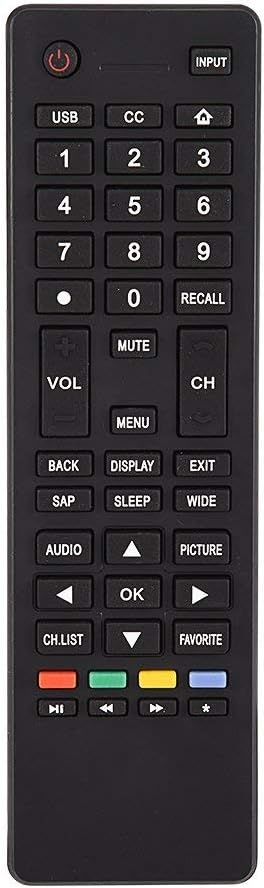
ຮູບພາບ 3.1: ຫຼາຍກວ່າview of the remote control's button layout for easy identification of functions.
3.2 ຊ່ວງການດໍາເນີນງານ
The remote control has a stable signal transmission distance of up to 10 meters (33 feet). Actual remote distance may vary depending on environmental factors and the specific model of your TV.
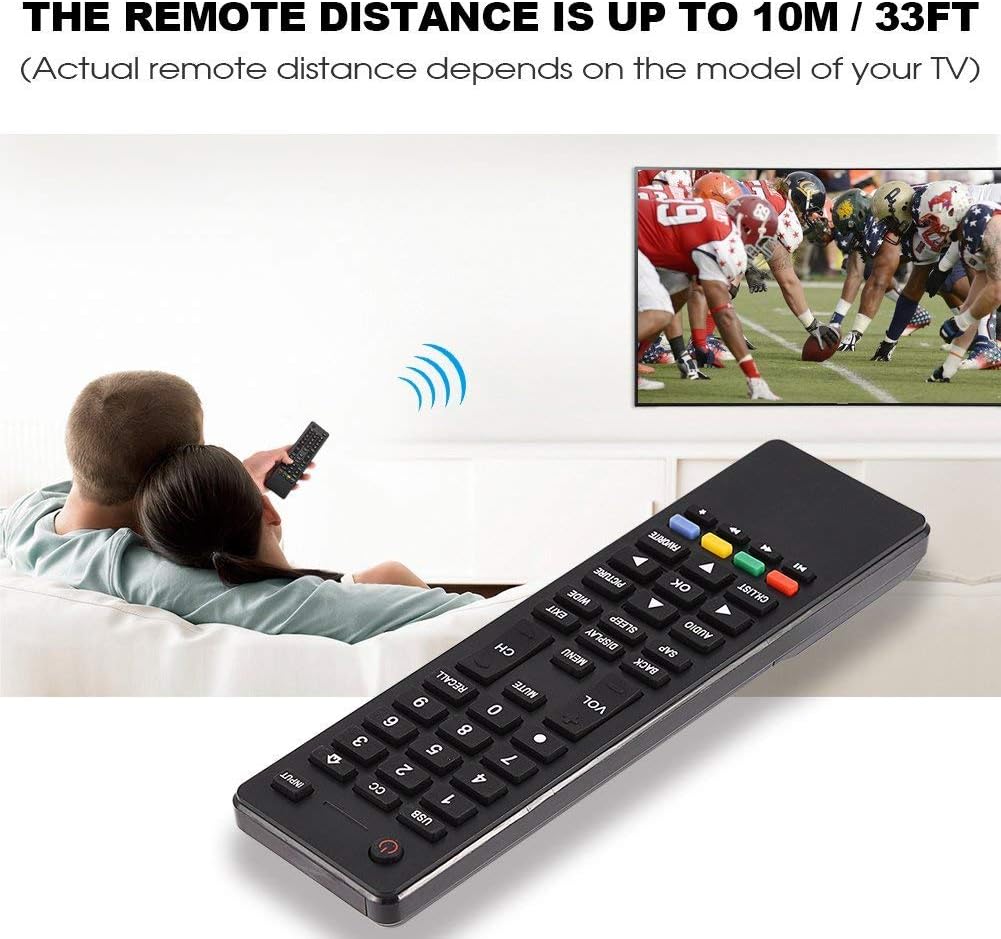
Image 3.2: Visual representation of the remote control's effective operating distance to the television.
4. ບໍາລຸງຮັກສາ
4.1 ການທໍາຄວາມສະອາດ
ເພື່ອທຳຄວາມສະອາດຣີໂໝດຄວບຄຸມ, ໃຫ້ໃຊ້ຜ້າອ່ອນໆແລະແຫ້ງ. ສຳລັບຝຸ່ນທີ່ຝັງແໜ້ນ, ໃຫ້ເຊັດເບົາໆ.ampen the cloth with water or a mild cleaning solution. Avoid using harsh chemicals or abrasive cleaners, as these can damage the remote's surface or internal components.
4.2 ການດູແລຫມໍ້ໄຟ
- ໃຫ້ປ່ຽນແບັດເຕີຣີເມື່ອການຕອບສະໜອງຂອງຣີໂໝດຊ້າລົງ ຫຼື ຢຸດເຮັດວຽກ.
- ຢ່າຜະສົມແບດເຕີຣີເກົ່າແລະໃຫມ່, ຫຼືແບດເຕີລີ່ປະເພດຕ່າງໆ.
- ຖອດແບດເຕີລີ່ອອກຖ້າຫາກວ່າການຄວບຄຸມຫ່າງໄກສອກຫຼີກຈະບໍ່ຖືກນໍາໃຊ້ເປັນໄລຍະເວລາເພີ່ມເຕີມເພື່ອປ້ອງກັນການຮົ່ວໄຫຼ.
- ຖິ້ມແບັດເຕີລີທີ່ໃຊ້ແລ້ວຢ່າງມີຄວາມຮັບຜິດຊອບຕາມລະບຽບທ້ອງຖິ່ນ.
5. ການແກ້ໄຂບັນຫາ
5.1 ໄລຍະໄກບໍ່ຕອບສະໜອງ
- ກວດສອບຫມໍ້ໄຟ: Ensure batteries are inserted correctly with the correct polarity (+/-) and are not depleted. Replace with fresh AAA batteries if necessary.
- ສາຍສາຍຕາ: Make sure there are no obstructions between the remote control and the TV's infrared sensor.
- ໄລຍະທາງ: Confirm you are within the effective operating range (up to 10 meters / 33 feet).
- ຄວາມເຂົ້າກັນໄດ້ຂອງໂທລະພາບ: Verify that your TV model is listed as compatible (Haier HTR-A18M, 55D3550, 40D3500M, 48D3500).
5.2 Buttons Not Working Correctly
- ຣີໂມດສະອາດ: Dust or debris under buttons can cause malfunction. Refer to the Maintenance section for cleaning instructions.
- ກວດສອບຫມໍ້ໄຟ: Weak batteries can lead to inconsistent button responses. Replace batteries.
6. ຂໍ້ມູນຈໍາເພາະ
| ຄຸນສົມບັດ | ລາຍລະອຽດ |
|---|---|
| ຍີ່ຫໍ້ | ເຊໂຣນ |
| ອຸປະກອນທີ່ເຂົ້າກັນໄດ້ | Haier HTR-A18M, 55D3550, 40D3500M, 48D3500 TVs |
| ເຕັກໂນໂລຊີການເຊື່ອມຕໍ່ | ອິນຟາເຣດ |
| ຂອບເຂດສູງສຸດ | 10 ແມັດ (33 ຟຸດ) |
| ປະເພດຫມໍ້ໄຟ | 2 x AAA (ບໍ່ລວມ) |
| ປະເພດການຄວບຄຸມ | ການຄວບຄຸມປຸ່ມ |
| ວັດສະດຸ | ABS |
| ໝາຍເລກຕົວແບບ | Zerone9rnag3b5y4-cr |
| UPC | 647213811490 |

Image 6.1: Physical dimensions of the Zerone Universal Remote Control.
7. ຂໍ້ມູນການຮັບປະກັນ
This product is offered as an Amazon Renewed item. Amazon Renewed products are professionally inspected and tested to work and look like new. If you are not satisfied with your purchase, renewed products are eligible for replacement or refund under the Amazon Renewed Guarantee.
Additionally, the manufacturer provides a ການຮັບປະກັນຈໍາກັດ 90 ວັນ. For specific details regarding the terms and conditions of this warranty, please refer to the documentation provided at the time of purchase or contact customer support.
8. ການຊ່ວຍເຫຼືອລູກຄ້າ
If you encounter any issues or have questions regarding your Zerone Universal Remote Control that are not addressed in this manual, please contact the seller or Amazon Renewed customer service for assistance.
For Amazon Renewed Guarantee claims, please visit the Amazon Renewed program page or contact Amazon customer support directly.