
ແນະນຳ
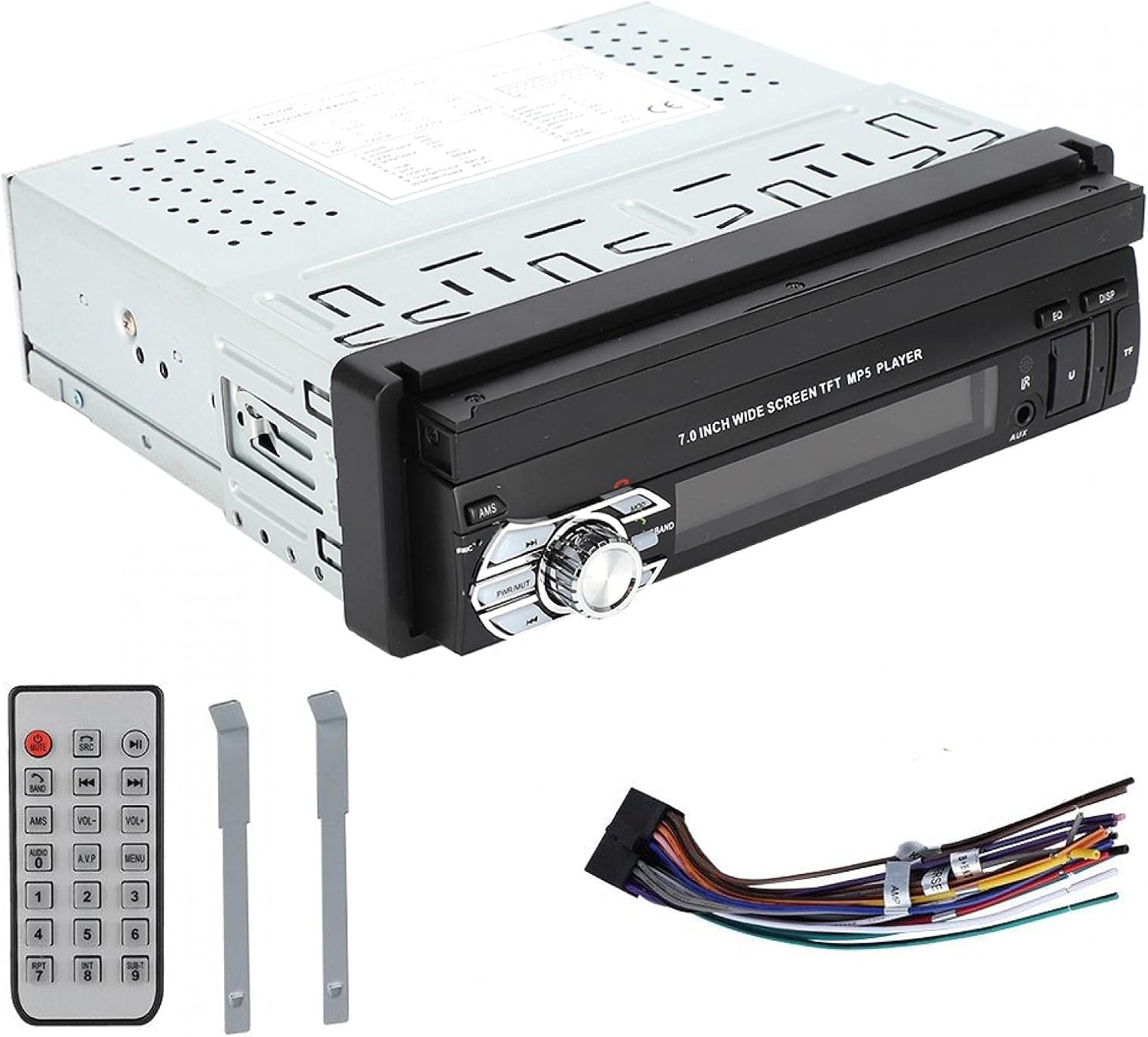
This manual provides detailed instructions for the installation, operation, and maintenance of your ASHATA MP5-SWM9601 Car Stereo. This single-DIN multimedia player features a 7-inch retractable touchscreen, Bluetooth connectivity for calls and music streaming, and supports various audio and video formats via USB, TF card, and AUX input. Please read this manual thoroughly before using the product to ensure proper function and safety.
ຄຸນສົມບັດຜະລິດຕະພັນ
- 7-inch high-definition retractable touchscreen display.
- Bluetooth ສໍາລັບການໂທແບບບໍ່ໃຊ້ແຮນຟຣີ ແລະການຖ່າຍທອດສຽງ.
- Supports various audio formats including APE, FLAC, WAV, DIS, MP3, WMA, ACC, OGG, RA, AC3, MP2, AMR.
- Supports various video formats including AVI, MP4, FLV, PMP, RM, RMVB, MPG.
- USB 2.0 and TF card slot for media playback.
- AUX audio input for external devices.
- Supports rear view camera input for parking assistance.
- Electronic sound processing (EQ) with adjustable treble, bass, balance, and sound field.
- Memory playback function for songs.
- Remote control included for convenient operation.
ການຕິດຕັ້ງແລະການຕິດຕັ້ງ
Proper installation is crucial for the performance and safety of your car stereo. It is recommended to have this unit installed by a professional technician. Ensure the vehicle's battery is disconnected before starting installation.
ຂະໜາດ
Before installation, verify that the unit's dimensions are compatible with your car's dashboard opening. The unit is a standard single-DIN size.

ຮູບທີ 1: Dimensions of the ASHATA MP5-SWM9601 car stereo. The unit measures approximately 18.4 cm (7.2 inches) in width, 6.2 cm (2.4 inches) in height, and 17.8 cm (7.0 inches) in depth.
ແຜນຜັງສາຍ
Refer to the following diagram for correct wiring connections. Incorrect wiring can cause damage to the unit or your vehicle's electrical system.
ຮູບທີ 2: ຫລັງ view of the ASHATA MP5-SWM9601 showing the wiring harness connector and RCA outputs for audio and video. The wiring harness typically includes connections for power (ACC, B+, Ground), speakers, antenna, and steering wheel controls (if applicable).
- ການເຊື່ອມຕໍ່ໄຟຟ້າ: Connect the yellow wire to the constant 12V power supply (B+), the red wire to the accessory 12V power supply (ACC), and the black wire to ground.
- ການເຊື່ອມຕໍ່ລຳໂພງ: Connect the speaker wires to the corresponding positive and negative terminals for each speaker (e.g., front left +, front left -).
- ເສົາອາກາດ: Connect the car's radio antenna to the antenna input.
- ຫລັງ View ກ້ອງຖ່າຍຮູບ: Connect the video input from your rear view camera to the designated video input on the unit. Ensure the reverse trigger wire is connected to activate the camera display when reversing.
- ຜົນອອກຂອງ RCA: Use the RCA outputs for connecting external amplifiers ຫຼືການສະແດງເພີ່ມເຕີມ.
ຄໍາແນະນໍາການດໍາເນີນງານ
ເປີດ/ປິດ ແລະການຄວບຄຸມພື້ນຖານ

ຮູບທີ 3: Front panel of the ASHATA MP5-SWM9601 showing the main controls, including the power/volume knob, mode button, band button, and USB/AUX/TF card slots.
- ເປີດ/ປິດ: ກົດ PWR/MUT button to turn the unit on. Press and hold to turn off. A short press will mute/unmute the audio.
- ການຄວບຄຸມລະດັບສຽງ: ໝຸນປຸ່ມກາງເພື່ອປັບລະດັບສຽງ.
- ການເລືອກໂໝດ: ກົດ ໂໝດ button to cycle through available sources (Radio, USB, TF, AUX, Bluetooth).
- Retract/Extend Screen: The screen can be manually or automatically retracted/extended. Refer to the on-screen menu for specific settings.
ການເຊື່ອມຕໍ່ Bluetooth
Pair your mobile phone with the car stereo to enjoy hands-free calling and wireless audio streaming.
- Turn on the unit and select Bluetooth mode using the ໂໝດ ປຸ່ມ.
- ໃນໂທລະສັບມືຖືຂອງທ່ານ, ເປີດໃຊ້ Bluetooth ແລະຄົ້ນຫາອຸປະກອນທີ່ມີຢູ່.
- Select "ASHATA" or a similar device name from the list. If prompted for a password, enter "0000" or "1234".
- Once paired, you can make/receive calls and play music through the car stereo.
ການຫຼິ້ນສື່ (USB/TF/AUX)
- ການຫລີ້ນ USB: Insert a USB drive into the USB port. The unit will automatically switch to USB mode and begin playing compatible media files.
- ການຫຼິ້ນບັດ TF: Insert a TF (MicroSD) card into the TF card slot. The unit will automatically switch to TF mode and begin playing compatible media files.
- AUX Input: Connect an external audio device (e.g., MP3 player, phone) to the AUX input using a 3.5mm audio cable. Select AUX mode using the ໂໝດ ປຸ່ມ.
- ຮູບແບບທີ່ຮອງຮັບ:
- Audio: DIS, MP3, WMA, ACC, OGG, WAV, RA, AC3, MP2, AMR, APE, FLAC.
- Video: AVI, MP4, FLV, PMP, RM, RMVB, MPG.
- Image: JPEG.
ການຕັ້ງຄ່າສຽງ
Adjust the audio output to your preference using the electronic sound processing (EQ) features.
- ກົດ EQ button to access equalizer presets or custom settings.
- Navigate through the menu to adjust electronic volume, treble, bass, left/right balance, and front/rear sound field.

ຮູບທີ 4: The display showing sound adjustment options, including electronic volume, treble, bass, left and right balance, and front and rear sound field settings.
ຫລັງ View ຟັງຊັນກ້ອງຖ່າຍຮູບ
ເມື່ອມີທາງຫຼັງ view camera is connected and the vehicle is in reverse gear, the unit will automatically display the camera feed on the screen, providing assistance for parking and maneuvering.
ບໍາລຸງຮັກສາ
- ທໍາຄວາມສະອາດຫນ້າຈໍ: Use a soft, dry, lint-free cloth to gently wipe the touchscreen. Do not use abrasive cleaners or solvents.
- ທໍາຄວາມສະອາດຫນ່ວຍບໍລິການ: Wipe the exterior of the unit with a soft, dry cloth. Avoid getting liquids inside the unit.
- ອຸນຫະພູມ: ຫຼີກລ້ຽງການເປີດອຸນຫະພູມທີ່ຮ້າຍແຮງຫຼືແສງແດດໂດຍກົງເປັນເວລາດົນນານ.
ການແກ້ໄຂບັນຫາ
| ບັນຫາ | ສາເຫດທີ່ເປັນໄປໄດ້ | ການແກ້ໄຂ |
|---|---|---|
| ບໍ່ມີພະລັງງານ | ສາຍໄຟບໍ່ຖືກຕ້ອງ; ຟິວເປົ່າ; ແບັດເຕີຣີລົດຕໍ່າ. | Check power connections (B+, ACC, Ground). Inspect and replace fuse if necessary. Check vehicle battery. |
| ບໍ່ມີສຽງ | Volume too low; Mute function active; Incorrect speaker wiring; Faulty speakers. | Increase volume. Press PWR/MUT to unmute. Check speaker connections. Test with different speakers if possible. |
| Bluetooth ບໍ່ເຊື່ອມຕໍ່ | Bluetooth not enabled on phone/unit; Incorrect pairing procedure; Device out of range. | Ensure Bluetooth is active on both devices. Repeat pairing steps. Move phone closer to the unit. |
| ບໍ່ສາມາດຫຼິ້ນບັດ USB/TF ໄດ້ | ບໍ່ເຂົ້າກັນໄດ້ file ຟໍແມັດ; ສື່ເສຍຫາຍ; ບໍ່ໄດ້ໃສ່ກາດ/ໄດຣຟ໌ຢ່າງຖືກຕ້ອງ. | ຮັບປະກັນ files are in supported formats. Try a different USB drive/TF card. Reinsert the media. |
| Screen not retracting/extending | Mechanical obstruction; Software glitch. | Check for any physical obstructions. Try resetting the unit (if a reset button is available, or disconnect power briefly). |
ຖ້າບັນຫາຍັງຄົງຢູ່ຫຼັງຈາກພະຍາຍາມແກ້ໄຂເຫຼົ່ານີ້, ກະລຸນາຕິດຕໍ່ຝ່າຍຊ່ວຍເຫຼືອລູກຄ້າ.
ຂໍ້ມູນຈໍາເພາະ
| ຄຸນສົມບັດ | ລາຍລະອຽດ |
|---|---|
| ຍີ່ຫໍ້ | ASHATA |
| ໝາຍເລກຕົວແບບ | MP5-SWM9601 (9601G) |
| ເຕັກໂນໂລຊີການເຊື່ອມຕໍ່ | Bluetooth |
| ປະເພດການຄວບຄຸມ | ການຄວບຄຸມໄລຍະໄກ |
| ຄຸນນະສົມບັດພິເສດ | Multimedia Player |
| ອຸປະກອນທີ່ເຂົ້າກັນໄດ້ | MP3 Player, Mobile Phone |
| ປະເພດຕົວເຊື່ອມຕໍ່ | USB |
| ຮູບແບບການອອກສຽງ | ສະເຕຣິໂອ |
| ການຕັ້ງຄ່າຊ່ອງສຽງອ້ອມຮອບ | 2.0 |
| ຈໍານວນຊ່ອງ | 2 |
| ວິທີການຄວບຄຸມ | ການຄວບຄຸມໄລຍະໄກ |
| ປະເພດສຽງອອກ | AUX, Speaker, USB |
| ຄວາມເຂົ້າກັນໄດ້ຂອງເຮືອນອັດສະລິຍະ | Not Smart Home Compatible |
| ຮູບແບບສື່ດິຈິຕອລ | AVI, WAV, WMA (also supports DIS, MP3, ACC, OGG, RA, AC3, MP2, AMR, APE, FLAC, MP4, FLV, PMP, RM, RMVB, MPG, JPEG) |
| UPC | 783335388899 |
| ປະເທດຕົ້ນກໍາເນີດ | ຈີນ |
ການຮັບປະກັນແລະການສະຫນັບສະຫນູນ
ສຳລັບຂໍ້ມູນການຮັບປະກັນ ຫຼື ການຊ່ວຍເຫຼືອດ້ານເຕັກນິກ, ກະລຸນາອ້າງອີງເອກະສານທີ່ມາພ້ອມກັບການຊື້ຂອງທ່ານ ຫຼື ຕິດຕໍ່ຜູ້ຂາຍຍ່ອຍ/ຜູ້ຜະລິດໂດຍກົງ. ຮັກສາຫຼັກຖານການຊື້ຂອງທ່ານໄວ້ສຳລັບການຮຽກຮ້ອງການຮັບປະກັນໃດໆ.