
1. ບົດແນະນຳ
This manual provides instructions for the installation, operation, and maintenance of the Cisco CP-68KEM-3PCC Expansion Module. This module is designed to enhance the functionality of your Cisco IP Phone 6851 by providing additional programmable keys.
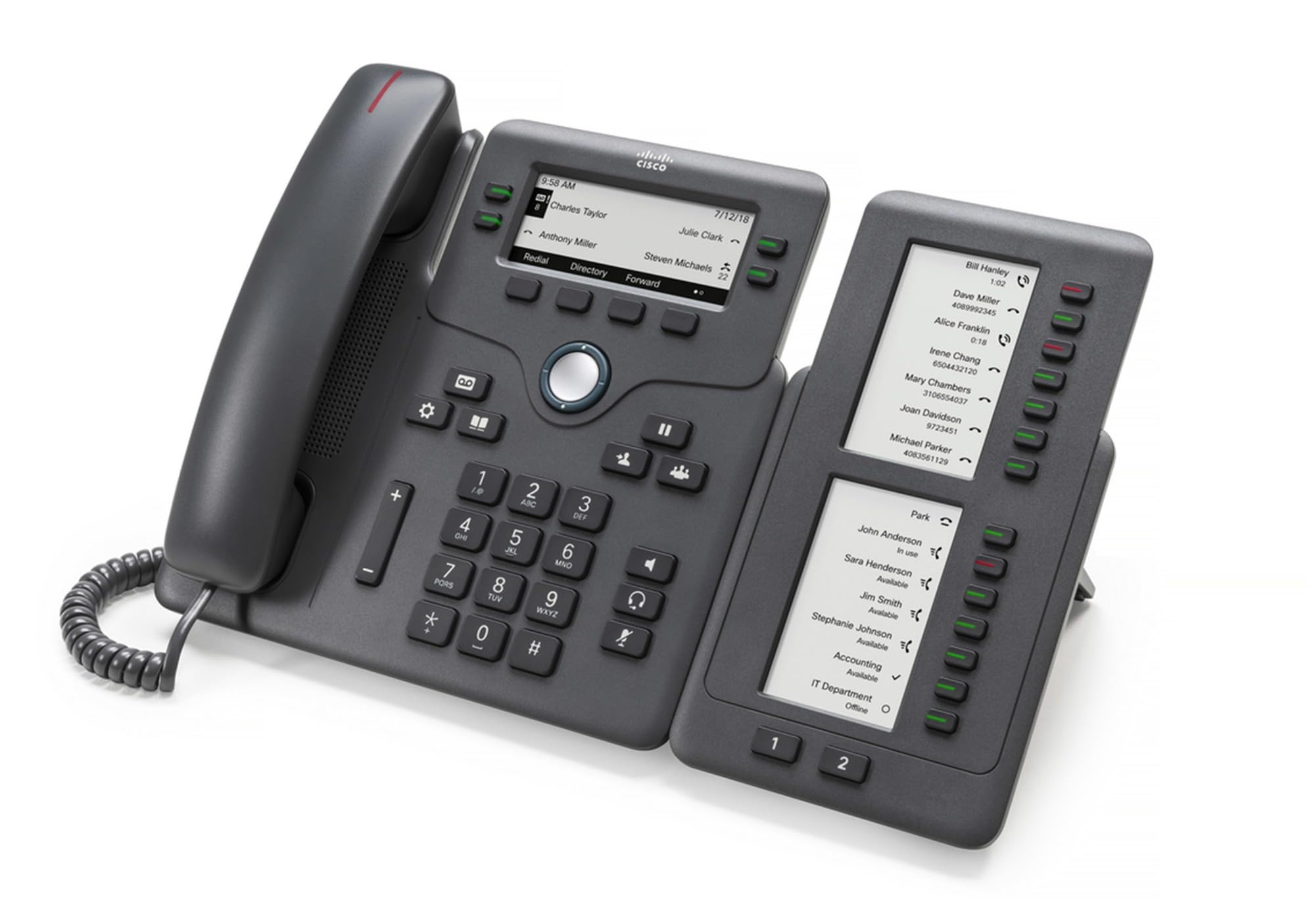
Figure 1: Cisco CP-68KEM-3PCC Expansion Module. This image shows the front view of the expansion module with its grayscale LCD screen and programmable keys.
The Cisco CP-68KEM-3PCC Expansion Module adds 14-line keys and 2-page keys, totaling 28 additional keys, with an easy-to-read grayscale LCD screen. It is ideal for monitoring and managing call status, directory numbers, and speed dial functions.
2. ສິ່ງທີ່ຢູ່ໃນກ່ອງ
ຖອດກ່ອງຢ່າງລະມັດລະວັງ ແລະຮັບປະກັນວ່າສິນຄ້າທັງໝົດມີຢູ່:
- Cisco CP-68KEM-3PCC Phone Expansion Module
- Connecting Cable (typically included for linking to the phone)
- Documentation (this user manual, safety information)
ຖ້າມີລາຍການໃດຂາດຫາຍໄປ ຫຼື ເສຍຫາຍ, ກະລຸນາຕິດຕໍ່ຫາຜູ້ຂາຍ ຫຼື ຝ່າຍຊ່ວຍເຫຼືອ Cisco ຂອງທ່ານທັນທີ.
3. ຄໍາແນະນໍາການຕິດຕັ້ງ
Follow these steps to connect your Cisco CP-68KEM-3PCC Expansion Module to your Cisco IP Phone 6851.
- Prepare the IP Phone: Ensure your Cisco IP Phone 6851 is powered off and disconnected from the network.
- Connect the Expansion Module: Locate the expansion port on the back or side of your Cisco IP Phone 6851. Connect the provided connecting cable from the expansion module to this port.
- ຮັບປະກັນການເຊື່ອມຕໍ່: Ensure the cable is securely fastened to prevent accidental disconnection.
- ເປີດ: Reconnect your Cisco IP Phone 6851 to the network and power it on. The expansion module should be detected automatically.
- ກວດສອບການທໍາງານ: Once the phone has booted, check the expansion module's display and keys to ensure they are responsive.
For detailed visual instructions, refer to the official Cisco documentation or support webເວັບໄຊ.
4. Operating the Expansion Module
The expansion module provides additional keys for various functions, enhancing your call management capabilities.
4.1 ລະຫັດໂປຣແກຣມ
The 28 programmable keys (14 keys across 2 pages) can be configured for:
- Directory Numbers (DNs): Assign specific phone lines or extensions.
- ສາຍຄວາມໄວສູງ: ໂປລແກລມເອີ້ນເລື້ອຍໆວ່າຕົວເລກສໍາລັບການເຂົ້າເຖິງໄວ.
- Feature Keys: Assign functions like call transfer, conference, or call park.
- Call Status Monitoring: Monitor the status of other lines (e.g., busy, ringing).
4.2 Page Navigation
Use the dedicated page keys (usually located near the display) to switch between the two pages of programmable keys. The grayscale LCD screen will update to show the labels for the currently active page.
4.3 ການຕັ້ງຄ່າ
Configuration of the programmable keys is typically managed through your organization's phone system administrator or via the web interface of the Cisco IP Phone 6851. Consult your IT department for specific configuration instructions.
5. ບໍາລຸງຮັກສາ
To ensure the longevity and optimal performance of your Cisco CP-68KEM-3PCC Expansion Module, follow these maintenance guidelines:
- ທໍາຄວາມສະອາດ: ໃຊ້ຜ້າອ່ອນ, ແຫ້ງ, ແລະ ບໍ່ມີຂົນເພື່ອທຳຄວາມສະອາດພື້ນຜິວພາຍນອກ. ສຳລັບຮອຍທີ່ຝັງແໜ້ນ, ໃຫ້ເຊັດອອກເລັກນ້ອຍampen the cloth with water. Avoid using harsh chemicals, abrasive cleaners, or solvents, as these can damage the finish and electronic components.
- ສະພາບແວດລ້ອມ: Keep the module in a clean, dry environment, away from direct sunlight, excessive heat, and moisture.
- ການຈັດການ: ຈັດການໂມດູນດ້ວຍຄວາມລະມັດລະວັງ. ຫຼີກລ້ຽງການປະຖິ້ມມັນຫຼືການຮັບຜົນກະທົບທີ່ເຂັ້ມແຂງ.
- ການຄຸ້ມຄອງສາຍໄຟ: Ensure connecting cables are not kinked, pinched, or under strain.
There are no user-serviceable parts inside the expansion module. Do not attempt to open or repair the device yourself.
6. ການແກ້ໄຂບັນຫາ
If you encounter issues with your expansion module, try the following troubleshooting steps:
| ບັນຫາ | ສາເຫດທີ່ເປັນໄປໄດ້ | ການແກ້ໄຂ |
|---|---|---|
| Module not recognized by phone | Loose cable connection, phone not restarted, incompatible phone model. |
|
| ປຸ່ມບໍ່ຕອບສະໜອງ | Software glitch, configuration issue. |
|
| ຈໍສະແດງຜົນຫວ່າງເປົ່າ ຫຼື flickering | ບັນຫາພະລັງງານ, ຄວາມຜິດປົກກະຕິພາຍໃນ. |
|
If these steps do not resolve the issue, please contact Cisco technical support or your authorized reseller.
7. ຂໍ້ມູນຈໍາເພາະ
| ຄຸນສົມບັດ | ລາຍລະອຽດ |
|---|---|
| ໝາຍເລກຕົວແບບ | CP-68KEM-3PCC |
| ຍີ່ຫໍ້ | ຊິສໂກ |
| ອຸປະກອນທີ່ເຂົ້າກັນໄດ້ | ໂທລະສັບ Cisco IP 6851 |
| ສີ | ດຳ |
| ວັດສະດຸ | ໂລຫະ |
| ຂະໜາດລາຍການ (LxWxH) | 5.1 x 10.2 x 20.3 cm |
| ແຫຼ່ງພະລັງງານ | Corded (powered via host IP Phone) |
| ຈໍານວນກະແຈ | 28 (14 keys across 2 pages) |
| ຈໍສະແດງຜົນ | Grayscale LCD |
| GTIN/UPC | 889728068383 |
8. ຂໍ້ມູນການຮັບປະກັນ
The Cisco CP-68KEM-3PCC Expansion Module comes with a ຮັບປະກັນສິນຄ້າ 2 ປີ ນັບຈາກວັນທີ່ຊື້. ການຮັບປະກັນນີ້ກວມເອົາຂໍ້ບົກຜ່ອງດ້ານວັດສະດຸ ແລະ ຝີມືການຜະລິດພາຍໃຕ້ການນໍາໃຊ້ປົກກະຕິ. ມັນບໍ່ກວມເອົາຄວາມເສຍຫາຍທີ່ເກີດຈາກການໃຊ້ຜິດ, ອຸບັດຕິເຫດ, ການດັດແປງທີ່ບໍ່ໄດ້ຮັບອະນຸຍາດ, ຫຼື ສາເຫດພາຍນອກ.
For warranty claims or detailed terms and conditions, please refer to the official Cisco warranty policy available on their webເວັບໄຊ ຫຼືຕິດຕໍ່ຈຸດຊື້ຂອງທ່ານ.
9. ສະຫນັບສະຫນູນ
For technical assistance, product information, or to report issues, please contact Cisco support:
- ສະຫນັບສະຫນູນ Cisco Webເວັບໄຊ: ຢ້ຽມຢາມຢ່າງເປັນທາງການ ສະຫນັບສະຫນູນ Cisco webເວັບໄຊ for documentation, downloads, and contact options.
- ຕົວແທນຈຳໜ່າຍທີ່ໄດ້ຮັບອະນຸຍາດ: Contact the reseller from whom you purchased the product.
When contacting support, please have your product model (CP-68KEM-3PCC) and serial number ready.