
1. ບົດແນະນຳ
This manual provides comprehensive instructions for the proper use and maintenance of your Zerone Replacement TV Remote Control, model BN59-01199G. This remote is designed as a direct replacement for compatible Samsung Smart TVs, ensuring seamless operation without complex setup.

Image 1.1: The Zerone Replacement TV Remote Control, showcasing ຮູບແບບປຸ່ມຂອງມັນແລະການອອກແບບ ergonomic.
2. ເນື້ອໃນຊຸດ
- 1 x Zerone Replacement TV Remote Control (Model: BN59-01199G)
3. ຂໍ້ມູນຈໍາເພາະ
| ຄຸນສົມບັດ | ລາຍລະອຽດ |
|---|---|
| ວັດສະດຸ Shell | ABS |
| ໄລຍະໄກການຄວບຄຸມ | Greater than 8 meters (actual distance may vary based on TV model and environment) |
| ຮູບແບບຫມໍ້ໄຟ | 2 x AA ຫມໍ້ໄຟ (ບໍ່ລວມ) |
| ຂະໜາດສິນຄ້າ | ປະມານ. 175 x 45 x 20 ມມ (6.9 x 1.8 x 0.8 ນິ້ວ) |
| ນ້ໍາຫນັກລາຍການ | ປະມານ. 67 g (2.46 ອອນສ໌) |
| ອຸປະກອນທີ່ເຂົ້າກັນໄດ້ | Samsung Smart TVs requiring BN59-01199G remote |

Image 3.1: Dimensions of the remote control: 175mm (6.9in) length, 45mm (1.8in) width, and 20mm (0.8in) thickness.
4. ຕັ້ງຄ່າ
4.1 ການຕິດຕັ້ງຫມໍ້ໄຟ
- ຊອກຫາຊ່ອງໃສ່ຫມໍ້ໄຟຢູ່ດ້ານຫຼັງຂອງການຄວບຄຸມໄລຍະໄກ.
- ເລື່ອນຝາປິດແບັດເຕີຣີລົງລຸ່ມເພື່ອເປີດມັນ.
- ໃສ່ໝໍ້ໄຟ AA ສອງ (2) ໜ່ວຍ, ຮັບປະກັນຈຸດບວກ (+) ແລະ ລົບ (-) ສອດຄ່ອງຢ່າງຖືກຕ້ອງກັບເຄື່ອງໝາຍພາຍໃນຊ່ອງ.
- ເລື່ອນຝາປິດແບັດເຕີຣີຄືນໃສ່ບ່ອນເກົ່າຈົນກວ່າມັນຈະກົດຢ່າງປອດໄພ.
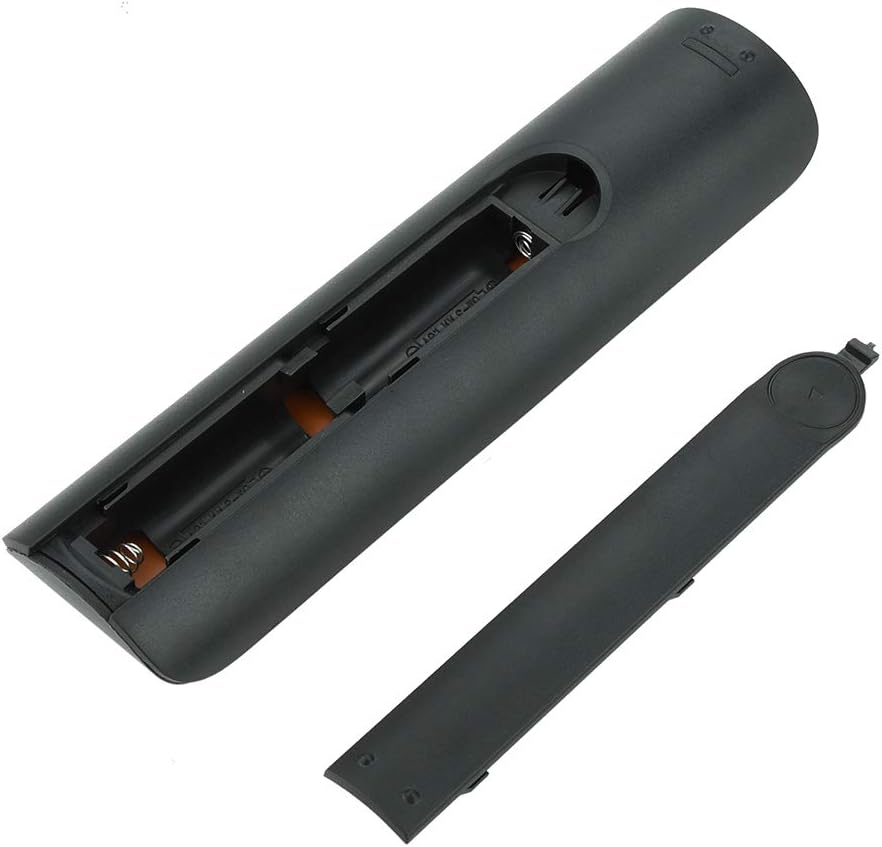
ຮູບພາບ 4.1: View of the remote control with the battery cover removed, showing the two AA battery slots.
4.2 ການນໍາໃຊ້ເບື້ອງຕົ້ນ
This remote control is designed to work directly with compatible Samsung Smart TVs that originally used the BN59-01199G model. No programming or pairing is typically required. Simply install the batteries and point the remote towards your television.

Image 4.2: The remote control positioned near a television, illustrating its intended use with compatible Samsung models.
5. ຄໍາແນະນໍາການດໍາເນີນງານ
The remote control features standard buttons for TV operation. Refer to the image below for a visual guide to the button layout.

ຮູບພາບ 5.1: A ລາຍລະອຽດ view of the remote control's buttons, including power, number pad, volume, channel, and smart functions.
- ປຸ່ມເປີດປິດ (ສີແດງ): ເປີດ ຫຼືປິດໂທລະພາບ.
- ໝາຍເລກ Pad (0-9): For direct channel input.
- ລະດັບສຽງຂຶ້ນ/ລົງ (+/-): ປັບລະດັບສຽງໂທລະພາບ.
- ຊ່ອງຂຶ້ນ/ລົງ (CH +/-): ປ່ຽນຊ່ອງໂທລະພາບ.
- ປິດສຽງ: ປິດສຽງໂທລະພາບ.
- Smart Hub: Accesses the Smart Hub interface for apps and streaming services.
- ເມນູ: ເປີດເມນູຫຼັກຂອງໂທລະພາບ.
- ເຄື່ອງມື: Provides quick access to common TV functions.
- ຂໍ້ມູນ: ສະແດງຂໍ້ມູນກ່ຽວກັບໂຄງການຫຼືການປ້ອນຂໍ້ມູນໃນປະຈຸບັນ.
- Navigation Pad (ຂຶ້ນ, ລົງ, ຊ້າຍ, ຂວາ, ໃສ່): ໃຊ້ເພື່ອນໍາທາງເມນູແລະເລືອກທາງເລືອກ.
- ກັບຄືນ: ກັບຄືນໄປໜ້າຈໍ ຫຼືເມນູກ່ອນໜ້າ.
- ອອກ: Closes the current menu or application.
- ປຸ່ມສີ (A, B, C, D): Functionality varies by TV model and application.
- ການຄວບຄຸມການຫຼິ້ນ: Play, Pause, Stop, Fast Forward, Rewind for media playback.
6. ບໍາລຸງຮັກສາ
6.1 ການທໍາຄວາມສະອາດ
ເພື່ອເຮັດຄວາມສະອາດເຄື່ອງຄວບຄຸມໄລຍະໄກ, ຄ່ອຍໆເຊັດມັນດ້ວຍຜ້າອ່ອນໆ, ແຫ້ງ. ສໍາລັບຝຸ່ນ stubborn, ເລັກນ້ອຍ dampen the cloth with water or a mild, non-abrasive cleaner. Avoid using harsh chemicals or excessive moisture, as these can damage the remote's electronics.
6.2 ການທົດແທນຫມໍ້ໄຟ
Replace batteries when the remote control's response becomes sluggish or stops working. Always replace both AA batteries at the same time with new ones. Do not mix old and new batteries, or different types of batteries.
7. ການແກ້ໄຂບັນຫາ
- ໄລຍະໄກບໍ່ຕອບສະໜອງ:
- ກວດເບິ່ງວ່າໃສ່ແບັດເຕີລີ່ຖືກໃສ່ຢ່າງຖືກຕ້ອງກັບຂົ້ວທີ່ຖືກຕ້ອງຫຼືບໍ່.
- ປ່ຽນແບັດເຕີລີ່ໃໝ່.
- ໃຫ້ແນ່ໃຈວ່າບໍ່ມີສິ່ງກີດຂວາງລະຫວ່າງການຄວບຄຸມໄລຍະໄກ ແລະເຄື່ອງຮັບອິນຟາເຣດຂອງໂທລະພາບ.
- ຢືນຢັນວ່າຣີໂໝດນັ້ນຊີ້ໄປທີ່ໂທລະພາບໂດຍກົງ.
- Short remote control distance:
- This can indicate low battery power; replace the batteries.
- Environmental factors or strong light sources can interfere with the infrared signal. Try using the remote in different lighting conditions.
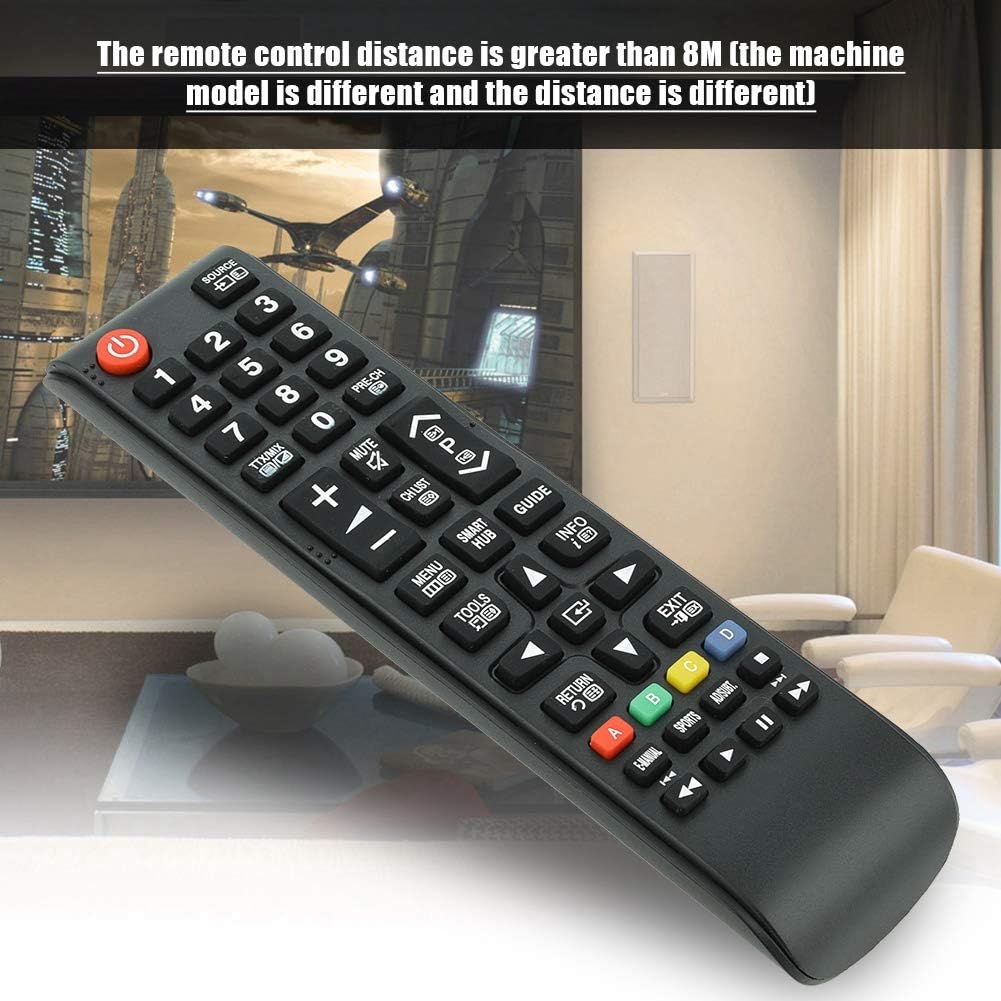
Image 7.1: The remote control in a typical home environment, demonstrating its effective range for TV operation.
8. ການຮັບປະກັນແລະການສະຫນັບສະຫນູນ
Zerone products are manufactured with quality in mind. If you encounter any issues or are not satisfied with your product, please contact the seller or manufacturer for support. Refer to your purchase documentation for specific warranty terms and contact information.