
1. ບົດແນະນຳ
This user manual provides detailed instructions for the installation, operation, and troubleshooting of the SIIG HDMI 2.0 Audio Extractor (Model: CE-H24F11-S1). This device is designed to split an incoming HDMI audio signal into stereo analog audio and Toslink optical outputs, enabling connection to various audio systems that may lack HDMI input.
The extractor supports high-resolution video up to 4K/60Hz with HDR and is compliant with HDCP 2.2. It also features ARC (Audio Return Channel) support via Toslink and CEC bypass, ensuring compatibility with modern home theater setups. Please read this manual thoroughly before use to ensure proper setup and optimal performance.
2. ຄຸນລັກສະນະຂອງຜະລິດຕະພັນ
- HDMI 2.0a and HDCP 2.2 compliant.
- Supports HDCP 2.2, HDR, and CEC bypass.
- Video resolutions up to 4Kx2K@60Hz YUV 4:4:4 8-bit and 4K HDR YUV 4:2:0 10-bit.
- Supports 480p, 720p, 1080i, 1080p resolutions.
- Video bandwidth: 18Gbps (600MHz per channel).
- Audio extraction via 3.5mm stereo jack and Toslink optical output.
- ARC audio extraction via Toslink (S/PDIF).
- Supports audio embedded via stereo and S/PDIF (Toslink).
- ຮູບແບບສຽງສະຫນັບສະຫນູນ:
- HDMI: PCM 2/5.1/7.1, Dolby 5.1/7.1, DTS 5.1/7.1
- Toslink (S/PDIF): PCM 2, Dolby 5.1, DTS 5.1
- 3.5mm Stereo: PCM 2
- Sturdy metal enclosure for durability and EMI/RFI noise interference minimization.
- ESD protection: ±15kV Air & ±8kV Contact.
- Country of origin: Taiwan.
- Regulatory approvals: FCC, CE, RoHS.

3. ເນື້ອໃນຊຸດ
Please verify that all items are present and in good condition. If any items are missing or damaged, contact your vendor for assistance.
- 1x HDMI 2.0 Audio Extractor/Embedder (CE-H24F11-S1)
- 1x USB Type-A to Micro B Cable (for power)
- 1x Installation Guide (this document)
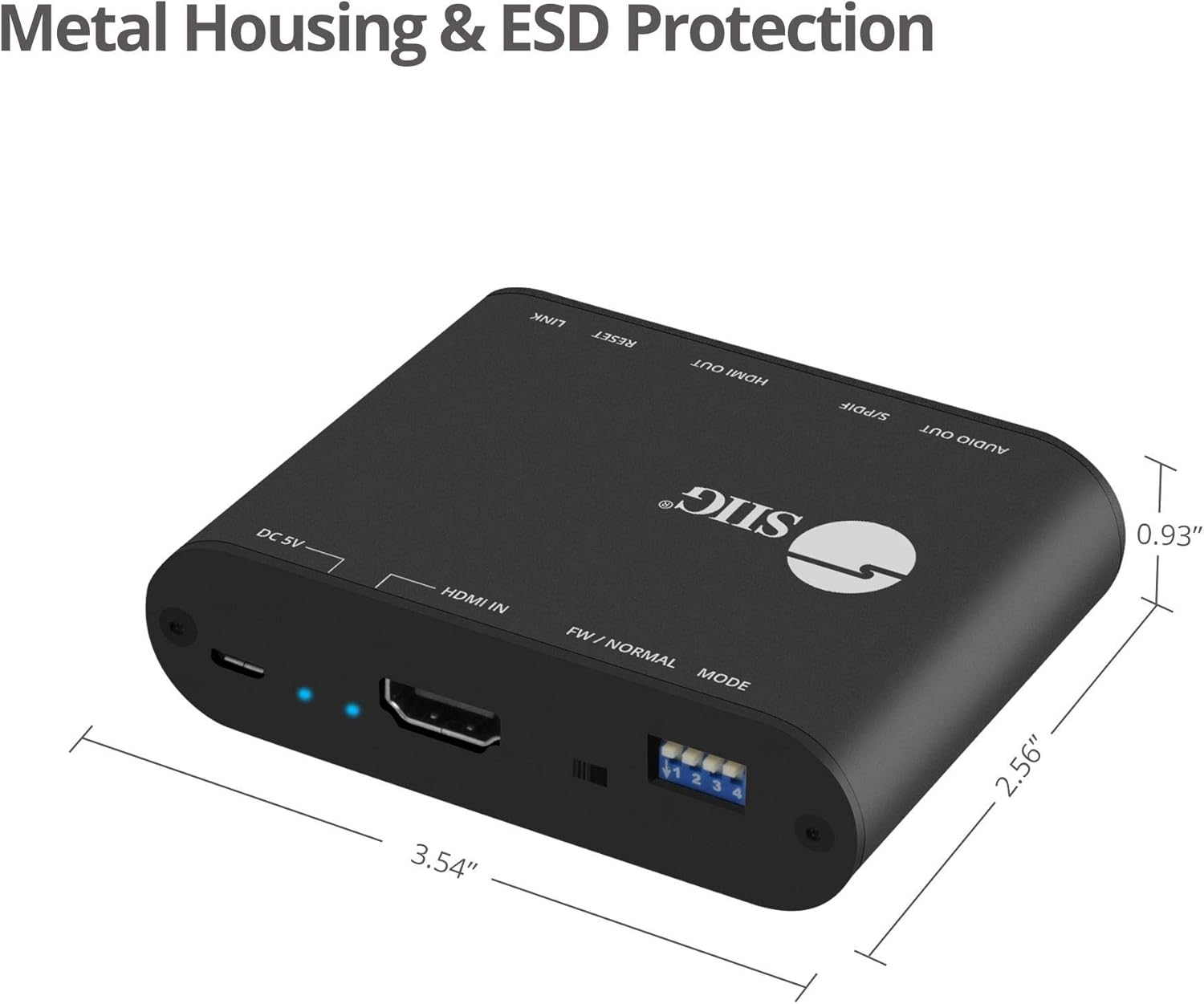
4. ຜະລິດຕະພັນເກີນview and Port Descriptions


ແຜງໜ້າ:
- ຜົນຜະລິດສະເຕີລິໂອ 3.5 ມມ: Connect to analog audio devices (e.g., headphones, stereo speakers).
- S/PDIF (Toslink) Output: Connect to digital optical audio receivers or soundbars.
- HDMI Output: Connect to an HDMI display (e.g., TV, monitor, projector).
- Output Signal LED Indicator: Illuminates when an HDMI output signal is detected.
- ປຸ່ມຣີເຊັດ: ໃຊ້ເພື່ອຣີເຊັດອຸປະກອນ.
- Slide Switch (FW/NORMAL Mode):
- Left (FW): Firmware update mode.
- Right (NORMAL): Normal operating mode. Ensure this is set to NORMAL for regular use.
ແຜງດ້ານຫຼັງ:
- Micro-USB Port (DC 5V): Connect the provided USB power cable for device power. Also used for firmware updates.
- ຕົວຊີ້ວັດໄຟ LED: ເຮັດໃຫ້ມີແສງເມື່ອອຸປະກອນເປີດ.
- Input Signal LED Indicator: Illuminates when an HDMI input signal is detected.
- ການປ້ອນ HDMI: Connect to an HDMI source device (e.g., Blu-ray player, game console, streaming device).
- 4-pin DIP Switch: Used to configure EDID settings and enable/disable ARC and audio extraction functions.
5. ຄໍາແນະນໍາການຕິດຕັ້ງ
Follow these steps to set up your SIIG HDMI 2.0 Audio Extractor:
- ອຸປະກອນປິດເຄື່ອງ: Ensure all source devices, displays, and audio systems are powered off before making any connections.
- ເຊື່ອມຕໍ່ອິນພຸດ HDMI: Connect an HDMI cable from your source device (e.g., Blu-ray player, game console) to the HDMI ເຂົ້າ port on the audio extractor.
- ເຊື່ອມຕໍ່ HDMI Output: ເຊື່ອມຕໍ່ສາຍ HDMI ຈາກ HDMI ອອກ port on the audio extractor to your display device (e.g., TV, monitor, projector).
- Connect Audio Output (Digital): For digital audio, connect a Toslink (optical) cable from the S/PDIF (Toslink) Output port on the extractor to your audio receiver, soundbar, or ampມີຊີວິດຊີວາ.
- Connect Audio Output (Analog): For analog stereo audio, connect a 3.5mm audio cable from the 3.5mm Stereo Output port on the extractor to your headphones or stereo speakers.
- ເຊື່ອມຕໍ່ພະລັງງານ: Connect the provided USB Type-A to Micro B cable to the ພອດ Micro-USB (DC 5V) on the extractor and the other end to a USB power source (e.g., USB wall adapter, TV USB port). The Power LED Indicator will illuminate.
- Verify Slide Switch: Ensure the slide switch on the front panel is set to the ປົກກະຕິ position (right).
- ເປີດໃຊ້ອຸປະກອນ: Power on your display, audio system, and source device in that order.

6. ຄໍາແນະນໍາການດໍາເນີນງານ
6.1 EDID and Function Configuration (DIP Switch)
The 4-pin DIP switch on the back panel allows you to configure the EDID (Extended Display Identification Data) settings and control the ARC and audio extraction functions. Adjust these settings based on your connected devices and desired audio output.

| DIP Switch position | ລາຍລະອຽດ |
|---|---|
| PIN1: OFF, PIN2: OFF | ຂ້າມ EDID |
| PIN1: OFF, PIN2: ON | Ultra HD (4K2K@60Hz) – 8/10/12bit, 3D, HDR video & 5.1ch audio |
| PIN1: ON, PIN2: OFF | Ultra HD (4K2K@60Hz) – 8/10/12bit, 3D, HDR video & 2ch audio |
| PIN1: ON, PIN2: ON | Learning EDID from Output |
| PIN3: OFF | Disable ARC Function |
| PIN3: ON | Enable ARC Function |
| PIN4: OFF | Disable Audio Extractor Function |
| PIN4: ON | Enable Audio Extractor Function (via Toslink & 3.5mm) |
ໝາຍເຫດ: After changing DIP switch settings, it is recommended to power cycle the audio extractor and all connected devices to ensure the new settings are applied correctly.
6.2 ARC (Audio Return Channel) Function
When ARC is enabled (PIN3 ON) and your display supports ARC, audio from your TV's internal tuner or smart apps can be sent back to the audio extractor via the HDMI cable and then output through the Toslink (S/PDIF) port to your audio system.

6.3 CEC Bypass
The device supports CEC (Consumer Electronics Control) bypass, allowing CEC commands to pass through the extractor to control connected HDMI devices. This means you can use a single remote to control multiple CEC-enabled devices in your setup.
7. ການແກ້ໄຂບັນຫາ
If you encounter issues with the SIIG HDMI 2.0 Audio Extractor, please refer to the following common troubleshooting steps:
- ບໍ່ມີຜົນຜະລິດວິດີໂອ:
- ໃຫ້ແນ່ໃຈວ່າສາຍ HDMI ທັງໝົດເຊື່ອມຕໍ່ຢ່າງປອດໄພ.
- Verify the input source is selected correctly on your display.
- Check the power connection to the extractor; the Power LED should be illuminated.
- ລອງສາຍ HDMI ອື່ນ.
- Adjust DIP switch settings for EDID (PIN1 & PIN2) to match your display's capabilities or try "EDID bypass".
- Power cycle all connected devices (source, extractor, display).
- No Audio Output (Toslink/3.5mm):
- Ensure audio cables (Toslink or 3.5mm) are securely connected to the correct output ports on the extractor and input ports on your audio system.
- Verify the audio input is selected correctly on your audio receiver/soundbar.
- Check DIP switch PIN4 is set to ON to enable audio extraction.
- If using ARC, ensure DIP switch PIN3 is set to ON and your TV's ARC function is enabled.
- Confirm the audio format from your source is supported by your audio system and the extractor (refer to "Product Features" for supported formats). Some audio systems may not support certain multi-channel formats.
- Try setting DIP switch PIN1: ON, PIN2: OFF for 2ch audio output if your audio system only supports stereo.
- Power cycle all connected devices.
- Intermittent Video/Audio:
- ກວດເບິ່ງການເຊື່ອມຕໍ່ສາຍເຄເບີ້ນວ່າງ.
- ໃຫ້ແນ່ໃຈວ່າການສະຫນອງພະລັງງານມີຄວາມຫມັ້ນຄົງ.
- Reduce cable lengths if possible, especially for HDMI.
- Verify that the slide switch is in the ປົກກະຕິ ຕໍາແຫນ່ງ.
- Test with different HDMI cables.
- HDR/4K Issues:
- Ensure all connected HDMI cables are rated for HDMI 2.0 or higher and support 18Gbps bandwidth.
- Verify your source and display devices both support 4K/60Hz and HDR.
- Adjust EDID settings (PIN1 & PIN2) to ensure the correct video mode is selected.
8. ຂໍ້ມູນຈໍາເພາະ
| ຄຸນສົມບັດ | ລາຍລະອຽດ |
|---|---|
| ໝາຍເລກຕົວແບບ | CE-H24F11-S1 |
| ການປະຕິບັດຕາມ HDMI | HDMI 2.0a |
| ການປະຕິບັດຕາມ HDCP | HDCP 2.2 |
| ແບນວິດວິດີໂອ | 18Gbps (600MHz per channel) |
| ການແກ້ໄຂທີ່ຮອງຮັບ | Up to 4Kx2K@60Hz (YUV 4:4:4 8-bit), 4K HDR (YUV 4:2:0 10-bit), 1080p, 1080i, 720p, 480p |
| ຮອງຮັບ HDR | Yes (4K@60Hz YUV 4:2:0 10-bit) |
| ຜົນໄດ້ຮັບສຽງ | 1x Toslink (S/PDIF), 1x 3.5mm Stereo |
| ສະຫນັບສະຫນູນ ARC | Yes (via Toslink) |
| ສະຫນັບສະຫນູນ CEC | ຂ້າມ |
| ການປົກປ້ອງ ESD | ±15kV Air & ±8kV Contact |
| ວັດສະດຸ | ຝາປິດໂລຫະ |
| ຂະໜາດສິນຄ້າ (L x W) | 4.56" x 0.78" (11.58 ຊມ x 1.98 ຊມ) |
| ນ້ໍາຫນັກລາຍການ | 6.4 ອອນສ໌ (181.4 ກຣາມ) |
| ການສະຫນອງພະລັງງານ | DC 5V (via Micro-USB) |
| ອຸນຫະພູມປະຕິບັດການ | ສູງສຸດ 104°F (40°C) |
| ການຢັ້ງຢືນ | FCC, CE, RoHS, TAA compliant |
| ປະເທດຕົ້ນກໍາເນີດ | ໄຕ້ຫວັນ |
9. ບໍາລຸງຮັກສາ
The SIIG HDMI 2.0 Audio Extractor is designed for reliable operation with minimal maintenance.
- ທໍາຄວາມສະອາດ: Use a soft, dry cloth to clean the device. Avoid using liquid or aerosol cleaners, as they may damage the unit.
- ການລະບາຍອາກາດ: ໃຫ້ແນ່ໃຈວ່າອຸປະກອນຖືກວາງໄວ້ໃນພື້ນທີ່ທີ່ມີລະບາຍອາກາດໄດ້ດີເພື່ອປ້ອງກັນຄວາມຮ້ອນເກີນໄປ. ຫ້າມປິດຊ່ອງລະບາຍອາກາດໃດໆ.
- ການເກັບຮັກສາ: ເມື່ອບໍ່ໄດ້ໃຊ້ເປັນເວລາດົນ, ໃຫ້ເກັບຮັກສາອຸປະກອນໄວ້ໃນບ່ອນທີ່ເຢັນ, ແຫ້ງແລ້ງຫ່າງຈາກແສງແດດໂດຍກົງ ແລະ ອຸນຫະພູມທີ່ຮຸນແຮງ.
- ການອັບເດດເຟີມແວ: Periodically check the SIIG website for any available firmware updates for your model. Follow the instructions provided with the firmware update carefully.
10. ຂໍ້ມູນຄວາມປອດໄພ
Please observe the following safety guidelines to prevent damage to the device and ensure user safety:
- ຢ່າປ່ອຍໃຫ້ອຸປະກອນຖືກນ້ໍາຫຼືຄວາມຊຸ່ມຊື່ນຫຼາຍເກີນໄປ.
- ຢ່າພະຍາຍາມເປີດ ຫຼືແກ້ໄຂອຸປະກອນ. ບໍ່ມີສ່ວນທີ່ຜູ້ໃຊ້ບໍລິການພາຍໃນ.
- Use only the provided power cable or a certified 5V USB power adapter.
- ຮັກສາອຸປະກອນໃຫ້ຫ່າງຈາກແຫຼ່ງຄວາມຮ້ອນ, ແສງແດດໂດຍກົງ, ແລະວັດຖຸທີ່ຕິດໄຟໄດ້.
- Ensure proper grounding for all connected electrical equipment.
11. ການຮັບປະກັນແລະການສະຫນັບສະຫນູນດ້ານວິຊາການ
11.1 ຂໍ້ມູນການຮັບປະກັນ
The SIIG HDMI 2.0 Audio Extractor (CE-H24F11-S1) comes with a ຮັບປະກັນ 3 ປີ. This warranty covers defects in materials and workmanship under normal use. For specific terms and conditions, please refer to the warranty documentation provided with your purchase or visit the official SIIG webເວັບໄຊ.
11.2 ສະຫນັບສະຫນູນດ້ານວິຊາການ
For technical assistance, product inquiries, or troubleshooting beyond the scope of this manual, please contact SIIG customer support.
- Webເວັບໄຊ: Visit the official SIIG webເວັບໄຊສໍາລັບຊັບພະຍາກອນສະຫນັບສະຫນູນ, FAQs, ແລະຂໍ້ມູນການຕິດຕໍ່.
- ຕິດຕໍ່: Refer to your product packaging or the SIIG webເວັບໄຊສໍາລັບລາຍລະອຽດຕິດຕໍ່ໃນປະຈຸບັນທີ່ສຸດສໍາລັບການສະຫນັບສະຫນູນດ້ານວິຊາການ.