
1. ບົດແນະນຳ
Thank you for choosing the iggual QR Barcode Scanner. This device is designed for efficient and reliable scanning of both 1D and 2D barcodes, offering both manual and automatic scanning modes. It features an ergonomic design for comfortable use and broad compatibility with various operating systems. This manual provides essential information for setting up, operating, and maintaining your scanner.
ຄຸນນະສົມບັດທີ່ສໍາຄັນ:
- Ergonomic design with a comfortable trigger button.
- Detects all common 1D and 2D barcodes, including QR codes.
- Supports manual and automatic scanning modes.
- Wired USB connectivity for reliable data transmission.
- Compatible with Windows XP/7/8/10, macOS, Linux, and Android.
2. ເນື້ອໃນຊຸດ
ກະລຸນາກວດສອບເນື້ອໃນຂອງຊຸດເພື່ອໃຫ້ແນ່ໃຈວ່າລາຍການທັງຫມົດມີຢູ່:
- iggual QR Barcode Scanner (Model IGG315651)
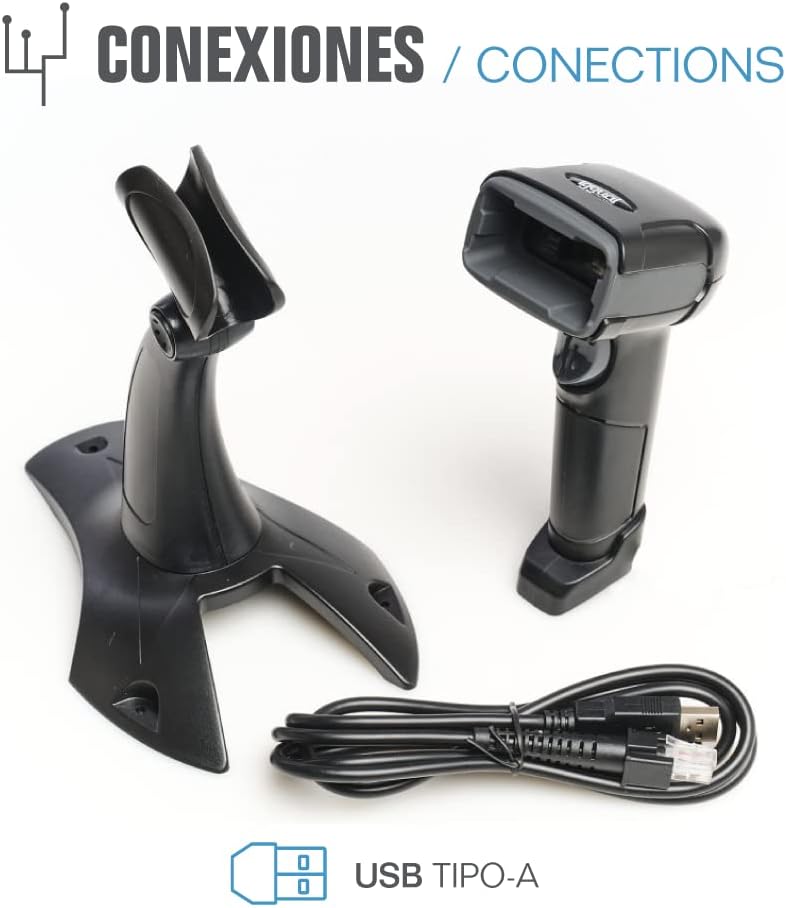
- ສາຍ USB (ປະເພດ-A)
- Scanner Stand (Optional, depending on package)

ຮູບທີ 2.1: Package contents including the scanner, stand, and USB Type-A cable.
3. ຜະລິດຕະພັນເກີນview
Familiarize yourself with the main components of your iggual barcode scanner:
- ໜ້າຈໍສະແກນ: ພື້ນທີ່ທີ່ອ່ານບາໂຄດ.
- ປຸ່ມກະຕຸ້ນ: ເປີດໃຊ້ງານການສະແກນໃນໂໝດຄູ່ມື.
- ພອດ USB: For connecting the scanner to your computer.
- ຕົວຊີ້ວັດ LED: Provides visual feedback on scanning status.
- Beeper: Provides audible feedback on scanning status.

ຮູບທີ 3.1: The iggual barcode scanner with its optional stand, highlighting the LED indicator and beeper functionality.
4. ຕັ້ງຄ່າ
4.1 ການເຊື່ອມຕໍ່ເຄື່ອງສະແກນ
- Connect the USB cable to the USB port on the scanner.
- Plug the other end of the USB cable into an available USB port on your computer or host device.
- The scanner will typically be recognized automatically by your operating system as a standard HID keyboard device. No special drivers are usually required.
4.2 ຄວາມເຂົ້າກັນໄດ້ຂອງລະບົບ
The iggual QR Barcode Scanner is compatible with a wide range of operating systems:
- Windows XP / 7 / 8 / 10
- macOS
- Linux
- Android

ຮູບທີ 4.1: Operating system compatibility for the iggual barcode scanner.
5. ຄໍາແນະນໍາການດໍາເນີນງານ
5.1 ຮູບແບບການສະແກນ
ເຄື່ອງສະແກນຮອງຮັບສອງໂໝດການສະແກນຫຼັກຄື:
- ໂໝດຄູ່ມື: Press the trigger button to activate the scanner and read a barcode. Release the button after a successful scan.
- ໂໝດອັດຕະໂນມັດ: The scanner continuously emits a scanning beam, reading barcodes as they are presented within its field of view without needing to press the trigger. Refer to the full product manual (if available from iggual.com) for instructions on switching between modes, usually done by scanning specific configuration barcodes.
5.2 ປະເພດບາໂຄດທີ່ຮອງຮັບ
This scanner is capable of reading a wide range of 1D and 2D barcode symbologies, including:
- ລະຫັດ 2D: QR Code, Maxi Code, MicroPDF, PDF417
- ລະຫັດ 1D: Code 128, EAN-13, EAN-8, Code 39, UPC-A, UPC-E, Code 93, Interleaved 2 of 5, Codabar, MSI, RSS, etc.

ຮູບທີ 5.1: Scanner capabilities including 200 scans/second, 2D scanning, and supported code types.
5.3 ຂັ້ນຕອນການສະແກນ
- Ensure the scanner is properly connected to your host device.
- Open an application where you want the scanned data to appear (e.g., a text editor, spreadsheet, or POS software).
- ຊີ້ໜ້າຕ່າງການສະແກນໄປທີ່ບາໂຄດທີ່ທ່ານຕ້ອງການອ່ານ.
- If in manual mode, press and hold the trigger button. If in automatic mode, simply present the barcode.
- A successful scan will be indicated by a short beep and/or a flash of the LED indicator. The scanned data will appear in your active application.
- If the barcode is not read, adjust the distance and angle of the scanner relative to the barcode.
6. ບໍາລຸງຮັກສາ
6.1 ການທໍາຄວາມສະອາດ
- To clean the scanner's exterior, use a soft, damp ຜ້າ.
- For the scanning window, use a lint-free cloth and a mild glass cleaner. Avoid abrasive materials or harsh chemicals that could scratch the surface.
- ຮັບປະກັນວ່າບໍ່ມີຂອງແຫຼວເຂົ້າໄປໃນຕົວເຄື່ອງສະແກນ.
6.2 ການເກັບຮັກສາ
When not in use, store the scanner in a cool, dry place, away from direct sunlight and extreme temperatures.
7. ການແກ້ໄຂບັນຫາ
| ບັນຫາ | ສາເຫດທີ່ເປັນໄປໄດ້ | ການແກ້ໄຂ |
|---|---|---|
| ເຄື່ອງສະແກນບໍ່ຮັບຮູ້ໂດຍຄອມພິວເຕີ. | Loose USB connection, faulty USB port, or cable issue. | Ensure USB cable is securely connected. Try a different USB port or cable. Restart the computer. |
| ເຄື່ອງສະແກນບໍ່ໄດ້ອ່ານບາໂຄດ. | Barcode damaged, incorrect scanning angle/distance, scanner in wrong mode, or dirty scanning window. | Check barcode integrity. Adjust scanning angle and distance. Ensure scanner is in the correct mode (manual/automatic). Clean the scanning window. |
| ຂໍ້ມູນທີ່ສະແກນແລ້ວປະກົດຂຶ້ນຢ່າງບໍ່ຖືກຕ້ອງ. | Keyboard layout mismatch or corrupted data. | Ensure your computer's keyboard layout matches the scanner's default output (usually US English). If issues persist, consult the full product manual for advanced configuration. |
8. ຂໍ້ມູນຈໍາເພາະ
| ຄຸນສົມບັດ | ລາຍລະອຽດ |
|---|---|
| ຕົວແບບ | IGG315651 |
| ຂະໜາດ (L x W x H) | 160 x 80 x 100 ມມ (6.3 x 3.15 x 3.94 ນິ້ວ) |
| ນ້ຳໜັກ | 120 ກຣາມ (0.26 ປອນ) |
| ຄວາມໄວສະແກນ | 200 ສະແກນ/ວິນາທີ |
| ເຊັນເຊີຮູບພາບ | 640(H) x 480(V), 256 Grayscale |
| ການເຊື່ອມຕໍ່ | USB ແບບມີສາຍ (ປະເພດ-A) |
| ແຫຼ່ງພະລັງງານ | ໄຟຟ້າສາຍ (ໃຊ້ USB) |
| ລະບົບປະຕິບັດການ | Windows XP/7/8/10, macOS, Linux, Android |
| ບາໂຄດທີ່ຮອງຮັບ | 1D & 2D (QR, Maxi Code, MicroPDF, Code, PDF417, RSS, etc.) |
ຮູບທີ 8.1: Physical dimensions of the iggual barcode scanner.
9. ການຮັບປະກັນແລະການສະຫນັບສະຫນູນ
For warranty information, technical support, or to download the complete product manual with advanced configuration options, please visit the official iggual webສະຖານທີ່ຫຼືຕິດຕໍ່ຜູ້ຈັດຈໍາຫນ່າຍທ້ອງຖິ່ນຂອງທ່ານ.
ທາງການ Webເວັບໄຊ: www.iggual.com