
ແນະນຳ
Thank you for choosing the SIMOLIO Kids Wireless Headphones Model JH-711. This manual provides essential information for the proper setup, operation, and maintenance of your headphones. Please read it carefully to ensure safe and optimal use.
ຄຸນສົມບັດຜະລິດຕະພັນ
- 3-Level Volume Limiting: Protects children's hearing with switchable volume limits (75dB for toddlers, 85dB for kids, 94dB for adults). This feature is active in both wired and wireless modes.
- ການແຍກສຽງລົບກວນ: Over-ear design provides passive noise reduction, helping to block external sounds for improved listening focus.
- Wireless & Wired Modes: Offers Bluetooth connectivity for wireless use and includes a 3.5mm audio cable for wired connection when the battery is depleted or for non-Bluetooth devices.
- ໄມໂຄຣໂຟນໃນຕົວ: Enables hands-free calling and voice chat.
- Audio Sharing Port: Allows another headphone to connect and share audio from the same device.
- Durable & Flexible Design: Constructed with memory stainless steel strips in the headband for impressive durability and flexibility, designed to withstand active use. Earmuffs feature an anti-shedding design.
- ພັບໄດ້ ແລະກະທັດຮັດ: Easy to fold and store in the included EVA carrying case, ideal for travel and school.
- ຊີວິດຫມໍ້ໄຟຍາວ: ເວລາຫຼິ້ນດົນເຖິງ 15 ຊົ່ວໂມງດ້ວຍການສາກຄັ້ງດຽວ.

The headphones feature a 3-level volume limiter to protect hearing, adjustable for toddlers, kids, and adults.
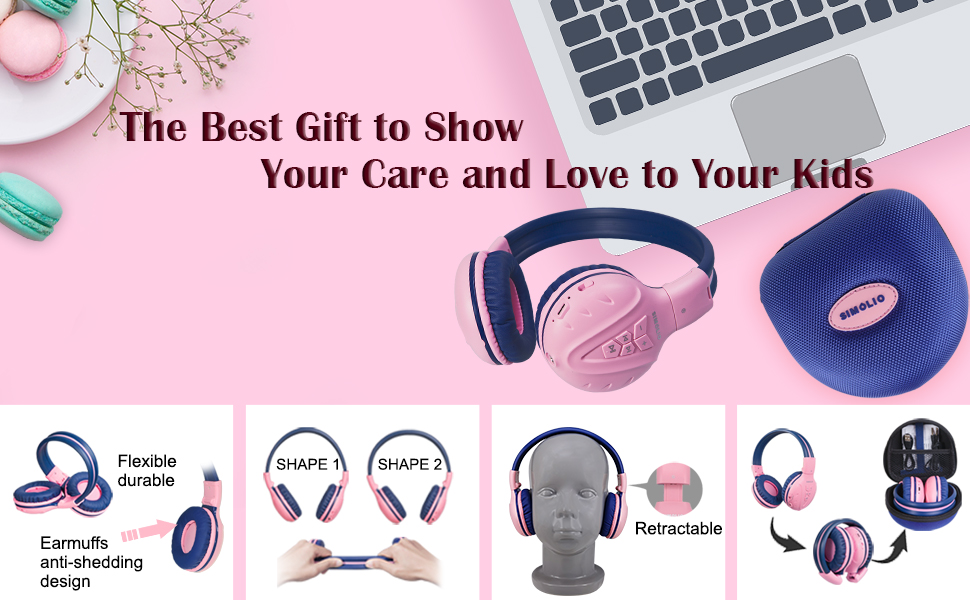
The flexible and durable design allows the headphones to withstand bending and twisting.
ແມ່ນຫຍັງຢູ່ໃນກ່ອງ
ຊຸດປະກອບມີລາຍການຕໍ່ໄປນີ້:
- SIMOLIO Kids Wireless Headphones JH-711
- ສາຍສາກ (USB)
- AUX Cable (3.5mm audio cable)
- ຄູ່ມືຜູ້ໃຊ້
- Carrying EVA Case
ຕັ້ງຄ່າ
1. ການສາກຫູຟັງ
Before first use, fully charge the headphones. Connect the provided USB charging cable to the charging port on the headphones and to a USB power source (e.g., computer, wall adapter). The LED indicator will show charging status and turn off when fully charged.
2. ການຈັບຄູ່ Bluetooth
- ກວດໃຫ້ແນ່ໃຈວ່າປິດຫູຟັງແລ້ວ.
- Press and hold the Multi-Function Button (MFB) until the LED indicator flashes blue and red alternately, indicating pairing mode.
- ໃນອຸປະກອນຂອງທ່ານ (ໂທລະສັບສະຫຼາດ, ແທັບເລັດ, ແລະອື່ນໆ), ເປີດໃຊ້ Bluetooth ແລະຊອກຫາອຸປະກອນທີ່ມີຢູ່.
- Select "SIMOLIO JH-711" from the list of devices.
- ເມື່ອເຊື່ອມຕໍ່ແລ້ວ, ຕົວຊີ້ວັດ LED ຈະກະພິບເປັນສີຟ້າຊ້າ slowly.
3. Wired Mode Connection
To use the headphones in wired mode, connect one end of the 3.5mm AUX cable to the audio jack on the headphones and the other end to the audio output of your device. The headphones will automatically switch to wired mode, even if the battery is dead.

The headphones support both wireless Bluetooth mode and wired mode via the included AUX cable.
4. Volume Limiter Adjustment
Locate the 3-level volume limiter switch on the headphones. Adjust the switch to the desired maximum volume level:
- 75dB (S): Recommended for toddlers or very quiet environments.
- 85dB (M): Recommended for children in general listening environments.
- 94dB (L): Recommended for adults or noisy environments.

Adjust the physical switch to select the appropriate volume limit.
5. Using the Sharing Port
The headphones feature an additional sharing jack on the right side. To share audio, plug another headphone into this port. This allows two users to listen to the same audio source simultaneously.

Connect another headphone to the sharing port to share audio with a friend.
ຄໍາແນະນໍາການດໍາເນີນງານ
1. ເປີດ/ປິດ
- ເປີດ: Press and hold the MFB for approximately 3 seconds until the LED indicator lights up.
- ປິດພະລັງງານ: ກົດ MFB ຄ້າງໄວ້ປະມານ 3 ວິນາທີຈົນກວ່າຕົວຊີ້ LED ຈະປິດ.
2. ການຫຼິ້ນເພງ
- ຫຼິ້ນ/ຢຸດ: ກົດສັ້ນ MFB.
- ເພງຕໍ່ໄປ: ກົດປຸ່ມ "+".
- ຕິດຕາມກ່ອນ ໜ້າ ນີ້: ກົດປຸ່ມ "-".
- ປະລິມານຂຶ້ນ: ກົດປຸ່ມ "+" ຄ້າງໄວ້.
- ປະລິມານລົງ: ກົດປຸ່ມ "-" ຄ້າງໄວ້.
3. ການຄຸ້ມຄອງການໂທ
When connected via Bluetooth:
- ຮັບ/ສາຍໂທ: ກົດສັ້ນ MFB.
- ປະຕິເສດການໂທ: ກົດ MFB ຄ້າງໄວ້.

The built-in microphone allows for hands-free calling.
ບໍາລຸງຮັກສາ
- ເຊັດຫູຟັງດ້ວຍຜ້າອ່ອນໆແຫ້ງ. ຢ່າໃຊ້ນໍ້າຢາທຳຄວາມສະອາດທີ່ມີສີຂັດ ຫຼື ສານລະລາຍ.
- ຫຼີກເວັ້ນການເປີດຫູຟັງກັບອຸນຫະພູມທີ່ຮຸນແຮງ, ຄວາມຊຸ່ມຊື່ນ, ຫຼືແສງແດດໂດຍກົງ.
- Store the headphones in the provided EVA carrying case when not in use to protect them from dust and damage.
- ຢ່າພະຍາຍາມຖອດ ຫຼືດັດແປງຫູຟັງ, ເພາະວ່ານີ້ຈະເປັນການປະຖິ້ມການຮັບປະກັນ ແລະອາດເຮັດໃຫ້ເກີດຄວາມເສຍຫາຍໄດ້.

The headphones fold compactly and fit into the included EVA case for easy storage and transport.
ການແກ້ໄຂບັນຫາ
| ບັນຫາ | ສາເຫດທີ່ເປັນໄປໄດ້ | ການແກ້ໄຂ |
|---|---|---|
| ຫູຟັງບໍ່ເປີດ. | ແບັດເຕີຣີຕໍ່າ. | ສາກຫູຟັງໃຫ້ເຕັມ. |
| ບໍ່ສາມາດຈັບຄູ່ຜ່ານ Bluetooth ໄດ້. | ຫູຟັງບໍ່ຢູ່ໃນໂໝດຈັບຄູ່; ອຸປະກອນ Bluetooth ປິດ; ໄກຈາກອຸປະກອນ. | Ensure headphones are in pairing mode (flashing red/blue). Turn on device Bluetooth. Move headphones closer to device (within 9 meters). |
| ບໍ່ມີສຽງຢູ່ໃນໂໝດໄຮ້ສາຍ. | ປະລິມານຕ່ໍາເກີນໄປ; ບໍ່ເຊື່ອມຕໍ່; ເລືອກສຽງອອກບໍ່ຖືກຕ້ອງໃນອຸປະກອນ. | Increase headphone and device volume. Re-pair headphones. Check device audio settings. |
| ບໍ່ມີສຽງຢູ່ໃນໂໝດມີສາຍ. | AUX cable not fully inserted; cable damaged; device volume too low. | Ensure AUX cable is securely connected at both ends. Try a different AUX cable. Increase device volume. |
ຂໍ້ມູນຈໍາເພາະ
| ຄຸນສົມບັດ | ລາຍລະອຽດ |
|---|---|
| ຊື່ຕົວແບບ | Kids Bluetooth Headphones JH-711 |
| ເຕັກໂນໂລຊີການເຊື່ອມຕໍ່ | ໄຮ້ສາຍ (Bluetooth), ມີສາຍ (Jack 3.5 ມມ) |
| ລຸ້ນ Bluetooth | 4.0 |
| ຊ່ວງ Bluetooth | 9 ແມັດ |
| ການຄວບຄຸມສິ່ງລົບກວນ | ການແຍກສຽງ |
| ຄວາມອ່ອນໄຫວ | 94 dB (ສູງສຸດ) |
| ຊີວິດຫມໍ້ໄຟ | 15 ຊົ່ວໂມງ |
| ເວລາສາກໄຟ | 3 ຊົ່ວໂມງ |
| ນ້ໍາຫນັກລາຍການ | 187 ກຣາມ (6.6 ອອນສ໌) |
| ຂະໜາດສິນຄ້າ | 5.51 x 3.15 x 5.31 ນິ້ວ |
| ວັດສະດຸ | Nylon, Stainless Steel (headband) |
| ວັດສະດຸພົກພາ | EVA |
| ຄຸນນະສົມບັດພິເສດ | 3 Adjustable Volume Limited, Microphone, Durable, Flexible, Foldable, Wired & Wireless, Share Port, EVA Case |
ວິດີໂອຜະລິດຕະພັນຢ່າງເປັນທາງການ
ວິດີໂອນີ້ສະຫນອງການເບິ່ງview of the SIMOLIO Bluetooth Headphones for Kids with Case JH-711, demonstrating its features and functionality.
ການຮັບປະກັນແລະການສະຫນັບສະຫນູນ
SIMOLIO products are designed for quality and reliability. For specific warranty information, please refer to the warranty card included with your product or visit the official SIMOLIO website. If you encounter any issues or require technical assistance, please contact SIMOLIO customer support through their official channels.