
Amazon B07KRY43KN
Echo Glow - ຫຼາຍສີ Smart Lamp ຄູ່ມືຜູ້ໃຊ້
Model: B07KRY43KN
1. ບົດແນະນຳ
The Echo Glow is a multicolor smart lamp designed to enhance your smart home experience. It pairs with any compatible Alexa device, allowing you to control its color and brightness using voice commands. This device is ideal for creating colorful routines, setting visual timers, and adding dynamic lighting for various activities like gaming, watching videos, or listening to music. Its simple setup ensures a hassle-free experience.

Figure 1.1: The Echo Glow smart lamp ໃນການຕັ້ງຄ່າເຮືອນ.
2. ຂໍ້ມູນຄວາມປອດໄພ
Please read and follow all safety instructions carefully to prevent injury or damage to your device.
- ຢ່າປ່ອຍໃຫ້ອຸປະກອນຖືກນ້ໍາຫຼືຄວາມຊຸ່ມຊື່ນ.
- ໃຊ້ພຽງແຕ່ອະແດັບເຕີໄຟທີ່ໃຫ້ມາກັບອຸປະກອນ.
- ຢ່າພະຍາຍາມຖອດປະກອບ, ສ້ອມແປງ, ຫຼືດັດແປງອຸປະກອນ.
- ຮັກສາອຸປະກອນໃຫ້ຫ່າງຈາກແສງແດດໂດຍກົງ ແລະແຫຼ່ງຄວາມຮ້ອນ.
- ຮັບປະກັນການລະບາຍອາກາດທີ່ເຫມາະສົມຮອບອຸປະກອນ.
3. ສິ່ງທີ່ຢູ່ໃນກ່ອງ
ກວດສອບວ່າລາຍການທັງຫມົດແມ່ນມີຢູ່ໃນການຫຸ້ມຫໍ່:
- Echo Glow device
- ອະແດັບເຕີໄຟ (5W)
- ຄູ່ມືເລີ່ມຕົ້ນດ່ວນ
4. ຕັ້ງຄ່າ
Setting up your Echo Glow is designed to be quick and straightforward.
4.1. ເປີດເຄື່ອງ
- Plug the provided power adapter into the Echo Glow.
- Plug the other end of the power adapter into a wall outlet. The Echo Glow will power on automatically.
4.2. Connecting to Wi-Fi and Alexa
The Echo Glow connects to your Wi-Fi network and is controlled via an Alexa-enabled device or the Alexa app.
- Download and open the Amazon Alexa app on your Fire OS, Android, or iOS device.
- Ensure your Alexa-enabled device (e.g., Echo Dot, Echo Plus) is set up and connected to the same Wi-Fi network.
- In the Alexa app, navigate to the 'Devices' section.
- ແຕະທີ່ໄອຄອນ '+' ເພື່ອເພີ່ມອຸປະກອນໃໝ່.
- Select 'Light' and then 'Amazon Echo Glow'.
- Follow the on-screen instructions to complete the setup. The Echo Glow supports 2.4 GHz Wi-Fi only (802.11 b/g/n).
Amazon Wi-Fi simple setup can also be used to connect the device to your Wi-Fi network with minimal steps.
5. ຄໍາແນະນໍາການດໍາເນີນງານ
The Echo Glow offers various functionalities controlled primarily through Alexa voice commands or the Alexa app.
5.1. ການຄວບຄຸມສຽງ
Once paired with an Alexa-enabled device, you can control the Echo Glow using your voice. Ensure your Echo Glow has a recognizable name in the Alexa app (e.g., 'Glow Lamp', 'Charlie's Lamp').
- ປ່ຽນສີ: "Alexa, set [Glow Lamp name] to blue."
- ປັບຄວາມສະຫວ່າງ: "Alexa, dim [Glow Lamp name] to 50%." or "Alexa, brighten [Glow Lamp name]."
- ເປີດ/ປິດ: "Alexa, turn on [Glow Lamp name]." / "Alexa, turn off [Glow Lamp name]."

Figure 5.1: The Echo Glow can display a wide spectrum of colors.
5.2. Routines and Timers
Integrate the Echo Glow into your daily routines or use it for visual timers.
- Color-Changing Timer: Use the Echo Glow as a visual reminder for activities. For example, "Alexa, set a Rainbow Timer for 30 minutes on Charlie's Lamp." The colors will change as time progresses.
- Wake-up Light Alarm: Create routines in the Alexa app to have the Echo Glow gradually brighten or change color to help with waking up. For example, "Alexa, set a wakeup light alarm for 7 AM on My Light."
- Bedtime Routines: Set the Echo Glow to dim or change to a calming color as part of a bedtime routine.
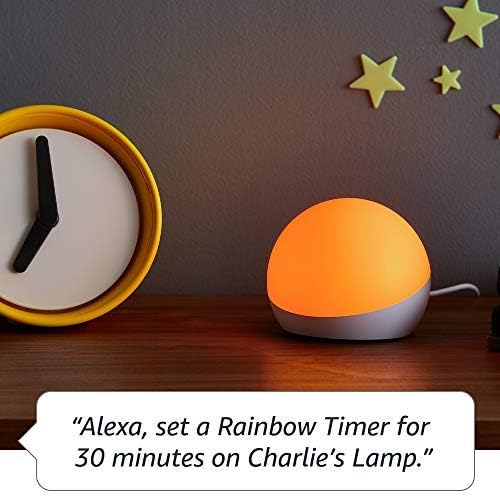
Figure 5.2: Using Echo Glow for a Rainbow Timer.
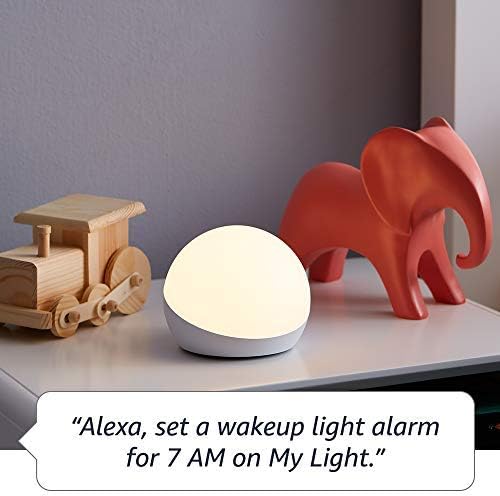
Figure 5.3: Echo Glow as a wake-up light alarm.
5.3. Creating and Choosing Lighting
The Echo Glow can add ambiance to various activities:
- ເກມ: Set dynamic colors to match your gaming environment.
- ເບິ່ງວີດີໂອ: Create a cozy or immersive viewປະສົບການ.
- ຟັງເພງ: Sync the lighting to the mood of your music (requires specific Alexa routines or skills).

Figure 5.4: Echo Glow adding color to a child's play space.
6. ບໍາລຸງຮັກສາ
The Echo Glow requires minimal maintenance.
- ທໍາຄວາມສະອາດ: Unplug the device before cleaning. Use a soft, dry, lint-free cloth to wipe the exterior. Do not use abrasive cleaners or sprays.
- ການເກັບຮັກສາ: ຖ້າເກັບຮັກສາອຸປະກອນເປັນເວລາດົນ, ຖອດປລັກມັນອອກແລະເກັບຮັກສາໄວ້ໃນບ່ອນທີ່ເຢັນ, ແຫ້ງ.
7. ການແກ້ໄຂບັນຫາ
If you encounter issues with your Echo Glow, try the following steps:
- ອຸປະກອນບໍ່ຕອບສະໜອງ:
- Ensure the power adapter is securely plugged into both the Echo Glow and the wall outlet.
- Unplug the Echo Glow, wait 30 seconds, and plug it back in.
- Verify that your Alexa-enabled device is online and functioning correctly.
- ບໍ່ສາມາດເຊື່ອມຕໍ່ກັບ Wi-Fi ໄດ້:
- Confirm your Wi-Fi network is 2.4 GHz. The Echo Glow does not support 5GHz networks.
- Ensure your Wi-Fi password is entered correctly in the Alexa app.
- Move the Echo Glow closer to your Wi-Fi router.
- ຣີສະຕາດເຣົາເຕີ Wi-Fi ຂອງທ່ານ.
- ຄຳສັ່ງສຽງບໍ່ເຮັດວຽກ:
- Ensure your Alexa-enabled device can hear you clearly.
- Verify the Echo Glow is correctly named in the Alexa app and use that name in your commands.
- Check the Alexa app for any pending updates for your Echo Glow or Alexa-enabled device.
8. ຂໍ້ມູນຈໍາເພາະ
| ຄຸນສົມບັດ | ລາຍລະອຽດ |
|---|---|
| ຂະໜາດ | 100 x 100 x 81 ມມ (3.9” x 3.9” x 3.2”) |
| ນ້ຳໜັກ | 245 g (8.6 ອໍ) |
| ການເຊື່ອມຕໍ່ Wi-Fi | 2.4 GHz only, 802.11 b/g/n. Does not support 5GHz networks or ad-hoc networks. |
| ປະເພດແສງສະຫວ່າງ | 100 lumens ສີຂາວອົບອຸ່ນ (2600K) ແລະ LEDs ສີ RGB |
| ຄວາມເຂົ້າກັນໄດ້ | Works exclusively with Alexa-enabled devices (Echo Dot, Echo Plus, Alexa app). Compatible with Fire OS, Android, and iOS devices. Does not contain microphones or speakers. |
| ຊ່ວງອາຍຸ | ອາຍຸ 3 ປີຂຶ້ນໄປ |
9. ການຮັບປະກັນແລະການສະຫນັບສະຫນູນ
Your Echo Glow is covered by a limited warranty.
- ໄລຍະເວລາຮັບປະກັນ: 90-day limited warranty and service.
- ເງື່ອນໄຂການນໍາໃຊ້: Use of Echo Glow is subject to the terms found on the official Amazon webເວັບໄຊ.
- ການຊ່ວຍເຫຼືອລູກຄ້າ: ສຳລັບການຊ່ວຍເຫຼືອເພີ່ມເຕີມ, ການແກ້ໄຂບັນຫາ ຫຼື ການຮຽກຮ້ອງການຮັບປະກັນ, ກະລຸນາເຂົ້າເບິ່ງທີ່ຝ່າຍສະໜັບສະໜູນລູກຄ້າຂອງ Amazon webເວັບໄຊ ຫຼືຕິດຕໍ່ທີມງານຊ່ວຍເຫຼືອຂອງເຂົາເຈົ້າໂດຍກົງ.
Ask a question about this manual
Ask about setup, troubleshooting, compatibility, parts, safety, or missing instructions. Manuals+ will review the question and use this page’s manual context to help answer it.