
iBasso DX120
iBasso DX120 Digital Audio Player User Manual
1. ຜະລິດຕະພັນເກີນview
The iBasso DX120 is a high-performance digital audio player designed for audiophiles. It features an AK4495 DAC, multiple output options including 2.5mm balanced, 3.5mm, and coaxial, and supports DSD. The device incorporates advanced clock synchronization technology for ultra-low phase noise and distortion, ensuring a natural and realistic sound reproduction. Its true balanced output design and independent differential amplifier circuits contribute to superior audio quality.
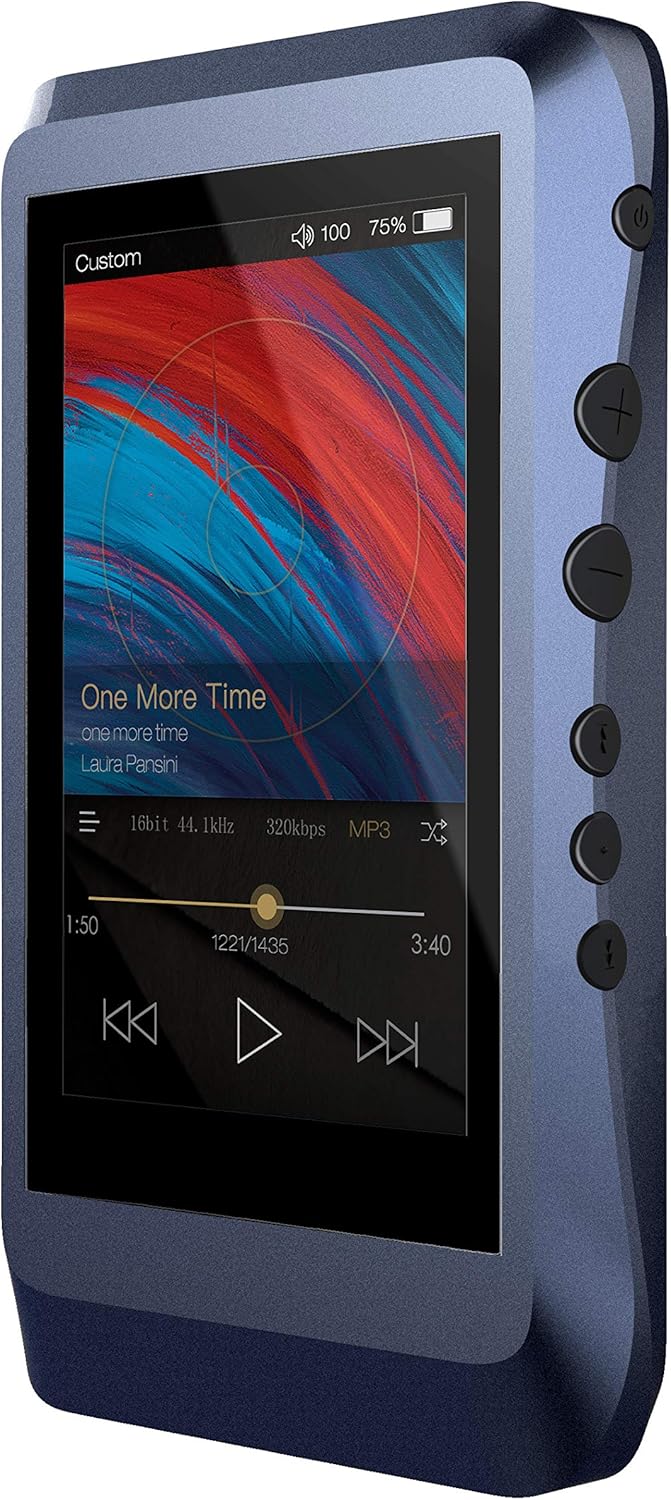
Figure 1: iBasso DX120 Digital Audio Player (Front View)

Figure 2: iBasso DX120 Digital Audio Player (Front and Back View)
ຄຸນນະສົມບັດທີ່ສໍາຄັນ
- Lowest Distortion AK4495 Player: Utilizes the AK4495 DAC for exceptional audio fidelity.
- Full Balanced Output: Features a true balanced output design with independent differential amplifier circuits for each channel.
- Full Synchronization Technology: Employs TCXO active temperature compensation crystal oscillator and phase-locked loop technology for precise clock synchronization.
- Dual Quick Charge & USB Type-C: Supports QC2.0 and MTK-PE+ dual fast charging, compatible with 5V/2A chargers.
- The New Mango OS: Runs on a highly optimized, Linux-derived pure sound system for fast and clean operation.
2. ຄູ່ມືການຕິດຕັ້ງ
2.1 ເນື້ອໃນຊຸດ
ກ່ອນທີ່ທ່ານຈະເລີ່ມຕົ້ນ, ກະລຸນາກວດສອບວ່າລາຍການທັງໝົດຢູ່ໃນຊຸດ:
- iBasso DX120 ເຄື່ອງຫຼິ້ນສຽງດິຈິຕອນ
- ສາຍ USB
- Micro SD Card (if included in specific bundle)
- Playback Controls (integrated)
2.2 ການສາກອຸປະກອນ
The DX120 supports QC2.0 and MTK-PE+ dual fast charging technology, as well as standard 5V/2A charging. A full charge provides over 16 hours of battery life.
- Connect the included USB Type-C cable to the charging port on the DX120.
- ເຊື່ອມຕໍ່ອີກສົ້ນຂອງສາຍ USB ກັບອະແດັບເຕີໄຟ USB ທີ່ເຂົ້າກັນໄດ້ (ບໍ່ລວມ) ຫຼືພອດ USB ຂອງຄອມພິວເຕີ.
- The device will indicate charging status on its screen.
2.3 Inserting Micro SD Cards
The DX120 features two Micro SD card slots for expanded storage.
- Locate the Micro SD card slots on the side of the device.
- Gently insert a Micro SD card into an available slot until it clicks into place. Ensure the card is oriented correctly.
- ເພື່ອເອົາອອກ, ຄ່ອຍໆຍູ້ບັດເຂົ້າໄປຂ້າງໃນຈົນກວ່າມັນຈະງໍອອກມາ.
2.4 ການເປີດເຄື່ອງເບື້ອງຕົ້ນ
To power on your DX120 for the first time:
- Press and hold the Power button (usually located on the side) for a few seconds.
- The iBasso logo will appear, and the device will boot into the Mango OS.
3. ຄໍາແນະນໍາການດໍາເນີນງານ
3.1 ການຄວບຄຸມພື້ນຖານ
The DX120 features physical buttons for easy control:
- ປຸ່ມເປີດປິດ: ກົດຄ້າງໄວ້ເພື່ອເປີດ/ປິດ. ກົດສັ້ນໆເພື່ອເປີດ/ປິດໜ້າຈໍ.
- ປຸ່ມປຸ່ມ Volume Up / Down: ປັບລະດັບສຽງອອກ.
- ປຸ່ມຄວບຄຸມການຫຼິ້ນ: Typically include Play/Pause, Next Track, and Previous Track.
3.2 Navigating the Mango OS
The new generation Mango OS is a pure sound system derived from Linux, offering a highly tailored and deeply optimized user interface.
- ການໂຕ້ຕອບຫນ້າຈໍສໍາຜັດ: Navigate menus, select songs, and adjust settings by tapping and swiping on the screen.
- ເມນູຫຼັກ: Access various functions such as Music Playback, File Browser, Settings, and more.
- ທ່າທາງ: Specific swipe gestures may be available for quick access to certain functions (refer to on-screen prompts or detailed in-device help).
3.3 ການຫຼິ້ນສຽງ
To play music on your DX120:
- ຮັບປະກັນເພງຂອງເຈົ້າ files are loaded onto the internal storage or an inserted Micro SD card.
- From the main menu, select the Music Playback or File Browser option.
- Browse your music library by artist, album, genre, or folder.
- ແຕະທີ່ເພງເພື່ອເລີ່ມຫຼິ້ນຄືນ.
- Use the physical playback buttons or on-screen controls to manage playback (play, pause, skip, etc.).
3.4 ໂຫມດ USB DAC
The DX120 can function as a USB Digital-to-Analog Converter (DAC) for your computer, utilizing its professional sound card chip (XMOS Xu208) and customized Thesycon drivers.
- Connect the DX120 to your computer using the USB Type-C cable.
- On the DX120, select the USB DAC mode when prompted (or navigate to it in settings).
- Your computer should recognize the DX120 as an audio output device. You may need to install specific drivers from the iBasso website for optimal performance on Windows.
- Select the DX120 as your audio output device in your computer's sound settings or media player.
4. ບໍາລຸງຮັກສາ
4.1 ການທໍາຄວາມສະອາດ
To maintain the appearance and functionality of your DX120:
- Use a soft, dry, lint-free cloth to wipe the device.
- ສໍາລັບ smudges stubborn, ເລັກນ້ອຍ dampen ຜ້າທີ່ມີນ້ໍາຫຼືເຄື່ອງເຮັດຄວາມສະອາດຫນ້າຈໍທີ່ຖືກອອກແບບມາສໍາລັບເອເລັກໂຕຣນິກ.
- ຫຼີກລ້ຽງການໃຊ້ສານເຄມີທີ່ຮຸນແຮງ, ເຄື່ອງຂັດຂັດ, ຫຼືສານລະລາຍ.
4.2 ການດູແລຫມໍ້ໄຟ
To prolong the life of the built-in Lithium Polymer battery:
- ຫຼີກລ້ຽງການປະຈຸຫມໍ້ໄຟຢ່າງເຕັມທີ່ເລື້ອຍໆ.
- ເກັບຮັກສາອຸປະກອນໄວ້ໃນບ່ອນທີ່ເຢັນ, ແຫ້ງ, ເມື່ອບໍ່ໄດ້ໃຊ້ເປັນເວລາດົນນານ.
- ສາກອຸປະກອນເປັນປະຈໍາ, ເຖິງແມ່ນວ່າບໍ່ໄດ້ໃຊ້ເລື້ອຍໆ, ເພື່ອປ້ອງກັນການໄຫຼເລິກ.
4.3 ການປັບປຸງຊອບແວ
iBasso may release firmware updates to improve performance, add features, or fix bugs. Check the official iBasso webເວັບໄຊທ໌ສໍາລັບເຟີມແວຫລ້າສຸດແລະຄໍາແນະນໍາກ່ຽວກັບວິທີການອັບເດດອຸປະກອນຂອງທ່ານ.
5. ການແກ້ໄຂບັນຫາ
This section addresses common issues you might encounter with your iBasso DX120.
| ບັນຫາ | ການແກ້ໄຂທີ່ເປັນໄປໄດ້ |
|---|---|
| ອຸປະກອນບໍ່ເປີດ. | Ensure the battery is charged. Connect to a power source and try again. If unresponsive, perform a hard reset (refer to the official user guide for specific instructions). |
| ບໍ່ມີສຽງອອກ. | Check volume level. Ensure headphones/speakers are properly connected. Verify the audio file format is supported. Try a different audio file. |
| ບໍ່ຮູ້ຈັກບັດ Micro SD. | Ensure the card is inserted correctly. Try reinserting the card. Test with a different Micro SD card. Format the card (this will erase all data). |
| ອຸປະກອນຄ້າງ ຫຼື ບໍ່ຕອບສະໜອງ. | Press and hold the Power button for an extended period (e.g., 10-15 seconds) to force a shutdown, then restart. If persistent, consider a factory reset (backup data first). |
| ຄຸນະພາບສຽງບໍ່ດີ. | ຮັບປະກັນສຽງ files are high quality. Check headphone/cable connections. Try different headphones. Ensure no dust or debris in audio ports. |
6. ຂໍ້ກໍານົດດ້ານວິຊາການ
Detailed specifications for the iBasso DX120 Digital Audio Player:
| ຄຸນສົມບັດ | ຂໍ້ມູນຈໍາເພາະ |
|---|---|
| ຂະໜາດສິນຄ້າ | 2.48 x 0.59 x 4.45 ນິ້ວ |
| ນ້ໍາຫນັກລາຍການ | 1.14 ປອນ |
| ໝາຍເລກຕົວແບບ | DX120 |
| ໝໍ້ໄຟ | ຕ້ອງໃຊ້ແບັດເຕີຣີ Lithium Polymer 1 ອັນ |
| ຜູ້ຜະລິດ | iBasso |
| ເຕັກໂນໂລຊີການເຊື່ອມຕໍ່ | Aux |
| ຄວາມອາດສາມາດເກັບຮັກສາຫນ່ວຍຄວາມຈໍາ | 16 GB (ພາຍໃນ) |
| ສີ | ທ້ອງຟ້າ |
| ຂະໜາດໜ້າຈໍ | 3.2 ນິ້ວ |
| ອຸປະກອນທີ່ເຂົ້າກັນໄດ້ | Laptop (for USB DAC mode) |
| ປະເພດສື່ | Micro SD |
| ຄຸນນະສົມບັດພິເສດ | ສຽງ Hi-Res |
7. ການຮັບປະກັນແລະການສະຫນັບສະຫນູນ
7.1 ຂໍ້ມູນການຮັບປະກັນ
The iBasso DX120 typically comes with a standard manufacturer's warranty. Please refer to the warranty card included with your product for specific terms and conditions. Additionally, a 30-day refund/replacement return policy may apply from the point of purchase. Optional protection plans (e.g., 2-Year or 3-Year) may be available for extended coverage.
7.2 ສະຫນັບສະຫນູນລູກຄ້າ
For further assistance, technical support, or to download the latest drivers and firmware, please refer to the following resources:
- ຄູ່ມືຜູ້ໃຊ້ທີ່ເປັນທາງການ (PDF): For detailed instructions and diagrams, you can download the official PDF user guide ທີ່ນີ້.
- iBasso Official Store: Visit the iBasso store for product information and support resources: iBasso Store on Amazon.
Ask a question about this manual
Ask about setup, troubleshooting, compatibility, parts, safety, or missing instructions. Manuals+ will review the question and use this page’s manual context to help answer it.