
1. ບົດແນະນຳ
This manual provides essential information for the safe and efficient operation of your Zerone 10.8V-12V Lithium Battery Charger. This charger is designed for use with 10.8V to 12V Lithium-Ion batteries, offering quick and reliable charging. Please read this manual thoroughly before first use and retain it for future reference.

Image 1: The Zerone 10.8V-12V Lithium Battery Charger, showing its compact design and universal compatibility label.
2. ຄໍາແນະນໍາຄວາມປອດໄພ
Always observe the following safety precautions to reduce the risk of electric shock, fire, or serious injury:
- ອ່ານຄໍາແນະນໍາທັງຫມົດ: ກ່ອນທີ່ຈະໃຊ້ເຄື່ອງສາກ, ໃຫ້ອ່ານຄໍາແນະນໍາທັງໝົດ ແລະເຄື່ອງໝາຍເຕືອນກ່ຽວກັບເຄື່ອງສາກ, ແບດເຕີລີ່, ແລະຜະລິດຕະພັນໂດຍໃຊ້ແບັດເຕີຣີ.
- ໃຊ້ພາຍໃນເຮືອນເທົ່ານັ້ນ: ຢ່າເຮັດໃຫ້ເຄື່ອງສາກຖືກtoົນຕົກຫຼືໃນສະພາບທີ່ຊຸ່ມ.
- ປະລິມານທີ່ເຫມາະສົມtage: ຮັບປະກັນການສະຫນອງພະລັງງານ voltage ກົງກັບ voltage ທີ່ລະບຸໄວ້ໃນແຜ່ນຈັດອັນດັບຂອງເຄື່ອງສາກໄຟ.
- ຫຼີກລ່ຽງຄວາມເສຍຫາຍ: ຫ້າມໃຊ້ເຄື່ອງສາກ ຖ້າມັນໄດ້ຮັບແຮງສັ່ນສະເທືອນ, ຕົກ, ຫຼືເສຍຫາຍຢ່າງອື່ນ. ເອົາມັນໄປຫາຜູ້ບໍລິການທີ່ມີຄຸນວຸດທິ.
- ການລະບາຍອາກາດ: Do not block any ventilation openings. Ensure adequate airflow around the charger during operation.
- ຖອດສຽບເມື່ອບໍ່ໄດ້ໃຊ້: Always unplug the charger from the power outlet before attempting any maintenance or cleaning, and when not in use.
- Use specified batteries: Only charge batteries specifically designed for this charger. Charging other battery types may cause them to burst, leading to personal injury and damage.
- ຫ້າມລັດຖະບານກາງ: ຫ້າມບໍ່ໃຫ້ເກີດການວົງຈອນຂອງສາຍໄຟຂອງແບັດເຕີລີ.
- ຫ່າງໄກຈາກເດັກນ້ອຍ: ເຄື່ອງໃຊ້ນີ້ບໍ່ໄດ້ມີຈຸດປະສົງເພື່ອໃຊ້ໂດຍບຸກຄົນ (ລວມທັງເດັກນ້ອຍ) ທີ່ມີຄວາມສາມາດທາງຮ່າງກາຍ, ຄວາມຮູ້ສຶກ ຫຼືຈິດໃຈທີ່ຫຼຸດລົງ, ຫຼືຂາດປະສົບການ ແລະຄວາມຮູ້, ເວັ້ນເສຍແຕ່ວ່າພວກເຂົາໄດ້ຮັບການຊີ້ນໍາ ຫຼືຄໍາແນະນໍາກ່ຽວກັບການນໍາໃຊ້ເຄື່ອງໃຊ້ໂດຍບຸກຄົນທີ່ຮັບຜິດຊອບຄວາມປອດໄພຂອງເຂົາເຈົ້າ.
3. ເນື້ອໃນຊຸດ
ກວດສອບວ່າລາຍການທັງຫມົດແມ່ນມີຢູ່ໃນສະພາບທີ່ດີ:
- 1 x Zerone 10.8V-12V Lithium Battery Charger
- 1 x ຄູ່ມືຜູ້ໃຊ້
4. ຄຸນລັກສະນະຂອງຜະລິດຕະພັນ
The Zerone 10.8V-12V Lithium Battery Charger offers the following key features:
- ຄວາມເຂົ້າກັນໄດ້ທົ່ວໂລກ: Specifically designed for 10.8V to 12V Lithium-Ion batteries.
- ຕົວຊີ້ວັດ LED: Built-in LED display provides intuitive monitoring of battery status.
- ການຈັດການການສາກໄຟອັດສະລິຍະ: Utilizes a 'first in, first charged' system and protects against overload.
- ການສາກໄວ: Capable of charging a 12V Lithium-Ion 1.5Ah battery in approximately 50 minutes.
- Wide Model Compatibility: Compatible with models such as DC10WD, DC10SB, DC10WC, BL1015, BL1016, BL1021B, and BL1041B.

Image 2: The charger displaying its compatibility with various battery models, including DC10WD, DC10SB, DC10WC, BL1015, BL1016, BL1021B, and BL1041B.
5. ຕັ້ງຄ່າ
Follow these steps to set up your battery charger:
- ຖອດເຄື່ອງສາກອອກ: ເອົາເຄື່ອງສາກ ແລະສ່ວນປະກອບທັງໝົດອອກຈາກເຄື່ອງຫຸ້ມຫໍ່ຢ່າງລະມັດລະວັງ.
- ເຊື່ອມຕໍ່ກັບພະລັງງານ: Plug the charger's power cord into a standard 100V-260V AC electrical outlet. The charger's LED indicator will flash green once to confirm power connection.
- Prepare Battery: Ensure the battery to be charged is clean and free from debris.
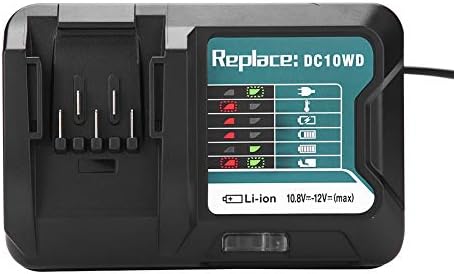
Image 3: The Zerone charger with its integrated power cord, ready for connection to an electrical outlet.
6. ຄໍາແນະນໍາການດໍາເນີນງານ
ເພື່ອສາກແບັດເຕີຣີ:
- ໃສ່ແບັດເຕີລີ: ວາງແບັດເຕີຣີໃຫ້ກົງກັບຊ່ອງສຽບຂອງເຄື່ອງສາກ ແລະ ເລື່ອນມັນເຂົ້າໄປຈົນກວ່າມັນຈະຄລິກເຂົ້າທີ່ຢ່າງແໜ້ນໜາ.
- ຕິດຕາມການສາກໄຟ: The LED indicator will show the charging status. Refer to the "LED Indicator Guide" section for detailed explanations of the light patterns.
- ການສາກໄຟສຳເລັດແລ້ວ: Once the battery is fully charged, the LED indicator will show a solid green light.
- ເອົາແບັດເຕີຣີອອກ: Press the release button on the battery (if applicable) and slide it out of the charger.
- ຖອດສາຍສາກອອກ: ຖອດສາຍສາກຈາກປລັກສຽບໄຟເມື່ອບໍ່ໄດ້ໃຊ້.

Image 4: The Zerone charger with a compatible lithium-ion battery inserted, ready for charging.
7. ຄູ່ມືຕົວຊີ້ວັດ LED
The charger features an LED display to communicate the battery's status:
| ແສງຕົວຊີ້ວັດ | ສະຖານະ |
|---|---|
| ກະພິບສີຂຽວ | ເຄື່ອງສາກສຽບແລ້ວ ແລະ ພ້ອມແລ້ວ. |
| ກະພິບສີແດງ | Battery is in cooling mode. Charging will begin once the battery temperature is within the optimal range. |
| Red Sustained Light | Battery is currently charging (0-100%). |
| Green Sustained Light | Charging is completed. The battery is fully charged. |
| Red and Green Flashing | Indicates a defective battery pack or charger. |

ຮູບພາບທີ 5: ເປັນການປິດ view of the charger's LED indicator panel, detailing the meaning of each light pattern for battery status.
8. ບໍາລຸງຮັກສາ
Proper maintenance ensures the longevity and performance of your charger:
- ທໍາຄວາມສະອາດ: ຖອດສາຍສາກອອກຈາກແຫຼ່ງຈ່າຍໄຟກ່ອນທຳຄວາມສະອາດ. ໃຊ້ຜ້າແຫ້ງ ແລະ ອ່ອນໆເຊັດດ້ານນອກຂອງສາຍສາກ. ຢ່າໃຊ້ນ້ຳ ຫຼື ສານເຄມີທຳຄວາມສະອາດ.
- ການເກັບຮັກສາ: ເກັບຮັກສາເຄື່ອງສາກໄຟໄວ້ໃນບ່ອນແຫ້ງ, ເຢັນ, ຫ່າງຈາກແສງແດດໂດຍກົງ ແລະ ຄວາມຊຸ່ມ.
- ກວດສອບເປັນປົກກະຕິ: Periodically inspect the charger and its cord for any signs of damage. If damage is found, discontinue use and seek professional repair.
9. ການແກ້ໄຂບັນຫາ
ຖ້າທ່ານພົບບັນຫາກັບເຄື່ອງສາກຂອງທ່ານ, ໃຫ້ອ້າງອີງເຖິງບັນຫາທົ່ວໄປ ແລະວິທີແກ້ໄຂບັນຫາຕໍ່ໄປນີ້:
- ເຄື່ອງສາກບໍ່ເປີດ:
- Ensure the power cord is securely plugged into both the charger and a working electrical outlet.
- ກວດສອບປລັກໄຟດ້ວຍອຸປະກອນອື່ນເພື່ອຢືນຢັນວ່າມັນໃຊ້ງານໄດ້.
- Battery not charging (Red Flashing LED):
- The battery may be too hot or too cold. Allow the battery to reach room temperature before attempting to charge again. Charging will automatically resume once the temperature is optimal.
- Battery not charging (Red and Green Flashing LED):
- This indicates a defective battery or charger. Try charging a different, known-good battery. If the issue persists, the charger may be faulty. If only the original battery causes this, the battery is likely defective.
- ການສາກໄຟຊ້າ:
- Ensure the battery is fully seated in the charger.
- Verify that the battery is compatible with this charger.
ຖ້າຂັ້ນຕອນເຫຼົ່ານີ້ບໍ່ສາມາດແກ້ໄຂບັນຫາໄດ້, ກະລຸນາຕິດຕໍ່ຝ່າຍຊ່ວຍເຫຼືອລູກຄ້າ.
10. ຂໍ້ມູນຈໍາເພາະ
| ຂໍ້ມູນຈໍາເພາະ | ລາຍລະອຽດ |
|---|---|
| ໝາຍເລກຕົວແບບ | Zeronegfvetp6dn8-01 |
| ການປ້ອນຂໍ້ມູນ Voltage | 100V-260V AC, 50-60Hz |
| ຜົນໄດ້ຮັບ Voltage | 10.8V-12V (DC) |
| ຂະໜາດສິນຄ້າ | 4.72 x 1.97 x 5.91 ນິ້ວ |
| ນ້ໍາຫນັກລາຍການ | 11.6 ອອນສ໌ (0.33 ກິໂລກຣາມ) |
| ຜູ້ຜະລິດ | ເຊໂຣນ |
| ປະເພດຫມໍ້ໄຟທີ່ເຂົ້າກັນໄດ້ | 10.8V-12V Lithium-Ion (e.g., BL1015, BL1016, BL1021B, BL1041B) |
| Compatible Charger Models | DC10WD, DC10SB, DC10WC |

Image 6: The bottom view of the Zerone charger, showing its input/output specifications and model number.
11. ການຮັບປະກັນແລະການສະຫນັບສະຫນູນ
For warranty information or technical support, please refer to the documentation provided with your purchase or contact Zerone customer service through the retailer where the product was purchased. Keep your purchase receipt as proof of purchase.