
1. ບົດແນະນຳ
This manual provides instructions for the proper setup, operation, and maintenance of your Acer B247Y 23.8-inch LED LCD Monitor. Please read this manual thoroughly before using your monitor to ensure optimal performance and to prevent damage.
The Acer B247Y is a 23.8-inch Full HD (1920 x 1080) monitor featuring an IPS panel for wide viewing angles, an anti-glare display, and a frameless design on three sides. It includes multiple connectivity options and an ergonomic stand for comfortable viewing.
2. ເນື້ອໃນຊຸດ
ກວດສອບວ່າລາຍການທັງຫມົດແມ່ນມີຢູ່ໃນຊຸດຂອງທ່ານ. ຖ້າລາຍການໃດຂາດຫາຍໄປ ຫຼືເສຍຫາຍ, ໃຫ້ຕິດຕໍ່ຮ້ານຂາຍຍ່ອຍຂອງເຈົ້າ.
- Acer B247Y 23.8-inch LED LCD Monitor
- Monitor Stand (ຖານ ແລະ ຄໍ)
- Power Adapter (Internal) and Power Cable
- ສາຍ VGA
- ສາຍ DisplayPort 1.2
- ສາຍ HDMI
- Audio-in Cable (if included)
- Audio-out Cable (if included)
- ຄູ່ມືຜູ້ໃຊ້ (ເອກະສານນີ້)
3. ຕັ້ງຄ່າ
3.1 ການປະກອບ Monitor Stand
The monitor comes with a detachable foot stand. Follow these steps to assemble:
- ລະມັດລະວັງຖອດຈໍແລະອົງປະກອບຢືນອອກຈາກການຫຸ້ມຫໍ່.
- ແນບຄໍຂາຕັ້ງໃສ່ກັບແຜງຈໍພາບ. ໃຫ້ແນ່ໃຈວ່າມັນຄລິກໃສ່ຢ່າງປອດໄພ.
- ແນບຖານຂາຕັ້ງໃສ່ຄໍຂາຕັ້ງ. ຮັດສະກູໃດນຶ່ງໃຫ້ແໜ້ນ, ໂດຍປົກກະຕິແລ້ວຕັ້ງຢູ່ດ້ານລຸ່ມຂອງຖານ.
- ວາງຈໍສະແດງຜົນທີ່ປະກອບໃສ່ໃນພື້ນທີ່ຮາບພຽງທີ່ຫມັ້ນຄົງ.
ໝາຍເຫດ: The monitor also supports VESA mount (100 x 100 mm) for wall or arm mounting. Refer to your VESA mount kit instructions for installation.
3.2 ການເຊື່ອມຕໍ່ Monitor
ເຊື່ອມຕໍ່ຈໍກັບຄອມພິວເຕີຫຼືອຸປະກອນອື່ນໆຂອງທ່ານໂດຍໃຊ້ສາຍທີ່ເຫມາະສົມ.
- ການເຊື່ອມຕໍ່ວິດີໂອ:
- ເຊື່ອມຕໍ່ປາຍດ້ານໜຶ່ງຂອງສາຍ DisplayPort ເຂົ້າກັບຊ່ອງອອກ DisplayPort ໃນຄອມພິວເຕີຂອງທ່ານ ແລະ ປາຍອີກດ້ານໜຶ່ງເຂົ້າກັບຊ່ອງເຂົ້າ DisplayPort ໃນຈໍພາບ.
- ອີກທາງເລືອກໜຶ່ງ, ເຊື່ອມຕໍ່ສາຍ HDMI ຈາກຊ່ອງອອກ HDMI ຂອງຄອມພິວເຕີຂອງທ່ານເຂົ້າກັບຊ່ອງເຂົ້າ HDMI ຂອງຈໍພາບ.
- For older systems, connect a VGA cable from your computer's VGA output to the monitor's VGA input.
- ການເຊື່ອມຕໍ່ສຽງ:
- If using VGA or DisplayPort without audio, connect an audio cable from your computer's audio output to the monitor's audio-in port for integrated speakers.
- To connect external speakers or headphones, use the monitor's audio-out port.
- ການເຊື່ອມຕໍ່ພະລັງງານ:
- ເຊື່ອມຕໍ່ສາຍໄຟເຂົ້າກັບຊ່ອງສຽບໄຟຟ້າຂອງຈໍພາບ, ຈາກນັ້ນສຽບປາຍອີກດ້ານໜຶ່ງເຂົ້າກັບປລັກໄຟຟ້າທີ່ມີສາຍດິນ.

Figure 3.2.1: Acer B247Y Monitor with Stand. This image illustrates the overall appearance of the monitor when fully assembled on its stand.
4. ຄໍາແນະນໍາການດໍາເນີນງານ
4.1 ການເປີດ/ປິດ
ກົດປຸ່ມເປີດປິດ, ໂດຍປົກກະຕິແລ້ວຈະຕັ້ງຢູ່ທາງລຸ່ມເບື້ອງຂວາ ຫຼື ດ້ານຫຼັງຂອງຈໍພາບ, ເພື່ອເປີດ ຫຼື ປິດຈໍພາບ. ໄຟສະແດງພະລັງງານຈະສະຫວ່າງຂຶ້ນເມື່ອຈໍພາບເປີດຢູ່.
4.2 Adjusting Monitor Settings (OSD)
The monitor features an On-Screen Display (OSD) menu for adjusting various settings. Use the control buttons (typically located near the power button) to navigate and select options within the OSD menu.
ການຕັ້ງຄ່າ OSD ທົ່ວໄປປະກອບມີ:
- ຮູບ: Brightness, Contrast, Color Temperature, Gamma, Acer eColor Management modes (e.g., Dark Room, Eco).
- ສຽງ: Volume control for integrated speakers or audio-out.
- ປ້ອນຂໍ້ມູນ: Select the active video input source (VGA, DisplayPort, HDMI).
- OSD: ໝົດເວລາ OSD, ພາສາ.
- ການຄຸ້ມຄອງ: ປັບກັບຄ່າເລີ່ມຕົ້ນຂອງໂຮງງານ.
4.3 ການປັບຕົວ Ergonomic
The Acer B247Y monitor stand offers several ergonomic adjustments to optimize your viewປະສົບການ:
- ອຽງ: Adjust the screen angle from -5 degrees to 25 degrees (forward/backward).
- ໝູນ: Rotate the monitor horizontally up to +/- 45 degrees.
- ການປັບຄວາມສູງ: ປັບຄວາມສູງຂອງຫນ້າຈໍໄດ້ເຖິງ 120mm.
- pivot: ໝຸນໜ້າຈໍ 90 ອົງສາສຳລັບຮູບຄົນ viewing.
5. ບໍາລຸງຮັກສາ
ການບໍາລຸງຮັກສາທີ່ເຫມາະສົມຮັບປະກັນອາຍຸຍືນແລະການປະຕິບັດທີ່ດີທີ່ສຸດຂອງຈໍພາບຂອງທ່ານ.
- ທໍາຄວາມສະອາດຫນ້າຈໍ: ເຊັດໜ້າຈໍຢ່າງອ່ອນໂຍນດ້ວຍຜ້າອ່ອນໆ, ບໍ່ມີເຈັ້ຍ. ສໍາລັບຮອຍແຂງ, ງampen the cloth with a small amount of water or a non-abrasive screen cleaner. Do not spray liquid directly onto the screen.
- ທໍາຄວາມສະອາດ Casing: ໃຊ້ຜ້າປຽກແຫ້ງເພື່ອເຮັດຄວາມສະອາດຈໍສະແດງຜົນ casing. ຫຼີກເວັ້ນການໃຊ້ສານຊັກຟອກທີ່ເຂັ້ມແຂງຫຼືເຄື່ອງເຮັດຄວາມສະອາດຂັດ.
- ການລະບາຍອາກາດ: ໃຫ້ແນ່ໃຈວ່າຊ່ອງລະບາຍອາກາດຢູ່ໃນຈໍສະແດງຜົນບໍ່ໄດ້ຖືກບລັອກເພື່ອປ້ອງກັນຄວາມຮ້ອນເກີນໄປ.
- ປິດພະລັງງານ: ປິດຈໍສະແດງຜົນທຸກເທື່ອ ແລະຖອດສາຍອອກຈາກປລັກສຽບໄຟກ່ອນທຳຄວາມສະອາດ ຫຼືເມື່ອບໍ່ໄດ້ໃຊ້ເປັນໄລຍະເວລາທີ່ຍາວນານ.
6. ການແກ້ໄຂບັນຫາ
ຖ້າທ່ານພົບບັນຫາກັບຈໍພາບຂອງທ່ານ, ໃຫ້ອ້າງອີງເຖິງຂັ້ນຕອນການແກ້ໄຂບັນຫາທົ່ວໄປຕໍ່ໄປນີ້:
- No Power / Monitor Does Not Turn On:
- ໃຫ້ແນ່ໃຈວ່າສາຍໄຟໄດ້ເຊື່ອມຕໍ່ກັບທັງຈໍພາບ ແລະ ປລັກໄຟຟ້າທີ່ໃຊ້ງານໄດ້ຢ່າງແໜ້ນໜາແລ້ວ.
- ກວດສອບວ່າປລັກສຽບໄຟເຮັດວຽກໄດ້ໂດຍການສຽບໃສ່ອຸປະກອນອື່ນ.
- ກົດປຸ່ມເປີດປິດຢ່າງແຫນ້ນຫນາ.
- No Image / "No Signal" Message:
- Check that the video cable (DisplayPort, HDMI, or VGA) is securely connected to both the monitor and your computer.
- ໃຫ້ແນ່ໃຈວ່າຄອມພິວເຕີຂອງທ່ານເປີດຢູ່ ແລະບໍ່ໄດ້ຢູ່ໃນໂໝດນອນ.
- ໃຊ້ເມນູ OSD ເພື່ອເລືອກແຫຼ່ງປ້ອນຂໍ້ມູນທີ່ຖືກຕ້ອງດ້ວຍຕົນເອງ.
- ລອງໃຊ້ສາຍ ຫຼືພອດວິດີໂອອື່ນຖ້າມີ.
- ຮູບພາບມີການບິດເບືອນ ຫຼື ບໍ່ຊັດເຈນ:
- ໃຫ້ແນ່ໃຈວ່າຄວາມລະອຽດຈໍສະແດງຜົນຢູ່ໃນຄອມພິວເຕີຂອງທ່ານຖືກຕັ້ງເປັນຄວາມລະອຽດເດີມຂອງຈໍສະແດງຜົນ (1920 x 1080).
- Adjust brightness, contrast, and other picture settings via the OSD menu.
- Check for any physical damage to the screen or cables.
- ບໍ່ມີສຽງຈາກລຳໂພງ:
- Increase the volume using the OSD menu or your computer's sound settings.
- ໃຫ້ແນ່ໃຈວ່າສາຍສຽງ (ຖ້າໃຊ້) ຖືກເຊື່ອມຕໍ່ຢ່າງຖືກຕ້ອງ.
- ກວດສອບວ່າໄດ້ເລືອກອຸປະກອນສົ່ງສຽງທີ່ຖືກຕ້ອງໃນການຕັ້ງຄ່າສຽງຂອງຄອມພິວເຕີຂອງທ່ານແລ້ວ.
7. ຂໍ້ມູນຈໍາເພາະ
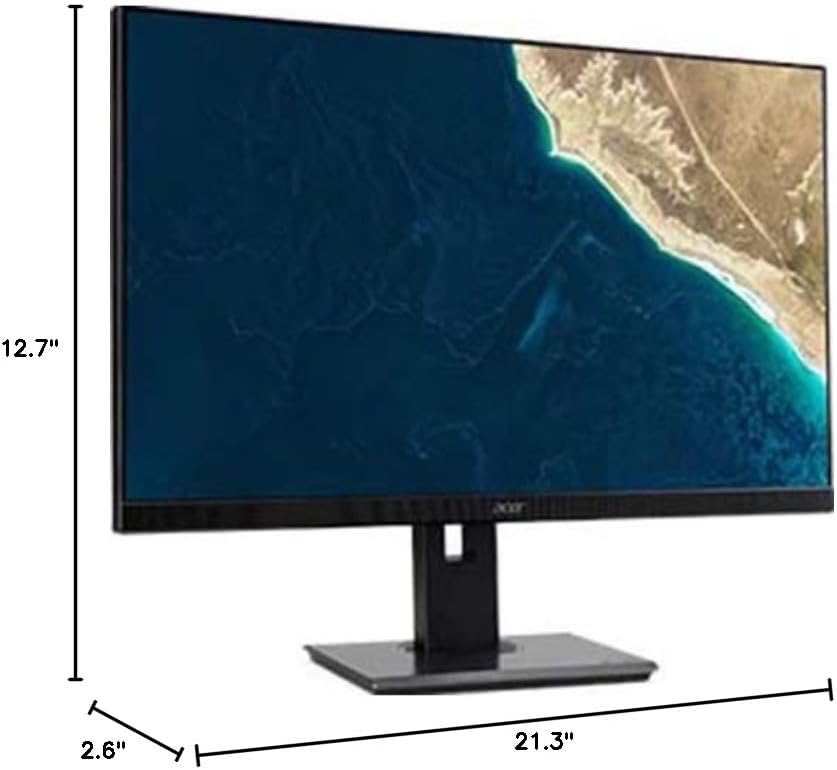
Figure 7.1.1: Acer B247Y Monitor Dimensions. This image shows the approximate height (12.7"), width (21.3"), and depth (2.6") of the monitor without the stand.
| ຄຸນສົມບັດ | ຂໍ້ມູນຈໍາເພາະ |
|---|---|
| ໝາຍເລກຕົວແບບ | B247Y |
| ຂະໜາດໜ້າຈໍ | 23.8 ນິ້ວ (60.5 ຊຕມ) |
| ປະເພດການສະແດງ | LED LCD, IPS Panel, Anti-glare (AG) |
| ຄວາມລະອຽດສູງສຸດ | 1920 x 1080 (Full HD) |
| ອັດຕາສ່ວນ | 16:9 |
| ອັດຕາການໂຫຼດຂໍ້ມູນຄືນໃໝ່ | 75 Hz |
| ເວລາຕອບສະຫນອງ | 4ms (gray-to-gray) |
| ຄວາມສະຫວ່າງ (ປົກກະຕິ) | 250 cd/m² |
| ອັດຕາສ່ວນກົງກັນຂ້າມແບບພື້ນເມືອງ | 1,000:1 |
| ອັດຕາສ່ວນຄວາມຄົມຊັດແບບໄດນາມິກ | 100,000,000:1 |
| Viewມຸມເຂົ້າ (H/V) | 178° / 178° |
| ການເຊື່ອມຕໍ່ | VGA, DisplayPort 1.2, HDMI, Audio-in, Audio-out |
| ລໍາໂພງປະສົມປະສານ | 2 x 2.0W |
| ການປັບຕົວ Ergonomic | Tilt (-5° to 25°), Swivel (+/- 45°), Height Adjustment (120mm), Pivot (90°) |
| VESA Mount Support | 100 x 100 ມມ |
| ຂະໜາດພ້ອມຂາຕັ້ງ (ກວ້າງ x ສູງ x ຍາວ) | 21.3" x 14.9"~19.6" x 7.6" (54.0cm x 37.9cm~49.9cm x 19.3cm) |
| ນ້ຳໜັກພ້ອມຂາຕັ້ງ | 12.3 lb. (5.6 kg) |
| Power Adapter | ພາຍໃນ |
| ສີ | ດຳ |
8. ການຮັບປະກັນແລະການສະຫນັບສະຫນູນ
Your Acer B247Y monitor comes with a Limited Three-Year Warranty. Please retain your proof of purchase for warranty claims.
For technical support, service, or warranty inquiries, please refer to the official Acer support website or contact their customer service department. Contact information can typically be found on the Acer webສະຖານທີ່ຫຼືຢູ່ໃນບັດຮັບປະກັນລວມຢູ່ໃນຜະລິດຕະພັນຂອງທ່ານ.
ລັອກ Kensington: The monitor supports a Kensington lock for security. Attach a compatible Kensington lock (sold separately) to the security slot on the monitor to deter theft.