
ແນະນຳ
This manual provides instructions for the installation, operation, and maintenance of your Audiovox ELEAUDAX80EXT Wireless Extension. This device is designed to expand the functionality of compatible Audiovox phone models, specifically the AX8001, AX8001E, and AX8101AM, by providing an additional wireless handset.
ເນື້ອໃນຊຸດ
ກະລຸນາກວດສອບວ່າລາຍການທັງຫມົດແມ່ນມີຢູ່ໃນຊຸດກ່ອນທີ່ຈະສືບຕໍ່ການຕັ້ງຄ່າ.
- Audiovox ELEAUDAX80EXT Wireless Extension Unit
- Power Adapter (ຖ້າມີ)
- ແບັດເຕີຣີທີ່ສາມາດສາກໄດ້ (ຕິດຕັ້ງໄວ້ລ່ວງໜ້າ ຫຼືແຍກກັນ)
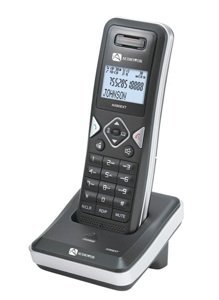
Image: The Audiovox ELEAUDAX80EXT Wireless Extension Unit. This image displays the compact design of the extension handset.
ຕັ້ງຄ່າ
- ສາກແບັດເຕີຣີ: If the battery is not pre-installed, insert it into the extension unit according to the markings. Place the extension unit on its charging cradle (if included) or connect the power adapter directly to the unit and a power outlet. Allow the unit to charge for at least 12-16 hours before initial use.
- Register the Extension:
- Ensure your main Audiovox phone base (AX8001, AX8001E, or AX8101AM) is powered on.
- On the main phone base, locate and press the "Register" or "Page" button. Hold it until the indicator light on the base begins to flash (refer to your main phone's manual for exact instructions).
- While the base is in registration mode, on the ELEAUDAX80EXT extension unit, navigate to the "Menu" and select "Register Handset" or a similar option. Follow the on-screen prompts.
- Once registration is successful, the extension unit will display a confirmation message, and the indicator light on the base will stop flashing.
- ການທົດສອບການເຊື່ອມຕໍ່: Make a test call from the extension unit to ensure proper functionality.
ຄໍາແນະນໍາການດໍາເນີນງານ
ໂທອອກ
- ເອົາມືຖືຫລືກົດປຸ່ມ ສົນທະນາ ປຸ່ມ.
- ກົດເບີໂທລະສັບທີ່ຕ້ອງການ.
- ກົດ ສົນທະນາ ກົດປຸ່ມອີກຄັ້ງ ຫຼື ວາງຫູຟັງກັບຄືນເທິງຖານເພື່ອວາງສາຍ.
ຮັບສາຍ
- ເມື່ອໂທລະສັບດັງຂຶ້ນ, ເອົາໂທລະສັບຂຶ້ນມາ ຫຼືກົດປຸ່ມ ສົນທະນາ ປຸ່ມ.
- ເພື່ອສິ້ນສຸດການໂທ, ກົດປຸ່ມ ສິ້ນສຸດ button or place the handset back on the cradle.
Intercom Function (if supported by base unit)
- ກົດ ອິນເຕີເນັດ ປຸ່ມ.
- Dial the number of the extension you wish to call (e.g., "2" for the second handset).
- ກົດ ສົນທະນາ ເພື່ອເລີ່ມການໂທລະຫວ່າງລະບົບ.
ບໍາລຸງຮັກສາ
- ທໍາຄວາມສະອາດ: ເຊັດ ໜ່ວຍ ດ້ວຍຄວາມອ່ອນ, ດamp ຜ້າ. ຢ່າໃຊ້ສານເຄມີທີ່ຮຸນແຮງຫຼືເຄື່ອງເຮັດຄວາມສະອາດຂັດ.
- ການດູແລຫມໍ້ໄຟ: For optimal battery life, avoid fully discharging the battery frequently. Keep the unit on its charger when not in use.
- ການເກັບຮັກສາ: If storing the unit for an extended period, remove the battery and store it in a cool, dry place.
ການແກ້ໄຂບັນຫາ
| ບັນຫາ | ການແກ້ໄຂ |
|---|---|
| No dial tone / Cannot make calls |
|
| ມືຖືບໍ່ໄດ້ສາກ |
|
| ຄຸນນະພາບການໂທທີ່ບໍ່ດີ / Static |
|
ຂໍ້ມູນຈໍາເພາະ
- ໝາຍເລກຕົວແບບ: ELEAUDAX80EXT
- Compatible Base Units: Audiovox AX8001, AX8001E, AX8101AM
- ຂະໜາດ (L x W x H): 20 x 40 x 30 ມີລີແມັດ
- ນ້ຳໜັກ: 20 ກຣາມ
- UPC: 044476082719
ການຮັບປະກັນແລະການສະຫນັບສະຫນູນ
For specific warranty information and technical support, please refer to the documentation included with your original Audiovox phone system or visit the official Audiovox webເວັບໄຊ. ຮັກສາໃບຮັບເງິນການຊື້ຂອງທ່ານໄວ້ເປັນຫຼັກຖານການຊື້ສໍາລັບການຮ້ອງຂໍການຮັບປະກັນ.
For further assistance, please contact Audiovox customer service.