
1. ບົດແນະນຳ
This manual provides detailed instructions for the installation, operation, and maintenance of your GZYF 18-SMD LED License Plate Lights. These lights are designed as a direct replacement for specific Mercedes-Benz models, offering enhanced brightness and energy efficiency. Please read this manual thoroughly before installation to ensure proper function and safety.
2. ຄຸນລັກສະນະຂອງຜະລິດຕະພັນ
- One pair of high-power, error-free LED license plate lights.
- Each light is equipped with 18-3528-SMD LEDs, producing super bright Xenon White light (6000-6500K).
- Low power consumption, high efficiency, and energy saving design.
- Direct installation: no wiring or modification required; plug and play.
- Designed to prevent damage to the vehicle's housing.
- No On-Board Diagnostics (OBD) error messages on applicable models.
- Durable construction with quality materials and LED bulbs.
3. Compatibility / Fitment
These GZYF LED license plate lights are compatible with the following Mercedes-Benz vehicle models:
- 2002-2005 C-Class W203: 5-door station wagon / estate (C240, C320)
- 2003-2009 E-Class W211: 4-door sedan (E320, E350, E500, E550, E55, E63)
- 2003-2009 E-Class S211: 5-door station wagon / estate (E320, E350, E500, E63)
- 2006-2011 CLS-Class W219: (CLS500, CLS550, CLS55, CLS63)
- 2005-2011 SLK-Class R171: (SLK280, SLK300, SLK350, SLK55)
Please verify your vehicle's make, model, and year to ensure compatibility before proceeding with installation.
4. ເນື້ອໃນຊຸດ
ແຕ່ລະຊຸດປະກອບມີ:
- 2 x GZYF 18-SMD LED License Plate Lights
5. ຂໍ້ມູນຈໍາເພາະ
| ປະເພດ LED | 3528 SMD |
| ປະລິມານ LED | 18 pieces per bulb |
| ສີອ່ອນ | 6000-6500K Xenon White |
| ສະບັບtage | 12V (Standard Automotive) |
| ວັດສະດຸ | ເລນອະຄິລິກ |
| ຄຸນນະສົມບັດພິເສດ | Waterproof, Error-Free |
| ຕໍາແຫນ່ງສ່ວນອັດຕະໂນມັດ | ຫລັງ |
6. ການຕິດຕັ້ງແລະການຕິດຕັ້ງ
ຂໍ້ຄວນລະວັງຄວາມປອດໄພ: Before beginning installation, ensure your vehicle's engine is off and the parking brake is engaged. If possible, disconnect the vehicle's battery to prevent electrical shorts.
- Locate Existing License Plate Lights: Identify the current license plate light assemblies on the rear of your vehicle. They are typically located above the license plate.
- Remove Existing Lights: Depending on your vehicle model, the existing lights may be held in place by clips, screws, or a simple twist-and-pull mechanism. Carefully use a plastic trim removal tool or a small screwdriver to pry them out without damaging the surrounding paint or trim. Disconnect the electrical connector from the old light assembly.
- Inspect the New LED Lights: Before installation, examine the GZYF LED lights for any visible damage.
- Connect New LED Lights: Take one of the new GZYF LED license plate lights. Align its electrical connector with the vehicle's wiring harness connector. Push firmly until it clicks into place, ensuring a secure connection.
- ການທໍາງານຂອງການທົດສອບ: Before fully securing the new lights, temporarily reconnect your vehicle's battery (if disconnected) and turn on your vehicle's lights to verify that the new LED license plate lights illuminate correctly. If they do not light up, check the connection and ensure the polarity is correct (though these are typically non-polar).
- Secure New Lights: Once tested and confirmed working, carefully push the new LED license plate light assemblies back into their housing until they are flush and securely seated. Ensure any clips or tabs engage properly.
- Repeat for Second Light: Follow the same steps for the other license plate light.
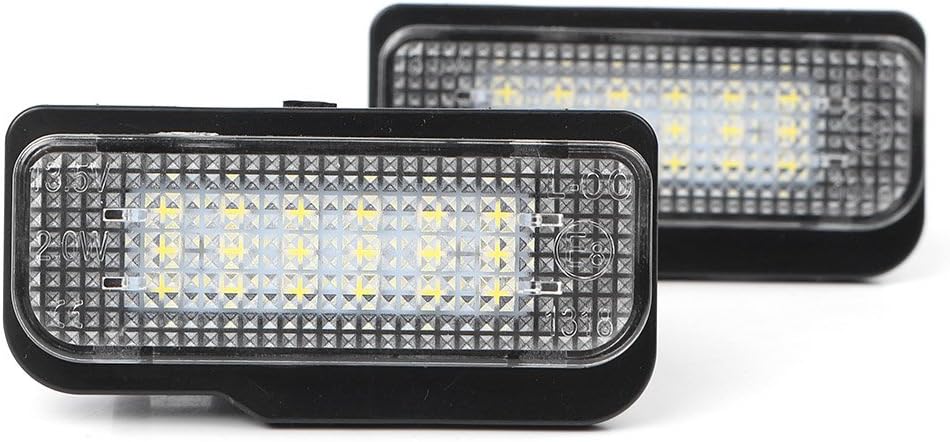
ຮູບພາບ: ທາງຫນ້າ view of the two GZYF 18-SMD LED license plate lights, showcasing their design and LED array.
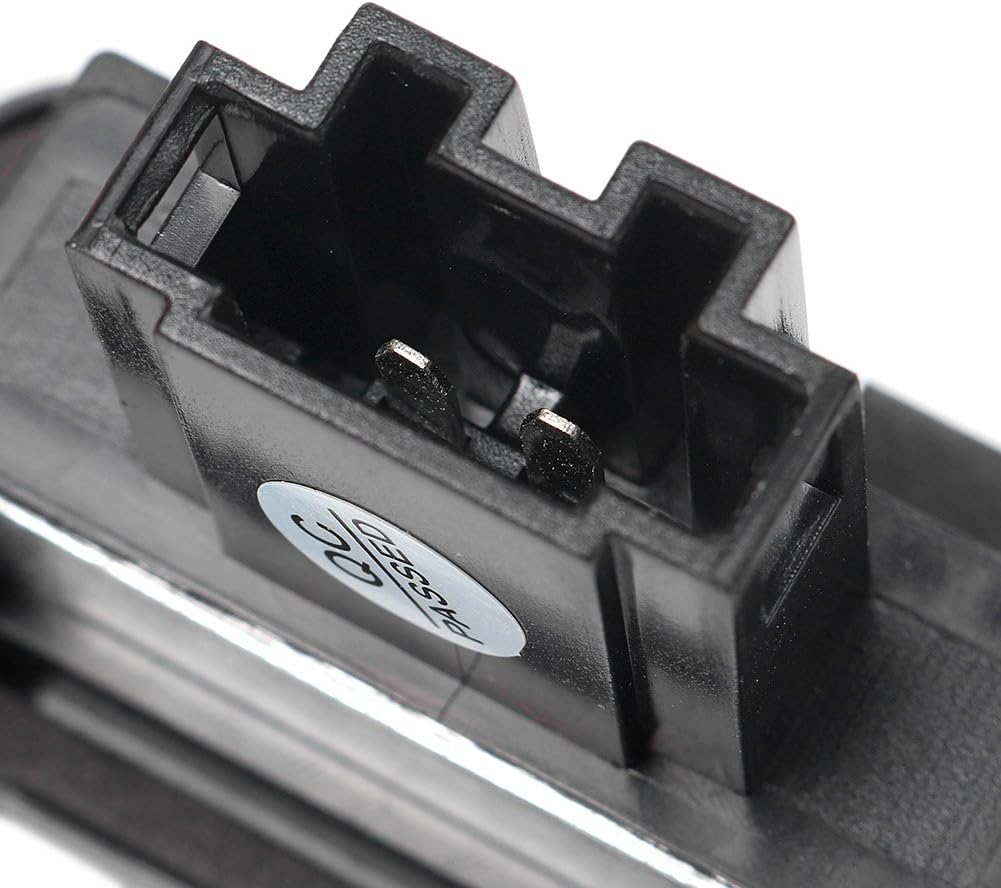
ຮູບພາບ: ໃກ້ຊິດ view of the electrical connector on the back of the GZYF LED license plate light, highlighting the plug-and-play design.

Image: The GZYF LED license plate lights installed on a vehicle, demonstrating their bright, white illumination of the license plate area.
7. ຄໍາແນະນໍາການດໍາເນີນງານ
The GZYF LED license plate lights operate automatically with your vehicle's existing lighting system. When your vehicle's exterior lights (headlights or parking lights) are activated, the LED license plate lights will illuminate. No additional controls or adjustments are required.
8. ບໍາລຸງຮັກສາ
These LED license plate lights are designed for minimal maintenance. Follow these guidelines to ensure longevity:
- ທໍາຄວາມສະອາດ: Periodically clean the lens of the lights with a soft, damp cloth to remove dirt and debris. Avoid abrasive cleaners or harsh chemicals that could damage the acrylic lens.
- ການກວດກາ: Occasionally check the lights for proper illumination. If one light is out, refer to the troubleshooting section.
- ກວດສອບການເຊື່ອມຕໍ່: If experiencing intermittent issues, ensure the electrical connections remain secure.
9. ການແກ້ໄຂບັນຫາ
If you encounter issues with your GZYF LED license plate lights, refer to the following common problems and solutions:
- Light Does Not Illuminate:
- Check the electrical connection to ensure it is fully seated and secure.
- Verify that your vehicle's lights are turned on.
- Inspect the vehicle's fuse box for any blown fuses related to exterior lighting.
- Ensure the light is correctly installed in the housing.
- ແສງກະພິບ:
- ກວດເບິ່ງການເຊື່ອມຕໍ່ໄຟຟ້າວ່າງ.
- ຮັບປະກັນ voltage ການສະຫນອງແມ່ນຫມັ້ນຄົງ.
- Error Message on Dashboard (OBD Error):
- These lights are designed to be error-free. If an error occurs, double-check that the lights are fully compatible with your specific vehicle model and year as listed in Section 3.
- Ensure the installation was performed correctly and connections are secure.
- If the issue persists, consult a professional automotive technician.
If these steps do not resolve the issue, please contact GZYF customer support for further assistance.
10. ການຮັບປະກັນແລະການສະຫນັບສະຫນູນ
GZYF products are manufactured to high-quality standards. For any questions, technical support, or warranty inquiries, please contact the seller or GZYF customer service through the platform where the product was purchased. Please have your purchase details and product model number (2066YF038) available when contacting support.