
ແນະນຳ
This manual provides detailed instructions for the setup, operation, and maintenance of your Zerone BN59-01179A Replacement Remote Control. Please read this manual carefully before using the product to ensure proper functionality and longevity.
ສິນຄ້າເກີນview
The Zerone BN59-01179A is a universal replacement remote control designed for compatible Smart TVs. It offers a compact design and a comprehensive set of buttons for various functions.
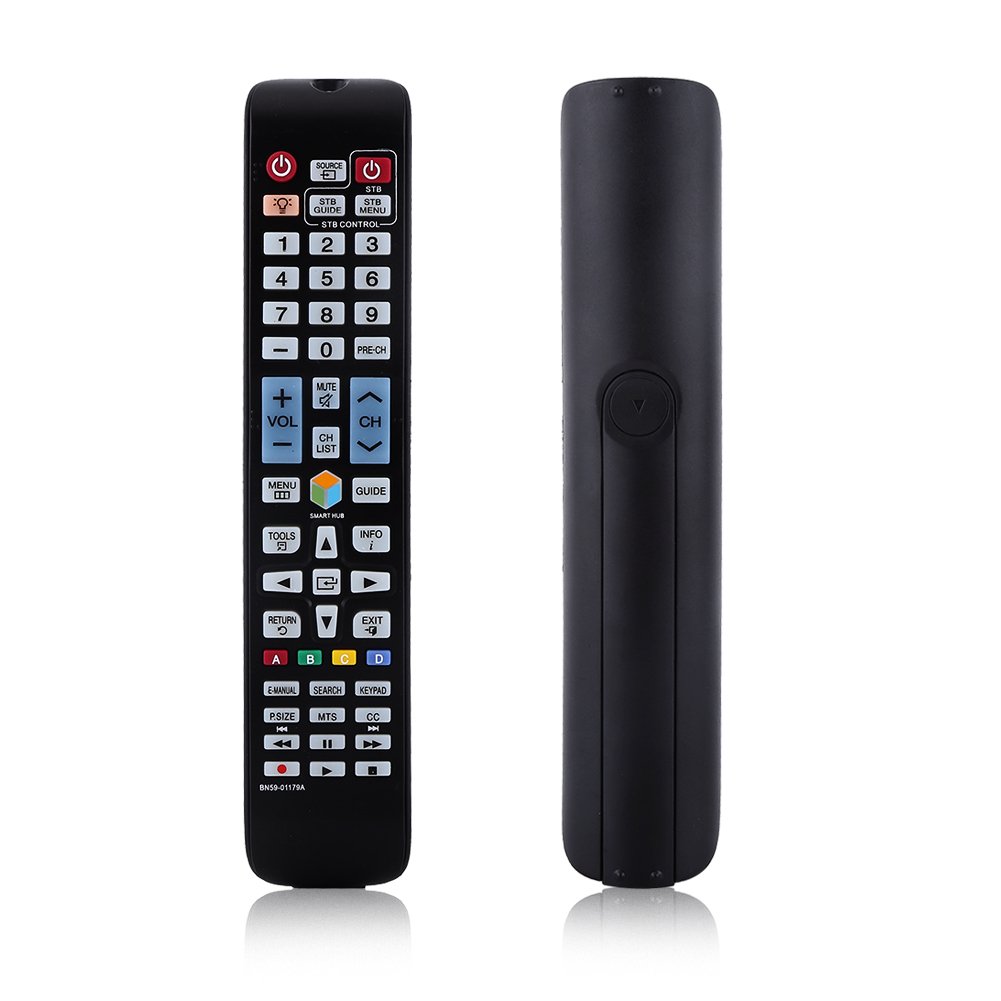
ຮູບພາບ: ທາງຫນ້າ view of the Zerone BN59-01179A remote control, showing its full layout and approximate dimensions (23cm length, 4.7cm width, 2cm thickness).
ຕັ້ງຄ່າ
ການຕິດຕັ້ງຫມໍ້ໄຟ
- ຊອກຫາຊ່ອງໃສ່ຫມໍ້ໄຟຢູ່ດ້ານຫຼັງຂອງການຄວບຄຸມໄລຍະໄກ.
- ເລື່ອນຝາປິດແບັດເຕີຣີລົງລຸ່ມ ຫຼື ກົດສະກູແລະຍົກຂຶ້ນເພື່ອເປີດ.
- ໃສ່ໝໍ້ໄຟ AAA ສອງ (2) ໜ່ວຍ, ຮັບປະກັນວ່າຈຸດບວກ (+) ແລະ ລົບ (-) ສອດຄ່ອງຖືກຕ້ອງກັບເຄື່ອງໝາຍພາຍໃນຊ່ອງ.
- ປ່ຽນຝາແບັດເຕີລີໂດຍການເລື່ອນມັນກັບຄືນໄປບ່ອນຢູ່ໃນຕໍາແຫນ່ງຈົນກ່ວາມັນກົດຢ່າງປອດໄພ.
ໝາຍເຫດ: Batteries are not included with the remote control. Please use new AAA batteries for optimal performance.

Image: The back of the remote control with the battery cover removed, showing the empty battery compartment ready for two AAA batteries.
ຄໍາແນະນໍາການດໍາເນີນງານ
This remote control is designed for immediate use with compatible TVs without requiring programming. Simply insert batteries and point the remote towards your television.
ຟັງຊັນຫຼັກ

Image: A hand holding the Zerone remote control, with inset close-ups highlighting the power/source buttons and the navigation/Smart Hub buttons.
- ພະລັງງານ (ປຸ່ມສີແດງ): ເປີດ ຫຼືປິດໂທລະພາບ.
- ທີ່ມາ: ເລືອກແຫຼ່ງປ້ອນຂໍ້ມູນ (HDMI, AV, ແລະອື່ນໆ).
- STB/DTV: Switches between Set-Top Box and Digital TV modes.
- ປຸ່ມຕົວເລກ (0-9): ການເລືອກຊ່ອງໂດຍກົງ.
- Pre-CH: ກັບໄປທີ່ຊ່ອງກ່ອນໜ້າ.
- ປະລິມານ (+/-): ປັບລະດັບສຽງ.
- ປິດສຽງ: ປິດສຽງ ຫຼືປິດສຽງໂທລະພາບ.
- ຊ່ອງ (CH ຂຶ້ນ/ລົງ): ປ່ຽນຊ່ອງໂທລະພາບຕາມລຳດັບ.
- CH ລາຍຊື່: ສະແດງລາຍການຊ່ອງ.
- ເມນູ: ເຂົ້າເຖິງເມນູຫຼັກຂອງໂທລະພາບ.
- Smart Hub: Opens the Smart Hub interface for apps and streaming services.
- ຄູ່ມື: ສະແດງຄູ່ມືໂຄງການເອເລັກໂຕຣນິກ.
- ຂໍ້ມູນ: Shows information about the current program.
- ເຄື່ອງມື: Accesses quick settings or contextual options.
- ປຸ່ມນຳທາງ (ຂຶ້ນ/ລົງ/ຊ້າຍ/ຂວາ/Enter): ນຳທາງຜ່ານເມນູ ແລະ ເລືອກຕົວເລືອກຕ່າງໆ.
- ກັບຄືນ: ກັບຄືນໄປໜ້າຈໍ ຫຼືເມນູກ່ອນໜ້າ.
- ອອກ: ອອກຈາກເມນູ ຫຼືແອັບພລິເຄຊັນປະຈຸບັນ.
- ປຸ່ມສີ (A, B, C, D): Functionality varies by TV model and application.
- E-MANUAL: ເຂົ້າເຖິງຄູ່ມືເອເລັກໂຕຣນິກຂອງໂທລະພາບ.
- ຄົ້ນຫາ: Opens the search function.
- ປຸ່ມກົດ: Displays an on-screen keypad.
- P.SIZE: Adjusts picture size/aspect ratio.
- MTS: Multi-channel Television Sound (SAP).
- CC: Closed Captioning.
- ປຸ່ມຄວບຄຸມສື່ (ຫຼິ້ນ, ຢຸດຊົ່ວຄາວ, ຢຸດ, ຖອຍຫຼັງ, ເລື່ອນໄປໜ້າ): ຄວບຄຸມການຫຼິ້ນສື່.
ບໍາລຸງຮັກສາ
- ທໍາຄວາມສະອາດ: ໃຊ້ຜ້າປຽກແຫ້ງເພື່ອເຮັດຄວາມສະອາດຣີໂໝດ. ຢ່າໃຊ້ເຄື່ອງເຮັດຄວາມສະອາດຂອງແຫຼວຫຼືວັດສະດຸຂັດ.
- ການປ່ຽນແບັດເຕີຣີ: Replace batteries when the remote's response becomes sluggish or stops working. Always replace both batteries at the same time with new ones.
- ການເກັບຮັກສາ: ຖ້າຣີໂມດຈະບໍ່ຖືກໃຊ້ເປັນເວລາດົນ, ໃຫ້ຖອດແບັດເຕີຣີອອກເພື່ອປ້ອງກັນການຮົ່ວໄຫຼ ແລະຄວາມເສຍຫາຍ.
- ຫຼີກລ່ຽງການສຳຜັດເຊື້ອ: Keep the remote away from direct sunlight, heat sources, and moisture.
ການແກ້ໄຂບັນຫາ
- ໄລຍະໄກບໍ່ຕອບສະໜອງ:
- Ensure batteries are inserted correctly with the correct polarity.
- ປ່ຽນແບັດເກົ່າດ້ວຍແບັດ AAA ໃໝ່.
- Check for any obstructions between the remote and the TV's infrared sensor.
- ໃຫ້ແນ່ໃຈວ່າຣີໂໝດຖືກຊີ້ໂດຍກົງໃສ່ໂທລະພາບ.
- ຂອບເຂດຈໍາກັດ:
- ປ່ຽນແບັດ.
- Ensure there are no strong light sources or electronic devices interfering with the signal.
- ປຸ່ມສະເພາະບໍ່ເຮັດວຽກ:
- Clean the remote control, especially around the unresponsive buttons, to remove any dirt or debris.
- If the issue persists after battery replacement and cleaning, the remote may be faulty.
ຂໍ້ມູນຈໍາເພາະ
| ຄຸນສົມບັດ | ລາຍລະອຽດ |
|---|---|
| ຍີ່ຫໍ້ | ເຊໂຣນ |
| ຊື່ຕົວແບບ | Zerone32687x9gqs (BN59-01179A compatible) |
| ເຕັກໂນໂລຊີການເຊື່ອມຕໍ່ | ອິນຟາເຣດ |
| ອຸປະກອນທີ່ເຂົ້າກັນໄດ້ | Television (specifically for Samsung BN59-01179A compatible models) |
| ຈຳນວນສູງສຸດຂອງອຸປະກອນທີ່ຮອງຮັບ | 8 (Universal functionality) |
| ປະລິມານປຸ່ມ | 12 (referring to main function groups, actual count is higher) |
| ປະເພດການຄວບຄຸມ | ການຄວບຄຸມປຸ່ມ |
| ຂອບເຂດສູງສຸດ | 8 ແມັດ |
| ປະເພດຫມໍ້ໄຟ | AAA |
| ຈໍານວນຫມໍ້ໄຟ | 2 ຫມໍ້ໄຟ AAA ຕ້ອງການ (ບໍ່ລວມ) |
| ຄຸນນະສົມບັດພິເສດ | ການທົດແທນທົ່ວໄປ, ບໍ່ຕ້ອງການການຂຽນໂປຣແກຣມ |
ການຮັບປະກັນແລະການສະຫນັບສະຫນູນ
Zerone provides a service guarantee for this product. If you encounter any questions or issues regarding your remote control, please contact the seller or manufacturer for assistance. They will provide follow-up services to address your concerns.
For specific warranty details and support contact information, please refer to your purchase documentation or the retailer's webເວັບໄຊ.