
1. ຜະລິດຕະພັນເກີນview
The Integra DTM-7 is a Network A/V Stereo Receiver designed to integrate modern digital audio and video technologies with traditional stereo sound. It supports advanced HDMI switching for 4K and HDR10 content, offers robust network connectivity for streaming services, and includes wireless audio capabilities. The receiver is built with a focus on sound quality and versatile control options.
ຮູບທີ 1.1: ດ້ານໜ້າ view of the Integra DTM-7 Network A/V Stereo Receiver. This image displays the front panel controls, display, and input jacks.
ຄຸນນະສົມບັດທີ່ສໍາຄັນ:
- ຜົນຜະລິດພະລັງງານສູງ: Delivers 100 Watts per channel (8 Ohms, 20 Hz-20 kHz, 0.08% THD, 2 Channels Driven, FTC) with 4-ohm stability, housed in an anti-resonant steel chassis and audiophile-grade aluminum front panel.
- Advanced HDMI Connectivity: Features 4 HDMI inputs and 1 HDMI output, supporting 4K/60 Hz, HDR10, HLG (Hybrid Log-Gamma), Dolby Vision, and BT.2020 Pass-thru with HDCP 2.2, 4:4:4 Color Space, and WCG (Wide Color Gamut).
- Sonos Integration: Compatible with existing Sonos Home Sound Systems or as a starting point for a new one, allowing for music streaming capability with Sonos Connect and a firmware update.
- Extensive Network and Wireless Audio: Includes Wi-Fi and Bluetooth compatibility, providing access to internet radio sources such as Tidal, Pandora, Spotify, Deezer, and TuneIn. Supports Chromecast Built-In, DTS Play-Fi technology, and AirPlay for wireless audio streaming.
- ການເຊື່ອມຕໍ່ແບບອະນາລັອກ: Features a built-in phono preamp for turntable connection.
- ຕົວເລືອກການຄວບຄຸມແບບຍືດຫຍຸ່ນ: Controllable via the included IR remote, the Integra Control Pro app (for iOS and Android devices), or through 3rd party control systems utilizing IP or RS232C.
2. ສິ່ງທີ່ຢູ່ໃນກ່ອງ
ກວດສອບວ່າລາຍການທັງຫມົດທີ່ລະບຸໄວ້ຂ້າງລຸ່ມນີ້ແມ່ນລວມຢູ່ໃນຊຸດ:
- Integra DTM-7 Network A/V Stereo Receiver
- ສາຍໄຟ
- ເສົາອາກາດ FM ພາຍໃນ
- ເສົາອາກາດວົງ AM
- ໄມໂຄຣໂຟນຕິດຕັ້ງລຳໂພງ
- Basic manual (this document provides detailed instructions)
- ການຄວບຄຸມໄລຍະໄກ
- 2 ຫມໍ້ໄຟ AAA (ສໍາລັບການຄວບຄຸມໄລຍະໄກ)
3. ຕັ້ງຄ່າ
3.1 ການເຊື່ອມຕໍ່ອົງປະກອບຂອງທ່ານ
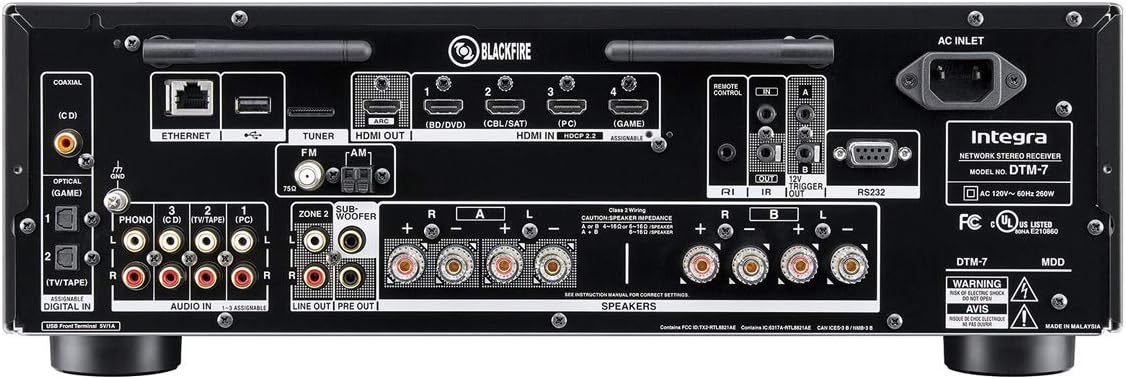
Before making any connections, ensure the receiver and all components are powered off and unplugged from the wall outlet. Refer to the rear panel diagram for connection points.

ຮູບທີ 3.1: Rear panel connections of the Integra DTM-7. This image illustrates the various input and output ports for audio, video, and network connections.
- ການເຊື່ອມຕໍ່ລຳໂພງ: Connect your passive speakers to the SPEAKER terminals on the rear panel. Ensure correct polarity (+ to + and - to -) for each speaker. The DTM-7 supports 4-ohm compatible speakers. For optimal performance, use high-quality speaker cables.
- ການເຊື່ອມຕໍ່ HDMI: Connect your video sources (e.g., Blu-ray player, game console, streaming device) to the HDMI IN ports. Connect your TV or projector to the HDMI OUT port. The HDMI ports support 4K/60 Hz, HDR10, Dolby Vision, and HDCP 2.2.
- ການເຊື່ອມຕໍ່ເຄືອຂ່າຍ: For wired network access, connect an Ethernet cable from your router to the ETHERNET port. For wireless network access, ensure the Wi-Fi antennas are properly attached and positioned.
- ການເຊື່ອມຕໍ່ສຽງອະນາລັອກ: Connect analog audio sources (e.g., CD player, cassette deck) to the AUDIO IN ports. For turntables, connect to the PHONO input, which includes a built-in preampມີຊີວິດຊີວາ.
- ການເຊື່ອມຕໍ່ເສົາອາກາດ: ເຊື່ອມຕໍ່ສາຍອາກາດ FM ແລະ AM ທີ່ສະໜອງໃຫ້ກັບສະຖານີຮັບສັນຍານວິທະຍຸ.
- ການເຊື່ອມຕໍ່ພະລັງງານ: After all other connections are made, connect the power cord to the AC INLET on the receiver and then to a wall outlet.
3.2 ການຕັ້ງຄ່າເບື້ອງຕົ້ນແລະ Calibration
After connecting your components, perform the initial setup:
- ເປີດ: ກົດ ON / STANDBY button on the front panel or remote control to power on the receiver.
- On-Screen Setup Guide: Follow the on-screen instructions displayed on your TV for initial configuration, including language selection and network settings.
- ການປັບທຽບລຳໂພງ: Use the supplied speaker setup microphone. Connect it to the dedicated port on the front panel. Place the microphone at your primary listening position and follow the on-screen prompts to automatically calibrate your speakers for optimal sound.
4. ຄໍາແນະນໍາການດໍາເນີນງານ
4.1 ການດໍາເນີນງານພື້ນຖານ
- ເປີດ/ປິດ: ກົດ ON / STANDBY button on the front panel or remote.
- ການຄັດເລືອກການປ້ອນຂໍ້ມູນ: ໃຊ້ ປ້ອນຂໍ້ມູນ selector buttons on the front panel or the remote control to choose your desired audio/video source (e.g., HDMI 1, CD, NET).
- ການຄວບຄຸມລະດັບສຽງ: ປັບ ໝວດ MASTER VOLUME ປຸ່ມໃນກະດານດ້ານຫນ້າຫຼື ປະລິມານ +/- ປຸ່ມໃນການຄວບຄຸມໄລຍະໄກ.
- ການຄວບຄຸມໂຕນ: ໃຊ້ ເບສ ແລະ ຄວບຄຸມ knobs on the front panel to adjust the sound characteristics to your preference.
4.2 Network and Wireless Features
The DTM-7 offers a range of network and wireless audio capabilities:
- ບໍລິການຖ່າຍທອດ: Access integrated streaming services such as Tidal, Pandora, Spotify, Deezer, and TuneIn directly from the receiver's menu. A stable internet connection is required.
- Chromecast ໃນຕົວ: Cast audio from compatible apps on your smartphone, tablet, or computer directly to the receiver.
- DTS Play-Fi: Enjoy high-quality wireless audio from your mobile device or PC to the receiver and other DTS Play-Fi enabled products.
- AirPlay: Stream audio from your Apple devices (iPhone, iPad, Mac) to the receiver over your home network.
- Bluetooth: Pair your Bluetooth-enabled devices to stream audio wirelessly to the receiver.
4.3 ຕົວເລືອກການຄວບຄຸມ
- ການຄວບຄຸມໄລຍະໄກ IR: Use the included remote for direct control of all receiver functions. Ensure line of sight to the receiver's IR sensor.
- Integra Control Pro App: Download the free Integra Control Pro app for iOS and Android devices. This app provides comprehensive control over the receiver's functions, including input selection, volume, network features, and settings.
- 3rd Party Control: The DTM-7 supports integration with custom installation systems via IP control or RS232C for advanced home automation.
5. ບໍາລຸງຮັກສາ
To ensure the longevity and optimal performance of your Integra DTM-7 receiver, follow these maintenance guidelines:
- ທໍາຄວາມສະອາດ: Gently wipe the exterior surfaces with a soft, dry cloth. Do not use abrasive cleaners, waxes, or solvents, as they can damage the finish.
- ການລະບາຍອາກາດ: Ensure adequate ventilation around the receiver. Do not block the ventilation openings on the top or sides. Avoid placing the unit in an enclosed cabinet without proper airflow.
- ການກຳຈັດຂີ້ຝຸ່ນ: Periodically use a soft brush or a vacuum cleaner with a brush attachment to remove dust from the ventilation grilles.
- ສາຍໄຟ: Regularly check the power cord for any signs of damage. If damaged, discontinue use and contact customer support for a replacement.
6. ການແກ້ໄຂບັນຫາ
If you encounter issues with your DTM-7 receiver, refer to the following common troubleshooting steps:
- ບໍ່ມີພະລັງງານ:
- ກວດໃຫ້ແນ່ໃຈວ່າໄດ້ສຽບສາຍໄຟຢ່າງປອດໄພໃສ່ທັງຕົວຮັບ ແລະປລັກສຽບໄຟທີ່ເຮັດວຽກ.
- ກວດເບິ່ງວ່າປລັກສຽບຝາເຮັດວຽກໄດ້ບໍໂດຍການສຽບໃສ່ອຸປະກອນອື່ນ.
- ບໍ່ມີສຽງ:
- ຢືນຢັນວ່າແຫຼ່ງປ້ອນຂໍ້ມູນທີ່ຖືກຕ້ອງຖືກເລືອກ.
- ກວດສອບການເຊື່ອມຕໍ່ລຳໂພງທັງໝົດວ່າມີຄວາມດັນໄຟຟ້າ ແລະ ຂະໜາດທີ່ເໝາະສົມຫຼືບໍ່.
- ໃຫ້ແນ່ໃຈວ່າລະດັບສຽງບໍ່ໄດ້ຖືກຕັ້ງໄວ້ທີ່ລະດັບສຽງຕໍ່າສຸດ ຫຼື ປິດສຽງໄວ້.
- Confirm that your speakers are functional.
- ບໍ່ມີວິດີໂອ:
- Ensure the HDMI cables are securely connected to both the source device, the receiver's HDMI IN, and the TV's HDMI OUT.
- Verify that the correct HDMI input is selected on the receiver and the correct HDMI input is selected on your TV.
- ລອງໃຊ້ສາຍ HDMI ຫຼືພອດອື່ນ.
- ບັນຫາການເຊື່ອມຕໍ່ເຄືອຂ່າຍ:
- For wired connections, ensure the Ethernet cable is properly connected to the receiver and your router.
- For Wi-Fi, check your router's status and ensure the receiver is within range. Re-enter Wi-Fi credentials if necessary.
- ຣີສະຕາດເຣົາເຕີ ແລະເຄື່ອງຮັບຂອງທ່ານ.
- ການຄວບຄຸມໄລຍະໄກບໍ່ເຮັດວຽກ:
- ປ່ຽນແບັດໃນຣີໂມດຄວບຄຸມ.
- ໃຫ້ແນ່ໃຈວ່າບໍ່ມີສິ່ງກີດຂວາງລະຫວ່າງທາງໄກ ແລະເຊັນເຊີ IR ຂອງຕົວຮັບ.
If the problem persists after trying these steps, please refer to the Integra support webເວັບໄຊ ຫຼືຕິດຕໍ່ບໍລິການລູກຄ້າ.
7. ຂໍ້ມູນຈໍາເພາະ
| ຄຸນສົມບັດ | ຂໍ້ມູນຈໍາເພາະ |
|---|---|
| ຜົນຜະລິດພະລັງງານ | 100 W/Ch. (8 Ohms, 20 Hz-20 kHz, 0.08% THD, 2 Channels Driven, FTC) |
| HDMI Inputs/Outputs | 4 ໃນ / 1 ອອກ |
| ຄຸນນະສົມບັດ HDMI | 4K/60 Hz, HDR10, HLG, Dolby Vision, BT.2020 Pass-thru, HDCP 2.2, 4:4:4 Color Space, WCG |
| ເຕັກໂນໂລຊີການເຊື່ອມຕໍ່ | AirPlay, Bluetooth, HDMI, Wi-Fi, Ethernet |
| Wireless Audio Features | Chromecast Built-In, DTS Play-Fi, AirPlay, Spotify, Pandora, Tidal, Deezer, TuneIn |
| ຮູບແບບການອອກສຽງ | ສະເຕຣິໂອ |
| ການຕັ້ງຄ່າຊ່ອງສຽງອ້ອມຮອບ | 2.1 |
| ການປ້ອນຂໍ້ມູນ Phono | Yes (Built-in phono preamp) |
| ປະເພດການຄວບຄຸມ | IR Remote, Android/iOS App (Integra Control Pro), IP, RS232C |
| ຂະ ໜາດ ຜະລິດຕະພັນ (W x H x D) | 17.1 x 5.9 x 12.9 ນິ້ວ (ປະມານ) |
| ນ້ໍາຫນັກລາຍການ | 18.7 ປອນ |
| ຜູ້ຜະລິດ | Onkyo |
8. ການຮັບປະກັນແລະການສະຫນັບສະຫນູນ
For detailed warranty information, please refer to the warranty card included with your product or visit the official Integra website. For technical support, product registration, or service inquiries, please contact Integra customer support or visit their official webເວັບໄຊທ໌ສໍາລັບຂໍ້ມູນຂ່າວສານທີ່ທັນສະໄຫມທີ່ສຸດ.
Manufacturer: Onkyo