
1. ບົດແນະນຳ
Thank you for choosing the Zerone LP-838 Small Power Amplifier. This manual provides essential information for the safe and efficient operation of your device. Please read these instructions thoroughly before use and retain them for future reference.
2. ຜະລິດຕະພັນເກີນview
2.1 ລັກສະນະທີ່ສໍາຄັນ
- ການອອກແບບກະທັດຮັດແລະເຄື່ອນທີ່.
- RCA and 3.5mm audio input compatibility.
- High-power audio amplifier chip for 2.1 channel output.
- Adjustable Treble, Bass, and Volume controls.
- Durable all-aluminum alloy shell for electromagnetic interference reduction.
2.2 ການກໍານົດອົງປະກອບ
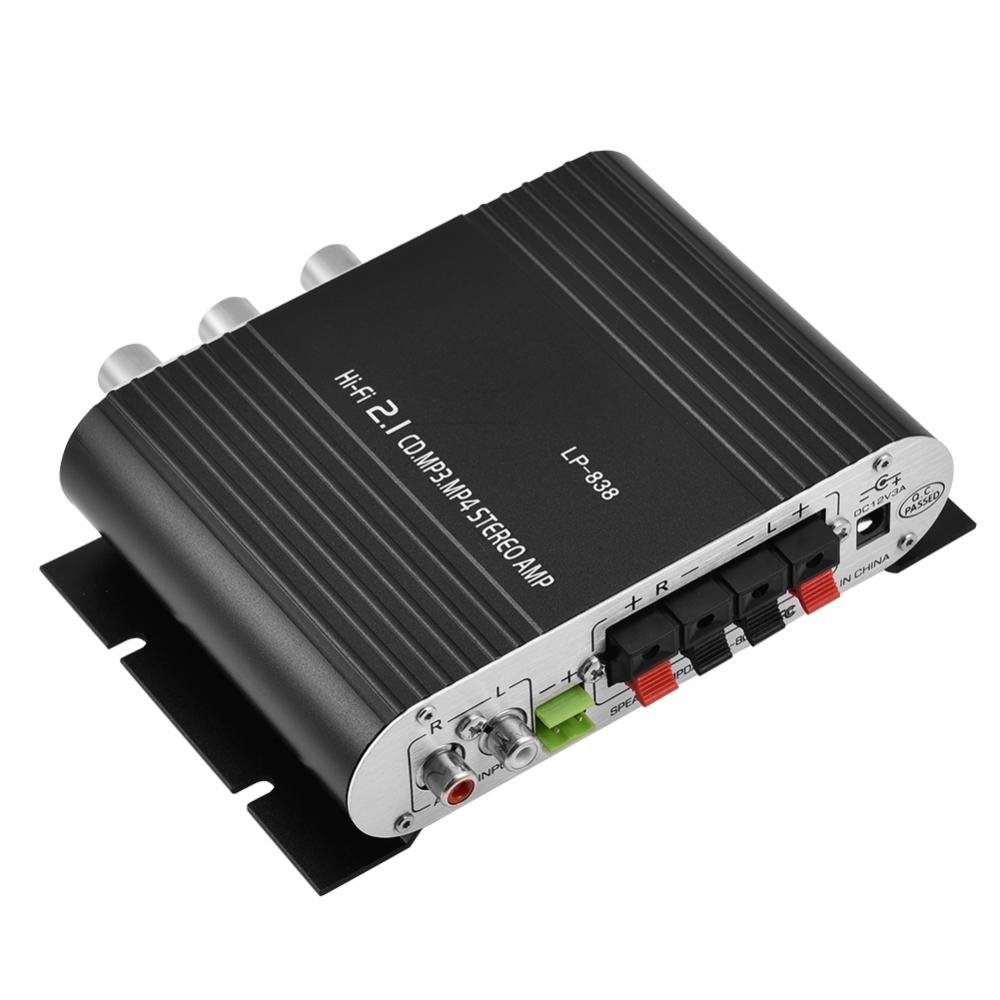
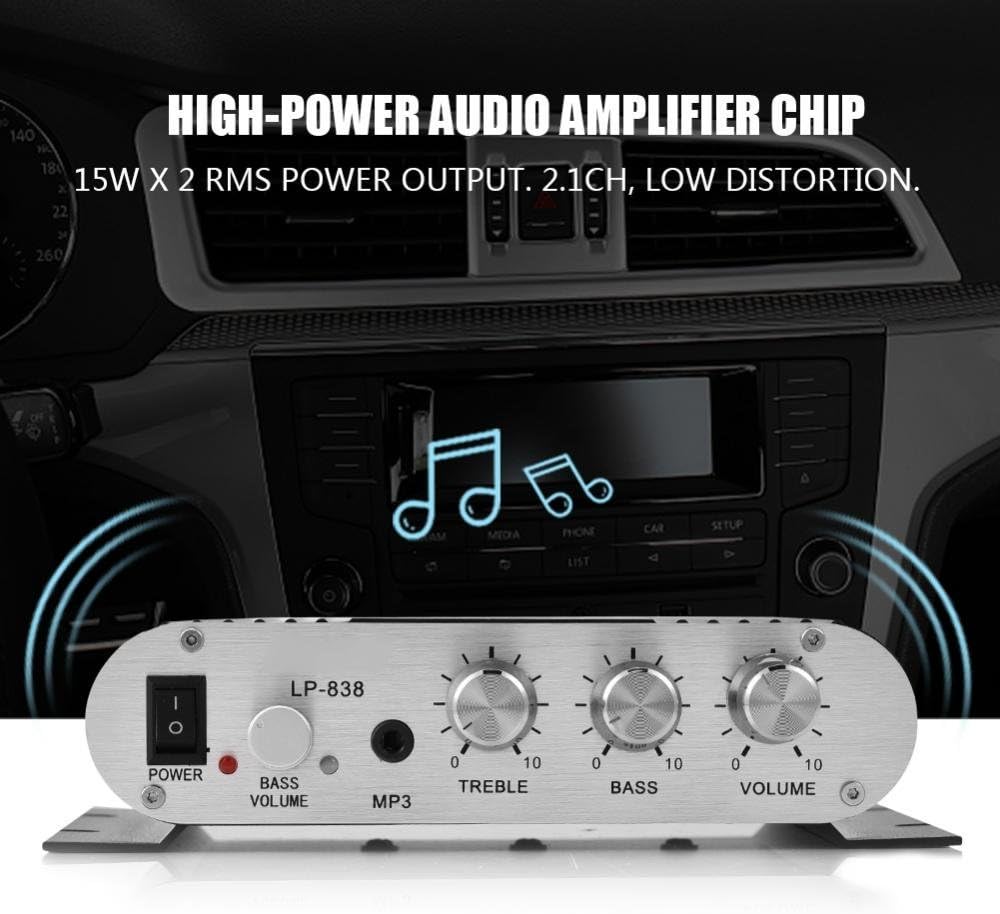
Figure 1: Front Panel Controls and Inputs
This image displays the front panel of the LP-838 amplifier. From left to right, it features a power switch, a bass volume knob, a 3.5mm MP3 input jack, and three rotary knobs for Treble, Bass, and Master Volume control. The unit also supports RCA audio input, as indicated by the text overlay.
ຮູບທີ 2: ການເຊື່ອມຕໍ່ແຜງດ້ານຫລັງ
This image shows the rear panel of the LP-838 amplifier. On the left are the RCA audio input jacks (red for right, white for left). In the center are the spring-clip speaker terminals for connecting left and right speakers. On the right is the DC 12V/3A power input jack and a 'Q.C. PASSED' stamp, indicating quality control.
ແຜງໜ້າ:
- ສະຫວິດໄຟຟ້າ: ສະຫຼັບໄດ້ ampເປີດ/ປິດ lifier.
- BASS VOLUME Knob: ປັບລະດັບສຽງເບສຂອງສຽງອອກ.
- ການປ້ອນຂໍ້ມູນ MP3: 3.5mm jack for connecting portable audio devices.
- ລູກບິດ TREBLE: ປັບການຕອບສະໜອງຄວາມຖີ່ສູງ.
- ບິດເບສ: ປັບການຕອບສະໜອງຄວາມຖີ່ຕໍ່າ.
- ປຸ່ມລະດັບສຽງ: ຄວບຄຸມປະລິມານຜົນຜະລິດໂດຍລວມ.
ກະດານດ້ານຫລັງ:
- AUDIO INPUT (RCA): Red and white RCA jacks for connecting audio sources (e.g., DVD players, computers).
- SPEAKER OUTPUTS (+R -R +L -L): Spring-clip terminals for connecting passive speakers. Ensure correct polarity (+ to + and - to -).
- ກະແສໄຟຟ້າເຂົ້າ DC 12V/3A: Power input jack for connecting the external power adapter (not included).
3. ຕັ້ງຄ່າ
- ເຊື່ອມຕໍ່ລໍາໂພງ: Connect your passive speakers to the SPEAKER OUTPUT terminals on the rear panel. Ensure the positive (+) terminal of the ampຕົວຮັບສັນຍານເຊື່ອມຕໍ່ກັບຂົ້ວບວກ (+) ຂອງລຳໂພງ, ແລະຂົ້ວລົບ (-) ຂອງ amplifier connects to the negative (-) terminal of the speaker. The amplifier supports speakers with an impedance of 4-8 Ohms.
- ເຊື່ອມຕໍ່ແຫຼ່ງສຽງ:
- For RCA input: Connect your audio source (e.g., CD player, TV, computer) to the RCA AUDIO INPUT jacks on the rear panel using an RCA cable.
- For 3.5mm input: Connect your portable audio device (e.g., smartphone, MP3 player) to the MP3 input jack on the front panel using a 3.5mm audio cable.
- ເຊື່ອມຕໍ່ພະລັງງານ: Connect a compatible DC 12V/3A power adapter (not included) to the DC 12V/3A input jack on the rear panel. Plug the power adapter into a wall outlet.
Important: Ensure all connections are secure before powering on the ampມີຊີວິດຊີວາ.
4. ຄໍາແນະນໍາການດໍາເນີນງານ
- ເປີດ: ເລື່ອນສະວິດ POWER ຢູ່ເທິງແຜງດ້ານໜ້າໄປທີ່ຕຳແໜ່ງ 'ON'. ໄຟສະແດງພະລັງງານຈະສະຫວ່າງຂຶ້ນ.
- ເລືອກການປ້ອນຂໍ້ມູນ: ໄດ້ amplifier automatically uses the active input. If both RCA and 3.5mm inputs are connected, the 3.5mm input may take precedence.
- ປັບລະດັບສຽງ: Start with the VOLUME knob set to a low level. Begin playing audio from your source, then slowly increase the VOLUME knob to your desired listening level.
- ປັບໂທນສຽງ: Use the TREBLE and BASS knobs to fine-tune the high and low frequencies according to your preference. The BASS VOLUME knob provides additional control over the bass output.
- ປິດພະລັງງານ: When finished, turn the VOLUME knob down to its minimum setting, then flip the POWER switch to the 'OFF' position.
5. ບໍາລຸງຮັກສາ
- ທໍາຄວາມສະອາດ: ໃຊ້ຜ້າແຫ້ງທີ່ອ່ອນໆເພື່ອເຮັດຄວາມສະອາດພາຍນອກ ampຕົວຊີ້ບອກ. ຢ່າໃຊ້ນໍ້າສະອາດ ຫຼືສານລະລາຍ.
- ການລະບາຍອາກາດ: ຮັບປະກັນ amplifier is placed in a well-ventilated area to prevent overheating. Do not block the ventilation slots.
- ການເກັບຮັກສາ: ເມື່ອບໍ່ໄດ້ໃຊ້ເປັນເວລາດົນ, ໃຫ້ຖອດອະແດບເຕີໄຟຟ້າອອກ ແລະ ເກັບຮັກສາອຸປະກອນໄວ້. ampເກັບຮັກສາເຄື່ອງໃຊ້ໄວ້ໃນບ່ອນທີ່ເຢັນແລະແຫ້ງ.
6. ການແກ້ໄຂບັນຫາ
| ບັນຫາ | ສາເຫດທີ່ເປັນໄປໄດ້ | ການແກ້ໄຂ |
|---|---|---|
| ບໍ່ມີພະລັງງານ | ອະແດບເຕີໄຟຟ້າບໍ່ໄດ້ເຊື່ອມຕໍ່ ຫຼື ມີຂໍ້ບົກຜ່ອງ; ສະວິດໄຟປິດ. | Ensure power adapter is securely connected and functional. Flip power switch to ON. |
| ບໍ່ມີສຽງອອກ | Incorrect audio input connection; speaker wires loose or incorrect polarity; volume too low; audio source issue. | Check audio input cables and connections. Verify speaker wire connections and polarity. Increase volume. Test audio source with another device. |
| ສຽງບິດເບືອນ | Volume too high; incorrect tone settings; faulty audio source or cable. | Reduce volume. Adjust Treble and Bass knobs. Test with a different audio source or cable. |
| ສຽງດັງ ຫຼື ສຽງດັງ | Ground loop issue; interference from other electronics; faulty cables. | Ensure all components are properly grounded. Move amplifier away from other electronic devices. Try different audio cables. |
7. ຂໍ້ມູນຈໍາເພາະ
- ຍີ່ຫໍ້: ເຊໂຣນ
- ໝາຍເລກຕົວແບບ: Zeroneq8ae3d902g-02 (LP-838)
- ສະບັບtage: 14.4 Volts (Operating)
- ຈຳນວນຊ່ອງ: 2
- ລຳໂພງ Impedance: 4-8 Ohms
- ປະເພດການຕິດຕັ້ງ: Surface Mount
- ນ້ໍາຫນັກລາຍການ: 7.8 ອອນ
- ASIN: B07DM4QJGX
- UPC: 763741184919
- ວັນທີທໍາອິດທີ່ມີ: ວັນທີ 4 ກໍລະກົດ 2019
8. ຂໍ້ມູນການຮັບປະກັນ
For specific warranty terms and conditions, please refer to the documentation provided at the time of purchase or contact your retailer. Warranty coverage typically includes defects in materials and workmanship under normal use.
9. ສະຫນັບສະຫນູນ
If you encounter issues that cannot be resolved using the troubleshooting guide, please contact the retailer or manufacturer for assistance. Provide your product model number (LP-838) and a detailed description of the problem when seeking support.