
1. ຜະລິດຕະພັນເກີນview
The Zerone Multi-Language Translator Bluetooth Earphone is a portable wireless device designed for real-time language translation and audio playback. It features Bluetooth 4.1 connectivity, high-fidelity audio output, and a compact in-ear design for comfortable use during various activities.

ຮູບພາບ 1.1: ຫຼັກ view of the Zerone Multi-Language Translator Bluetooth Earphone.
2. ເນື້ອໃນຊຸດ
ກະລຸນາກວດສອບວ່າລາຍການທັງຫມົດທີ່ລະບຸໄວ້ຂ້າງລຸ່ມນີ້ແມ່ນລວມຢູ່ໃນຊຸດຂອງທ່ານ:
- Zerone Multi-Language Translator Bluetooth Earphone
- ສາຍສາກ USB
- ເຄັດລັບຫູເພີ່ມເຕີມ (ຂະຫນາດຕ່າງໆ)
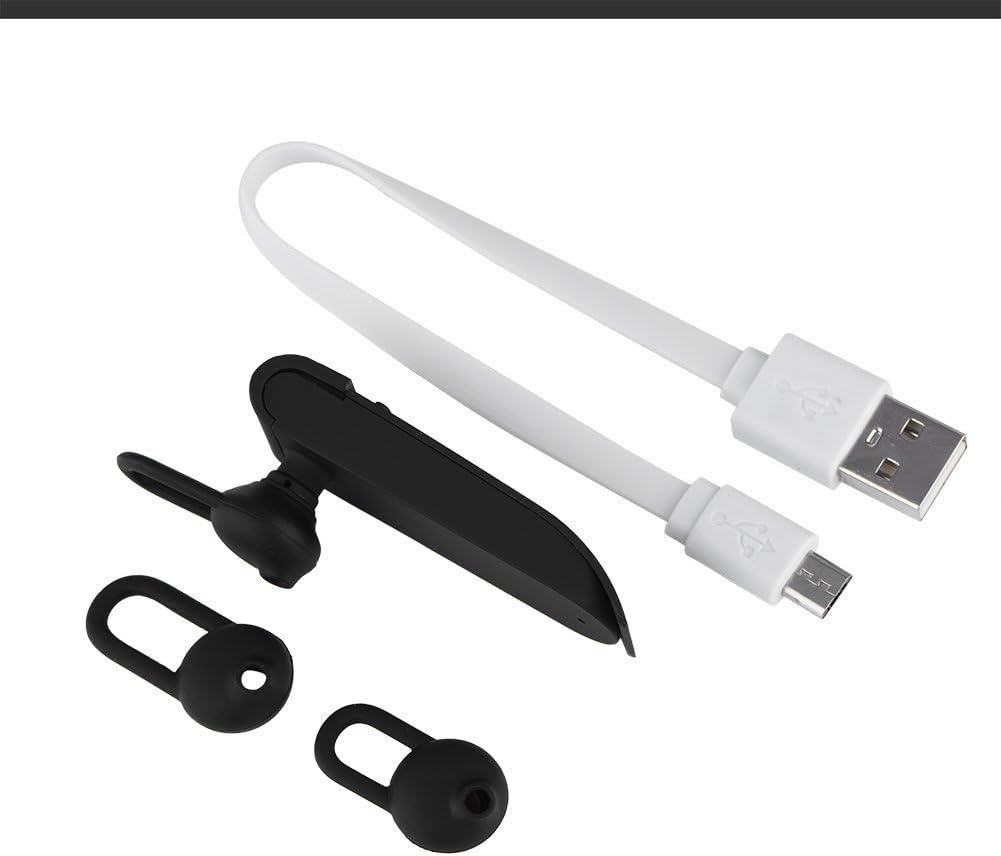
Image 2.1: The earphone with its charging cable and two additional ear tips.
3. ຄຸນລັກສະນະຂອງຜະລິດຕະພັນ
- Multi-Language Translation: Supports up to 16 languages for real-time translation. Speak into the earphone, and it will translate into the desired language.
- ຜົນຜະລິດສຽງຄວາມລະອຽດສູງ: Equipped with an 8mm moving coil speaker for clear, smooth audio and enhanced bass.
- True Wireless In-Ear Design: Mini and compact, offering a stable and comfortable fit without tangled wires, suitable for various activities.
- ການເຊື່ອມຕໍ່ Bluetooth 4.1: Optimized Bluetooth 4.1 version ensures a stable and fast wireless connection with a range of up to 10 meters.
- ອາຍຸແບັດເຕີຣີທີ່ຂະຫຍາຍອອກ: Built-in 90mAh rechargeable lithium battery provides approximately 5-8 hours of playback time and up to 13 hours of talk time.

Image 3.1: Visual representation of the 16 languages translation feature.

Image 3.2: Illustration of the high fidelity audio output with an 8mm moving coil speaker.

Image 3.3: Visual representation of the Bluetooth true wireless connection with a 10-meter transmission range.

Image 3.4: Details on the earphone's 90mAh rechargeable lithium battery and extended usage times.
4. ຕັ້ງຄ່າ
4.1 ການສາກຫູຟັງ
Before initial use, fully charge the earphone. Connect the provided USB charging cable to the earphone's charging port and the other end to a USB power source (e.g., computer, wall adapter). The charging time is approximately 2 hours.
4.2 ການຈັບຄູ່ Bluetooth
- Ensure the earphone is fully charged and powered off.
- Press and hold the multi-function button on the earphone until the indicator light flashes red and blue alternately, indicating pairing mode.
- ໃນສະມາດໂຟນ ຫຼືອຸປະກອນທີ່ເປີດໃຊ້ Bluetooth ຂອງທ່ານ, ໃຫ້ໄປທີ່ການຕັ້ງຄ່າ Bluetooth.
- ຊອກຫາ available devices and select "Zerone Translator Earphone" (or similar name) from the list.
- Once connected, the indicator light will typically turn solid blue or flash blue slowly.
4.3 Companion Application (for Translation)
To utilize the multi-language translation feature, you will need to download and install a compatible companion application on your smartphone. Refer to the packaging or product documentation for the specific app name and download instructions. Ensure your phone is connected to the internet for translation services.
5. ຄໍາແນະນໍາການດໍາເນີນງານ
5.1 ເປີດ/ປິດ
- ເປີດ: Press and hold the multi-function button for approximately 3 seconds until the indicator light turns blue.
- ປິດພະລັງງານ: ກົດປຸ່ມຫຼາຍຟັງຊັນຄ້າງໄວ້ປະມານ 5 ວິນາທີຈົນກວ່າໄຟສະແດງຈະປ່ຽນເປັນສີແດງ.
5.2 ການຫລີ້ນດົນຕີ
- ຫຼິ້ນ/ຢຸດ: ກົດປຸ່ມສັ້ນຫຼາຍຟັງຊັນ.
- ເພງຕໍ່ໄປ: ກົດປຸ່ມຫຼາຍຟັງຊັນສອງເທື່ອ.
- ຕິດຕາມກ່ອນ ໜ້າ ນີ້: ກົດປຸ່ມຫຼາຍຟັງຊັນສາມເທື່ອ.
5.3 ການຄຸ້ມຄອງການໂທ
- ຮັບ/ສາຍໂທ: ກົດປຸ່ມສັ້ນຫຼາຍຟັງຊັນ.
- ປະຕິເສດການໂທ: ກົດປຸ່ມຫຼາຍ ໜ້າ ທີ່ຄ້າງໄວ້ເປັນເວລາ 2 ວິນາທີ.
5.4 ການໃຊ້ຟັງຊັນການແປພາສາ
After successfully pairing the earphone with your device and setting up the companion application:
- Open the translation application on your smartphone.
- Select the source and target languages within the app.
- Activate the translation mode as instructed by the application (this may involve pressing a button on the earphone or within the app).
- Speak clearly into the earphone's microphone. Your speech will be translated and played back through the earphone or your phone's speaker, depending on the app's settings.

Image 5.1: A conceptual image demonstrating the earphone's translation capability between two languages.
6. ບໍາລຸງຮັກສາ
- ທໍາຄວາມສະອາດ: Use a soft, dry cloth to clean the earphone. Do not use abrasive cleaners or immerse the device in water.
- ການເກັບຮັກສາ: ເກັບຮັກສາຫູຟັງໄວ້ໃນບ່ອນທີ່ເຢັນ, ແຫ້ງ ແລະ ຫ່າງຈາກແສງແດດໂດຍກົງ ແລະ ອຸນຫະພູມສູງສຸດ.
- ການດູແລຫມໍ້ໄຟ: ເພື່ອຍືດອາຍຸການໃຊ້ງານຂອງແບັດເຕີຣີ, ໃຫ້ຫຼີກລ່ຽງການສາກຫູຟັງຈົນໝົດເລື້ອຍໆ. ໃຫ້ສາກໄຟເປັນປະຈຳ, ເຖິງແມ່ນວ່າຈະບໍ່ໄດ້ໃຊ້ເປັນເວລາດົນກໍຕາມ.
7. ການແກ້ໄຂບັນຫາ
| ບັນຫາ | ສາເຫດທີ່ເປັນໄປໄດ້ | ການແກ້ໄຂ |
|---|---|---|
| Earphone does not power on | ແບັດເຕີຣີຕໍ່າ | Charge the earphone for at least 30 minutes. |
| ບໍ່ສາມາດຈັບຄູ່ກັບອຸປະກອນໄດ້ | Earphone not in pairing mode; Bluetooth off on device; device too far | Ensure earphone is in pairing mode (flashing red/blue). Turn on Bluetooth on your device. Move device closer to earphone (within 10m). |
| No sound during playback/calls | Volume too low; earphone not connected; media output not selected | Increase volume on both earphone and connected device. Re-pair the earphone. Check device's audio output settings. |
| ຟັງຊັນການແປພາສາບໍ່ເຮັດວຽກ | Companion app not open/configured; no internet connection; microphone blocked | Ensure the companion app is open and correctly configured. Verify internet connectivity. Check if the earphone's microphone is clear. |
8. ຂໍ້ມູນຈໍາເພາະ
| ຄຸນສົມບັດ | ລາຍລະອຽດ |
|---|---|
| ໝາຍເລກຕົວແບບ | 4351510494 |
| ເຕັກໂນໂລຊີການເຊື່ອມຕໍ່ | ໄຮ້ສາຍ (Bluetooth) |
| ລຸ້ນ Bluetooth | 4.1 |
| ຊ່ວງ Bluetooth | ເຖິງ 10 ແມັດ |
| ຄວາມອາດສາມາດຫມໍ້ໄຟ | ແບດເຕີຣີ້ມາດຕະຖານ Lithium 90mAh |
| ເວລາຫຼີ້ນ | 5-8 ຊົ່ວໂມງ |
| ເວລາເວົ້າ | ສູງສຸດ 13 ຊົ່ວໂມງ |
| ເວລາສາກໄຟ | ປະມານ 2 ຊົ່ວໂມງ |
| Jack ຫູຟັງ | USB (ສໍາລັບການສາກໄຟ) |
| ວັດສະດຸ | ພາດສະຕິກ |
| ການຈັດວາງຫູ | ໃນຫູ |
| ປັດໄຈແບບຟອມ | ໃນຫູ |
| ປະເພດການຄວບຄຸມ | ການຄວບຄຸມສື່, ແຕະ |
| ການຄວບຄຸມສິ່ງລົບກວນ | Active Noise Cancellation |
| ນ້ໍາຫນັກລາຍການ | 2.39 ອອນ |
9. ການຮັບປະກັນແລະການສະຫນັບສະຫນູນ
For warranty information and technical support, please refer to the documentation included with your purchase or visit the official Zerone webເວັບໄຊ. ຮັກສາຫຼັກຖານການຊື້ຂອງທ່ານສໍາລັບການຮ້ອງຂໍການຮັບປະກັນ.