
ແນະນຳ
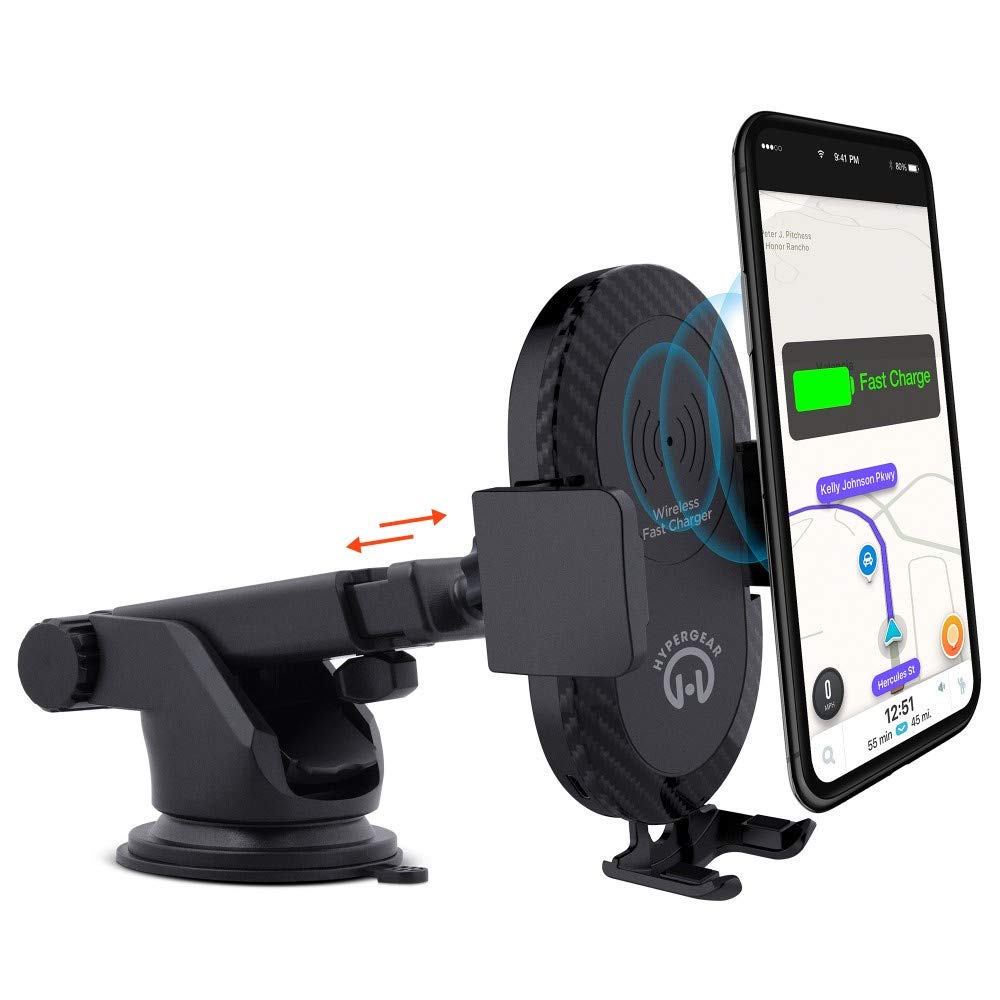
This manual provides instructions for the HyperGear HYG-14590 Wireless Fast Charging Car Dash Mount. This device is designed to securely hold and wirelessly charge Qi-enabled smartphones in your vehicle, offering hands-free navigation and communication.
ເນື້ອໃນຊຸດ
ກວດສອບວ່າລາຍການທັງຫມົດແມ່ນມີຢູ່ໃນຊຸດ:
- Telescopic Mount
- Fast Charge Car Adapter
- ສາຍ Micro USB
- ຄູ່ມືຜູ້ໃຊ້ (ເອກະສານນີ້)
ຄໍາແນະນໍາການຕິດຕັ້ງ
- ເລືອກສະຖານທີ່ຕິດຕັ້ງ: Select a clean, flat surface on your dashboard or windshield. Ensure the location does not obstruct your view ຫຼືແຊກແຊງການຄວບຄຸມຍານພາຫະນະ.
- ຕິດພູ:
- Clean the chosen surface thoroughly.
- Remove the protective film from the sticky gel suction cup.
- ກົດຖ້ວຍດູດໃສ່ຫນ້າດິນຢ່າງແຫນ້ນຫນາ.
- Engage the 2-step locking lever to secure the mount in place.
- ເຊື່ອມຕໍ່ພະລັງງານ:
- Insert the Micro USB cable into the charging port on the mount.
- Plug the other end of the Micro USB cable into the Fast Charge Car Adapter.
- Insert the Fast Charge Car Adapter into your vehicle's 12V power outlet (cigarette lighter socket).
- Adjust the Mount:
- Extend the telescopic arm up to 8 inches as needed.
- Pivot the arm up to 230° to achieve the desired angle.
- Rotate the cradle head 360° to switch between portrait and landscape orientation.
ຄໍາແນະນໍາການດໍາເນີນງານ
- ການວາງອຸປະກອນຂອງທ່ານ: Gently open the adjustable padded cradle grips and place your Qi-enabled smartphone into the mount. The grips will automatically secure the device.
- ການສາກໄຟໄຮ້ສາຍ: Once your device is placed in the mount and the mount is powered, wireless charging will begin automatically. Ensure your device is centered on the charging pad for optimal performance.
- ການຖອດອຸປະກອນຂອງທ່ານ: To remove your device, gently open the cradle grips and lift your smartphone out.
- ການນໍາໃຊ້ແບບແຮນຟຣີ: The mount allows for hands-free use of navigation, calls, and other applications while driving. Always ensure your device is positioned safely and does not obstruct your view ຂອງຖະຫນົນຫົນທາງ.
ບໍາລຸງຮັກສາ
- ທໍາຄວາມສະອາດ: Use a soft, dry cloth to clean the mount. Do not use abrasive cleaners or solvents.
- ການດູແລຈອກດູດ: If the sticky gel suction cup loses adhesion, rinse it with warm water and let it air dry. This can help restore its stickiness.
- ການເກັບຮັກສາ: ເມື່ອບໍ່ໄດ້ໃຊ້ງານເປັນເວລາດົນ, ໃຫ້ເກັບຮັກສາຕົວຍຶດໄວ້ໃນບ່ອນທີ່ເຢັນ, ແຫ້ງ ແລະ ຫຼີກລ່ຽງແສງແດດໂດຍກົງ.
ການແກ້ໄຂບັນຫາ
- ອຸປະກອນບໍ່ໄດ້ສາກໄຟແບບໄຮ້ສາຍ:
- Ensure your smartphone is Qi-enabled or has a Qi-enabled receiver.
- Verify the Micro USB cable is securely connected to both the mount and the car adapter.
- Check that the car adapter is firmly seated in the vehicle's 12V power outlet.
- Ensure your phone is centered on the charging pad of the mount.
- ເອົາກໍລະນີໂທລະສັບທີ່ໜາທີ່ອາດລົບກວນການສາກໄຟໄຮ້ສາຍອອກ.
- Mount not sticking to surface:
- Clean the dashboard or windshield surface thoroughly before attachment.
- Ensure the 2-step locking lever is fully engaged.
- Rinse the sticky gel suction cup with warm water and air dry to restore adhesion.
- Avoid mounting on textured or porous surfaces.
- Phone not held securely:
- Ensure the adjustable padded cradle grips are properly closed around your device.
- Verify that your phone's size is compatible with the mount's adjustable range.
ຂໍ້ມູນຈໍາເພາະ
| ໝາຍເລກຕົວແບບ | HYG-14590 |
| ຍີ່ຫໍ້ | HyperGear |
| ເຕັກໂນໂລຊີການເຊື່ອມຕໍ່ | ໄຮ້ສາຍ |
| ປະເພດຕົວເຊື່ອມຕໍ່ | USB, Wireless |
| ອຸປະກອນທີ່ເຂົ້າກັນໄດ້ | Cellular Phones (Qi-enabled) |
| ຮູບແບບໂທລະສັບທີ່ເຂົ້າກັນໄດ້ | iPhone X/8/8 Plus, Samsung Galaxy S9/S9+, S8/S8+, Note 8, and other Qi-enabled devices |
| ຄຸນນະສົມບັດພິເສດ | ສາກໄວ, ສາກໄຮ້ສາຍ |
| ວັດtage | 10 ວັດ |
| ແຫຼ່ງພະລັງງານ | Vehicle 12V Power Outlet |
| ປະເພດຕົວເຊື່ອມຕໍ່ພະລັງງານຫຼັກ | USB Type C (for car adapter) |
| ນ້ໍາຫນັກລາຍການ | 11.84 ອອນ |
| ວັດສະດຸຫຸ້ມຫໍ່ | Gel (suction cup) |
| ສີ | ດຳ |
| UPC | 633755145902 |
ຂໍ້ມູນການຮັບປະກັນ
This HyperGear product comes with a ຮັບປະກັນ 30 ວັນ from the date of purchase. This warranty covers manufacturing defects. Please retain your proof of purchase for warranty claims. For further details or to initiate a claim, please refer to the HyperGear official webເວັບໄຊທ໌ຫຼືຕິດຕໍ່ສະຫນັບສະຫນູນລູກຄ້າຂອງພວກເຂົາ.
ການຊ່ວຍເຫຼືອລູກຄ້າ
For technical assistance, product inquiries, or warranty support, please visit the official HyperGear webເວັບໄຊ ຫຼືຕິດຕໍ່ພະແນກບໍລິການລູກຄ້າຂອງເຂົາເຈົ້າ. ໂດຍທົ່ວໄປແລ້ວ ຂໍ້ມູນການຕິດຕໍ່ສາມາດພົບເຫັນຢູ່ໃນການຫຸ້ມຫໍ່ຜະລິດຕະພັນ ຫຼືການມີຢູ່ທາງອອນລາຍຢ່າງເປັນທາງການຂອງຍີ່ຫໍ້.