
ແນະນຳ
The Nitecore NU30 is a high-performance, lightweight rechargeable headlamp designed for various outdoor activities. It features a powerful primary white LED, high CRI auxiliary white LEDs for close-range illumination, and a red auxiliary LED for preserving night vision. With its integrated USB-C charging and durable construction, the NU30 provides reliable lighting for your adventures.

ຮູບພາບ: ທາງຫນ້າ view of the Nitecore NU30 headlamp with its adjustable headband.
ເນື້ອໃນຊຸດ
ກະລຸນາກວດເບິ່ງຊຸດສຳລັບລາຍການຕໍ່ໄປນີ້:
- ຫົວ Nitecore NU30amp
- ສາຍສາກໄຟ USB-C ເຖິງ USB-C
- ຜ້າພັນຫົວ
- ສະຕິກເກີ້ໄນທ໌ຄໍ
ສິນຄ້າເກີນview
The Nitecore NU30 features a dual-button interface for intuitive control over its various light sources and brightness levels. The headlamp unit is attached to an adjustable, elastic headband for comfortable wear.

Image: Diagram illustrating the location of the Power Button and Mode Button on the Nitecore NU30 headlamp.
ການຄວບຄຸມ:
- ປຸ່ມເປີດປິດ: Controls power on/off and brightness levels for the primary white light.
- ປຸ່ມໂໝດ: Switches between different light sources (primary white, auxiliary white, auxiliary red) and special modes.
ການສາກໄຟ Headlamp
The NU30 headlamp is equipped with a built-in 1500mAh Li-ion battery and a USB-C charging port for convenient recharging. A power indicator will show the charging status.
- ຊອກຫາພອດສາກໄຟ USB-C ຢູ່ດ້ານຂ້າງຂອງຫົວamp.
- Connect the included USB-C to USB-C charging cable to the headlamp and a USB power source (e.g., wall adapter, power bank, computer).
- The power indicator will illuminate during charging.
- Charging is complete when the indicator light changes or turns off (refer to the power indicator section for details). A full charge typically takes approximately 2 hours.

Image: The Nitecore NU30 headlamp being charged via its USB-C port.
ຄໍາແນະນໍາການດໍາເນີນງານ
The NU30 offers multiple light sources and modes for various lighting needs.

Image: Diagram illustrating the three distinct light sources available on the Nitecore NU30 headlamp.
ເປີດ/ປິດ:
- ເພື່ອເປີດ: Press and hold the Power Button for 1 second. The headlamp will turn on in the previously used primary white light mode.
- ປິດ: ເມື່ອຫົວamp is on, long press either the Power Button or the Mode Button until the light turns off.
Switching Light Sources:
ເມື່ອຫົວamp is on, short press the Mode Button to cycle through the light sources in the following order:
Primary White Light → Auxiliary White Light → Auxiliary Red Light → Primary White Light...
Adjusting Brightness (Primary White Light):
When the Primary White Light is active, short press the Power Button to cycle through brightness levels:
Low → Mid → High → Low...
Auxiliary White Light Modes:
When the Auxiliary White Light is active, short press the Power Button to cycle through:
Ultralow → Flood → Ultralow...

Image: Visual comparison demonstrating the wide and even illumination of the TrueVision+ flood beam.
Auxiliary Red Light Modes:
When the Auxiliary Red Light is active, short press the Power Button to cycle through:
Low → High → Slow Flashing → Low...
Special Modes (SOS / Beacon):
ເມື່ອຫົວamp is off, press and hold the Mode Button for 1 second to directly access SOS mode. While in SOS mode, short press the Power Button to switch to Beacon mode. Short press the Power Button again to return to SOS. Long press either button to turn off.
ຕົວຊີ້ບອກພະລັງງານ:
The power indicator light provides information on the remaining battery power. Refer to the product's specific indicator patterns for detailed battery status (e.g., flashes for remaining power, solid for charging, off for fully charged).
ບໍາລຸງຮັກສາ
Proper maintenance ensures the longevity and optimal performance of your Nitecore NU30 headlamp.
- ທໍາຄວາມສະອາດ: ເຊັດຫົວamp ມີອ່ອນ, damp ຜ້າ. ຫຼີກເວັ້ນການນໍາໃຊ້ເຄື່ອງເຮັດຄວາມສະອາດຂັດຫຼືສານລະລາຍ.
- ການເກັບຮັກສາ: ເກັບຮັກສາຫົວamp in a cool, dry place when not in use. Recharge the battery every 3 months to maintain battery health if stored for extended periods.
- ຄວາມຕ້ານທານນ້ໍາ: The NU30 is rated IP66, meaning it is protected against powerful water jets. Do not submerge the headlamp in water. Ensure the USB-C port cover is securely closed to maintain water resistance.
ການແກ້ໄຂບັນຫາ
If you encounter issues with your NU30 headlamp, ລອງໃຊ້ວິທີແກ້ໄຂຕໍ່ໄປນີ້:
- ຫົວamp ບໍ່ເປີດ: ໃຫ້ແນ່ໃຈວ່າແບັດເຕີຣີຖືກສາກແລ້ວ. ເຊື່ອມຕໍ່ຫົວamp to a power source using the USB-C cable and check if the charging indicator activates.
- ຜົນຜະລິດແສງສະຫວ່າງມືດມົວ: ແບັດເຕີຣີອາດຈະອ່ອນ. ສາກໄຟຫົວຄືນamp ຢ່າງເຕັມສ່ວນ.
- ການສາກໄຟບໍ່ເຮັດວຽກ: Check the USB-C cable for damage and ensure the power source is functional. Try a different cable or power adapter.
- ປຸ່ມບໍ່ຕອບສະໜອງ: ຮັບປະກັນຫົວamp is not in a locked mode (if applicable, refer to specific product features for lock-out functions). If issues persist, contact customer support.
ຂໍ້ມູນຈໍາເພາະ
Detailed technical specifications for the Nitecore NU30 headlamp:
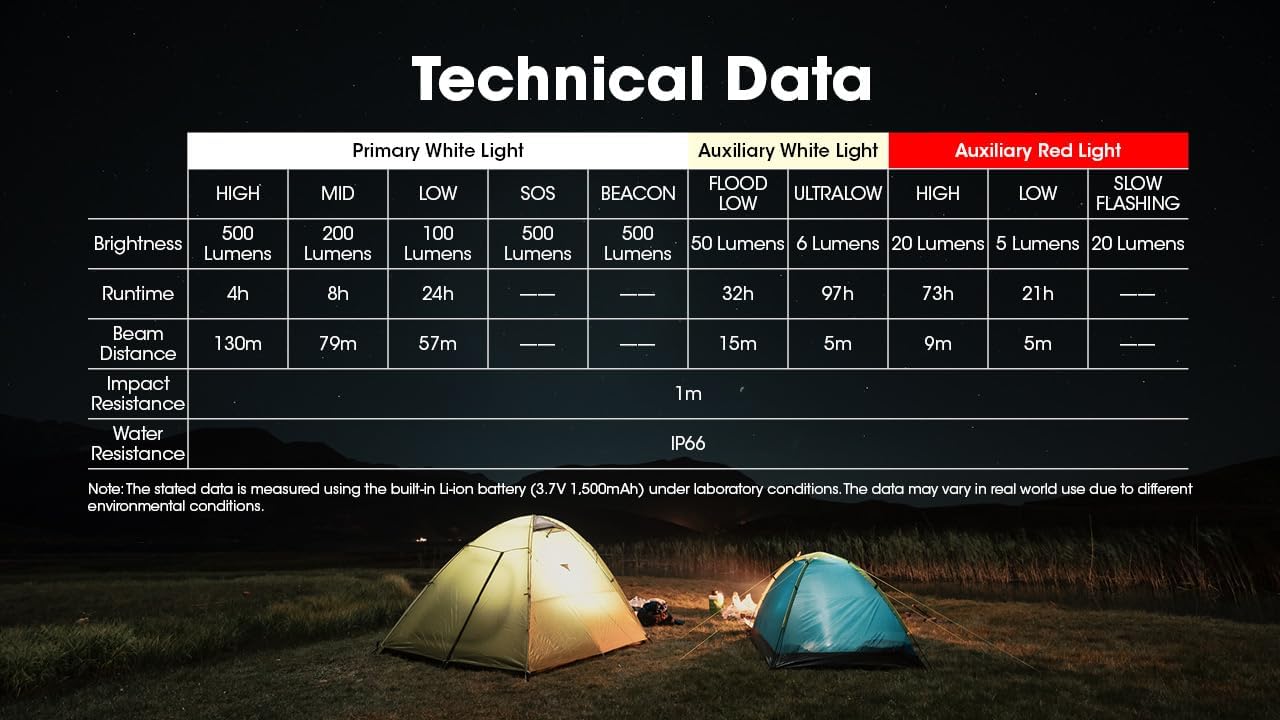
Image: Comprehensive table detailing the technical specifications of the Nitecore NU30 headlamp.
| ຄຸນສົມບັດ | ລາຍລະອຽດ |
|---|---|
| ຄວາມສະຫວ່າງສູງສຸດ | 500 Lumens |
| ໄລຍະຫ່າງສູງສຸດຂອງ Beam | 130 ແມັດ (142 ແມັດ) |
| ປະເພດຫມໍ້ໄຟ | ແບດເຕີຣີ້ມາດຕະຖານ Li-ion 1500mAh ໃນຕົວ |
| ພອດສາກໄຟ | USB-C |
| ເວລາແລ່ນສູງສຸດ | Up to 97 hours (Ultralow Auxiliary White) |
| ຄວາມຕ້ານທານຜົນກະທົບ | 1 ແມັດ |
| ການຕໍ່ຕ້ານນ້ໍາ | IP66 |
| ນ້ຳໜັກ | 90g (3.17 oz) |
| ວັດສະດຸ | Durable PC Material |
ຂໍ້ມູນຄວາມປອດໄພ
Please read and follow these safety guidelines to prevent injury or damage to the headlamp:
- Do not shine the light directly into eyes, as this may cause temporary vision impairment.
- ຫ້າມຖອດ ຫຼືດັດແປງຫົວຫົວamp, as this may void the warranty and cause damage.
- ຮັກສາໃຫ້ໄກຈາກເດັກນ້ອຍ.
- ຫຼີກເວັ້ນການເປີດເຜີຍຫົວamp ຕໍ່ກັບອຸນຫະພູມທີ່ຮຸນແຮງ ຫຼືແສງແດດໂດຍກົງເປັນເວລາດົນ.
ການຮັບປະກັນແລະການສະຫນັບສະຫນູນ
Nitecore products are backed by a warranty. For detailed warranty terms and conditions, please refer to the official Nitecore website or the warranty card included with your product. If you require technical support or have questions about your NU30 headlamp, please contact Nitecore customer service or your authorized dealer.
For more information, visit the official Nitecore webເວັບໄຊ: www.nitecore.com