
ແນະນຳ
This manual provides detailed instructions for the Sony BRAVIA KJ-43X8500F 43-inch 4K Android LCD TV. This high-quality television features a vibrant 4K display, a double-speed drive panel for smooth motion, and integrated Android TV functionality. It is also compatible with "Works with Alexa" for convenient voice control.
ຄຸນນະສົມບັດທີ່ສໍາຄັນ
- Android TV(TM) functionality: Easily search for TV broadcasts, recorded programs, and online video content by speaking into the remote control. Enjoy desired content effortlessly.
- ເຮັດວຽກກັບ Alexa: Link with Amazon Echo series for hands-free BRAVIA operation. Voice commands include "TV power on/off," "channel and input switching," and "playback/rewind/stop of recorded content."
- PS4 software "Kingdom Hearts III" certified image quality: High-definition processing ensures optimal image representation. Colors are faithfully reproduced (when game mode is set).
- Smooth motion display: Sports scenes and other fast-moving images are displayed smoothly. The TV predicts image movement and inserts new frames between existing ones, reducing afterimages by rendering 120 frames per second.
- 4K high-definition processor "HDR X1": Enhances the three major image quality elements: detail, color vibrancy, and contrast. Each high-quality function is precisely controlled.
- Supports 4K streaming services: Compatible with services like "Prime Video" and "Netflix," allowing you to enjoy desired content from a wide range of services.
- External HDD recording: Connect a separately sold USB hard disk (HDD) to BRAVIA to record programs while watching another, enabling "external HDD simultaneous recording."
- High-contrast 4K image quality: Enhances contrast for each subject in the image, enabling HDR-equivalent bright and dark rendering. All images, including terrestrial digital broadcasts, Blu-ray software, and online videos, are transformed into high-contrast, high-definition 4K quality.
- HDR (High Dynamic Range) signal compatible: Utilizes maximum image information closer to reality, reproducing brightness and vibrant colors that could not be expressed by previous TVs.
- "Voice Zoom" function: Adjusts the volume of voices without changing the overall sound volume.
ຕັ້ງຄ່າ
ການຕິດຕັ້ງເບື້ອງຕົ້ນ
Follow these steps for the initial setup of your Sony BRAVIA KJ-43X8500F television.
- Unpack the TV and accessories carefully.
- Attach the stand securely to the television. Refer to the diagram below for proper attachment.
- ເຊື່ອມຕໍ່ສາຍໄຟກັບໂທລະພາບ ແລະຈາກນັ້ນໄປຫາປລັກສຽບໄຟ.
- Connect your antenna or cable to the appropriate input on the TV.
- Connect any external devices (e.g., Blu-ray player, game console) to the HDMI ports.
- ເປີດໂທລະທັດໂດຍໃຊ້ຣີໂໝດຄວບຄຸມ.
- Follow the on-screen instructions to complete the initial setup, including network connection and channel scanning.
ຄັດຕິດໂທລະທັດ Stand
The TV stand provides stable support. Ensure it is correctly attached before placing the TV on a flat surface.
This image shows the rear of the television with the stand attached. Ensure all screws are tightened to prevent instability.
ການເຊື່ອມຕໍ່ອຸປະກອນພາຍນອກ
Your BRAVIA TV offers multiple connectivity options.
- ຜອດ HDMI: 4 ports available for high-definition devices.
- ພອດ USB: 3 ports for connecting USB storage devices.
- ການປ້ອນຂໍ້ມູນປະກອບ: 1 port for older devices.
- Wireless LAN: IEEE802.11ac/a/b/g/n for network connectivity.

This image illustrates the various input and output ports located on the back of the television.
ຄໍາແນະນໍາການດໍາເນີນງານ
ການນໍາໃຊ້ການຄວບຄຸມໄລຍະໄກ
The remote control provides access to all TV functions, including smart features and voice control.

This image displays the remote control, highlighting buttons for power, volume, channel, and direct access to streaming services like Netflix and YouTube.
ການຄວບຄຸມສຽງດ້ວຍ Alexa
Your BRAVIA TV supports "Works with Alexa" for convenient voice commands.
- "Alexa, ເປີດໂທລະພາບ."
- "Alexa, switch to Channel 1."
- "Alexa, play [content name] on the TV."
- "Alexa, rewind/fast forward/stop the recording."

This image demonstrates how to use Alexa voice commands to control your television, such as turning it on or changing channels.
ການເຊື່ອມໂຍງສື່ມວນຊົນ
Streaming Services and Content
The Android TV platform provides access to a wide array of streaming services.
- ວິດີໂອ Amazon Prime
- Netflix
- YouTube
- ຮູລູ
- AbemaTV
- U-NEXT
- VideoMarket
- Google Play Movies & TV
- Spotify
- Niconico
- DAZN
- ແລະອື່ນໆອີກ.

This image illustrates the variety of streaming applications available on your BRAVIA TV, allowing you to enjoy movies, music, and games.
External HDD Recording
Connect a USB hard disk (sold separately) to enable recording of TV programs. You can record one program while watching another.
ບໍາລຸງຮັກສາ
Cleaning the TV Screen and Cabinet
- ຖອດປລັກໂທລະທັດທຸກຄັ້ງກ່ອນທຳຄວາມສະອາດ.
- For the screen, gently wipe with a soft, dry, lint-free cloth. For stubborn marks, lightly dampໃສ່ຜ້າດ້ວຍນ້ໍາຫຼືເຄື່ອງເຮັດຄວາມສະອາດຫນ້າຈໍອ່ອນໆ, ທີ່ບໍ່ມີຮອຍຂີດຂ່ວນ. ຢ່າສີດຂອງແຫຼວໂດຍກົງໃສ່ຫນ້າຈໍ.
- For the cabinet, use a soft, dry cloth. Avoid using abrasive pads, harsh chemicals, or solvents as they can damage the finish.
ການດູແລທົ່ວໄປ
- ຫຼີກເວັ້ນການວາງໂທລະທັດຢູ່ໃນແສງແດດໂດຍກົງຫຼືຢູ່ໃກ້ກັບແຫຼ່ງຄວາມຮ້ອນ.
- ຮັບປະກັນການລະບາຍອາກາດຢ່າງພຽງພໍຮອບໂທລະທັດເພື່ອປ້ອງກັນຄວາມຮ້ອນເກີນ.
- Do not block the ventilation openings on the back or sides of the TV.
ການແກ້ໄຂບັນຫາ
ບໍ່ມີພະລັງງານ
- ກວດໃຫ້ແນ່ໃຈວ່າສາຍໄຟຖືກເຊື່ອມຕໍ່ຢ່າງປອດໄພກັບທັງໂທລະພາບ ແລະປລັກສຽບໄຟ.
- ກວດເບິ່ງວ່າປລັກສຽບໄຟເຮັດວຽກຫຼືບໍ່ໂດຍການສຽບໃສ່ອຸປະກອນອື່ນ.
- ກົດປຸ່ມເປີດປິດໃນໂທລະພາບຕົວມັນເອງ, ບໍ່ພຽງແຕ່ຫ່າງໄກສອກຫຼີກ, ເພື່ອແກ້ໄຂບັນຫາຫ່າງໄກສອກຫຼີກ.
ບໍ່ມີຮູບພາບ/ສຽງ
- Verify that the correct input source is selected. Press the "Input" button on your remote.
- ກວດເບິ່ງການເຊື່ອມຕໍ່ສາຍທັງໝົດ (HDMI, ເສົາອາກາດ) ເພື່ອຮັບປະກັນວ່າພວກມັນປອດໄພ.
- ຖ້າໃຊ້ອຸປະກອນພາຍນອກ, ໃຫ້ແນ່ໃຈວ່າພວກມັນເປີດແລະເຮັດວຽກຢ່າງຖືກຕ້ອງ.
- Adjust volume levels on both the TV and any connected audio systems.
ການຄວບຄຸມໄລຍະໄກບໍ່ເຮັດວຽກ
- ປ່ຽນແບັດໃນຣີໂມດຄວບຄຸມ.
- ກວດໃຫ້ແນ່ໃຈວ່າບໍ່ມີສິ່ງກີດຂວາງລະຫວ່າງຣີໂໝດ ແລະເຊັນເຊີ IR ຂອງໂທລະທັດ.
- ຊີ້ຣີໂໝດໂດຍກົງໃສ່ໂທລະພາບ.
ບັນຫາການເຊື່ອມຕໍ່ເຄືອຂ່າຍ
- ຣີສະຕາດເຣົາເຕີ ແລະໂມເດັມຂອງທ່ານ.
- ໄປທີ່ການຕັ້ງຄ່າເຄືອຂ່າຍຂອງໂທລະທັດ ແລະລອງເຊື່ອມຕໍ່ຄືນໃໝ່ກັບເຄືອຂ່າຍ Wi-Fi ຂອງທ່ານ.
- ໃຫ້ແນ່ໃຈວ່າລະຫັດຜ່ານ Wi-Fi ຂອງທ່ານຖືກປ້ອນຢ່າງຖືກຕ້ອງ.
- If the issue persists, try connecting the TV directly to your router via an Ethernet cable.
ຂໍ້ມູນຈໍາເພາະ
| ຂະໜາດໜ້າຈໍ | 43 ນິ້ວ |
| ຍີ່ຫໍ້ | Sony |
| ເຕັກໂນໂລຊີການສະແດງ | ຈໍ LCD |
| ຄວາມລະອຽດ | 4K |
| ຄຸນສົມບັດ | Android TV, Works with Alexa, Double Speed Drive, 4K HDR, External HDD Recording, Wi-Fi Wireless LAN |
| ເຕັກໂນໂລຊີການເຊື່ອມຕໍ່ | IEEE802.11ac/a/b/g/n |
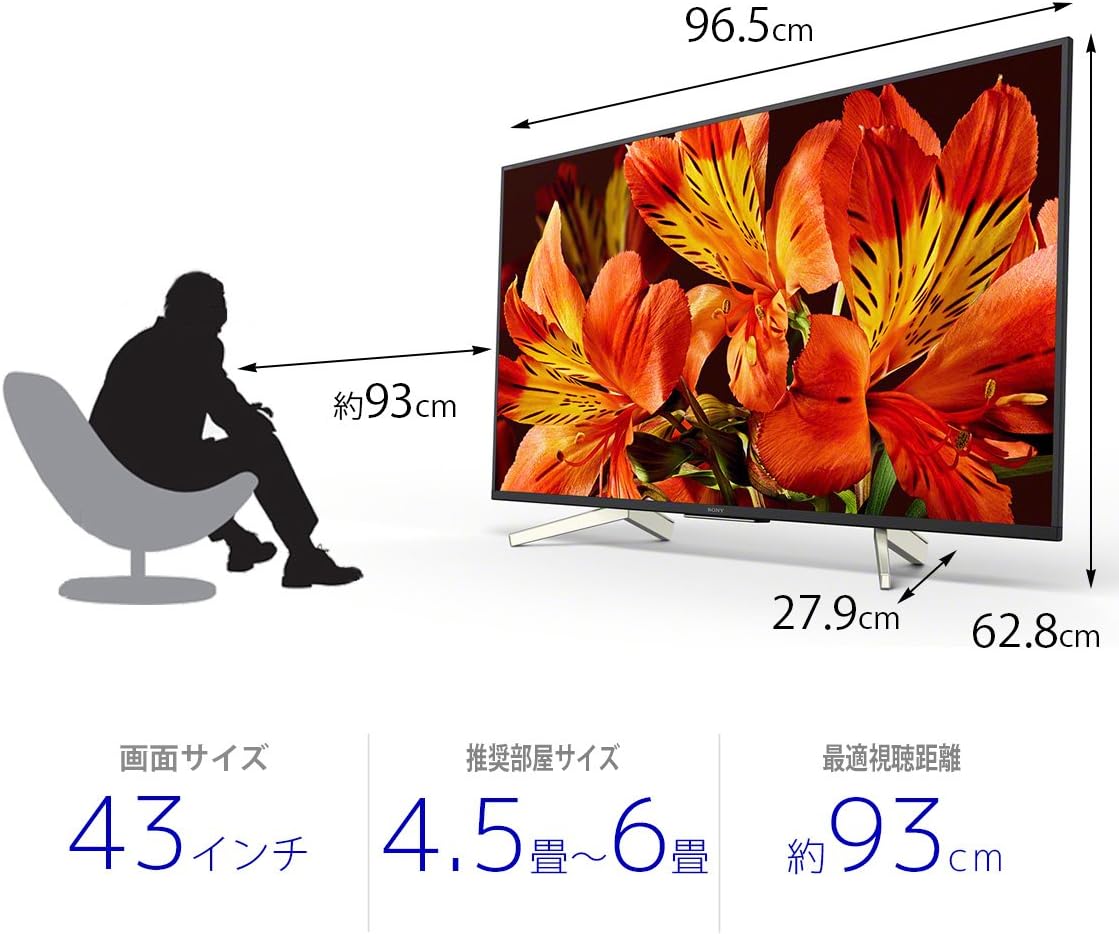
| ຂະໜາດສິນຄ້າ (ກວ້າງ x ຍາວ x ສູງ) | 27.9 x 96.5 x 62.8 cm |
| ບໍລິການອິນເຕີເນັດທີ່ຮອງຮັບ | Amazon Prime Video, Netflix |
| ຊື່ຕົວແບບ | KJ-43X8500F |
| ສີ | ດຳ |
| ນ້ໍາຫນັກລາຍການ | 11.3 ກິໂລກຣາມ |
| ພອດ HDMI | 4 |
| ການໂຕ້ຕອບຮາດແວ | USB |
| Composite Input Count | 1 |
| USB Port Count | 3 |
| ປະເພດການຕິດຕັ້ງ | Table Mount |
| ປະເພດເຄື່ອງປັບ | ດິຈິຕອນພື້ນດິນ, ດິຈິຕອນ BS, ດິຈິຕອນ CS 110 ອົງສາ |
| ລະບົບປະຕິບັດການ | Android |
| ວິທີການຄວບຄຸມ | ໄລຍະໄກ, ສຽງ |
ການຮັບປະກັນແລະການສະຫນັບສະຫນູນ
ສໍາລັບຂໍ້ມູນການຮັບປະກັນລະອຽດ, ກະລຸນາເບິ່ງບັດຮັບປະກັນທີ່ລວມຢູ່ໃນຜະລິດຕະພັນຂອງທ່ານ ຫຼືເຂົ້າໄປທີ່ສູນຊ່ວຍເຫຼືອ Sony ຢ່າງເປັນທາງການ webເວັບໄຊ.
For technical assistance or customer support, please contact Sony customer service or visit their online support portal.