
Bytech BCAUBS134BK
Bytech Massive Bluetooth Long Bar Speaker-BK User Manual
Model: BCAUBS134BK
1. ບົດແນະນຳ
ຂອບໃຈສໍາລັບການຊື້asing the Bytech Massive Bluetooth Long Bar Speaker-BK. This manual provides essential information for the proper setup, operation, and maintenance of your new speaker. Please read this manual thoroughly before using the product to ensure optimal performance and longevity.
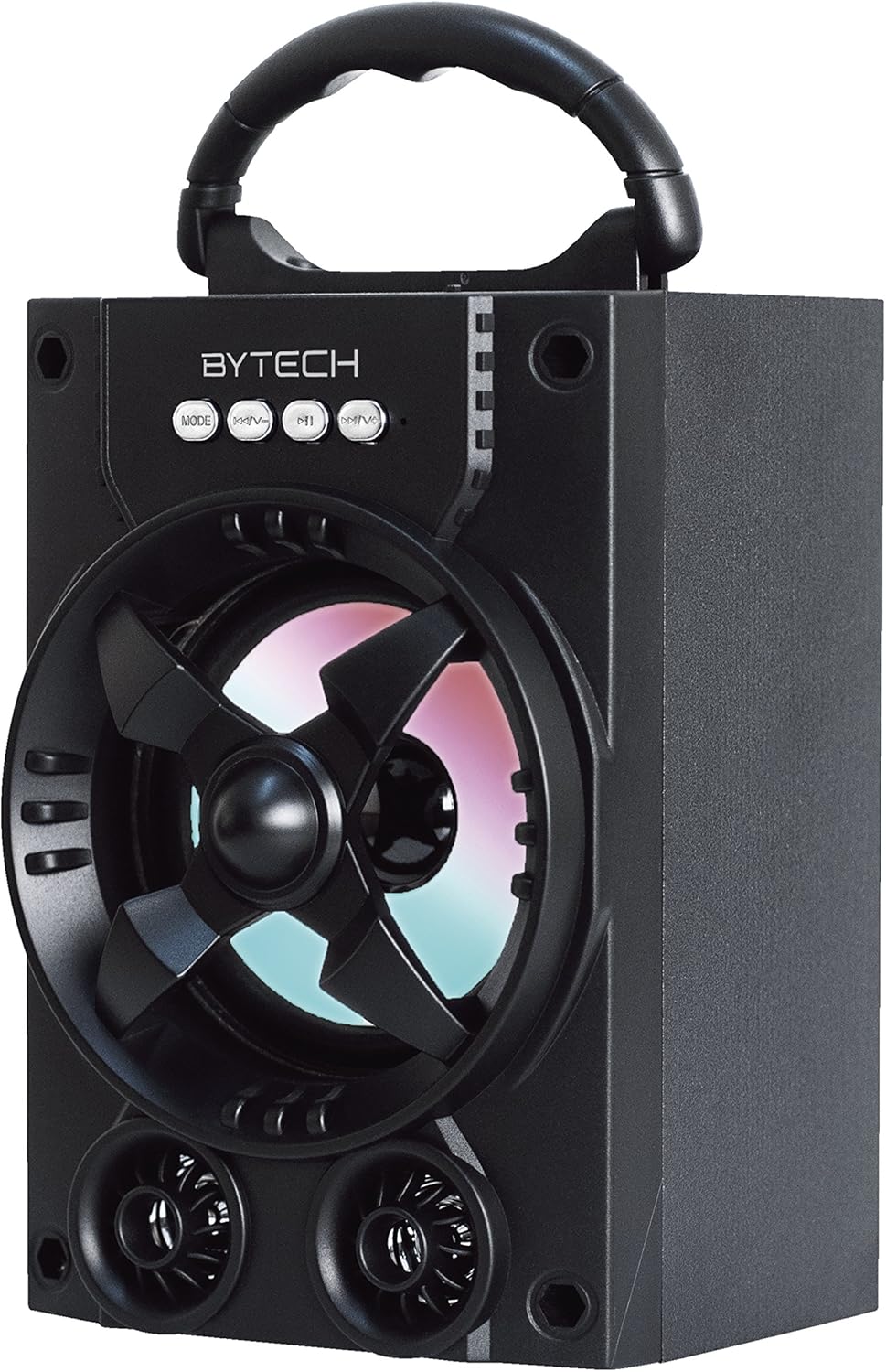
ຮູບ 1.1: ດ້ານຫນ້າ view of the Bytech Massive Bluetooth Long Bar Speaker-BK, showcasing its design, handle, and speaker grille with LED lights.
2. ເນື້ອໃນຊຸດ
ກະລຸນາກວດເບິ່ງຊຸດສຳລັບລາຍການຕໍ່ໄປນີ້:
- Bytech Massive Bluetooth Long Bar Speaker-BK
- ສາຍສາກ USB
- ຄູ່ມືຜູ້ໃຊ້ (ເອກະສານນີ້)
ຖ້າລາຍການໃດຂາດຫາຍໄປຫຼືເສຍຫາຍ, ກະລຸນາຕິດຕໍ່ຝ່າຍຊ່ວຍເຫຼືອລູກຄ້າ.
3. ຄຸນລັກສະນະຂອງຜະລິດຕະພັນ
- LED Performance Lights: Dynamic LED lights that synchronize with your music for an enhanced audio-visual experience.
- Convenient Carrying Handle: Integrated handle for easy portability, allowing you to take your music anywhere.
- Universal Bluetooth Connectivity: Seamlessly connect wirelessly to your smartphone, tablet, or other Bluetooth-enabled devices.
- ສຽງອ້ອມຂ້າງ: Designed to deliver a high-quality surround sound experience.
- ການອອກແບບແບບພົກພາ: Ideal for various settings, including parties, outdoor gatherings, and personal use.

Figure 1.2: The speaker shown with its retail packaging, illustrating its key features such as multi-color LED lights, Bluetooth connectivity, and surround sound capability.
4. ການຄວບຄຸມແລະຕົວຊີ້ວັດ
The speaker features intuitive controls and indicators for easy operation:
- ປຸ່ມ MODE: Press to switch between available input modes (e.g., Bluetooth).
- ປຸ່ມ V: Press to decrease volume. Long press to skip to the previous track.
- ປຸ່ມ V+: ກົດເພື່ອເພີ່ມລະດັບສຽງ. ກົດຄ້າງໄວ້ເພື່ອຂ້າມໄປຫາເພງຕໍ່ໄປ.
- ປຸ່ມ M: (Function not explicitly detailed, typically for mode or mute)
- ໄຟ LED: Indicate power status, charging status, and provide dynamic light effects during audio playback.
5. ຄູ່ມືການຕິດຕັ້ງ
5.1 ກຳລັງສາກລຳໂພງ
- ເຊື່ອມຕໍ່ປາຍສາຍສາກໄຟ USB ຂະໜາດນ້ອຍເຂົ້າກັບພອດສາກໄຟຢູ່ເທິງລຳໂພງ.
- ເຊື່ອມຕໍ່ປາຍໃຫຍ່ຂອງສາຍສາກ USB ກັບອະແດັບເຕີໄຟ USB (ບໍ່ລວມ) ຫຼືພອດ USB ຂອງຄອມພິວເຕີ.
- ຕົວຊີ້ວັດ LED ຈະສະແດງສະຖານະການສາກໄຟ (ເຊັ່ນ: ສີແດງສໍາລັບການສາກໄຟ, ປິດເມື່ອສາກເຕັມ).
- ໃຊ້ເວລາປະມານ 3-4 ຊົ່ວໂມງສໍາລັບການສາກເຕັມກ່ອນທີ່ຈະນໍາໃຊ້ຄັ້ງທໍາອິດ.
5.2 ການເປີດ/ປິດ
- To power on, press and hold the Power button (location not specified, typically near charging port or on control panel) for a few seconds until you hear an audible prompt or see the LED lights activate.
- ເພື່ອປິດເຄື່ອງ, ໃຫ້ກົດປຸ່ມເປີດ/ປິດຄ້າງໄວ້ອີກຄັ້ງຈົນກວ່າລຳໂພງຈະປິດ.
5.3 ການຈັບຄູ່ Bluetooth
- Ensure the speaker is powered on and in Bluetooth pairing mode (indicated by a flashing LED light or audible prompt).
- ໃນສະມາດໂຟນ ຫຼືແທັບເລັດຂອງທ່ານ, ໃຫ້ໄປທີ່ການຕັ້ງຄ່າ Bluetooth.
- ຊອກຫາ available devices. The speaker will appear as "BYTECH" or a similar name.
- ເລືອກລຳໂພງຈາກລາຍຊື່ເພື່ອເລີ່ມຕົ້ນການຈັບຄູ່.
- Once successfully paired, the LED indicator will typically become solid, and you may hear a confirmation tone.
6. ຄໍາແນະນໍາການດໍາເນີນງານ
6.1 ການຫຼິ້ນສຽງຜ່ານ Bluetooth
- After successful Bluetooth pairing, open your preferred music application on your connected device.
- Select and play your desired audio. The sound will be streamed wirelessly to the speaker.
- Use the V+ and V- buttons on the speaker or your connected device to adjust the volume.
- Long press V+ or V- to skip tracks.
6.2 LED Performance Lights
The speaker features integrated LED lights that enhance your listening experience. These lights typically activate automatically when the speaker is powered on and playing audio. Specific controls for light modes are not detailed, but they are designed to provide dynamic visual effects.
6.3 ການປ່ຽນໂໝດ
ກົດ ໂໝດ button to cycle through available input modes. While Bluetooth is the primary connectivity, other modes (if available, such as FM radio or AUX input) can be accessed via this button.
7. ການບໍາລຸງຮັກສາແລະການດູແລ
- ທໍາຄວາມສະອາດ: ໃຊ້ຜ້າປຽກແຫ້ງເພື່ອເຮັດຄວາມສະອາດດ້ານນອກຂອງລຳໂພງ. ຢ່າໃຊ້ເຄື່ອງເຮັດຄວາມສະອາດຂັດ, ຂີ້ເຜີ້ງ, ຫຼືສານລະລາຍ.
- ການເກັບຮັກສາ: ເມື່ອບໍ່ໄດ້ໃຊ້ເປັນເວລາດົນ, ໃຫ້ເກັບຮັກສາລໍາໂພງໄວ້ໃນບ່ອນທີ່ເຢັນ, ແຫ້ງແລ້ງຫ່າງຈາກແສງແດດໂດຍກົງ ແລະ ອຸນຫະພູມທີ່ຮຸນແຮງ.
- ການດູແລຫມໍ້ໄຟ: ເພື່ອຍືດອາຍຸການໃຊ້ງານຂອງແບັດເຕີຣີ, ໃຫ້ຫຼີກລ່ຽງການສາກແບັດເຕີຣີຈົນໝົດເລື້ອຍໆ. ໃຫ້ສາກລຳໂພງຄືນໃໝ່ເປັນປະຈຳ, ເຖິງແມ່ນວ່າຈະບໍ່ໄດ້ໃຊ້ງານກໍຕາມ, ເພື່ອຮັກສາສຸຂະພາບຂອງແບັດເຕີຣີ.
- ຄວາມຕ້ານທານນ້ໍາ: ຜະລິດຕະພັນນີ້ແມ່ນ ບໍ່ແມ່ນ waterproof. Avoid exposure to water, rain, or excessive moisture to prevent damage.
8. ການແກ້ໄຂບັນຫາ
ຖ້າເຈົ້າພົບບັນຫາກັບຜູ້ເວົ້າຂອງເຈົ້າ, ໃຫ້ອ້າງອີງເຖິງບັນຫາ ແລະວິທີແກ້ໄຂບັນຫາທົ່ວໄປຕໍ່ໄປນີ້:
| ບັນຫາ | ສາເຫດທີ່ເປັນໄປໄດ້ | ການແກ້ໄຂ |
|---|---|---|
| ລຳໂພງບໍ່ເປີດ. | ແບັດເຕີຣີຕໍ່າ. | ສາກລຳໂພງໃຫ້ເຕັມ. |
| ບໍ່ມີສຽງຈາກລຳໂພງ. | ປະລິມານຕ່ໍາເກີນໄປ; ບໍ່ໄດ້ຈັບຄູ່; ໂໝດບໍ່ຖືກຕ້ອງ. | Increase volume on speaker and device; Ensure successful Bluetooth pairing; Press MODE button to select correct input. |
| ການເຊື່ອມຕໍ່ Bluetooth ບໍ່ສະຖຽນ ຫຼື ລົ້ມເຫລວ. | Device too far; Interference; Pairing issue. | Move device closer to speaker (within 33 ft/10m); Avoid obstacles; Forget device on your phone and re-pair. |
| ໄຟ LED ບໍ່ເຮັດວຽກ. | Speaker not powered on or playing audio. | Ensure speaker is on and audio is playing. |
9. ຂໍ້ມູນຈໍາເພາະ
| ຄຸນສົມບັດ | ລາຍລະອຽດ |
|---|---|
| ຍີ່ຫໍ້ | Bytech |
| ຊື່ຕົວແບບ | BYTECH |
| ໝາຍເລກຕົວແບບ | BCAUBS134BK |
| ປະເພດລຳໂພງ | ສຽງອ້ອມຮອບ |
| ເຕັກໂນໂລຊີການເຊື່ອມຕໍ່ | Bluetooth |
| ເຕັກໂນໂລຊີການສື່ສານໄຮ້ສາຍ | Bluetooth |
| ອຸປະກອນທີ່ເຂົ້າກັນໄດ້ | ໂທລະສັບສະຫຼາດ |
| ລຳໂພງກຳລັງຜົນຜະລິດສູງສຸດ | 20 ວັດ |
| ການຕອບສະໜອງຄວາມຖີ່ | 20 KHz |
| impedance | 1 ໂອມ |
| ຂະຫນາດລໍາໂພງ | 5 ນິ້ວ |
| ແຫຼ່ງພະລັງງານ | ໄຟຟ້າມີສາຍ (ເພື່ອສາກໄຟ) |
| ປະເພດຫມໍ້ໄຟ | ຕ້ອງໃຊ້ແບັດເຕີຣີ Lithium Ion 1 ອັນ |
| ສີ | ດຳ |
| ຂະໜາດສິນຄ້າ | 4.75 x 5.5 x 8.5 ນິ້ວ |
| ນ້ໍາຫນັກລາຍການ | 1.3 ປອນ |
| ແມ່ນກັນນ້ໍາ | ບໍ່ |
| ປະເທດຕົ້ນກໍາເນີດ | ຈີນ |
| UPC | 805112038121 |
10. ຂໍ້ມູນການຮັບປະກັນ
Bytech products are manufactured to the highest quality standards. For specific warranty terms and conditions, please refer to the warranty card included with your purchase or visit the official Bytech webເວັບໄຊ. ຮັກສາຫຼັກຖານການຊື້ຂອງທ່ານສໍາລັບການຮ້ອງຂໍການຮັບປະກັນ.
11. ການຊ່ວຍເຫຼືອລູກຄ້າ
For technical assistance, troubleshooting, or general inquiries, please contact Bytech customer support. Contact information can typically be found on the product packaging, the official Bytech webເວັບໄຊ, ຫຼືໃບຮັບເງິນຊື້ຂອງທ່ານ.
ໝາຍເຫດ: ບໍ່ມີວິດີໂອຜະລິດຕະພັນທີ່ເປັນທາງການຈາກຜູ້ຂາຍສຳລັບການຝັງໂດຍອີງໃສ່ຂໍ້ມູນທີ່ສະໜອງໃຫ້.
Ask a question about this manual
Ask about setup, troubleshooting, compatibility, parts, safety, or missing instructions. Manuals+ will review the question and use this page’s manual context to help answer it.