
1. ບົດແນະນຳ
This document provides comprehensive instructions for the setup, operation, and maintenance of your Raspberry Pi 3 Model B+ Motherboard. The Raspberry Pi 3 Model B+ is a versatile single-board computer designed for a wide range of applications, from educational projects to home automation and server tasks.
Please read this manual thoroughly before using your device to ensure optimal performance and longevity.
2. ຜະລິດຕະພັນເກີນview
The Raspberry Pi 3 Model B+ features enhanced processing power and connectivity options compared to previous models. Key features include:
- ໜ່ວຍປະມວນຜົນ: 1.4GHz 64-bit quad-core ARMv8 CPU (Broadcom BCM2837B0)
- RAM: 1 GB LPDDR2 SDRAM
- ການເຊື່ອມຕໍ່ແບບໄຮ້ສາຍ: Dual-band 2.4GHz and 5GHz IEEE 802.11.b/g/n/ac Wireless LAN, Bluetooth 4.2/BLE
- ອີເທີເນັດ: Faster Gigabit Ethernet (via USB 2.0 bridge, max 300 Mbps)
- ພະລັງງານຫຼາຍກວ່າ Ethernet (PoE): Capability via a separate PoE HAT (Power over Ethernet Hardware Attached on Top)
- GPIO: 40-pin GPIO header for interfacing with external hardware
- ວິດີໂອ ແລະສຽງ: Full-size HDMI port, DSI display port, 3.5mm audio/video jack, CSI camera port
- USB: 4 ພອດ USB 2.0
- ການເກັບຮັກສາ: Micro SD card slot for operating system and data storage
- ການປ້ອນຂໍ້ມູນພະລັງງານ: Micro USB power input (5.1V / 2.5A recommended)
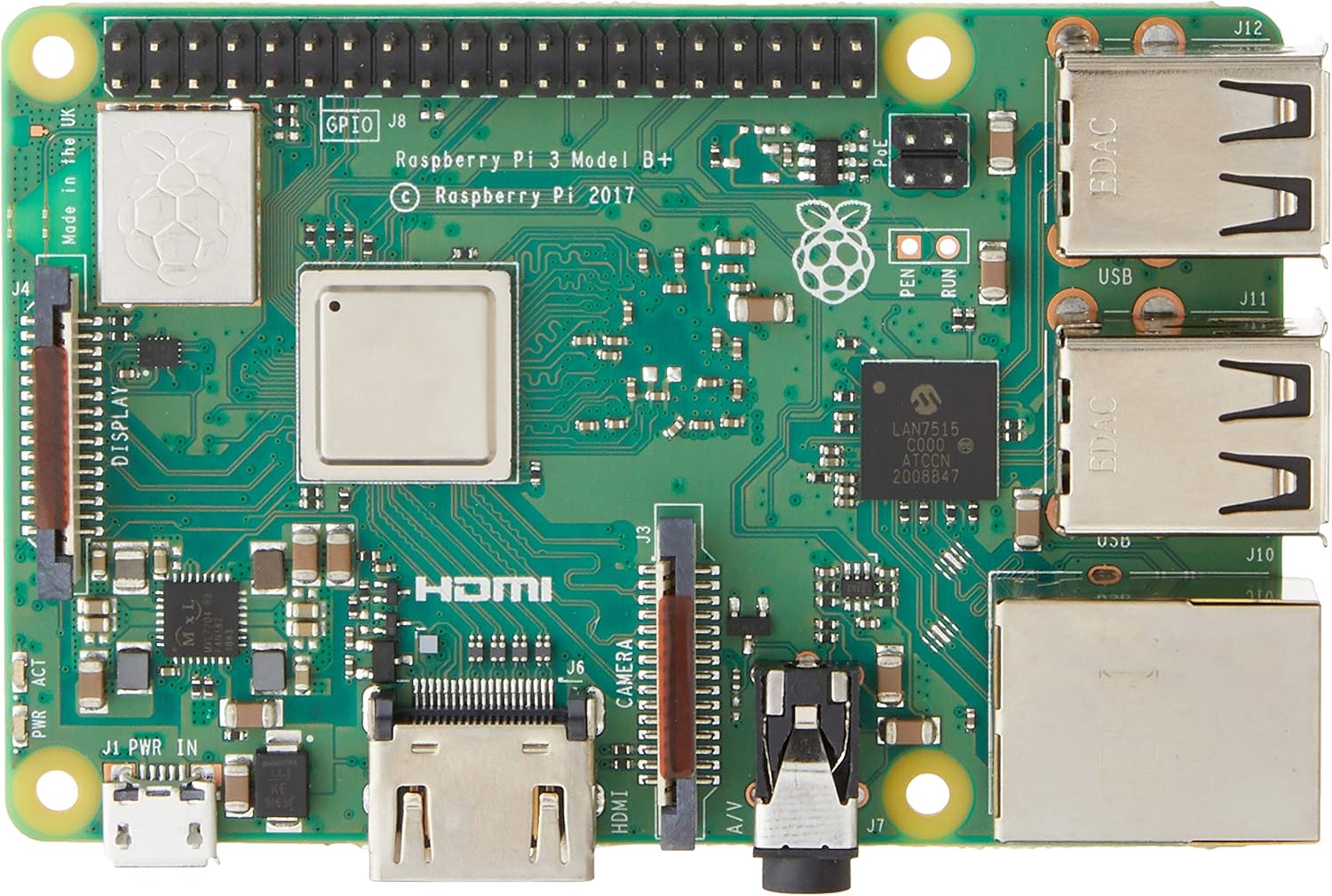
ຮູບທີ 2.1: ທາງເທິງ view of the Raspberry Pi 3 Model B+ Motherboard, showing the processor, RAM, GPIO pins, HDMI, USB ports, and Ethernet port.

ຮູບທີ 2.2: ດ້ານລຸ່ມ view of the Raspberry Pi 3 Model B+ Motherboard, highlighting the Micro SD card slot and various components.

ຮູບ 2.3: ຂ້າງ view of the Raspberry Pi 3 Model B+ Motherboard, detailing the Ethernet port and four USB ports.

ຮູບທີ 2.4: ມຸມ view of the Raspberry Pi 3 Model B+ Motherboard, showcasing the various input/output ports including HDMI, Micro USB, and audio jack.
3. ຕັ້ງຄ່າ
3.1 Required Components (Not Included)
- ການສະຫນອງພະລັງງານ: 2.5A Micro USB Power Supply (recommended for stable operation).
- ການເກັບຮັກສາ: Class 10 Micro SD Card (minimum 8GB, pre-loaded with Pi 3 B+ compatible software).
- ອຸປະກອນປ້ອນຂໍ້ມູນ (ທາງເລືອກ): USB or Bluetooth keyboard/mouse.
- ຈໍສະແດງຜົນ (ທາງເລືອກ): HDMI or DSI compatible display.
3.2 ຂັ້ນຕອນການຕິດຕັ້ງເບື້ອງຕົ້ນ
- ກະກຽມກາດ Micro SD: Download a compatible operating system image (e.g., Raspberry Pi OS) from the official Raspberry Pi website. Use an imaging tool (like Raspberry Pi Imager) to write the OS image to your Class 10 Micro SD card.
- ໃສ່ Micro SD Card: Gently insert the prepared Micro SD card into the card slot on the underside of the Raspberry Pi board.
- ເຊື່ອມຕໍ່ອຸປະກອນຕໍ່ພ່ວງ:
- Connect your HDMI display to the HDMI port on the Raspberry Pi.
- ເຊື່ອມຕໍ່ແປ້ນພິມ USB ແລະເມົ້າຂອງທ່ານກັບພອດ USB ທີ່ມີຢູ່.
- (Optional) Connect an Ethernet cable to the Ethernet port for wired network access.
- ນຳໃຊ້ພະລັງງານ: Connect the 2.5A Micro USB power supply to the Micro USB power port on the Raspberry Pi. The device will automatically power on and begin booting.
- ເກີບທໍາອິດ: Follow the on-screen instructions to complete the initial setup of the operating system, including setting up Wi-Fi, language, and user accounts.
4. ການເຮັດວຽກ
4.1 ການດໍາເນີນງານພື້ນຖານ
Once the operating system is installed and configured, your Raspberry Pi is ready for use. You can interact with it via the connected keyboard, mouse, and display, similar to a traditional desktop computer. The Raspberry Pi OS provides a graphical user interface (GUI) for ease of use.
4.2 ການຕິດຕັ້ງຊອບແວ ແລະ ການອັບເດດ
Software can be installed via the graphical "Add/Remove Software" utility or through the command line using `apt` commands (e.g., `sudo apt update`, `sudo apt install [package_name]`). Regular updates are recommended to ensure system stability and security.
4.3 GPIO Usage
The 40-pin GPIO header allows for advanced projects involving physical computing. You can connect various sensors, actuators, and other electronic components to control them programmatically using languages like Python.
Refer to the official Raspberry Pi documentation for detailed guides on GPIO programming and hardware interfacing.
5. ບໍາລຸງຮັກສາ
- ອັບເດດຊອບແວ: Regularly update your operating system and installed software packages to receive the latest features, bug fixes, and security patches. This can typically be done via the terminal using `sudo apt update` followed by `sudo apt upgrade`.
- ການຄຸ້ມຄອງພະລັງງານ: Always use a stable and sufficient power supply (5.1V / 2.5A) to prevent unexpected shutdowns or data corruption. Avoid disconnecting power without properly shutting down the operating system first.
- SD Card Care: Micro SD cards can wear out over time. Regularly back up your data and consider using high-quality, durable cards. Avoid frequent power cuts to minimize the risk of SD card corruption.
- ສະພາບແວດລ້ອມທາງກາຍະພາບ: Keep the Raspberry Pi in a cool, dry, and well-ventilated area. Avoid exposing it to extreme temperatures, humidity, or dust. Consider using a protective case.
6. ການແກ້ໄຂບັນຫາ
- ບໍ່ມີພະລັງງານ/ບູດ:
- Ensure the power supply is correctly connected and meets the 5.1V / 2.5A specification.
- Check the Micro SD card for proper insertion and ensure it has a valid operating system image.
- Look for the red power LED (PWR) to be steadily lit and the green activity LED (ACT) to flash during boot.
- ສະແດງບັນຫາ:
- Verify the HDMI cable is securely connected to both the Raspberry Pi and the display.
- Ensure your display is set to the correct input source.
- ບັນຫາການເຊື່ອມຕໍ່ເຄືອຂ່າຍ:
- For wired Ethernet, check the cable connection and router status.
- For Wi-Fi, ensure the correct network name (SSID) and password are entered in the OS settings.
- Restart your router and the Raspberry Pi.
- ອຸປະກອນຕໍ່ພ່ວງບໍ່ຕອບສະໜອງ:
- Try connecting USB devices to different USB ports.
- For Bluetooth devices, ensure they are in pairing mode and correctly configured in the OS.
7. ຂໍ້ມູນຈໍາເພາະ
| ຄຸນສົມບັດ | ຂໍ້ມູນຈໍາເພາະ |
|---|---|
| ໂຮງງານຜະລິດ | 1.4 GHz Broadcom BCM2837B0, Cortex-A53 (ARMv8) 64-bit SoC |
| RAM | 1GB LPDDR2 SDRAM |
| LAN ໄຮ້ສາຍ | Dual-band 2.4GHz and 5GHz IEEE 802.11.b/g/n/ac |
| Bluetooth | Bluetooth 4.2, Bluetooth ພະລັງງານຕໍ່າ (BLE) |
| ອີເທີເນັດ | Gigabit Ethernet (via USB 2.0, max 300 Mbps) |
| ພອດ USB | 4 x USB 2.0 ພອດ |
| GPIO | ຫົວຕໍ່ GPIO 40-pin |
| ຜົນຜະລິດວິດີໂອ | Full-size HDMI, DSI display port |
| ການໂຕ້ຕອບກ້ອງຖ່າຍຮູບ | CSI camera port |
| ສຽງອອກ | 3.5mm 4-pole stereo audio and composite video port |
| ການເກັບຮັກສາ | Micro SD port for loading your operating system and data storage |
| ການປ້ອນຂໍ້ມູນພະລັງງານ | 5.1V / 2.5A DC via Micro USB connector |
| ຂະໜາດ | 4.33 x 2.76 x 1.18 ນິ້ວ |
| ນ້ຳໜັກ | 2.82 ອອນ |
| ລະບົບປະຕິບັດການ | Linux (e.g., Raspberry Pi OS) |
8. ການຮັບປະກັນແລະການສະຫນັບສະຫນູນ
ສຳລັບຂໍ້ມູນການຮັບປະກັນ ແລະ ການຊ່ວຍເຫຼືອດ້ານເຕັກນິກ, ກະລຸນາອ້າງອີງເຖິງ Raspberry Pi ຢ່າງເປັນທາງການ webເວັບໄຊ ຫຼືຕິດຕໍ່ຮ້ານຂາຍຍ່ອຍຂອງທ່ານ. ຮັກສາຫຼັກຖານການຊື້ຂອງທ່ານສໍາລັບການຮຽກຮ້ອງການຮັບປະກັນໃດໆ.
Raspberry Pi ຢ່າງເປັນທາງການ Webເວັບໄຊ: www.raspberrypi.org