
1. ບົດແນະນຳ
The AIRTHEREAL CA300 is an advanced air purification system designed to improve indoor air quality. It combines ozone generation, True HEPA filtration, and ionization to address various air contaminants, including odors, allergens, and airborne particles. This manual provides essential information for the safe and effective operation and maintenance of your device.
2. ຄໍາແນະນໍາຄວາມປອດໄພ
- ອ່ານຄໍາແນະນໍາທັງຫມົດ ກ່ອນທີ່ຈະດໍາເນີນການອຸປະກອນ.
- ຄວາມປອດໄພຂອງໂອໂຊນ: When using the ozone generation function, ensure the area is unoccupied by humans, pets, or plants. Ventilate the treated area thoroughly before re-entry.
- ຄວາມປອດໄພທາງໄຟຟ້າ: Always plug the unit into a grounded outlet. Do not operate with a damaged cord or plug. Keep the power cord away from heated surfaces.
- ການຈັດວາງ: Place the unit on a stable, level surface. Do not block air inlets or outlets. Maintain adequate clearance around the unit for proper airflow.
- ຄວາມຊຸ່ມ: ຫ້າມໃຊ້ເຄື່ອງໃນປຽກ ຫຼື ງamp environments. Keep away from water and other liquids.
- ບໍາລຸງຮັກສາ: ຖອດປລັກໜ່ວຍອອກກ່ອນທຳຄວາມສະອາດ ຫຼືເຮັດການບຳລຸງຮັກສາ.
- ເດັກນ້ອຍແລະສັດລ້ຽງ: ຮັກສາເຄື່ອງໃຊ້ໃຫ້ໄກຈາກເດັກນ້ອຍ ແລະສັດລ້ຽງ.
3. ຜະລິດຕະພັນເກີນview
The AIRTHEREAL CA300 features a robust design with multiple purification stages and user-friendly controls.
3.1 ອົງປະກອບ
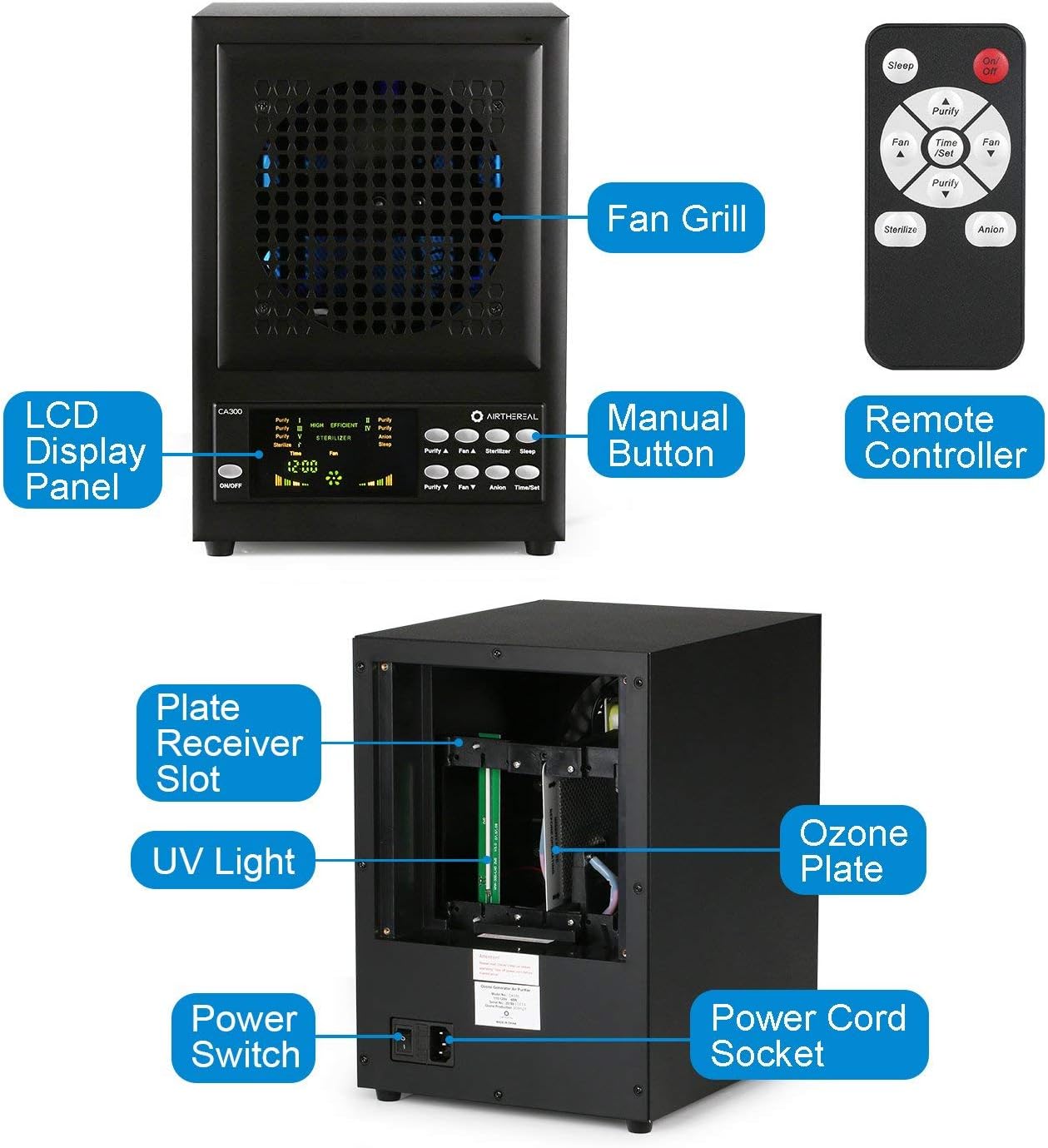
ຮູບທີ 1: Key components of the AIRTHEREAL CA300 unit, including the LCD display, control buttons, fan grill, and internal parts like the ozone plate and UV light.
- ແຜງຈໍສະແດງຜົນ LCD: Shows current settings and operational status.
- ປຸ່ມຄູ່ມື: For direct control of functions on the unit.
- ຄວບຄຸມໄລຍະໄກ: Provides convenient control from a distance.
- ປີ້ງພັດລົມ: Protects the internal fan and directs airflow.
- Plate Receiver Slot: Area for inserting the ozone plate.
- ແສງ UV: Utilized for sterilization.
- Ozone Plate: Generates ozone for powerful odor removal and sterilization.
- ສັບປ່ຽນພະລັງງານ: ການຄວບຄຸມພະລັງງານຫຼັກສຳລັບໜ່ວຍ.
- Power Cord Socket: Connection point for the power cord.
3.2 4-ສtage ລະບົບການກັ່ນຕອງ

ຮູບທີ 2: Illustration of the multi-stage air filtration process within the unit.
- ການກັ່ນຕອງກ່ອນ: Captures large particles like dust, lint, and pet dander, extending the life of subsequent filters.
- ກອງ HEPA: Traps fine particles, including pollen, dust mites, and other allergens.
- ການກັ່ນຕອງກາກບອນທີ່ເປີດໃຊ້ງານ: Absorbs odors from cooking, pets, smoke, and other volatile organic compounds (VOCs).
- TiO2 Photo-catalytic Filter: Works with UV light to break down pollutants at a molecular level.
4. ຕັ້ງຄ່າ
Follow these steps to prepare your AIRTHEREAL CA300 for first use or after filter maintenance.

ຮູບທີ 3: Step-by-step guide for filter and ozone plate installation.
- Unscrew four nails: Locate and remove the four screws securing the back panel.
- Remove four filter covers: Carefully detach the filter covers to access the filter compartments.
- Insert one ozone plate: Slide the ozone plate into its designated slot.
- Ensure the trigger is placed correctly as above: Verify that the ozone plate's trigger mechanism is properly aligned.
- Place the filters in sequence: Install the pre-filter, HEPA filter, activated carbon filter, and TiO2 photo-catalytic filter in the correct order. Refer to Figure 2 for the sequence.
- Use a secure socket or power strip, turn on the power switch: Connect the power cord to a suitable electrical outlet and then flip the main power switch on the unit.
5. ຄໍາແນະນໍາການດໍາເນີນງານ
The AIRTHEREAL CA300 can be operated using the manual buttons on the unit or the provided remote control.

ຮູບທີ 4: Control panel and function descriptions.
5.1 ເປີດ/ປິດ
- ກົດ ເປີດ/ປິດ button on the unit or the remote control to power the device on or off.
5.2 Function Modes
- Purity (Ozone Generation): Adjusts the level of activated oxygen (ozone). Use the 'Purify A' and 'Purify V' buttons to increase or decrease ozone output. Caution: Ensure no occupants are present during ozone generation.
- ຄວາມໄວພັດລົມ: Controls the airflow speed. Use the 'Fan A' and 'Fan V' buttons to adjust.
- Sterilizer (UV Lamp & Photo-catalytic Filter): Activates the UV lamps and photo-catalytic filter for enhanced sterilization. Press the 'Sterilizer' button to toggle.
- Anion: Controls the dispersal of negative ions, which help to clump airborne particles for easier filtration. Press the 'Anion' button to toggle.
- ຮູບແບບການນອນ: Dims the LCD panel and maintains current settings while operating quietly. Press the 'Sleep' button to activate.
- Time/Set (Timer Function): Sets the start and shut-off times for operation. Use the 'Time/Set' button to configure the timer.
6. ບໍາລຸງຮັກສາ
Regular maintenance ensures optimal performance and longevity of your AIRTHEREAL CA300.
6.1 ການທົດແທນການກັ່ນຕອງ
ຫຼາຍ s ໄດ້tage filters should be checked and replaced periodically based on usage and air quality. Refer to the setup section (Figure 3) for instructions on accessing and replacing filters.
- ການກັ່ນຕອງກ່ອນ: Clean every 2-4 weeks, replace every 6-12 months.
- HEPA & Activated Carbon Filter: ທົດແທນທຸກໆ 6-12 ເດືອນ.
- TiO2 Photo-catalytic Filter: ທົດແທນທຸກໆ 12-24 ເດືອນ.
6.2 Ozone Plate Cleaning/Replacement
The ozone plate may require cleaning or replacement if ozone output decreases. Unplug the unit, remove the ozone plate as shown in Figure 3, and clean with a dry cloth or replace if necessary.
6.3 ການທໍາຄວາມສະອາດທົ່ວໄປ
Wipe the exterior of the unit with a soft, dry cloth. Do not use abrasive cleaners or solvents. Ensure the unit is unplugged before cleaning.
7. ການແກ້ໄຂບັນຫາ
If you encounter issues with your AIRTHEREAL CA300, refer to the following common problems and solutions.
| ບັນຫາ | ສາເຫດທີ່ເປັນໄປໄດ້ | ການແກ້ໄຂ |
|---|---|---|
| ຫນ່ວຍບໍລິການບໍ່ເປີດ. | No power supply; Power cord not connected; Power switch off. | Check power outlet; Ensure power cord is securely plugged in; Turn on the main power switch. |
| ກະແສລົມອ່ອນແອ. | Filters are clogged; Fan speed is too low. | Clean or replace filters; Increase fan speed using 'Fan A' button. |
| Unusual odor (not ozone). | New unit smell; Filters need replacement. | Allow unit to run in a well-ventilated area for a few hours; Replace activated carbon filter. |
| Ozone function not working. | Ozone plate is dirty or damaged; Purity mode not activated. | Clean or replace ozone plate; Ensure 'Purity' mode is selected and level is set. |
8. ຂໍ້ມູນຈໍາເພາະ
- ຍີ່ຫໍ້: ທາງອາກາດ
- ໝາຍເລກຕົວແບບ: CA300
- ແຫຼ່ງພະລັງງານ: ໄຟຟ້າສາຍ
- ນ້ໍາຫນັກລາຍການ: 15 ປອນ
- ວິທີການຄວບຄຸມ: Remote, Manual Buttons
- ປະເພດການກັ່ນຕອງ: HEPA
- ປະເພດຄວບຄຸມ: ການຄວບຄຸມໄລຍະໄກ
9. ການຮັບປະກັນແລະການສະຫນັບສະຫນູນ
AIRTHEREAL products are designed for reliability and performance. For warranty information, technical support, or to purchase replacement parts, please refer to the official AIRTHEREAL webເວັບໄຊ ຫຼືຕິດຕໍ່ບໍລິການລູກຄ້າຂອງເຂົາເຈົ້າໂດຍກົງ. ຮັກສາໃບຮັບເງິນການຊື້ຂອງທ່ານສໍາລັບການຮ້ອງຂໍການຮັບປະກັນ.