
1. ບົດແນະນຳ
Thank you for choosing the ELECDER i37 Kids On-Ear Headphones. These headphones are designed for children and teens, offering a comfortable and adjustable listening experience. They feature a foldable design for portability and connect via a standard 3.5mm audio jack, compatible with a wide range of devices.

Image: Child wearing ELECDER i37 headphones.
2. ຂໍ້ມູນຄວາມປອດໄພ
- ການປ້ອງກັນການໄດ້ຍິນ: ເພື່ອປ້ອງກັນຄວາມເສຍຫາຍຂອງການໄດ້ຍິນ, ຫຼີກເວັ້ນການຟັງໃນລະດັບສຽງສູງສໍາລັບໄລຍະເວລາທີ່ຍາວນານ.
- ຄວາມຮັບຮູ້ດ້ານສິ່ງແວດລ້ອມ: ຢ່າໃຊ້ຫູຟັງໃນສະຖານະການທີ່ການບໍ່ສາມາດໄດ້ຍິນສຽງອ້ອມຂ້າງອາດເປັນອັນຕະລາຍໄດ້ ເຊັ່ນ: ໃນຂະນະທີ່ຂັບລົດ, ຂີ່ລົດຖີບ ຫຼື ຍ່າງຢູ່ໃນການຈະລາຈອນ.
- ຄວາມປອດໄພສາຍ: Keep the headphone cable away from sharp objects or moving parts to prevent damage. Ensure the cable does not pose a tripping hazard.
- No Volume Control: Please note that these headphones do not feature an integrated volume control. Adjust the volume directly on the connected audio device.
- ອັນຕະລາຍຕໍ່ເນື່ອງ This product contains small parts and a cable which could pose a choking or strangulation hazard for very young children. Adult supervision is recommended.
3. ເນື້ອໃນຊຸດ
ກວດສອບວ່າລາຍການທັງຫມົດແມ່ນມີຢູ່ໃນຊຸດຂອງທ່ານ:
- ELECDER i37 Kids On-Ear Headphones
- ຄູ່ມືຜູ້ໃຊ້ (ເອກະສານນີ້)
4. ຜະລິດຕະພັນເກີນview
The ELECDER i37 headphones are designed for ease of use and comfort. Key features include:
- ສາຍຫົວສາມາດປັບໄດ້: Allows for a secure and comfortable fit for various head sizes.
- ເບາະຫູອ່ອນ: Designed for comfort during extended listening sessions.
- ການອອກແບບແບບພັບ: Enables compact storage and easy portability.
- ສາຍບໍ່ຕິດຂັດ: The durable cloth-covered cable resists tangling.
- Jack ສຽງ 3.5mm: Standard connector for broad compatibility.

Ultra Soft Ear Cushions

ຕົວເລື່ອນທີ່ສາມາດປັບໄດ້

ສາຍບໍ່ຕິດຂັດ

ຄຸນນະສົມບັດທີ່ສໍາຄັນ
5. ຕັ້ງຄ່າ
- ເປີດຫູຟັງ: Gently unfold the earcups from their collapsed position until the headband forms a complete arc.
- ປັບແຖບຫົວ: Extend or retract the adjustable sliders on each side of the headband to fit your head comfortably. The earcups should rest fully over your ears.
- ເຊື່ອມຕໍ່ກັບອຸປະກອນສຽງ: Insert the 3.5mm audio jack firmly into the headphone port of your smartphone, computer, laptop, MP3/4 player, Kindle, or tablet.
Note on Device Compatibility: For devices like iPhone 7 and newer, or iPad Pro 11 and newer, a separate Lightning to 3.5mm jack adapter (not included) is required.

Image: 3.5mm jack compatibility with various devices.
6. ຄໍາແນະນໍາການດໍາເນີນງານ
Once connected, you can begin using your ELECDER i37 headphones:
- ຫຼິ້ນສຽງ: ເລີ່ມຫຼິ້ນສຽງຈາກອຸປະກອນທີ່ເຊື່ອມຕໍ່ຂອງທ່ານ.
- ປັບລະດັບສຽງ: Control the listening volume directly from your audio source device. These headphones do not have built-in volume controls.
- Comfortable Listening: Ensure the earcups are positioned comfortably over your ears for optimal sound and noise isolation.
Video: Demonstration of ELECDER i37 headphones in use, highlighting their features and comfort.

Enjoying audio

ເຊື່ອມຕໍ່ກັບອຸປະກອນ

ເຫມາະສໍາລັບການເດີນທາງ
7. ບໍາລຸງຮັກສາ
- ທໍາຄວາມສະອາດ: Use a soft, dry cloth to wipe the headphones. Do not use liquid cleaners or solvents.
- ການເກັບຮັກສາ: When not in use, fold the headphones to their compact size and store them in a clean, dry place away from extreme temperatures.
- ການດູແລສາຍໄຟ: ຫຼີກລ່ຽງການງໍ ຫຼື ດຶງສາຍຢ່າງແຮງເພື່ອປ້ອງກັນຄວາມເສຍຫາຍພາຍໃນ.
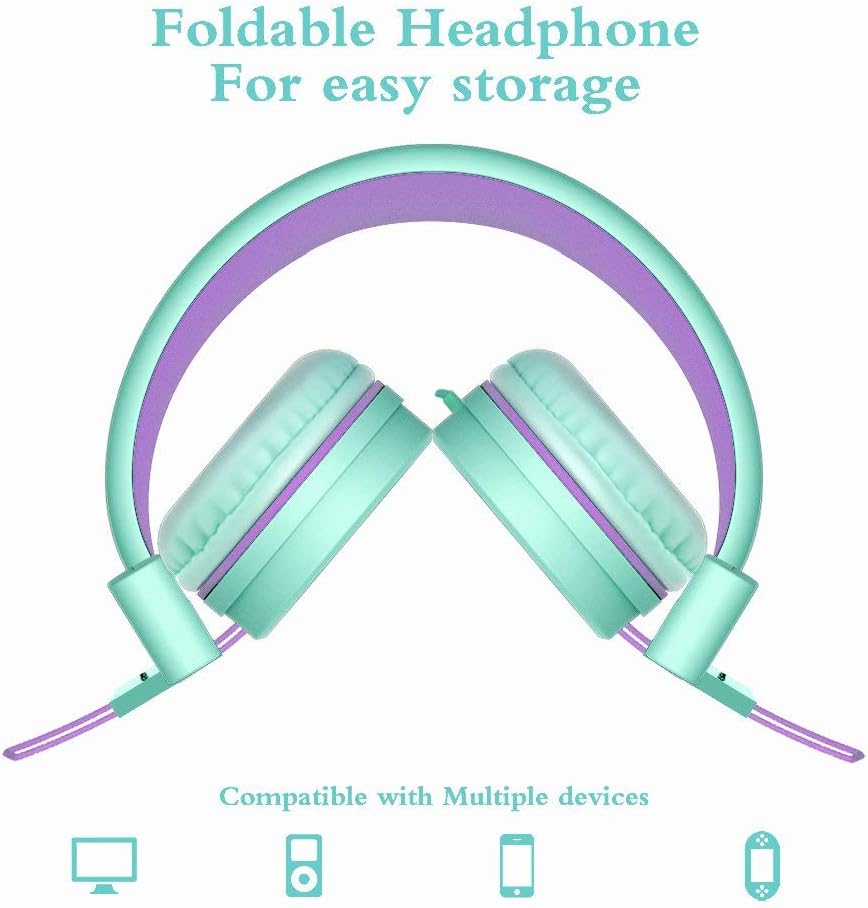
Image: Foldable design for easy storage.
8. ການແກ້ໄຂບັນຫາ
| ບັນຫາ | ສາເຫດທີ່ເປັນໄປໄດ້ | ການແກ້ໄຂ |
|---|---|---|
| ບໍ່ມີສຽງ | 1. Headphone jack not fully inserted. 2. Device volume is too low or muted. 3. ເລືອກຜົນຜະລິດສຽງທີ່ບໍ່ຖືກຕ້ອງໃນອຸປະກອນ. | 1. Ensure the 3.5mm jack is fully inserted into the device. 2. Increase the volume on your audio device and check for mute settings. 3. Verify that the correct audio output (e.g., "Headphones") is selected in your device's sound settings. |
| ສຽງບິດເບືອນ | 1. Volume too high on device. 2. Audio source quality is poor. 3. ສາຍໄຟ ຫຼື ຕົວເຊື່ອມຕໍ່ທີ່ເສຍຫາຍ. | 1. ຫຼຸດລະດັບສຽງລົງໃນອຸປະກອນສຽງຂອງທ່ານ. 2. Try a different audio source or file. 3. Inspect the cable and jack for visible damage. If damaged, contact support. |
| ຫູຟັງຮູ້ສຶກບໍ່ສະບາຍ | ການປັບສາຍຫົວທີ່ບໍ່ເໝາະສົມ. | Adjust the headband sliders to find a comfortable and secure fit. Ensure earcups are centered over the ears. |
9. ຂໍ້ມູນຈໍາເພາະ
| ຄຸນສົມບັດ | ລາຍລະອຽດ |
|---|---|
| ຊື່ຕົວແບບ | i37 |
| ເຕັກໂນໂລຊີການເຊື່ອມຕໍ່ | ມີສາຍ (ແຈັກ 3.5 ມມ) |
| ການຄວບຄຸມສິ່ງລົບກວນ | ການແຍກສຽງ |
| ຂະໜາດໄດເວີສຽງ | 40 ມິນລິແມັດ |
| impedance | 32 ໂອມ |
| ຄຸນສົມບັດສາຍ | Tangle Free (Cloth) |
| ຄຸນນະສົມບັດພິເສດ | Foldable, Lightweight, Adjustable |
| ວັດສະດຸ | ພາດສະຕິກ, ຜ້າ |
| ນ້ໍາຫນັກລາຍການ | 5.6 ອໍ (158.7 ກຣາມ) |
| ຂະໜາດສິນຄ້າ | 8.9 x 2.8 x 6.1 ນິ້ວ |
| ຊ່ວງອາຍຸ (ລາຍລະອຽດ) | ເດັກນ້ອຍໄວລຸ້ນ |
10. ການຮັບປະກັນແລະການສະຫນັບສະຫນູນ
ELECDER provides a 1-Year Hassle-Free Protection for your i37 headphones. This warranty covers manufacturing defects and ensures customer satisfaction.
For any questions, concerns, or support needs regarding your ELECDER i37 headphones, please contact us:
- ຜ່ານ Amazon: Use the Amazon messaging system to reach our customer service team.
- ຂໍ້ມູນຕິດຕໍ່: Refer to the contact details provided on the product packaging or included instruction leaflet for direct support options.
Our customer service team is committed to providing a quick response to assist you.