
ແນະນຳ
Thank you for choosing the KROM Kernel TKL Mechanical Gaming Keyboard. This compact, tenkeyless (TKL) keyboard is designed for gaming enthusiasts, offering a responsive mechanical experience with customizable RGB backlighting and a Spanish layout. This manual provides detailed instructions for setup, operation, maintenance, and troubleshooting to ensure optimal performance and longevity of your device.
ສິນຄ້າເກີນview
ຄຸນນະສົມບັດທີ່ສໍາຄັນ
- ສະວິດກົນຈັກ: Durable and responsive mechanical key switches for precise input.
- ການອອກແບບແບບບໍ່ມີກະແຈ Tenkey (TKL): Compact form factor without a numeric keypad, ideal for saving desk space and improving mouse movement.
- Backlighting RGB: Customizable LED backlighting with various effects and colors.
- ການທໍາງານຂອງ Macro: Assign macro functions to any key for personalized commands.
- ປຸ່ມມັນຕິມີເດຍ: Dedicated or function-layer multimedia controls for convenience.
- Anti-Ghosting: ຮັບປະກັນວ່າການກົດປຸ່ມທັງໝົດຖືກລົງທະບຽນຢ່າງຖືກຕ້ອງ, ເຖິງແມ່ນວ່າໃນລະຫວ່າງການຫຼິ້ນເກມທີ່ໜັກໜ່ວງກໍຕາມ.
- ການກໍ່ສ້າງທົນທານ: Built with quality materials for long-lasting performance.
- Spanish Layout: Designed with a QWERTY Spanish key layout.
ເນື້ອໃນຊຸດ
- KROM Kernel TKL Mechanical Gaming Keyboard
- ສາຍ USB (ຕິດຢູ່)
- ຄູ່ມືຜູ້ໃຊ້ (ເອກະສານນີ້)
- (Note: Additional accessories may vary by region or specific product bundle.)
ຮູບພາບ 1.1: KROM Kernel TKL Mechanical Gaming Keyboard packaging, showing the front and back of the box with product features and design.

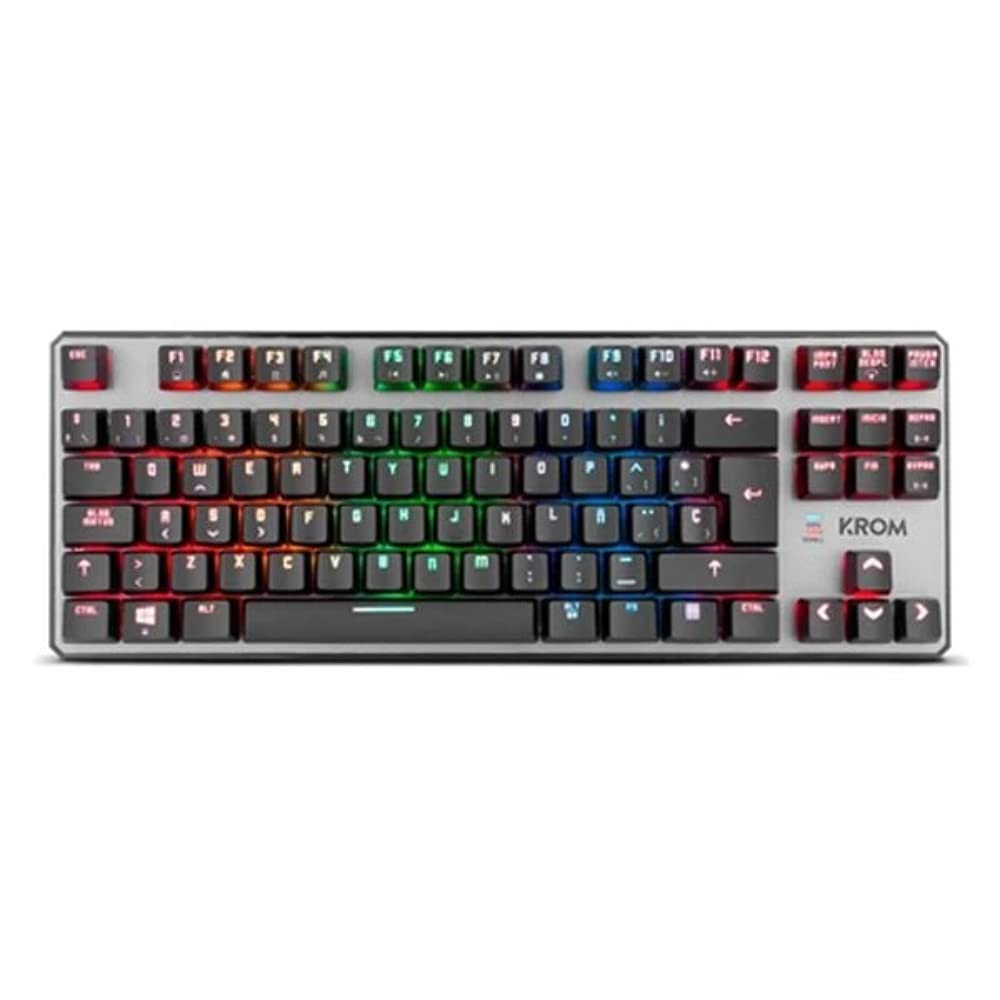
ຮູບພາບ 1.2: ລົງລຸ່ມ view of the KROM Kernel TKL keyboard, showcasing its compact design and vibrant RGB backlighting across all keys.
ຕັ້ງຄ່າ
- ຖອດແປ້ນພິມ: Carefully remove the KROM Kernel TKL keyboard from its packaging.
- ເຊື່ອມຕໍ່ກັບຄອມພິວເຕີ: Locate the USB cable attached to the keyboard. Plug the USB connector into an available USB port on your computer (PC or laptop).
- ການຕິດຕັ້ງໄດເວີ: The keyboard is plug-and-play. Your operating system (Windows 7/8/8.1/10) should automatically detect and install the necessary drivers. This process may take a few moments.
- ກວດສອບການທໍາງານ: Once drivers are installed, test the keyboard by typing in a text editor or browser to ensure all keys are responsive.
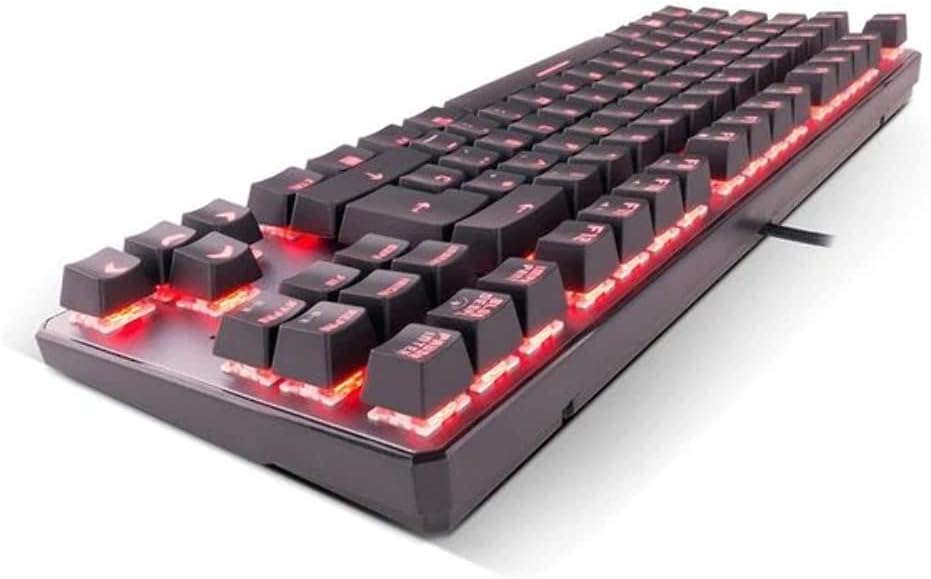
ຮູບພາບ 2.1: ຂ້າງ view of the KROM Kernel TKL keyboard, highlighting the red backlighting visible beneath the keycaps and the compact profile.
ຄໍາແນະນໍາການດໍາເນີນງານ
ການຄວບຄຸມໄຟ Backlighting RGB
The KROM Kernel TKL keyboard features dynamic RGB backlighting. Use the following key combinations to adjust lighting effects:
- Fn + [ຄີ]: Specific function keys (often F1-F12 or dedicated keys) are used in combination with the Function (Fn) key to cycle through lighting modes, adjust brightness, change speed, or select colors. Refer to the keyboard's keycap legends for specific symbols indicating lighting controls.
- ການປັບຄວາມສະຫວ່າງ: Typically Fn + Up/Down arrow keys or dedicated brightness keys.
- Effect Speed: Often Fn + Left/Right arrow keys to increase or decrease the speed of dynamic lighting effects.
- ການປ່ຽນໂໝດ: Cycle through various pre-set RGB lighting modes (e.g., wave, ripple, breathing, static color) using a dedicated Fn combination.

ຮູບພາບ 3.1: The KROM Kernel TKL keyboard displaying its full RGB spectrum backlighting, enhancing the visual appeal during use.
Macro Function Assignment
The keyboard supports on-the-fly macro recording or software-based macro assignment. For on-the-fly recording:
- Initiate Recording: Press a specific Macro Record key (often labeled "MR" or a Fn combination).
- Select Target Key: Press the key you wish to assign the macro to.
- ລຳດັບການບັນທຶກ: ພິມລໍາດັບຂອງກະແຈທີ່ທ່ານຕ້ອງການບັນທຶກເປັນມະຫາພາກ.
- ສິ້ນສຸດການບັນທຶກ: Press the Macro Record key again to save the macro.
Note: Detailed macro programming instructions may require specific software or refer to the full digital manual available on the KROM webເວັບໄຊ.
ມັນຕິມີເດຍ ແລະປຸ່ມລັດ
Access multimedia functions and system shortcuts using the Fn key in combination with the F-keys (F1-F12) or other designated keys. Common functions include:
- ການຄວບຄຸມລະດັບສຽງ: Fn + Fx (e.g., F1-F3 for Mute, Volume Down, Volume Up).
- ການຫຼິ້ນສື່: Fn + Fx (e.g., F5-F8 for Play/Pause, Stop, Previous Track, Next Track).
- ທາງລັດແອັບພລິເຄຊັນ: Fn + Fx (e.g., F9-F12 for Email, Web Browser, My Computer, Calculator).

ຮູບພາບ 3.2: ໃກ້ຊິດ view of the KROM Kernel TKL keyboard's keycaps, clearly showing the Spanish QWERTY layout and secondary functions.
ບໍາລຸງຮັກສາ
ການບໍາລຸງຮັກສາທີ່ເຫມາະສົມຮັບປະກັນຄວາມທົນທານແລະການປະຕິບັດຂອງແປ້ນພິມຂອງທ່ານ.
- ທໍາຄວາມສະອາດ:
- ຕັດການເຊື່ອມຕໍ່ແປ້ນພິມຈາກຄອມພິວເຕີຂອງທ່ານກ່ອນທີ່ຈະທໍາຄວາມສະອາດ.
- ໃຊ້ກະປ໋ອງທີ່ບີບອັດອາກາດເພື່ອເອົາຝຸ່ນ ແລະສິ່ງເສດເຫຼືອອອກຈາກລະຫວ່າງປຸ່ມກົດ.
- ເຊັດຄີບອດ ແລະ ພື້ນຜິວແປ້ນພິມດ້ວຍຜ້າອ່ອນໆ damp, ຜ້າບໍ່ມີ lint. ຫຼີກເວັ້ນຄວາມຊຸ່ມຊື່ນຫຼາຍເກີນໄປ.
- ຫ້າມໃຊ້ສານເຄມີທີ່ຮຸນແຮງ, ເຄື່ອງຂັດຂັດ, ຫຼືສານລະລາຍ.
- ການເກັບຮັກສາ: ເກັບຮັກສາແປ້ນພິມໄວ້ໃນບ່ອນແຫ້ງ, ເຢັນຫ່າງຈາກແສງແດດໂດຍກົງ ແລະອຸນຫະພູມທີ່ຮຸນແຮງ.
- ການຈັດການ: Avoid dropping the keyboard or exposing it to liquids. Do not attempt to disassemble the keyboard as this may void the warranty.

ຮູບພາບ 4.1: ດ້ານຂ້າງfile view of the KROM Kernel TKL keyboard, illustrating its ergonomic tilt and compact design.

ຮູບພາບ 4.2: A close-up image showing a mechanical switch on the KROM Kernel TKL keyboard, highlighting its design and potential for easy replacement (CIY Technology).

ຮູບພາບ 4.3: The CIY Technology logo, indicating that the keyboard features hot-swappable mechanical switches for easy customization or replacement.
ການແກ້ໄຂບັນຫາ
If you encounter issues with your KROM Kernel TKL keyboard, refer to the following common solutions:
- ແປ້ນພິມບໍ່ຕອບສະໜອງ:
- ກວດໃຫ້ແນ່ໃຈວ່າໄດ້ສຽບສາຍ USB ໃສ່ທັງແປ້ນພິມ ແລະຄອມພິວເຕີຢ່າງປອດໄພ.
- ລອງສຽບແປ້ນພິມໃສ່ພອດ USB ອື່ນໃນຄອມພິວເຕີຂອງທ່ານ.
- ປິດເປີດຄອມພິວເຕີຂອງທ່ານຄືນໃໝ່.
- ທົດສອບແປ້ນພິມໃນຄອມພິວເຕີເຄື່ອງອື່ນເພື່ອກວດສອບວ່າບັນຫາຢູ່ໃນແປ້ນພິມ ຫຼືລະບົບຂອງເຈົ້າ.
- Backlighting ບໍ່ເຮັດວຽກຫຼືບໍ່ຖືກຕ້ອງ:
- Check if the backlighting is turned off. Use the Fn key combinations to cycle through lighting modes and adjust brightness.
- Ensure no software conflicts are interfering with the lighting controls.
- ຄີບໍ່ໄດ້ລົງທະບຽນ ຫຼືພິມສອງເທື່ອ:
- Clean the affected keys with compressed air to remove any debris.
- If the keyboard uses hot-swappable switches (like the "CIY Technology" mentioned in an image), try gently removing and re-inserting the switch for the problematic key.
- ໃຫ້ແນ່ໃຈວ່າໄດຣເວີລະບົບປະຕິບັດການຂອງທ່ານທັນສະໄໝແລ້ວ.
- ຟັງຊັນ Macro ບໍ່ເຮັດວຽກ:
- Review the macro programming steps to ensure correct recording.
- Check if any software is overriding the keyboard's native macro functions.
ຂໍ້ມູນຈໍາເພາະ
| ຄຸນສົມບັດ | ລາຍລະອຽດ |
|---|---|
| ໝາຍເລກຕົວແບບ | NXKROMKRNLTKL |
| ປະເພດແປ້ນພິມ | ກົນຈັກ |
| ແຜນຜັງ | Spanish QWERTY (TKL) |
| Backlighting | RGB LED |
| ການເຊື່ອມຕໍ່ | Wired USB (Gold-plated) |
| ຄວາມຍາວສາຍ | 180 cm (Braided) |
| ແຮງກະຕຸ້ນ | 60 +/- 10 g |
| ອັດຕາການລົງຄະແນນສຽງ | 1000 Hz |
| ຫນ່ວຍຄວາມຈໍາພາຍໃນ | 64 KB (for macros/profiles) |
| ການບໍລິໂພກໃນປະຈຸບັນ | 100-260mA |
| ສະບັບtage | 5.0 +/- 0.25 V |
| ຂະໜາດ (L x W x H) | 361 x 133.5 x 22.5 ມມ |
| ນ້ຳໜັກ | 950 +/- 30 g |
| ຄວາມເຂົ້າກັນໄດ້ | Windows 7 / 8 / 8.1 / 10 |
| ຄຸນນະສົມບັດພິເສດ | Macro function assignment, Multimedia keys, Shortcut keys |
ການຮັບປະກັນແລະການສະຫນັບສະຫນູນ
KROM products are designed for reliability and performance. This product comes with a standard manufacturer's warranty. For specific warranty terms and conditions, please refer to the warranty card included with your product or visit the official KROM webເວັບໄຊ.
For technical support, driver downloads, or further assistance, please visit the KROM official support page or contact their customer service. Contact information can typically be found on the KROM webສະຖານທີ່ຫຼືການຫຸ້ມຫໍ່ຜະລິດຕະພັນ.
KROM Official Webເວັບໄຊ: www.kromgaming.com (ໝາຍເຫດ: ນີ້ແມ່ນຕົວຍຶດບ່ອນ URL, please verify the actual KROM support webເວັບໄຊ.)