
1. ບົດແນະນຳ
Thank you for choosing the TimeFlys Audio Baby Monitor Crown Series. This device is designed to provide reliable audio monitoring of your baby, ensuring peace of mind. It features clear sound transmission, temperature monitoring, a night light, and two-way communication. Please read this manual thoroughly before use to ensure proper operation and safety.
ຂໍ້ມູນຄວາມປອດໄພທີ່ສໍາຄັນ
- Keep the baby unit and its power cord out of reach of children (at least 1 meter / 3 feet away from the crib).
- Do not place the baby unit in or near water.
- ໃຊ້ພຽງແຕ່ອະແດັບເຕີໄຟທີ່ໃຫ້ມາ.
- Ensure proper ventilation for both units. Do not cover them with clothes or blankets.
- ຜະລິດຕະພັນນີ້ບໍ່ແມ່ນອຸປະກອນທາງການແພດ ແລະບໍ່ຄວນໃຊ້ແທນການເບິ່ງແຍງຜູ້ໃຫຍ່ທີ່ຮັບຜິດຊອບ.
2. ເນື້ອໃນຊຸດ
ຖອດກ່ອງຢ່າງລະມັດລະວັງ ແລະຮັບປະກັນວ່າສິນຄ້າທັງໝົດມີຢູ່:
- Parent Unit (with built-in rechargeable lithium battery)
- ໜ່ວຍ ເດັກນ້ອຍ
- 2 x Micro USB Power Adapters
- ຄູ່ມືຜູ້ໃຊ້

Image: Contents of the TimeFlys Audio Baby Monitor Crown Series package.
3. ຜະລິດຕະພັນເກີນview
ໜ່ວຍ ງານພໍ່ແມ່

ຮູບພາບ: ທາງຫນ້າ view of the Parent Unit, showing the LCD display, signal indicator, power button, night light button, lullaby button, intercom button, vibration button, and volume controls.

ຮູບພາບ: ກັບຄືນໄປບ່ອນ view of the Parent Unit, highlighting the battery compartment, volume controls, power button, push-to-talk button, lullaby button, night light button, USB connection, and belt clip.
ໜ່ວຍ ເດັກນ້ອຍ

ຮູບພາບ: ດ້ານຫນ້າແລະດ້ານຫລັງ views of the Baby Unit, illustrating its compact design with integrated night lights, microphone, speaker, power button, and DC5V micro USB port.
4. ຕັ້ງຄ່າ
4.1 ການສ້າງພະລັງງານຂອງຫນ່ວຍງານ
- ຫນ່ວຍງານແມ່: The Parent Unit has a built-in rechargeable lithium battery. Charge it fully before first use by connecting it to a power outlet using one of the provided Micro USB power adapters. A full charge provides up to 15 hours of operation.
- ໜ່ວຍ ເດັກ: The Baby Unit does not have a built-in battery and must be continuously plugged into a power outlet using the other Micro USB power adapter for operation.
4.2 ການຈັດວາງ
- Place the Baby Unit within 1 to 2 meters (3 to 6 feet) of your baby, ensuring it is out of reach.
- Position the Parent Unit in a location where you can easily hear alerts and monitor the display.
- Avoid placing units near other electronic devices that may cause interference (e.g., Wi-Fi routers, cordless phones).
4.3 ການຈັບຄູ່ (ອັດຕະໂນມັດ)
The Parent Unit and Baby Unit are pre-paired at the factory. Once both units are powered on, they should automatically connect. If they do not connect, ensure both units are within range and try restarting them.
5. ຄໍາແນະນໍາການດໍາເນີນງານ
5.1 ການຕິດຕາມພື້ນຖານ
- ເປີດ/ປິດ: Press and hold the Power button on both units to turn them on or off.
- ການຄວບຄຸມລະດັບສຽງ: Use the '+' and '-' buttons on the Parent Unit to adjust the listening volume.
- Sound Level Indicator: The Parent Unit's LED display will show visual indicators of sound levels detected by the Baby Unit.

Image: A woman monitoring her baby using the TimeFlys Parent Unit, with the baby unit placed near the baby.
5.2 Night Mode (Zero Radio Emission)
The Crown Series features a unique Night Mode that reduces radio emissions to zero when the baby's room is silent. The monitor will automatically activate when noise in the baby's room exceeds 50 dB. This feature is designed for energy efficiency and reduced exposure.
5.3 ການສົນທະນາສອງທາງ
To speak to your baby through the Baby Unit, press and hold the ອິນເຕີຄອມ button (often labeled with a microphone icon) on the Parent Unit. Release the button to resume listening.

Image: Visual representation of the two-way talk function, showing sound transmission from parent to baby unit.
5.4 Lullabies
ກົດ Lullaby button (often labeled with a music note icon) on the Parent Unit to play soothing melodies through the Baby Unit. Press it again to cycle through available lullabies or to turn them off.

Image: A baby sleeping while a lullaby icon indicates the feature is active.
5.5 ການຄວບຄຸມໄຟກາງຄືນ
The Baby Unit features an integrated night light. You can remotely control this night light from the Parent Unit by pressing the ແສງກາງຄືນ button (often labeled with a light bulb icon).
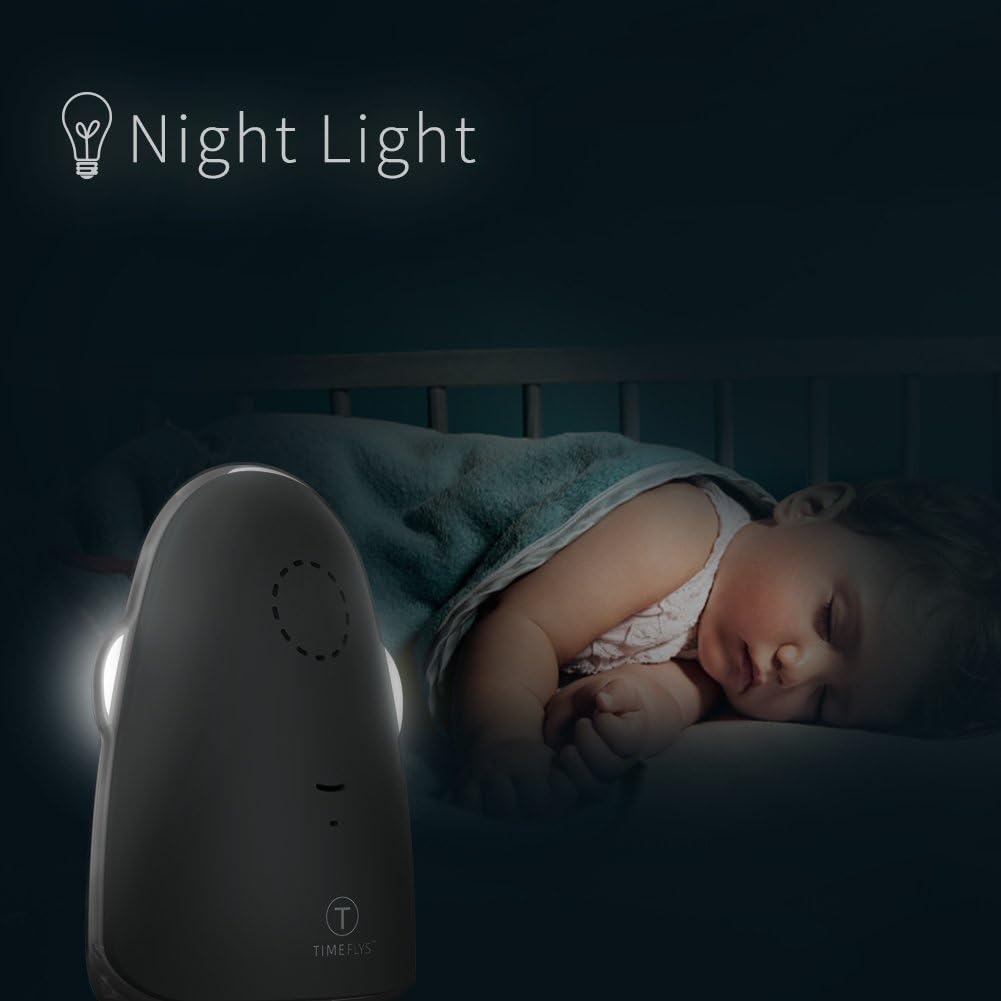
Image: The Baby Unit's night light providing a soft glow in a baby's room.
5.6 Temperature Monitoring & Alarm
The Parent Unit's LCD screen displays the real-time temperature of the baby's room, measured by the Baby Unit. An acoustical warning will sound if the room temperature goes outside the range of 60.8°F - 86°F (16°C - 30°C).

Image: A visual representation of the temperature monitoring feature, showing a thermometer and a sleeping baby.
5.7 ການແຈ້ງເຕືອນການສັ່ນສະເທືອນ
The Parent Unit can be set to vibrate when sound is detected, providing a silent alert. Press the ການສັ່ນສະເທືອນ button (often labeled with a vibration icon) to activate or deactivate this feature.

Image: A visual depicting the vibration function of the parent unit.
6. ບໍາລຸງຮັກສາ
- Clean the units with a dry, soft cloth. Do not use cleaning sprays or liquid cleaners.
- ຢ່າເອົາສ່ວນໃດໆຂອງຜະລິດຕະພັນເຂົ້າໄປໃນນ້ໍາ.
- ເກັບຮັກສາຈໍພາບໄວ້ໃນບ່ອນທີ່ເຢັນ, ແຫ້ງເມື່ອບໍ່ໄດ້ໃຊ້.
- Avoid exposing the units to extreme temperatures or direct sunlight.
7. ການແກ້ໄຂບັນຫາ
| ບັນຫາ | ສາເຫດທີ່ເປັນໄປໄດ້ | ການແກ້ໄຂ |
|---|---|---|
| ບໍ່ມີສຽງຈາກໜ່ວຍພໍ່ແມ່ | Volume is too low; Units are out of range; Baby Unit is not powered on. | Increase volume; Move units closer; Ensure Baby Unit is plugged in and powered on. |
| ການຮັບສັນຍານບໍ່ດີ ຫຼື ໄຟຟ້າສະຖິດ | Units are too far apart; Interference from other electronic devices. | Move units closer; Relocate units away from other electronics. |
| ແບັດເຕີຣີຂອງໜ່ວຍພໍ່ແມ່ໝົດໄວ | Battery not fully charged; Old battery (if applicable for replacement). | Ensure Parent Unit is fully charged; Contact support if battery life significantly degrades. |
| Temperature alarm sounds frequently | Room temperature is outside the set range. | Adjust room temperature or check for drafts/heat sources near the Baby Unit. |
8. ຂໍ້ມູນຈໍາເພາະ
- ຍີ່ຫໍ້: TimeFlys
- ຕົວແບບ: ມົງກຸດ
- ສີ: ສີເທົາ
- ຈຳນວນຊ່ອງ: 36
- ຂອບເຂດການສົນທະນາສູງສຸດ: 1000 ຟຸດ (ປະມານ 300 ແມັດ)
- ຊີວິດຫມໍ້ໄຟ (ຫນ່ວຍງານແມ່): Up to 15 Hours (rechargeable lithium battery)
- ຄຸນນະສົມບັດພິເສດ: Long Range, Dust Proof, Night Mode (Zero Radio Emission), Night Light Control, Temperature Monitoring & Alarm, Two-Way Talk, Lullabies, Vibration Alert.
- ການປ້ອນຂໍ້ມູນພະລັງງານ: DC 5V (ໄມໂຄຣ USB)
- ລະດັບຄວາມຕ້ານທານນ້ໍາ: ບໍ່ທົນທານຕໍ່ນ້ໍາ
9. ການຮັບປະກັນແລະການສະຫນັບສະຫນູນ
For warranty information or technical support, please refer to the documentation provided with your purchase or contact TimeFlys customer service through their official webເວັບໄຊທ໌ຫຼືຮ້ານຂາຍຍ່ອຍບ່ອນທີ່ຜະລິດຕະພັນໄດ້ຖືກຊື້.