
1. ບົດແນະນຳ
This manual provides essential information for the proper installation, operation, and maintenance of your Garmin 010-12523-03 Extension Cable. Please read these instructions carefully before using the product to ensure optimal performance and longevity. This cable is specifically designed to extend the reach of your Garmin GHS 11 Handset, enhancing flexibility in marine communication system setups.
2. ຜະລິດຕະພັນເກີນview
The Garmin 010-12523-03 is a 10-meter (approximately 33 feet) electronic extension cable engineered to provide additional length for connecting your GHS 11 Handset to a compatible marine VHF radio system. Its robust design ensures reliable communication and flexible placement options on various vessels or remote stations. The cable features a male-to-female connector gender and is designed to be tangle-free for ease of use and storage.
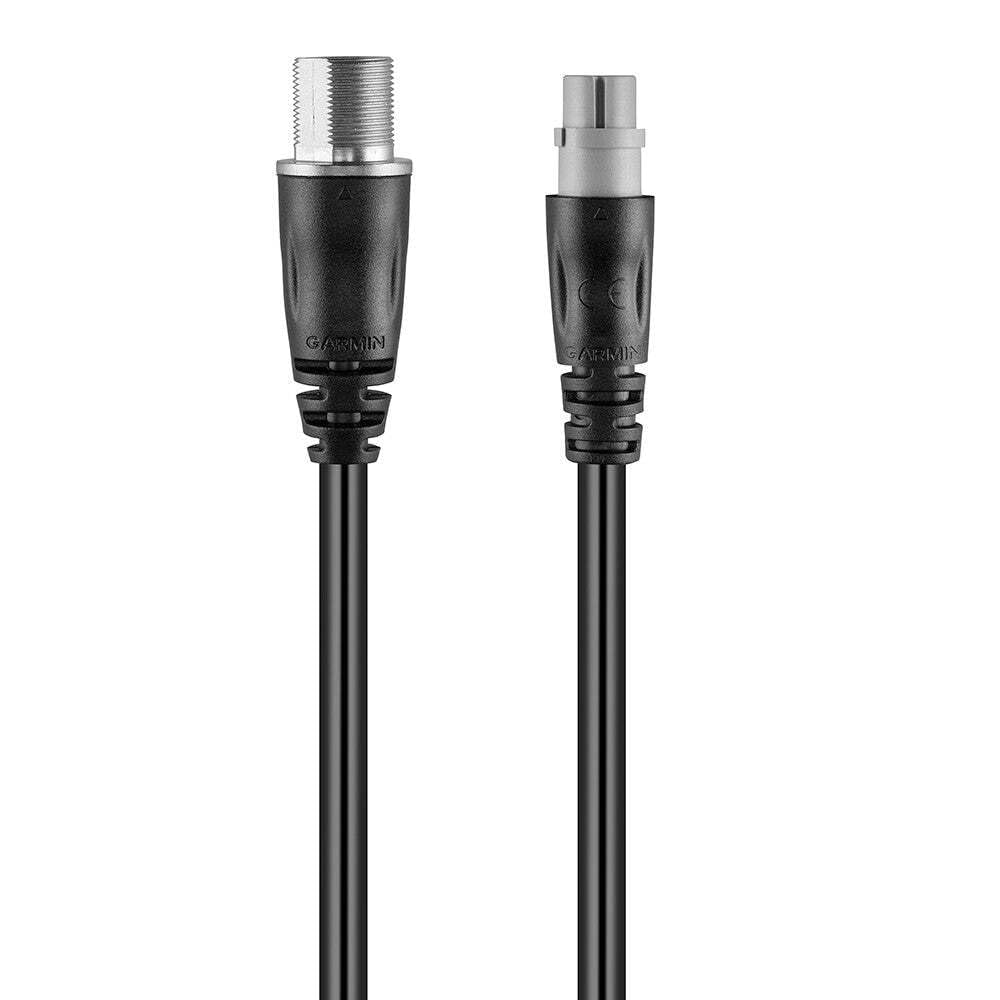
Figure 1: Garmin 010-12523-03 Extension Cable. This image displays the black, coiled extension cable with its male and female connectors visible at each end, ready for connection.
ອົງປະກອບລວມ:
- Garmin 010-12523-03 Extension Cable (1 unit)
3. ຕັ້ງຄ່າ
Follow these steps to properly connect your Garmin 010-12523-03 Extension Cable:
- ລະບຸຕົວເຊື່ອມຕໍ່: Locate the male and female connectors on the extension cable. The male end will plug into the GHS 11 Handset, and the female end will connect to the existing cable from your VHF radio system.
- ປິດພະລັງງານ: Ensure that your marine VHF radio system and any connected devices are powered off before making any connections.
- ເຊື່ອມຕໍ່ໂທລະສັບມືຖື: Carefully align the male connector of the extension cable with the port on your GHS 11 Handset. Push firmly until it clicks into place, ensuring a secure connection.
- ເຊື່ອມຕໍ່ກັບລະບົບ: Align the female connector of the extension cable with the corresponding male connector from your VHF radio system's existing cable. Push firmly to establish a secure connection.
- ສາຍທີ່ປອດໄພ: Route the cable safely, avoiding areas where it might be pinched, cut, or exposed to excessive strain. Use cable ties or clips if necessary to secure it in place.
- ເປີດ: Once all connections are secure, power on your marine VHF radio system and GHS 11 Handset.
4. ການເຮັດວຽກ
The Garmin 010-12523-03 Extension Cable is a passive component designed to extend the physical reach of your GHS 11 Handset. Once properly installed, it requires no specific operational steps. The handset will function as normal, but with the added flexibility of extended placement. Ensure that the cable is not subjected to excessive bending or pulling during use to maintain connection integrity.
5. ບໍາລຸງຮັກສາ
To ensure the longevity and reliable performance of your extension cable, follow these maintenance guidelines:
- ທໍາຄວາມສະອາດ: Periodically wipe the cable and connectors with a clean, damp cloth. Avoid using harsh chemicals or abrasive cleaners. Ensure connectors are dry before re-connecting.
- ການກວດກາ: Regularly inspect the entire length of the cable for any signs of wear, cuts, kinks, or damage to the insulation. Check connectors for corrosion or bent pins.
- ການເກັບຮັກສາ: When not in use, store the cable in a cool, dry place, away from direct sunlight and extreme temperatures. Coil the cable loosely to prevent kinking.
- ການປົກປ້ອງສິ່ງແວດລ້ອມ: While designed for indoor and outdoor use, minimize prolonged exposure to harsh marine environments (e.g., direct saltwater spray) when possible to extend its lifespan.
6. ການແກ້ໄຂບັນຫາ
If you experience issues with your GHS 11 Handset after installing the extension cable, consider the following troubleshooting steps:
- ບໍ່ມີການເຊື່ອມຕໍ່/ການເຊື່ອມຕໍ່ເປັນໄລຍະໆ:
- Ensure both ends of the extension cable are fully and securely connected to the GHS 11 Handset and the main VHF system cable.
- Power cycle the VHF radio and handset.
- Inspect the cable for any visible damage (cuts, severe kinks, bent pins in connectors). If damage is found, the cable may need replacement.
- Test the GHS 11 Handset directly with the main VHF system cable (without the extension cable) to determine if the issue lies with the extension cable or another component.
- ຄຸນະພາບສຽງບໍ່ດີ:
- ກວດເບິ່ງທຸກເຊື່ອມຕໍ່ ສຳ ລັບຄວາມ ແໜ້ນ.
- ໃຫ້ແນ່ໃຈວ່າສາຍໄຟບໍ່ໄດ້ຖືກສົ່ງໃກ້ກັບແຫຼ່ງທີ່ມາຂອງການລົບກວນແມ່ເຫຼັກໄຟຟ້າທີ່ແຮງ.
ຖ້າຂັ້ນຕອນເຫຼົ່ານີ້ບໍ່ສາມາດແກ້ໄຂບັນຫາໄດ້, ໃຫ້ຕິດຕໍ່ຝ່າຍສະໜັບສະໜູນລູກຄ້າ Garmin ເພື່ອຂໍຄວາມຊ່ວຍເຫຼືອເພີ່ມເຕີມ.
7. ຂໍ້ມູນຈໍາເພາະ
| ຄຸນສົມບັດ | ຂໍ້ມູນຈໍາເພາະ |
|---|---|
| ຍີ່ຫໍ້ | Garmin |
| ໝາຍເລກຕົວແບບ | 010-12523-03 |
| ຄວາມຍາວສາຍ | 10 ແມັດ (ປະມານ 33 ຟຸດ) |
| ປະເພດຜະລິດຕະພັນ | Electronic Cable |
| ເພດຂອງຕົວເຊື່ອມຕໍ່ | ຊາຍຫາຍິງ |
| ຈໍານວນ Pins | 12 |
| ສູງສຸດ Voltage | 5 ໂວນ |
| ອຸປະກອນທີ່ເຂົ້າກັນໄດ້ | Garmin GHS 11 Handset |
| ຄຸນນະສົມບັດພິເສດ | Tangle ຟຣີ |
| ສະພາບແວດລ້ອມການນໍາໃຊ້ | ພາຍໃນ, ກາງແຈ້ງ |
| ສີ | ດຳ |
| ນ້ໍາຫນັກລາຍການ | 0.721 Kg (1.2 Pounds) |
| ຂະໜາດແພັກເກັດ | 7.4 cm (L) x 16.3 cm (W) x 20.7 cm (H) |
8. ການຮັບປະກັນແລະການສະຫນັບສະຫນູນ
ຂໍ້ມູນການຮັບປະກັນ:
This Garmin product is covered by a limited warranty. For detailed information regarding the warranty period, terms, and conditions applicable to the 010-12523-03 Extension Cable, please refer to the official Garmin website or contact Garmin customer support directly. Proof of purchase may be required for warranty claims.
ການຊ່ວຍເຫຼືອລູກຄ້າ:
For technical assistance, product inquiries, or warranty service, please contact Garmin customer support through their official channels:
- Webເວັບໄຊ: Visit the official Garmin support website for FAQs, manuals, and contact options.
- ໂທລະສັບ: ອ້າງເຖິງ Garmin webສະຖານທີ່ສໍາລັບເບີໂທລະສັບບໍລິການລູກຄ້າໃນພາກພື້ນ.
Please have your product model number (010-12523-03) and proof of purchase available when contacting support.