
1. ບົດແນະນຳ
This manual provides essential instructions for the safe and efficient operation of your Automatic Mini Double Station Mug Heat Press Transfer Machine. Please read this manual thoroughly before use to ensure proper setup, operation, and maintenance.
This machine is designed for sublimation printing on various mug sizes, featuring a double station design for increased efficiency.
2. ຄໍາແນະນໍາຄວາມປອດໄພ
- ໃຫ້ໃຊ້ເຄື່ອງຢູ່ເທິງພື້ນຜິວທີ່ໝັ້ນຄົງ ແລະ ທົນຄວາມຮ້ອນສະເໝີ.
- Keep hands clear of heating elements during operation to prevent burns.
- ຮັບປະກັນການລະບາຍອາກາດທີ່ເຫມາະສົມໃນພື້ນທີ່ເຮັດວຽກ.
- ຢ່າປ່ອຍໃຫ້ເຄື່ອງຖືກນ້ໍາຫຼືຄວາມຊຸ່ມຊື່ນຫຼາຍເກີນໄປ.
- ຖອດປລັກເຄື່ອງອອກຈາກປລັກສຽບໄຟເມື່ອບໍ່ໄດ້ໃຊ້ ຫຼືກ່ອນທີ່ຈະທໍາຄວາມສະອາດ/ບໍາລຸງຮັກສາ.
- Do not attempt to modify or repair the machine yourself. Contact qualified personnel for service.
- ໃຫ້ເດັກນ້ອຍ ແລະ ສັດລ້ຽງຢູ່ຫ່າງຈາກເຄື່ອງຈັກທີ່ໃຊ້ງານ.
3. ເນື້ອໃນຊຸດ
ກວດສອບວ່າລາຍການທັງຫມົດແມ່ນມີຢູ່ໃນຊຸດ:
- 1x Double Mug Heat Press Machine
- 1x ຄູ່ມືຜູ້ໃຊ້ພາສາອັງກິດ (ເອກະສານນີ້)
- 2x 11oz Heating Pads (pre-installed or included separately)
ຖ້າລາຍການໃດຂາດຫາຍໄປຫຼືເສຍຫາຍ, ກະລຸນາຕິດຕໍ່ຝ່າຍຊ່ວຍເຫຼືອລູກຄ້າ.
4. ຕັ້ງຄ່າ
- ການຫຸ້ມຫໍ່: Carefully remove the heat press machine from its packaging. Retain packaging for future storage or transport.
- ການຈັດວາງ: Place the machine on a flat, stable, and heat-resistant surface. Ensure there is adequate space around the machine for ventilation and safe operation.
- ການເຊື່ອມຕໍ່ພະລັງງານ: Ensure the machine's power switch is in the OFF position. Plug the machine into a standard 110V AC power outlet.
- ການກວດກາເບື້ອງຕົ້ນ: Before first use, inspect the heating pads and control panel for any visible damage.

ຮູບ 1: ດ້ານຫນ້າ view of the Double Mug Heat Press Machine. This image shows the overall design with two mug stations and the central control panel.
5. ຄໍາແນະນໍາການດໍາເນີນງານ
5.1 ກະດານຄວບຄຸມຫຼາຍກວ່າview

Figure 2: Close-up of the LCD control panel. The panel features an LCD display for temperature and time, along with buttons for timing, temperature adjustment, and mode selection for left and right stations.
The machine features an LCD control panel for setting temperature and time. It allows for independent control of each mug station.
5.2 ຂັ້ນຕອນການດໍາເນີນງານພື້ນຖານ
- ເປີດ: ເປີດສະວິດໄຟຫຼັກ. ໜ້າຈໍ LCD ຈະສະຫວ່າງຂຶ້ນ.
- ຕັ້ງຄ່າອຸນຫະພູມ: Use the temperature adjustment buttons (often indicated by '+' and '-' or specific temperature setting buttons) to set the desired transfer temperature. The recommended transfer temperature is 180°C (356°F).
- ຕັ້ງເວລາ: Use the timing adjustment buttons to set the desired transfer time. The recommended transfer time is 90 seconds.
- Preheat: Allow the machine to preheat until it reaches the set temperature. The display will show the current temperature.
- Prepare Mug: Wrap your sublimation print around the mug, securing it with heat-resistant tape. Ensure the print is flat against the mug surface.
- Insert Mug: Carefully place the prepared mug into the heating pad of one or both stations. Ensure the mug is centered and the heating pad fully encompasses the printed area.
- ໃຊ້ຄວາມກົດດັນ: ປິດ clamp handle to apply even pressure to the mug. The machine is designed to accommodate various mug sizes (6OZ, 9OZ, 11OZ, 12OZ, 17OZ) with appropriate heating pads.
- Start Transfer: Press the start button (often labeled 'Timing' or 'Start') for the respective station. The timer will begin counting down.
- Remove Mug: Once the timer reaches zero, carefully open the clamp handle and remove the hot mug using heat-resistant gloves.
- ເຢັນລົງ: Place the mug on a heat-resistant surface to cool. Once cool, carefully remove the sublimation paper.

Figure 3: A mug correctly positioned within the heating element of the heat press machine, ready for the sublimation process.
5.3 Workflow Diagram
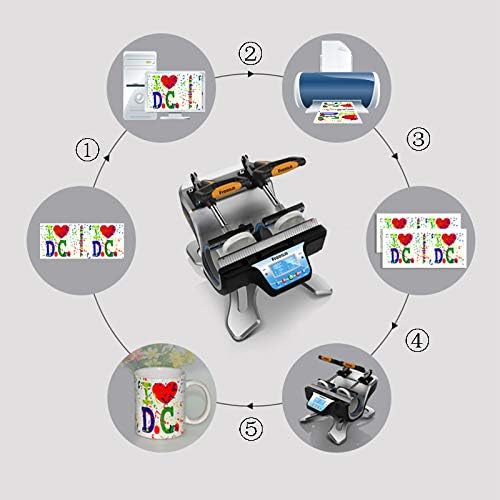
Figure 4: A visual representation of the sublimation printing process, from designing and printing the image to pressing it onto the mug and the final result.
5.4 Replacing Heating Pads
The heating pads are replaceable to accommodate different mug sizes. The machine includes two 11oz heating pads. For other sizes, contact customer support.

ຮູບທີ 5: A ລາຍລະອຽດ view of the heating element, showing its construction and how it secures the mug for heat transfer.
- ປິດ ແລະຖອດປລັກ: Ensure the machine is turned off and unplugged from the power source. Allow the heating pads to cool completely.
- Loosen Fasteners: Locate the fasteners securing the heating pad to the machine frame. Loosen or remove them as required.
- Disconnect Pad: Carefully disconnect the electrical connector for the heating pad.
- ເອົາແຜ່ນເກົ່າອອກ: Slide out the old heating pad.
- Install New Pad: Insert the new heating pad, ensuring it is correctly aligned.
- Connect and Secure: Reconnect the electrical connector and secure the heating pad with the fasteners.
- ການທົດສອບ: Plug in the machine and perform a test run to ensure the new heating pad functions correctly.
6. ບໍາລຸງຮັກສາ
- ທໍາຄວາມສະອາດ: After each use, ensure the machine is cool and unplugged. Wipe down the exterior surfaces with a soft, dry cloth. Do not use abrasive cleaners or solvents.
- Heating Pad Care: Inspect heating pads regularly for wear or damage. Replace if necessary to ensure consistent heat transfer.
- ການເກັບຮັກສາ: ເກັບຮັກສາເຄື່ອງໄວ້ໃນສະພາບແວດລ້ອມທີ່ແຫ້ງ, ບໍ່ມີຝຸ່ນໃນເວລາທີ່ບໍ່ໄດ້ໃຊ້.
7. ການແກ້ໄຂບັນຫາ
| ບັນຫາ | ສາເຫດທີ່ເປັນໄປໄດ້ | ການແກ້ໄຂ |
|---|---|---|
| ເຄື່ອງບໍ່ເປີດ. | Not plugged in; power switch off; faulty power outlet. | ກວດເບິ່ງການເຊື່ອມຕໍ່ສາຍໄຟ; ໃຫ້ແນ່ໃຈວ່າສະວິດໄຟເປີດຢູ່; ທົດສອບຊ່ອງສຽບກັບອຸປະກອນອື່ນ. |
| ອຸນຫະພູມບໍ່ຮອດຄ່າທີ່ກຳນົດໄວ້. | ການຕັ້ງຄ່າອຸນຫະພູມບໍ່ຖືກຕ້ອງ; ອົງປະກອບຄວາມຮ້ອນຜິດປົກກະຕິ. | Verify temperature setting; allow more time for preheating; contact support if issue persists. |
| ຜົນໄດ້ຮັບການໂອນຍ້າຍທີ່ບໍ່ສະໝໍ່າສະເໝີ. | Uneven pressure; worn heating pad; incorrect mug placement. | Ensure mug is centered and clamp is fully engaged; inspect heating pad for wear; ensure print is flat on mug. |
| Timer not functioning. | Incorrect operation; control panel issue. | Review operating instructions for timer activation; contact support. |
8. ຂໍ້ມູນຈໍາເພາະ
| ຕົວແບບ | Automatic Mini Double Station Mug Heat Press Transfer Machine |
| Compatible Mug Sizes | 6OZ, 9OZ, 11OZ, 12OZ, 17OZ |
| ສະບັບtage | 110V |
| ພະລັງງານ | 280W + 280W (ທັງໝົດ 560W) |
| Transfer Temperature | 180°C (356°F) |
| ເວລາໂອນ | 90 Seconds (Adjustable) |
| ຕົວແບບຄວບຄຸມ | ການຄວບຄຸມ LCD |
| ນ້ຳໜັກ | 14.6 lbs (7.2 KG) |
| ຂະໜາດລວມ | 14.5" x 12" x 13.38" (37 x 30.6 x 34 ຊມ) |
| ປະເພດສຽບ | US Plug |
9. ການຮັບປະກັນແລະການສະຫນັບສະຫນູນ
No specific warranty information is provided with this product. For technical support, replacement parts (such as different sized heating pads), or any operational questions, please refer to the seller or manufacturer's contact information provided at the point of purchase.