
1. ບົດແນະນຳ
Thank you for choosing the CELLO Quick Pop 300 2-Slice Automatic Pop-up Toaster. This appliance is designed for efficient and convenient toasting of bread slices. Featuring 7 browning levels, a cool-touch body, and a removable crumb tray, it ensures a safe and enjoyable user experience. Please read this manual thoroughly before use to ensure proper operation and maintenance.
2. ການປົກປ້ອງທີ່ສໍາຄັນ
- ອ່ານຄໍາແນະນໍາທັງໝົດກ່ອນທີ່ຈະໃຊ້ເຄື່ອງປີ້ງເຂົ້າຈີ່.
- ຢ່າແຕະພື້ນຜິວທີ່ຮ້ອນ. ໃຊ້ດ້າມຈັບ ຫຼື ບິດ.
- ເພື່ອປ້ອງກັນໄຟຟ້າ, ຢ່າເອົາສາຍໄຟ, ປລັກສຽບ, ຫຼືເຕົາອົບໃສ່ນ້ຳ ຫຼືຂອງແຫຼວອື່ນໆ.
- ການເບິ່ງແຍງຢ່າງໃກ້ຊິດແມ່ນມີຄວາມຈໍາເປັນໃນເວລາທີ່ອຸປະກອນໃດໆຖືກນໍາໃຊ້ໂດຍຫຼືຢູ່ໃກ້ກັບເດັກນ້ອຍ.
- ຖອດປລັກອອກຈາກປລັກສຽບໃນເວລາທີ່ບໍ່ໄດ້ໃຊ້ແລະກ່ອນທີ່ຈະເຮັດຄວາມສະອາດ. ປ່ອຍໃຫ້ເຢັນກ່ອນທີ່ຈະໃສ່ຫຼືເອົາຊິ້ນສ່ວນ.
- ຫ້າມນຳໃຊ້ເຄື່ອງໃຊ້ທີ່ມີສາຍໄຟ ຫຼື ປລັກສຽບທີ່ເສຍຫາຍ, ຫຼື ຫຼັງຈາກເຄື່ອງໃຊ້ຜິດປົກກະຕິ ຫຼືໄດ້ຮັບຄວາມເສຍຫາຍໃນທຸກຮູບແບບ.
- ການນໍາໃຊ້ອຸປະກອນເສີມທີ່ບໍ່ແນະນໍາໂດຍຜູ້ຜະລິດເຄື່ອງໃຊ້ອາດຈະເຮັດໃຫ້ເກີດການບາດເຈັບ.
- ຢ່າໃຊ້ນອກ.
- ຢ່າປ່ອຍໃຫ້ສາຍໄຟແຂວນໃສ່ຂອບໂຕະ ຫຼືໂຕະ, ຫຼືແຕະພື້ນຜິວທີ່ຮ້ອນ.
- ຢ່າວາງໃສ່ ຫຼືຢູ່ໃກ້ກັບເຕົາແກ໊ສຮ້ອນ ຫຼືເຕົາໄຟຟ້າ, ຫຼືໃນເຕົາອົບທີ່ມີຄວາມຮ້ອນ.
- ສຽບປລັກສຽບໃສ່ເຄື່ອງທຸກຄັ້ງກ່ອນ, ຈາກນັ້ນສຽບສາຍໃສ່ປລັກສຽບໃສ່ຝາ. ເພື່ອຕັດການເຊື່ອມຕໍ່, ເຮັດໃຫ້ການຄວບຄຸມໃດໆ "ປິດ", ຫຼັງຈາກນັ້ນເອົາປລັກອອກຈາກເຕົ້າສຽບຝາ.
- ຢ່າໃຊ້ເຄື່ອງໃຊ້ອື່ນນອກເໜືອໄປຈາກການໃຊ້ທີ່ຕັ້ງໃຈ.
- ອາຫານຂະໜາດໃຫຍ່, ແຜ່ນໂລຫະ ຫຼືເຄື່ອງໃຊ້ຕ້ອງບໍ່ໃສ່ໃນເຕົາອົບ ເພາະອາດເຮັດໃຫ້ເກີດໄຟໄໝ້ ຫຼືສ່ຽງຕໍ່ການເກີດໄຟຟ້າຊອດ.
- ໄຟໄຫມ້ອາດຈະເກີດຂື້ນຖ້າເຄື່ອງເຮັດເຕົາອົບຖືກປົກຄຸມຫຼືສໍາຜັດກັບວັດສະດຸທີ່ຕິດໄຟ, ລວມທັງຜ້າມ່ານ, ຜ້າມ່ານ, ຝາ, ແລະສິ່ງອື່ນໆ, ເມື່ອເຮັດວຽກ.
- ຢ່າພະຍາຍາມເອົາອາຫານອອກເມື່ອສຽບເຂົ້າເຕົາອົບ.
- ຫ້າມປະຕິບັດການໂດຍບໍ່ມີການດູແລ.
3. ຜະລິດຕະພັນເກີນview
Familiarize yourself with the components of your CELLO Quick Pop 300 Toaster:
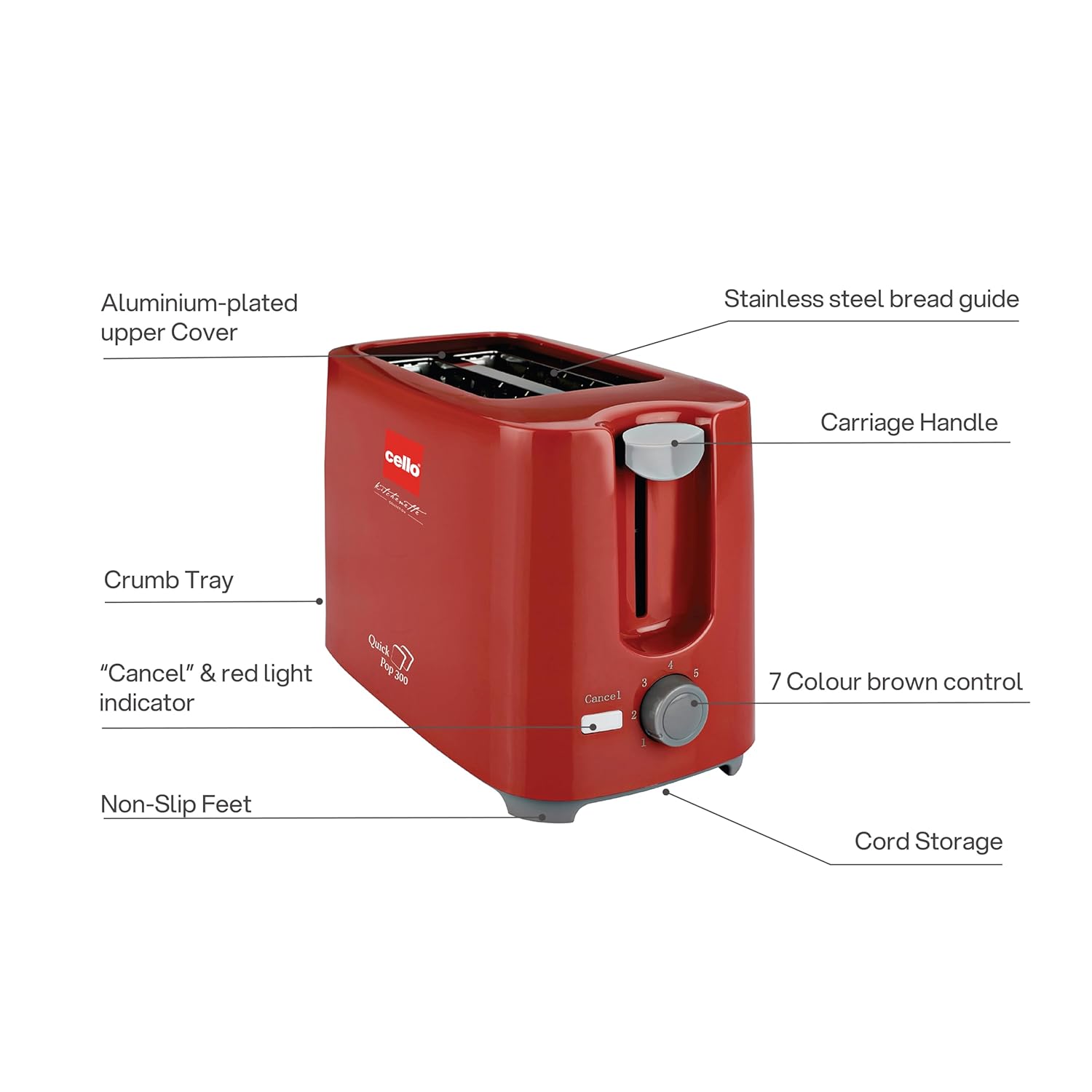
ຮູບທີ 3.1: Main components of the CELLO Quick Pop 300 Toaster.
- Aluminium-plated Upper Cover: Provides durability and a sleek finish.
- Stainless Steel Bread Guide: Ensures bread slices are centered for even toasting.
- ມືຈັບລົດມ້າ: ໃຊ້ເພື່ອຫຼຸດ ແລະ ຍົກເຂົ້າຈີ່ຂຶ້ນໃສ່ຊ່ອງປີ້ງ.
- ຖາດ Crumb: Removable tray located at the bottom for easy cleaning of crumbs.
- "Cancel" & Red Light Indicator: Button to stop the toasting cycle and indicator light for operation.
- 7 Colour Brown Control: Dial to select desired browning level from 1 (lightest) to 7 (darkest).
- ຕີນບໍ່ລື່ນ: Provides stability and prevents the toaster from sliding on surfaces.
- ການເກັບຮັກສາສາຍໄຟ: Integrated area at the base for neat storage of the power cord.

ຮູບທີ 3.2: ລະອຽດ views of key features including the crumb tray, browning control, upper cover, carriage handle, cord storage, and non-slip feet.
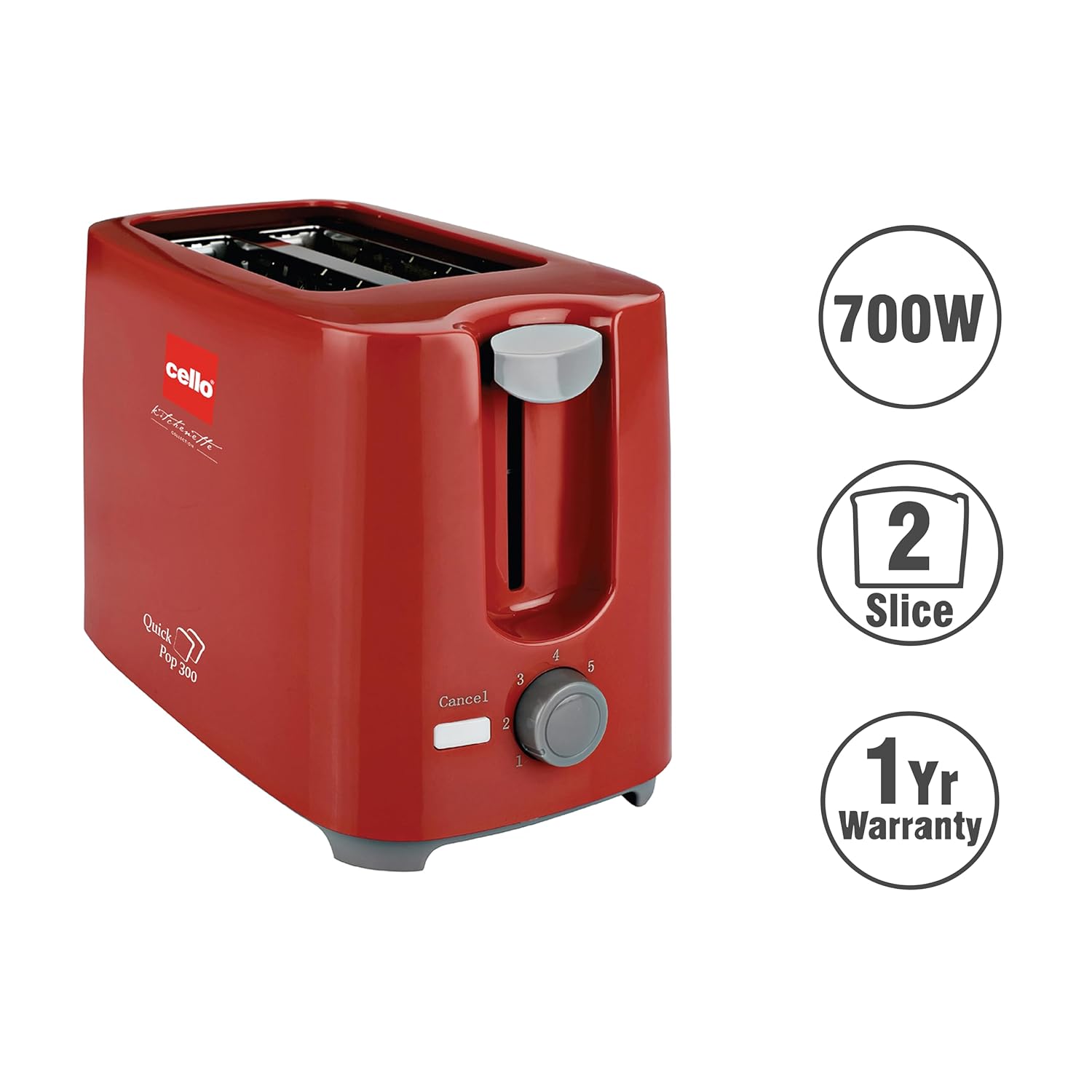
ຮູບທີ 3.3: The CELLO Quick Pop 300 Toaster, a 700W appliance with a 2-slice capacity, backed by a 1-year warranty.
4. ຕັ້ງຄ່າ
- Unpack the Toaster: Carefully remove the toaster and all packaging materials from the box. Retain the user manual and warranty card.
- ການຈັດວາງ: ວາງເຄື່ອງປີ້ງເຂົ້າຈີ່ໄວ້ເທິງພື້ນຜິວທີ່ໝັ້ນຄົງ, ຮາບພຽງ, ທົນຄວາມຮ້ອນ, ຫ່າງຈາກວັດສະດຸໄວໄຟເຊັ່ນ: ຜ້າມ່ານ ຫຼື ຝາ. ຮັບປະກັນວ່າມີລະບາຍອາກາດພຽງພໍອ້ອມຮອບເຄື່ອງໃຊ້.
- ການນໍາໃຊ້ເບື້ອງຕົ້ນ: Before first use, operate the toaster without bread for a few minutes on the highest browning setting (7) to burn off any manufacturing residues. A slight odor or smoke may be present; this is normal and will dissipate. Ensure the area is well-ventilated.
- ການເຊື່ອມຕໍ່ພະລັງງານ: ສຽບສາຍໄຟເຂົ້າໄປໃນບ່ອນສຽບໄຟຟ້າທີ່ເຫມາະສົມ.
ວິດີໂອ 4.1: Unboxing and initial setup of the CELLO Quick Pop 300 Toaster, demonstrating how to remove it from packaging and prepare for use. This video is provided by the seller.
5. ການດໍາເນີນງານ
- ໃສ່ເຂົ້າຈີ່: Place up to two slices of bread into the toasting slots. The stainless steel bread guide will automatically center the bread.
- ເລືອກລະດັບສີນ້ໍາຕານ: ຫັນ 7 Colour Brown Control dial to your desired browning setting. Level 1 is for light toast, and Level 7 is for dark toast.
- ເລີ່ມປີ້ງ: ກົດລົງ Carriage Handle until it locks into place. The red light indicator will illuminate, signifying that the toasting cycle has begun.
- ປັອບອັບອັດຕະໂນມັດ: Once the selected browning level is achieved, the toast will automatically pop up, and the red light indicator will turn off.
- ຍົກເລີກຟັງຊັນ: ເພື່ອຢຸດວົງຈອນການອົບໄດ້ທຸກເວລາ, ໃຫ້ກົດປຸ່ມ "Cancel" button. The carriage handle will immediately pop up, and the red light will turn off.
ວິດີໂອ 5.1: ສະຫຼຸບໂດຍຫຍໍ້view of the CELLO Quick Pop 300 Toaster's features, including the carriage handle, browning control, and crumb tray. This video is provided by the seller.
6. ການທໍາຄວາມສະອາດແລະບໍາລຸງຮັກສາ
ການທໍາຄວາມສະອາດເປັນປົກກະຕິຮັບປະກັນປະສິດທິພາບທີ່ດີທີ່ສຸດແລະຍືດອາຍຸຂອງ toaster ຂອງທ່ານ.
- ຖອດປລັກແລະເຢັນ: ຖອດປລັກເຕົາອົບອອກຈາກປລັກສຽບໄຟທຸກເທື່ອ ແລະປ່ອຍໃຫ້ມັນເຢັນໝົດກ່ອນທຳຄວາມສະອາດ.
- ຖາດເຂົ້າຈີ່ຫວ່າງ: ດຶງອອກ Removable Bread Crumbs Tray located at the bottom of the toaster. Dispose of the crumbs. Wipe the tray with a damp ຜ້າແລະເຊັດໃຫ້ແຫ້ງຢ່າງລະອຽດກ່ອນທີ່ຈະໃສ່ຄືນ.
- ການອະນາໄມພາຍນອກ: ເຊັດດ້ານນອກຂອງເຕົາອົບດ້ວຍຜ້າອ່ອນ, ງamp ຜ້າ. ຢ່າໃຊ້ນໍ້າຢາເຮັດຄວາມສະອາດທີ່ມີສີຂັດ ຫຼື ຜ້າຂັດໂລຫະ, ເພາະວ່າສິ່ງເຫຼົ່ານີ້ສາມາດຂູດພື້ນຜິວໄດ້.
- ທຳ ຄວາມສະອາດພາຍໃນ: Do not insert any objects into the toasting slots to clean them. If food gets stuck, unplug the toaster and carefully remove it once the appliance has cooled.
- ການເກັບຮັກສາສາຍໄຟ: Utilize the integrated cord storage facility at the base of the toaster to keep the power cord neatly wrapped when not in use.
7. ການແກ້ໄຂບັນຫາ
If you encounter any issues with your toaster, refer to the following common problems and solutions:
| ບັນຫາ | ສາເຫດທີ່ເປັນໄປໄດ້ | ການແກ້ໄຂ |
|---|---|---|
| ເຄື່ອງເຕົາອົບບໍ່ເປີດ. | Not plugged in; power outlet malfunction; carriage handle not fully depressed. | Ensure the toaster is securely plugged into a working outlet. Press the carriage handle down until it locks. |
| Bread is not toasting or toasts unevenly. | Browning control set too low; bread slices too thick or thin; first use residue. | Adjust the browning control to a higher setting. Ensure bread fits properly in slots. Perform initial burn-off cycle if new. |
| ຄວັນຢາສູບຫຼືກິ່ນຫອມ. | Crumbs in the toaster; food stuck in slots; initial use residue. | Unplug and let cool. Empty and clean the crumb tray. Carefully remove any stuck food. Ensure proper ventilation during initial use. |
| Carriage handle does not stay down. | Toaster not plugged in or no power; browning cycle not initiated. | Ensure the toaster is plugged in and the power outlet is active. The handle will only lock down when power is supplied and the toasting cycle can begin. |
8. ຂໍ້ມູນຈໍາເພາະ
- ຍີ່ຫໍ້: CELLO
- ຕົວແບບ: Quick Pop 300
- ສີ: ສີແດງ
- ວັດສະດຸ: Acrylonitrile Butadiene Styrene (ABS)
- ຂະໜາດຜະລິດຕະພັນ: 6.1D x 11.8W x 7.5H ຊມ
- ວັດtage: 700 ວັດ
- ຈໍານວນຊິ້ນ: 2
- ການຕັ້ງຄ່າ Browning: 7 ລະດັບ
- ສະບັບtage: 240 ໂວນ
- ນ້ໍາຫນັກລາຍການ: 810 ກຣາມ
- ຄຸນນະສົມບັດພິເສດ: Anti-Slip Base, Automatic Shut-Off, Cancel Function, Cool Touch Exterior, Removable Crumb Tray
- ປະເທດຕົ້ນກໍາເນີດ: ປະເທດອິນເດຍ

ຮູບທີ 8.1: Dimensions of the CELLO Quick Pop 300 Toaster.
9. ການຮັບປະກັນແລະການສະຫນັບສະຫນູນ
The CELLO Quick Pop 300 Toaster comes with a ຮັບປະກັນ 1 ປີ from the date of purchase. Please refer to the included warranty card for detailed terms and conditions.
For prompt after-sales service or any inquiries, please contact CELLO customer care:
- All India Customer Care No: 7400001799
- ອີເມວ: customercare@cellokitchenette.com

ຮູບທີ 9.1: CELLO Customer Care details for support and service.