
ແນະນຳ
ຂອບໃຈສໍາລັບການຊື້asing the Max Power MPD125L Karaoke DJ Speaker System. This portable 12-inch speaker system is designed to deliver powerful sound and vibrant LED lighting for your entertainment needs. It features a built-in rechargeable battery, multiple connectivity options including USB, SD, AM/FM radio, and Bluetooth, along with a strong amplifier ສໍາລັບປະສົບການສຽງທີ່ເລິກເຊິ່ງ.
Please read this manual thoroughly before operating the device to ensure proper use, optimal performance, and to prevent damage.
ຂໍ້ມູນຄວາມປອດໄພ
- ຫ້າມບໍ່ໃຫ້ອຸປະກອນຖືກຝົນ ຫຼື ຄວາມຊຸ່ມຊື້ນເພື່ອປ້ອງກັນໄຟ ຫຼື ໄຟຟ້າຊັອດ.
- ຫ້າມເປີດຄasing. ບໍ່ມີສ່ວນທີ່ຜູ້ໃຊ້ບໍລິການພາຍໃນ. ອ້າງອີງການບໍລິການທັງໝົດໃຫ້ກັບບຸກຄະລາກອນທີ່ມີຄຸນວຸດທິ.
- ວາງເຄື່ອງໄວ້ເທິງພື້ນຜິວທີ່ໝັ້ນຄົງ ແລະ ຮາບພຽງເພື່ອປ້ອງກັນບໍ່ໃຫ້ມັນຕົກ.
- ຮັກສາເຄື່ອງໃຫ້ຫ່າງຈາກແສງແດດໂດຍກົງ, ແຫຼ່ງຄວາມຮ້ອນ, ແລະຂີ້ຝຸ່ນຫຼາຍເກີນໄປ.
- ຮັບປະກັນການລະບາຍອາກາດທີ່ເຫມາະສົມ. ຫ້າມປິດຊ່ອງລະບາຍອາກາດ.
- ໃຊ້ພຽງແຕ່ອະແດບເຕີໄຟທີ່ໃຫ້ມາກັບເຄື່ອງ.
- ຖອດປລັກເຄື່ອງໃນເວລາມີພາຍຸຟ້າຜ່າ ຫຼືເມື່ອບໍ່ໄດ້ໃຊ້ເປັນເວລາດົນນານ.
- ຫຼີກເວັ້ນການວາງວັດຖຸຫນັກໃສ່ສາຍໄຟ.
- ຫ້າມໃສ່ສິ່ງຂອງໃດໆເຂົ້າໄປໃນຊ່ອງເປີດຂອງຫນ່ວຍງານ.
ເນື້ອໃນຊຸດ
ກະລຸນາກວດສອບວ່າທຸກລາຍການມີຢູ່ໃນສະພາບທີ່ດີ:
- Max Power MPD125L Karaoke DJ Speaker System
- ໄມໂຄຣໂຟນໄຮ້ສາຍ
- ການຄວບຄຸມໄລຍະໄກໄຮ້ສາຍ
- ຕົວແປງໄຟ/ສາຍສາກ
- ຄູ່ມືຜູ້ໃຊ້ (ເອກະສານນີ້)
ຄຸນສົມບັດຜະລິດຕະພັນ
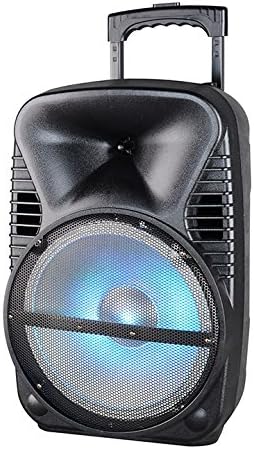
ຮູບພາບ: ທາງຫນ້າ view of the Max Power MPD125L Karaoke DJ Speaker System. It is a black, portable speaker with a retractable handle on top and wheels at the bottom. The front features a large speaker grille with blue LED lights illuminating the woofer, indicating its active state.
- ການອອກແບບແບບພົກພາ: 12-inch speaker with built-in retractable handle and wheels for easy transport.
- ສຽງທີ່ມີອໍານາດ: 4000W peak power output for loud and clear sound with good bass.
- ແບັດເຕີຣີທີ່ສາມາດສາກໄດ້ໃນຕົວ: Provides up to 4 hours of continuous playback. (Battery size: 12V/2.6A)
- LED Dance Lights: Integrated LED lights that flash, transforming any room into a disco club.
- ຕົວເລືອກການເຊື່ອມຕໍ່ຫຼາຍອັນ:
- Bluetooth: Wireless streaming from compatible devices (laptops, smartphones).
- ຊ່ອງສຽບ USB: ສໍາລັບການຫຼິ້ນສຽງ files ຈາກ USB drives.
- ຊ່ອງ SD: ສໍາລັບການຫຼິ້ນສຽງ files from SD cards.
- ວິທະຍຸ AM/FM: Built-in tuner for radio broadcasts.
- ຟັງຊັນຄາຣາໂອເກະ: Includes a wireless microphone for karaoke sessions.
- Full-Function Wireless Remote Control: ສໍາລັບການດໍາເນີນງານສະດວກຈາກໄລຍະໄກ.
- impedance: 4 ໂອມ.
- ການຕອບສະໜອງຄວາມຖີ່: 40 Hz - 20 kHz.
ຕັ້ງຄ່າ
1. ການສາກໄຟ ລຳ ໂພງ
- Locate the DC input port on the speaker (usually on the rear panel).
- Connect the supplied power adapter to the DC input port.
- ສຽບອະແດບເຕີໄຟເຂົ້າໄປໃນປລັກໄຟຟ້າມາດຕະຖານ.
- ໄຟສັນຍານສາກ (ຖ້າມີ) ຈະສະຫວ່າງຂຶ້ນ, ໂດຍປົກກະຕິແລ້ວຈະເປັນສີແດງ, ໃນລະຫວ່າງການສາກ ແລະ ປ່ຽນເປັນສີຂຽວເມື່ອສາກເຕັມແລ້ວ.
- Allow approximately 4-6 hours for a full charge before first use. The speaker can be used while charging.
2. ການຕັ້ງຄ່າໄມໂຄຣໂຟນໄຮ້ສາຍ
- Insert appropriate batteries (not included, usually AA) into the wireless microphone.
- Turn on the microphone. It should automatically pair with the speaker.
- ປັບປຸ່ມລະດັບສຽງໄມໂຄຣໂຟນຢູ່ເທິງແຜງຄວບຄຸມຂອງລຳໂພງໃຫ້ຢູ່ໃນລະດັບທີ່ທ່ານຕ້ອງການ.
3. ການຕັ້ງຄ່າການຄວບຄຸມໄລຍະໄກ
- Insert appropriate batteries (not included, usually AAA) into the wireless remote control.
- Point the remote control towards the speaker's IR receiver (usually on the front panel or near the controls) to operate.
ຄໍາແນະນໍາການດໍາເນີນງານ
1. ເປີດ/ປິດ
Locate the Power switch (usually a rocker switch) on the speaker's control panel. Flip it to the "ON" position to power on the speaker. Flip it to "OFF" to power off.
2. ການເລືອກແບບ
Press the "MODE" button on the control panel or remote control to cycle through available input modes: Bluetooth, USB, SD, FM Radio, AM Radio, AUX (if available).
3. ການຈັບຄູ່ Bluetooth
- Turn on the speaker and select Bluetooth mode. The speaker will typically announce "Bluetooth Mode" or display "BT" and enter pairing mode (indicated by a flashing Bluetooth indicator).
- On your smartphone, tablet, or laptop, enable Bluetooth and search for new devices.
- Select "MPD125L" (or similar name) from the list of available devices.
- Once paired, the speaker will confirm with an audible tone or a solid Bluetooth indicator light. You can now play audio wirelessly.
4. ການຫຼິ້ນ USB/SD
- Insert a USB flash drive or SD card (pre-loaded with MP3 or compatible audio files) into the respective slot.
- The speaker should automatically switch to USB/SD mode and begin playing the first track. If not, press the "MODE" button to select USB or SD mode.
- Use the Play/Pause, Next Track, and Previous Track buttons on the control panel or remote to navigate.
5. ການໃຊ້ງານວິທະຍຸ AM/FM
- Select FM or AM radio mode using the "MODE" button.
- Press and hold the Play/Pause button (often labeled "SCAN") to automatically scan and save available radio stations.
- Use the Next Track and Previous Track buttons to switch between saved stations.
- Extend the telescopic antenna (if present) for better reception.
6. ຟັງຊັ່ນຄາຣາໂອເກະ
Ensure the wireless microphone is powered on and paired. Play your desired music through any input mode (Bluetooth, USB, etc.). Speak or sing into the microphone. Adjust the microphone volume and echo effects (if available) using the dedicated knobs on the control panel.
7. LED Dance Lights
The LED lights typically activate automatically when the speaker is powered on. There may be a dedicated button (e.g., "LIGHT" or "LED") on the control panel or remote to toggle them on/off or change patterns.
8. ການຄວບຄຸມປະລິມານ
Adjust the master volume using the main volume knob on the speaker's control panel or the volume buttons on the remote control.
ບໍາລຸງຮັກສາ
- ທໍາຄວາມສະອາດ: Use a soft, dry cloth to wipe the exterior of the speaker. Do not use liquid cleaners or abrasive chemicals.
- ການເກັບຮັກສາ: ເມື່ອບໍ່ໄດ້ໃຊ້ເປັນເວລາດົນ, ໃຫ້ເກັບຮັກສາລຳໂພງໄວ້ໃນບ່ອນເຢັນ, ແຫ້ງ, ຫ່າງຈາກແສງແດດໂດຍກົງ ແລະ ອຸນຫະພູມທີ່ຮ້າຍກາດ.
- ການດູແລຫມໍ້ໄຟ: To prolong battery life, avoid fully discharging the battery frequently. Recharge the battery at least once every 3 months if not in regular use.
- ການລະບາຍອາກາດ: Ensure the speaker's ventilation openings are clear of dust and debris to prevent overheating.
ການແກ້ໄຂບັນຫາ
| ບັນຫາ | ສາເຫດທີ່ເປັນໄປໄດ້ | ການແກ້ໄຂ |
|---|---|---|
| ລຳໂພງບໍ່ເປີດ. | ແບັດເຕີຣີໝົດ. ສາຍໄຟບໍ່ໄດ້ເຊື່ອມຕໍ່ຢ່າງຖືກຕ້ອງ. | Connect the speaker to a power outlet and allow it to charge. Ensure the power cable is securely plugged into both the speaker and the outlet. |
| ບໍ່ມີສຽງຈາກລຳໂພງ. | ປະລິມານຕໍ່າເກີນໄປ. ເລືອກໂໝດການປ້ອນຂໍ້ມູນທີ່ບໍ່ຖືກຕ້ອງ. Device not properly connected (Bluetooth/USB/SD). | ເພີ່ມປະລິມານຕົ້ນສະບັບ. Press the "MODE" button to select the correct input. Re-pair Bluetooth device, re-insert USB/SD, or check AUX cable connection. |
| ອຸປະກອນ Bluetooth ຈະບໍ່ຈັບຄູ່. | ລຳໂພງບໍ່ໄດ້ຢູ່ໃນໂໝດຈັບຄູ່. ອຸປະກອນຢູ່ໄກຈາກລຳໂພງເກີນໄປ. Bluetooth ໃນອຸປະກອນປິດຢູ່. | Ensure speaker is in Bluetooth mode and indicator is flashing. Move device closer to the speaker (within 10 meters). ເປີດໃຊ້ Bluetooth ໃນອຸປະກອນຂອງທ່ານ. |
| ໄມໂຄຣໂຟນບໍ່ເຮັດວຽກ. | Microphone is off or batteries are dead. ປະລິມານໄມໂຄຣໂຟນຕໍ່າເກີນໄປ. | Turn on the microphone and replace batteries if necessary. Increase the microphone volume knob on the speaker. |
| ການຮັບວິທະຍຸແມ່ນບໍ່ດີ. | ສັນຍານອ່ອນ. ເສົາອາກາດບໍ່ໄດ້ຂະຫຍາຍ. | ຍ້າຍລຳໂພງໄປບໍລິເວນທີ່ມີສັນຍານດີກວ່າ. ຂະຫຍາຍເສົາອາກາດກ້ອງສຽບ. |
ຂໍ້ມູນຈໍາເພາະ
| ໝາຍເລກຕົວແບບ | MPD125L |
| ຍີ່ຫໍ້ | ພະລັງງານສູງສຸດ |
| ຜົນຜະລິດພະລັງງານສູງສຸດ | 4000 ວັດ |
| impedance | 4 ໂອມ |
| ການຕອບສະໜອງຄວາມຖີ່ | 40 Hz - 20 kHz |
| ຂະໜາດແບັດເຕີຣີ | 12V / 2.6A |
| ຊີວິດຫມໍ້ໄຟ | ສູງສຸດ 4 ຊົ່ວໂມງ |
| ຂະໜາດສິນຄ້າ (L x W x H) | 33.02 x 38.1 x 58.42 ຊມ (13 x 15 x 23 ນິ້ວ) |
| ນ້ຳໜັກສິນຄ້າ | 15.88 ກິໂລ (35 ປອນ) |
| ອຸປະກອນທີ່ເຂົ້າກັນໄດ້ | ແລັບທັອບ, ໂທລະສັບສະຫຼາດ |
| ປະເພດຕົວເຊື່ອມຕໍ່ | USB |
| UPC | 703510623201 |
ການຮັບປະກັນແລະການສະຫນັບສະຫນູນ
ສໍາລັບຂໍ້ມູນການຮັບປະກັນແລະການສະຫນັບສະຫນູນດ້ານວິຊາການ, ກະລຸນາເບິ່ງເອກະສານທີ່ສະຫນອງໃຫ້ໃນເວລາຊື້ຫຼືຕິດຕໍ່ຮ້ານຂາຍຍ່ອຍຂອງທ່ານ. ຮັກສາຫຼັກຖານການຊື້ຂອງທ່ານສໍາລັບການຮຽກຮ້ອງການຮັບປະກັນໃດໆ.
For further assistance or inquiries, please visit the official MAX POWER webເວັບໄຊ ຫຼືຕິດຕໍ່ພະແນກບໍລິການລູກຄ້າຂອງເຂົາເຈົ້າ.