
1. ບົດແນະນຳ
ຂອບໃຈສໍາລັບການຊື້asing the SABAJ Da3 Portable USB DAC Headphone Amplifier. This device is designed to deliver high-fidelity audio from your digital sources to your headphones. Please read this manual carefully to ensure proper setup, operation, and maintenance of your Da3 unit.

Figure 1: SABAJ Da3 Portable USB DAC Headphone Ampມີຊີວິດຊີວາ
2. ຜະລິດຕະພັນເກີນview
The SABAJ Da3 is a compact and powerful Digital-to-Analog Converter (DAC) and headphone amplifier. It features a fully balanced design utilizing dual ESS SABRE9018Q2C decoding chips, an XMOS USB audio solution for high-resolution audio playback, and an OLED display for easy operation. It supports both 3.5mm unbalanced and 2.5mm balanced headphone outputs.
3. ຄຸນນະສົມບັດທີ່ສໍາຄັນ
- Dual SABRE9018Q2C DAC Chips: Fully balanced design with two high-performance ESS SABRE9018Q2C decoding chips for superior audio quality, high dynamic range, and ultra-low distortion.
- Advanced USB Audio Solution: Utilizes the second-generation XMOS USB audio solution (XCore200XU208), supporting PCM up to 32-bit/768kHz and native DSD512.
- Asynchronous Clock System: Features two ultra-low phase noise crystal oscillators for precise timing, resulting in more accurate sound reproduction and higher resolution.
- Independent Power Supplies: Two ultra-low noise LDO power supplies independently power the left and right amplifier channels, ensuring stable voltage and a purer sound free from interference.
- ຈໍສະແດງຜົນ OLED: A 0.96-inch OLED screen provides clear information and a simple, intuitive user interface.
- ຜົນຜະລິດຫູຟັງຄູ່: Equipped with both 3.5mm unbalanced and 2.5mm balanced headphone jacks to accommodate various headphone types.
4. ເນື້ອໃນຊຸດ
ກະລຸນາກວດເບິ່ງຊຸດສຳລັບລາຍການຕໍ່ໄປນີ້:
- SABAJ Da3 Unit
- ສາຍ USB-C ຫາ USB-A
- ຄູ່ມືຜູ້ໃຊ້ (ເອກະສານນີ້)

Figure 2: SABAJ Da3 Package Contents
5. ຕັ້ງຄ່າ
5.1 ການເຊື່ອມຕໍ່ກັບອຸປະກອນແຫຼ່ງຂໍ້ມູນ
- Connect the SABAJ Da3 to your computer (PC/Mac) or compatible smartphone/tablet using the provided USB-C to USB-A cable. The Da3 draws power directly from the USB source.
- For optimal performance on Windows systems, you may need to install a specific driver for the XMOS USB audio solution. This driver can typically be found on the SABAJ official website. Mac and Linux systems are generally plug-and-play.
5.2 ການເຊື່ອມຕໍ່ຫູຟັງ
The SABAJ Da3 offers two headphone output options:
- 3.5mm Unbalanced Output: For standard headphones with a 3.5mm stereo jack.
- 2.5mm Balanced Output: For headphones equipped with a 2.5mm TRRS balanced cable. This output can provide more power and better channel separation for compatible headphones.
Insert your headphone connector firmly into the desired output jack on the Da3 unit.

Figure 3: Headphone Output Jacks (BAL and UNBAL)
6. ຄໍາແນະນໍາການດໍາເນີນງານ
6.1 ເປີດ/ປິດ
The Da3 powers on automatically when connected to a powered USB source. Disconnect the USB cable to power off the device.
6.2 ຈໍສະແດງຜົນ OLED
The 0.96-inch OLED display shows important information such as:
- Current audio format (e.g., PCM, DSD)
- Sampling rate (e.g., 44.1kHz, 192kHz, DSD256)
- ລະດັບສຽງ
- Selected output mode (3.5mm or 2.5mm)
6.3 ການຄວບຄຸມປະລິມານ
Use the '+' and '-' buttons on the front panel to adjust the volume. The volume level will be displayed on the OLED screen.
6.4 Audio Modes / Filters
The Da3 may offer different audio filter modes to subtly alter the sound characteristics. Refer to the device's on-screen menu (accessed via the central button, if available) to cycle through these modes and select your preferred sound profile. The device typically remembers your last selected settings.
6.5 ການເລືອກຜົນຜະລິດ
The Da3 automatically detects which headphone output (3.5mm or 2.5mm) is in use. Ensure your headphones are connected to the correct jack for your cable type.
7. ບໍາລຸງຮັກສາ
- ທໍາຄວາມສະອາດ: Use a soft, dry cloth to clean the exterior of the Da3. Avoid using liquid cleaners or solvents.
- ການເກັບຮັກສາ: ເມື່ອບໍ່ໄດ້ໃຊ້, ໃຫ້ເກັບຮັກສາອຸປະກອນໄວ້ໃນບ່ອນທີ່ເຢັນ, ແຫ້ງ, ຫ່າງຈາກແສງແດດໂດຍກົງ ແລະອຸນຫະພູມທີ່ຮຸນແຮງ.
- ການຈັດການ: ຈັດການອຸປະກອນດ້ວຍຄວາມລະມັດລະວັງເພື່ອປ້ອງກັນຄວາມເສຍຫາຍທາງຮ່າງກາຍ. ຫຼີກລ້ຽງການຫຼຸດລົງຫຼືຮັບມັນກັບຜົນກະທົບທີ່ເຂັ້ມແຂງ.
8. ການແກ້ໄຂບັນຫາ
| ບັນຫາ | ສາເຫດທີ່ເປັນໄປໄດ້ | ການແກ້ໄຂ |
|---|---|---|
| ອຸປະກອນບໍ່ເປີດ. | Insufficient power from USB source or faulty USB cable. | Ensure the USB source provides adequate power. Try a different USB port or cable. Some smartphones may not provide enough power; try connecting to a computer. |
| ບໍ່ມີສຽງຈາກຫູຟັງ. |
|
|
| ຄຸນະພາບສຽງບໍ່ດີ ຫຼືບິດເບືອນ. |
|
|
9. ຂໍ້ມູນຈໍາເພາະ
| ຄຸນສົມບັດ | ລາຍລະອຽດ |
|---|---|
| ໝາຍເລກຕົວແບບ | Da3 |
| ຊິບ DAC | Dual ESS SABRE9018Q2C |
| USB Audio Solution | XMOS XCore200XU208 |
| ສະຫນັບສະຫນູນ PCM | ສູງເຖິງ 32-bit / 768 kHz |
| ຮອງຮັບ DSD | ເດີມ DSD512 |
| ຜົນອອກຂອງຫູຟັງ | 3.5mm Unbalanced, 2.5mm Balanced |
| ຈໍສະແດງຜົນ | OLED ຂະໜາດ 0.96 ນິ້ວ |
| ຂະໜາດ (L x W x H) | 13.41 x 1.85 x 2.59 ຊມ (ປະມານ 94 ມມ x 40 ມມ x 12 ມມ) |
| ນ້ຳໜັກ | 50 g (approx. 64g net weight) |
| ສີ | ເງິນ |
| ການສະຫນອງພະລັງງານ | ພະລັງງານລົດເມ USB |
9.1 Technical Measurements

Figure 4: Dynamic Range (125.219 dB)

ຮູບທີ 5: ການຕອບສະໜອງຄວາມຖີ່
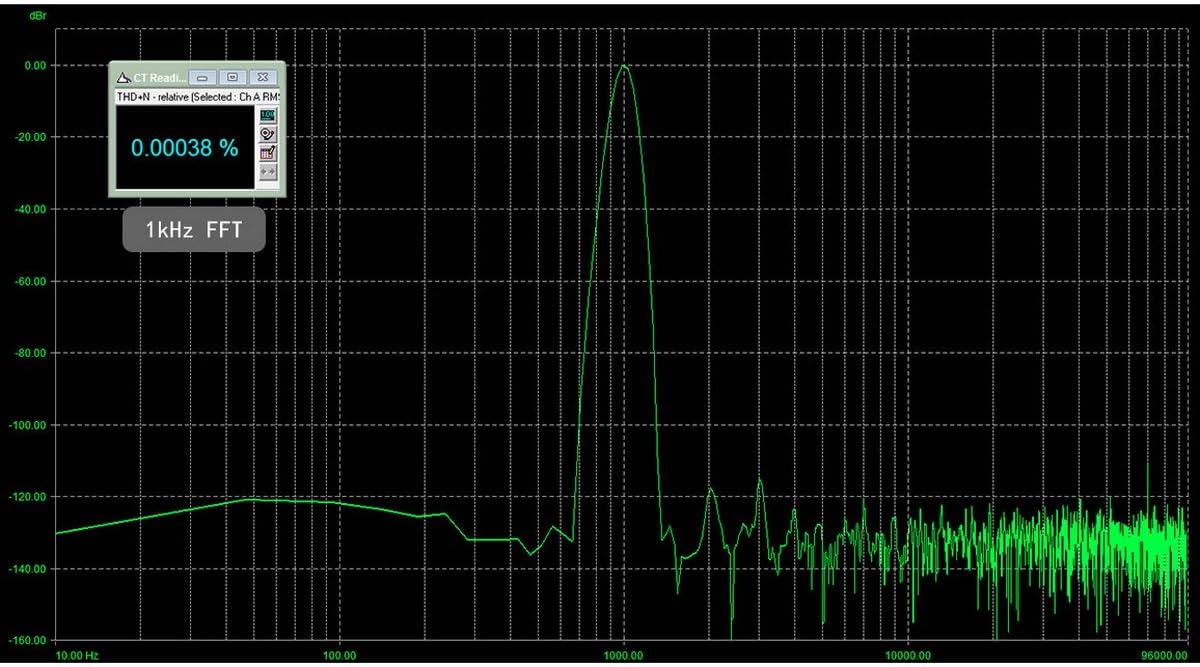
Figure 6: 1kHz FFT (THD+N 0.00038%)
10. ການຮັບປະກັນແລະການສະຫນັບສະຫນູນ
SABAJ products typically come with a limited warranty. For specific warranty terms and conditions, please refer to the warranty card included with your product or visit the official SABAJ website. For technical support, driver downloads, or service inquiries, please contact SABAJ customer support directly through their official channels.