
ແນະນຳ
The Beurer HM55 Wireless Thermometer and Hygrometer is designed to monitor your indoor climate, providing real-time data on temperature and relative humidity. This device helps you maintain a comfortable and healthy environment within your home by displaying current conditions and allowing long-term monitoring via the Beurer FreshRoom app on your smartphone. This manual provides essential information for the safe and effective use of your HM55 device.
ຄຸນນະສົມບັດທີ່ສໍາຄັນ
- Monitors and displays current time, temperature, and relative humidity.
- ສະໜອງໃຫ້ໄວview of indoor environment quality through a colored indicator.
- Bluetooth Smart connectivity for long-term monitoring with the free Beurer FreshRoom app.
- Allows monitoring of temperature and humidity trends over time with easy-to-read graphs in the app.
- Compact and elegant design for discreet placement.
- Multi-room display function enables management of multiple Beurer indoor humidity monitors via the app.
- App features include LED brightness control and time zone settings.
ຂໍ້ມູນຄວາມປອດໄພ
ກະລຸນາອ່ານຄໍາແນະນໍາດ້ານຄວາມປອດໄພເຫຼົ່ານີ້ຢ່າງລະອຽດກ່ອນທີ່ຈະນໍາໃຊ້ອຸປະກອນ. ເກັບຮັກສາຄູ່ມືນີ້ໄວ້ເພື່ອອ້າງອີງໃນອະນາຄົດ.
ຄວາມປອດໄພທົ່ວໄປ
- ຢ່າປ່ອຍໃຫ້ອຸປະກອນຖືກແສງແດດໂດຍກົງ, ອຸນຫະພູມທີ່ຮຸນແຮງ, ຫຼືຄວາມຊຸ່ມຊື່ນສູງ.
- Keep the device away from water and other liquids. Do not immerse it.
- ຢ່າເປີດ ຫຼື ພະຍາຍາມສ້ອມແປງອຸປະກອນດ້ວຍຕົວທ່ານເອງ. ໃຫ້ປຶກສາພະນັກງານທີ່ມີຄຸນວຸດທິເພື່ອສ້ອມແປງອຸປະກອນທັງໝົດ.
- ອຸປະກອນນີ້ບໍ່ແມ່ນຂອງຫຼິ້ນ. ເກັບຮັກສາມັນໄວ້ໃຫ້ໄກຈາກເດັກນ້ອຍ.
- ໃຊ້ອຸປະກອນເພື່ອຈຸດປະສົງຕາມທີ່ໄດ້ອະທິບາຍໄວ້ໃນຄູ່ມືນີ້ເທົ່ານັ້ນ.
ຄວາມປອດໄພຫມໍ້ໄຟ
- Always insert batteries with the correct polarity (+/-).
- ຢ່າຜະສົມແບດເຕີຣີເກົ່າແລະໃຫມ່, ຫຼືແບດເຕີລີ່ປະເພດຕ່າງໆ.
- ຖອດແບດເຕີລີ່ທີ່ຫມົດໄປທັນທີເພື່ອປ້ອງກັນການຮົ່ວໄຫຼແລະຄວາມເສຍຫາຍ.
- ຖ້າອຸປະກອນຈະບໍ່ຖືກໃຊ້ເປັນເວລາດົນ, ໃຫ້ຖອດແບັດເຕີຣີອອກ.
- ຖິ້ມແບດເຕີລີ່ຕາມກົດລະບຽບທ້ອງຖິ່ນ. ຫ້າມຖິ້ມແບັດເຕີລີໃນໄຟ.
ເນື້ອໃນຊຸດ
Carefully unpack your Beurer HM55 and check that all components are present and undamaged.
- 1 x Beurer HM55 Thermo-Hygrometer
- ແບັດເຕີຣີ 2 x 1.5V AAA
- 1 x ຄູ່ມືແນະນຳ (ເອກະສານນີ້)
ອຸປະກອນເກີນview
Familiarize yourself with the components of your Beurer HM55 device.
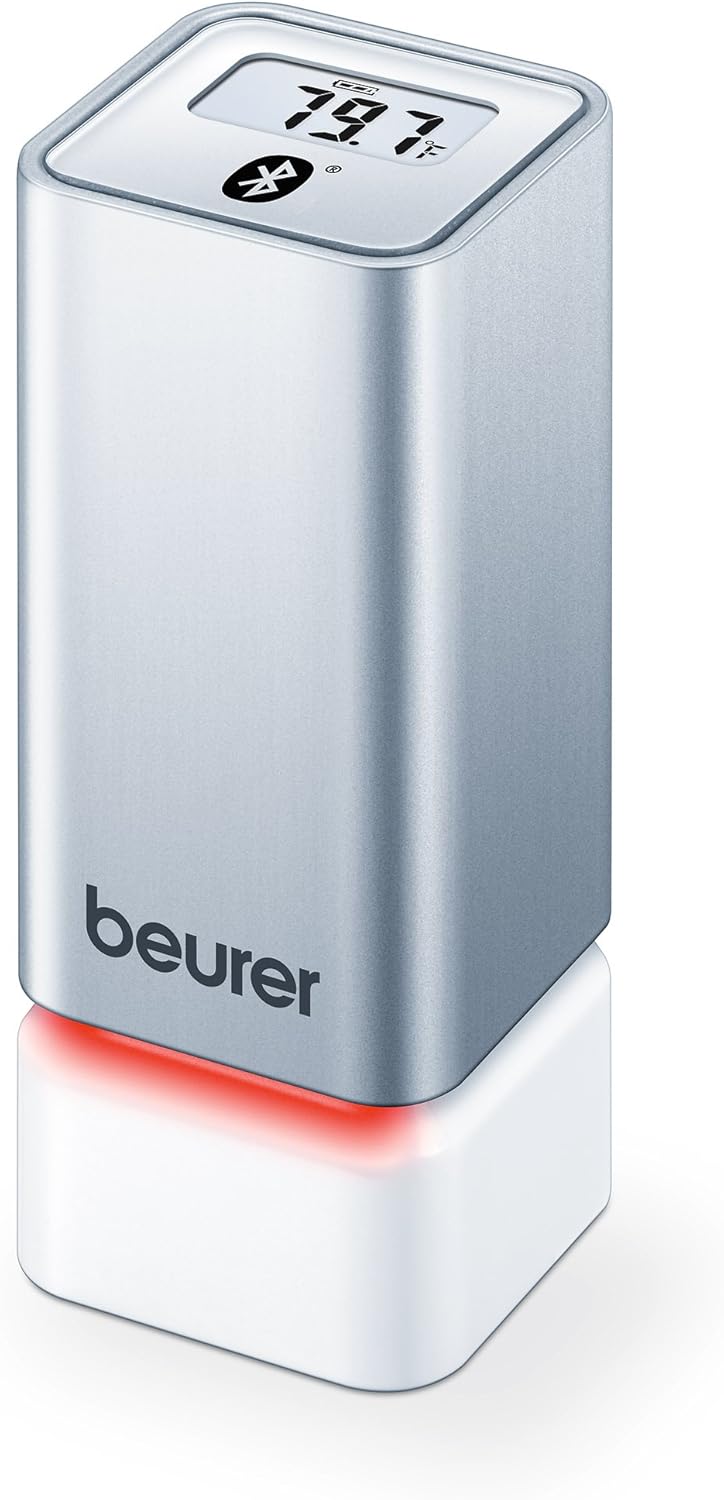
ຮູບທີ 1: ດ້ານໜ້າ view of the Beurer HM55 device, showing the display and Beurer logo.

ຮູບທີ 2: Close-up of the HM55 display, indicating temperature, humidity, and Bluetooth icon.

ຮູບທີ 3: The compact size of the HM55 device, shown in comparison to a hand.
- ຈໍສະແດງຜົນ: Shows current temperature, relative humidity, and time.
- ຕົວຊີ້ວັດ LED: Located at the base, changes color to indicate indoor climate quality.
- ຊ່ອງໃສ່ຫມໍ້ໄຟ: Located on the underside of the device.
- ສັນຍາລັກ Bluetooth: ຊີ້ບອກການເຊື່ອມຕໍ່ Bluetooth ທີ່ໃຊ້ຢູ່.
ຕັ້ງຄ່າ
1. ການໃສ່ແບັດເຕີລີ
- Locate the battery compartment on the bottom of the HM55 device.
- ເປີດຝາປິດຊ່ອງໃສ່ຫມໍ້ໄຟ.
- ໃສ່ແບັດເຕີຣີ AAA 1.5V ສອງກ້ອນ, ຮັບປະກັນວ່າຂົ້ວທີ່ຖືກຕ້ອງ (+/-).
- Close the battery compartment cover securely. The device display should activate.
2. Downloading the Beurer FreshRoom App
The Beurer FreshRoom app is required to utilize the full functionality of your HM55 device, including long-term monitoring and multi-room management. The app is compatible with iOS (version 8.0 or higher) and Android (version 4.4 or higher with Bluetooth 4.0).
- For iOS devices, download the "Beurer FreshRoom" app from the Apple App Store.
- For Android devices, download the "Beurer FreshRoom" app from the Google Play Store.
- Alternatively, scan the QR code provided in the product packaging or visit the official Beurer webເວັບໄຊທ໌ສໍາລັບການເຊື່ອມຕໍ່ໂດຍກົງ. Beurer Smartphone App Information

ຮູບທີ 4: Example of the Beurer FreshRoom app interface on a smartphone.
3. ການຈັບຄູ່ກັບໂທລະສັບສະຫຼາດຂອງທ່ານ
- ໃຫ້ແນ່ໃຈວ່າ Bluetooth ຖືກເປີດໃຊ້ຢູ່ໃນໂທລະສັບສະຫຼາດຂອງທ່ານ.
- Open the Beurer FreshRoom app.
- Follow the on-screen instructions within the app to search for and connect to your HM55 device. The app will guide you through the pairing process.
- Once successfully paired, the Bluetooth symbol on the HM55 display will illuminate, and data will begin to synchronize with the app.
4. ການຈັດວາງເບື້ອງຕົ້ນ
Place the HM55 in the room you wish to monitor. For accurate readings, avoid placing it:
- Near heat sources (e.g., radiators, direct sunlight).
- Near air conditioning vents or open windows.
- In areas with high airflow or drafts.
- In direct contact with moisture.
ປະຕິບັດການອຸປະກອນ
ຄວາມເຂົ້າໃຈໃນການສະແດງ
The HM55 display provides immediate readings:
- ອຸນຫະພູມ: Displays in Celsius (°C) or Fahrenheit (°F). The unit can be changed via the app.
- ຄວາມຊຸ່ມຊື່ນພີ່ນ້ອງ: Displays as a percentage (%).
- ເວລາ: Displays the current time, synchronized via the app.
- ໄອຄອນ Bluetooth: Indicates an active connection to your smartphone.
Interpreting the Colored Climate Indicator
The LED light at the base of the HM55 provides a quick visual indication of your indoor climate:
- ສີຂຽວ: Optimal indoor climate.
- ສີແດງ: Poor indoor climate (e.g., too dry, too humid, or extreme temperature).
- The specific thresholds for these indicators can be customized within the Beurer FreshRoom app.

ຮູບທີ 5: HM55 device showing a red LED indicator, signifying a poor indoor climate.

ຮູບທີ 6: HM55 device showing a green LED indicator, signifying an optimal indoor climate.
Using the Beurer FreshRoom App
The app provides advanced features for monitoring and managing your indoor climate:
- ຂໍ້ມູນເວລາຈິງ: View current temperature and humidity readings from your device.
- ຂໍ້ມູນປະຫວັດສາດ: Access graphs and logs of temperature and humidity over various periods (e.g., hourlວ, ປະຈຳວັນ, ປະຈຳອາທິດ, ປະຈຳເດືອນ).
- ແຈ້ງເຕືອນ: Set custom minimum and maximum thresholds for temperature and humidity. Receive notifications if readings fall outside these ranges.
- ການຕັ້ງຄ່າ: Adjust device settings such as temperature unit (°C/°F), LED brightness, and time zone.
Multi-Room Function
If you have multiple Beurer HM55 devices, the FreshRoom app allows you to monitor all of them from a single interface. Each device can be assigned to a specific room for easy identification and tracking.
- Add each additional HM55 device to the app following the pairing instructions.
- Assign a unique name or room designation to each device within the app settings.
- View and compare climate data from all connected rooms on a single dashboard.
ບໍາລຸງຮັກສາ
ທໍາຄວາມສະອາດ
- ເຊັດອຸປະກອນດ້ວຍຄວາມອ່ອນ, ແຫ້ງ, ຫຼືເລັກນ້ອຍ damp ຜ້າ.
- ຢ່າໃຊ້ນໍ້າຢາເຮັດຄວາມສະອາດທີ່ມີສີຂັດ, ຕົວລະລາຍ ຫຼື ສານເຄມີຮຸນແຮງ, ເພາະວ່າສິ່ງເຫຼົ່ານີ້ສາມາດທໍາລາຍພື້ນຜິວ ຫຼື ອົງປະກອບພາຍໃນໄດ້.
- ໃຫ້ແນ່ໃຈວ່າບໍ່ມີຂອງແຫຼວເຂົ້າໄປໃນອຸປະກອນ.
ການປ່ຽນແບັດ
When the battery low indicator appears on the display or in the app, replace both AAA batteries following the instructions in the "Inserting Batteries" section.
ການເກັບຮັກສາ
If the device will not be used for an extended period, remove the batteries and store the device in a cool, dry place, away from direct sunlight and extreme temperatures.
ການແກ້ໄຂບັນຫາ
If you encounter issues with your Beurer HM55, refer to the following common problems and solutions:
| ບັນຫາ | ສາເຫດທີ່ເປັນໄປໄດ້ | ການແກ້ໄຂ |
|---|---|---|
| ໜ້າຈໍອຸປະກອນວ່າງເປົ່າ. | ແບດເຕີລີ່ຫມົດແລ້ວຫຼືໃສ່ບໍ່ຖືກຕ້ອງ. | ກວດເບິ່ງຂົ້ວຂອງແບດເຕີຣີ້ ຫຼືປ່ຽນແບັດ AAA ໃໝ່. |
| ແອັບບໍ່ສາມາດເຊື່ອມຕໍ່ກັບອຸປະກອນໄດ້. | Bluetooth is off on smartphone; device is out of range; app issue. | Ensure Bluetooth is enabled. Move smartphone closer to the device. Restart the app or smartphone. Re-pair the device if necessary. |
| Readings appear inaccurate. | Device placement is suboptimal; environmental factors. | Relocate the device away from direct heat, cold, or drafts. Allow time for readings to stabilize after relocation. |
| LED indicator is always red. | Indoor climate is consistently outside optimal range; app settings. | Check temperature and humidity levels in the app. Adjust environmental conditions (e.g., use a humidifier/dehumidifier, adjust heating/cooling). Review and adjust alert thresholds in the app. |
ຂໍ້ມູນຈໍາເພາະ
| ຕົວແບບ | HM55 |
| ຍີ່ຫໍ້ | Beurer |
| ການສະຫນອງພະລັງງານ | ແບັດເຕີຣີ 2 x 1.5V AAA |
| ການເຊື່ອມຕໍ່ | Bluetooth Smart (Bluetooth 4.0) |
| ຄວາມເຂົ້າກັນໄດ້ຂອງ App | iOS 8.0 ຫຼືສູງກວ່າ, Android 4.4 ຫຼືສູງກວ່າ |
| ປະເພດການຕິດຕັ້ງ | ຕິດຝາ |
| ສີ | ເງິນ |
| ອົງປະກອບລວມ | Beurer Thermo-Hygrometer |
ການຮັບປະກັນແລະການສະຫນັບສະຫນູນ
Beurer provides a limited warranty for this product. For detailed warranty terms and conditions, please refer to the warranty card included with your product or visit the official Beurer webເວັບໄຊ.
For technical support, troubleshooting assistance, or to inquire about replacement parts, please contact Beurer customer service. Contact information can typically be found on the Beurer webສະຖານທີ່ຫຼືຢູ່ໃນການຫຸ້ມຫໍ່ຜະລິດຕະພັນ.
ຊັບພະຍາກອນອອນໄລນ໌: For additional information and app support, visit Beurer Smartphone App Information.