
Unknown Yu- TLXgo-2201
Wireless Bluetooth Headset User Manual
Model: Yu- TLXgo-2201 | Brand: Unknown
ແນະນຳ
ຂອບໃຈສໍາລັບການຊື້asing the Wireless Bluetooth Headset. This manual provides essential information for the proper use, setup, and maintenance of your new headset. Please read it thoroughly before use to ensure optimal performance and longevity of the product.
ເນື້ອໃນຊຸດ
ກະລຸນາກວດສອບວ່າລາຍການທັງຫມົດທີ່ລະບຸໄວ້ຂ້າງລຸ່ມນີ້ແມ່ນລວມຢູ່ໃນຊຸດຂອງທ່ານ:
- Wireless Bluetooth Headset (2 units)
- ສາຍສາກ USB (2 ໜ່ວຍ)
- ຄູ່ມືຜູ້ໃຊ້

Image: Contents of the headset package, showing one black headset and a white USB charging cable.
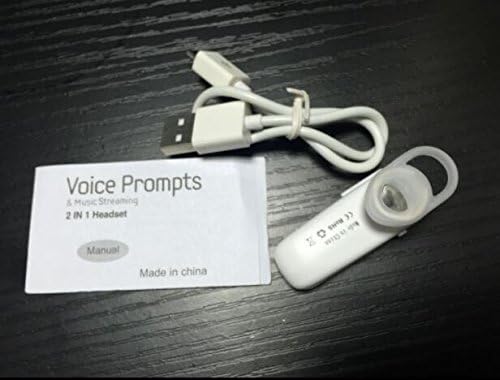
Image: Contents of the headset package, showing one white headset, a white USB charging cable, and the printed user manual.
ສິນຄ້າເກີນview
The Wireless Bluetooth Headset is designed for convenience and portability, ideal for sports, driving, and daily use. It features a super mini design and supports voice prompts and music streaming.

ຮູບພາບ: ທາງຫນ້າ view of the product packaging, displaying the black wireless Bluetooth headset inside its clear plastic casing.
ຂໍ້ມູນຈໍາເພາະ
| ຄຸນສົມບັດ | ລາຍລະອຽດ |
|---|---|
| ລຸ້ນ Bluetooth | V3.0 + EDR |
| ສະຫນັບສະຫນູນ Profiles | Headset, Handsfree, A2DP |
| Talk Time/Playing Time | ສູງສຸດ 5 ຊົ່ວໂມງ |
| ເວລາສະແຕນບາຍ | ສູງສຸດ 80 ຊົ່ວໂມງ |
| ແຫຼ່ງພະລັງງານ | ແບັດເຕີຣີ Li-ion ສາມາດສາກໄດ້ໃນຕົວ |
| ເຕັກໂນໂລຊີການເຊື່ອມຕໍ່ | ໄຮ້ສາຍ |
| ປັດໄຈແບບຟອມ | ໃນຫູ |
| ນ້ໍາຫນັກລາຍການ | 15.8 ounces (for 2 units) |
| ຂະໜາດແພັກເກັດ | 1.97 x 1.57 x 1.18 ນິ້ວ |
| ໝາຍເລກຕົວແບບ | Yu- TLXgo-2201 |

Image: Back of the product packaging, displaying a list of product specifications including Bluetooth version, talk time, and power source.
ຕັ້ງຄ່າ
ກຳລັງສາກຫູຟັງ
- ເຊື່ອມຕໍ່ປາຍສາຍສາກໄຟ USB ຂະໜາດນ້ອຍເຂົ້າກັບພອດສາກໄຟໃນຊຸດຫູຟັງ.
- ເຊື່ອມຕໍ່ປາຍໃຫຍ່ກວ່າຂອງສາຍສາກ USB ກັບແຫຼ່ງພະລັງງານ USB (ເຊັ່ນ: ພອດ USB ຂອງຄອມພິວເຕີ, ຕົວແປງໄຟ USB).
- The indicator light on the headset will illuminate during charging. It will change color or turn off once fully charged.
- ໂດຍປົກກະຕິການສາກເຕັມຈະໃຊ້ເວລາປະມານ 1-2 ຊົ່ວໂມງ.
ການຈັບຄູ່ກັບອຸປະກອນ Bluetooth
- Ensure the headset is fully charged before initial pairing.
- With the headset turned off, press and hold the Multi-function Button (MFB) for approximately 5-7 seconds until the indicator light flashes red and blue alternately. This indicates the headset is in pairing mode.
- On your Bluetooth-enabled device (smartphone, tablet, etc.), go to the Bluetooth settings and ensure Bluetooth is enabled.
- ຊອກຫາ available devices. The headset should appear in the list, typically named "MBT2013" or similar.
- Select the headset from the list to connect. If prompted for a password, enter "0000" (four zeros).
- Once successfully paired, the indicator light will stop flashing and may show a steady blue light, and you may hear a voice prompt confirming the connection.
- The headset will automatically connect to the last paired device when turned on, if the device's Bluetooth is active and within range.
ຄໍາແນະນໍາການດໍາເນີນງານ
ເປີດ/ປິດ
- ເປີດ: Press and hold the Multi-function Button (MFB) for about 3 seconds until the blue indicator light flashes and you hear a voice prompt.
- ປິດພະລັງງານ: Press and hold the MFB for about 3-4 seconds until the red indicator light flashes and you hear a voice prompt.
ການຄຸ້ມຄອງການໂທ
- ຮັບສາຍ: ກົດ MFB ຫນຶ່ງຄັ້ງ.
- ສິ້ນສຸດການໂທ: ກົດ MFB ຄັ້ງດຽວໃນລະຫວ່າງການໂທ.
- ປະຕິເສດການໂທ: Press and hold the MFB for about 2 seconds during an incoming call.
- ໂທຫາເບີສຸດທ້າຍ: ກົດປຸ່ມ MFB ສອງເທື່ອເມື່ອບໍ່ຢູ່ໃນສາຍ.
ເພັງ Playback
- ຫຼິ້ນ/ຢຸດ: Press the MFB once during music playback.
ໝາຍເຫດ: ການຄວບຄຸມລະດັບສຽງອາດຈະຖືກຈັດການໂດຍກົງຈາກອຸປະກອນທີ່ເຊື່ອມຕໍ່ຂອງທ່ານ.
ບໍາລຸງຮັກສາ
- ທໍາຄວາມສະອາດ: ໃຊ້ຜ້າປຽກແຫ້ງເພື່ອເຮັດຄວາມສະອາດຊຸດຫູຟັງ. ຢ່າໃຊ້ສານເຄມີທີ່ຮຸນແຮງຫຼືວັດສະດຸຂັດ.
- ການເກັບຮັກສາ: ເກັບຮັກສາຊຸດຫູຟັງໄວ້ໃນບ່ອນທີ່ເຢັນ, ແຫ້ງ, ຫ່າງຈາກແສງແດດໂດຍກົງ ແລະອຸນຫະພູມທີ່ຮຸນແຮງ.
- ການດູແລຫມໍ້ໄຟ: To prolong battery life, charge the headset regularly, even if not in frequent use. Avoid fully discharging the battery for extended periods.
- ຄວາມຕ້ານທານນ້ໍາ: This headset is not waterproof. Avoid exposure to water or excessive moisture.
ການແກ້ໄຂບັນຫາ
- ຊຸດຫູຟັງເປີດບໍ່ໄດ້:
- ໃຫ້ແນ່ໃຈວ່າຊຸດຫູຟັງສາກໄຟເຕັມແລ້ວ. ເຊື່ອມຕໍ່ມັນກັບແຫຼ່ງພະລັງງານ ແລະ ລອງໃໝ່ອີກຄັ້ງ.
- ບໍ່ສາມາດຈັບຄູ່ກັບອຸປະກອນ:
- Ensure the headset is in pairing mode (red and blue lights flashing alternately). Make sure Bluetooth is enabled on your device and it is within range (typically 10 meters). Try restarting both the headset and your device.
- ບໍ່ມີສຽງ ຫຼືຄຸນນະພາບສຽງບໍ່ດີ:
- Check the volume levels on both the headset and your connected device. Ensure the headset is properly connected to your device. Move closer to your device to avoid interference.
- ຊຸດຫູຟັງຕັດການເຊື່ອມຕໍ່ເລື້ອຍໆ:
- Ensure the headset is within range of your device. Check for potential interference from other wireless devices. Try re-pairing the headset.
ຂໍ້ມູນຄວາມປອດໄພ
- Do not disassemble, repair, or modify the headset. This may cause fire, electronic breakdown, or complete damage to the product.
- Keep the headset away from extreme temperatures, humidity, and corrosive substances.
- ຫຼີກລ່ຽງການລຸດລົງ ຫຼື ວາງຫູຟັງເພື່ອຮັບຜົນກະທົບທີ່ຮຸນແຮງ.
- Do not expose the headset to open flames or dispose of it in fire.
- ຖິ້ມຜະລິດຕະພັນແລະຫມໍ້ໄຟຂອງຕົນຢ່າງມີຄວາມຮັບຜິດຊອບຕາມກົດລະບຽບທ້ອງຖິ່ນ.
ການຮັບປະກັນແລະການສະຫນັບສະຫນູນ
ສຳລັບຂໍ້ມູນການຮັບປະກັນ ຫຼື ການຊ່ວຍເຫຼືອດ້ານເຕັກນິກ, ກະລຸນາອ້າງອີງເຖິງລາຍລະອຽດການຕິດຕໍ່ທີ່ຜູ້ຂາຍຍ່ອຍຂອງທ່ານ ຫຼື ເຈົ້າໜ້າທີ່ຂອງຜູ້ຜະລິດສະໜອງໃຫ້ webເວັບໄຊ. ກະລຸນາຮັກສາຫຼັກຖານການຊື້ຂອງທ່ານສໍາລັບການຮຽກຮ້ອງການຮັບປະກັນ.
Ask a question about this manual
Ask about setup, troubleshooting, compatibility, parts, safety, or missing instructions. Manuals+ will review the question and use this page’s manual context to help answer it.