
1. ບົດແນະນຳ
This manual provides comprehensive instructions for the safe and effective use of the PCE Instruments PCE-170 A Light Meter. This device is designed for measuring illuminance (lux or foot-candles) in various environments, such as offices, factories, and outdoor settings. It features a wide measurement range, fast response time, and a compact design for ease of use.
ກະລຸນາອ່ານຄູ່ມືນີ້ຢ່າງລະອຽດກ່ອນທີ່ຈະປະຕິບັດອຸປະກອນແລະເກັບຮັກສາມັນສໍາລັບການອ້າງອີງໃນອະນາຄົດ.
2. ຂໍ້ມູນຄວາມປອດໄພ
Observe the following safety precautions to prevent injury and avoid damage to the device:
- ຢ່າເຮັດໃຫ້ອຸປະກອນຖືກອຸນຫະພູມສູງ, ຄວາມຊຸ່ມຊື່ນ, ຫຼືແສງແດດໂດຍກົງ.
- ຫຼີກເວັ້ນການສັ່ນສະເທືອນຫຼືຜົນກະທົບທີ່ເຂັ້ມແຂງ.
- ຢ່າພະຍາຍາມເປີດ ຫຼືແກ້ໄຂອຸປະກອນ. ອ້າງອີງການບໍລິການທັງໝົດໃຫ້ກັບບຸກຄະລາກອນທີ່ມີຄຸນວຸດທິ.
- Keep the light sensor clean and free from obstructions to ensure accurate readings.
- ຖອດແບດເຕີຣີອອກຖ້າອຸປະກອນຈະບໍ່ຖືກໃຊ້ເປັນໄລຍະເວລາເພີ່ມເຕີມເພື່ອປ້ອງກັນການຮົ່ວໄຫຼ.
- ຖິ້ມແບດເຕີລີ່ແລະອຸປະກອນຕາມກົດລະບຽບທ້ອງຖິ່ນ.
3. ຜະລິດຕະພັນເກີນview
The PCE-170 A Light Meter consists of a main unit with a display and control buttons, and an integrated light sensor.

ຮູບທີ 1: ດ້ານໜ້າ view of the PCE-170 A Light Meter, showing the display, control buttons, and light sensor at the top.
3.1 ອົງປະກອບ
- ເຊັນເຊີແສງ: Located at the top of the device, protected by a white dome. This silicon photodiode measures incident light.
- ຈໍ LCD: A 5-digit display showing measurement values, units (lux/fc), and function indicators (e.g., AUTO RANGE, HOLD, MIN, MAX).
- ປຸ່ມເປີດ/ປິດ: ເປີດ ຫຼື ປິດອຸປະກອນ.
- ປຸ່ມ CAL: Used for zero adjustment.
- ປຸ່ມຖື: ຢຸດການອ່ານປັດຈຸບັນຢູ່ໃນຈໍສະແດງຜົນ.
- ປຸ່ມ fc/lx: Toggles between foot-candle (fc) and lux (lx) measurement units.
- ປຸ່ມ RANGE: Manually selects measurement ranges or activates auto-ranging.
- ຊ່ອງໃສ່ຫມໍ້ໄຟ: Located at the rear, houses the 9V battery.

ຮູບທີ 2: ໃກ້ຊິດ view of the LCD display, showing a reading of "534 lx" and "AUTO RANGE 4 000".
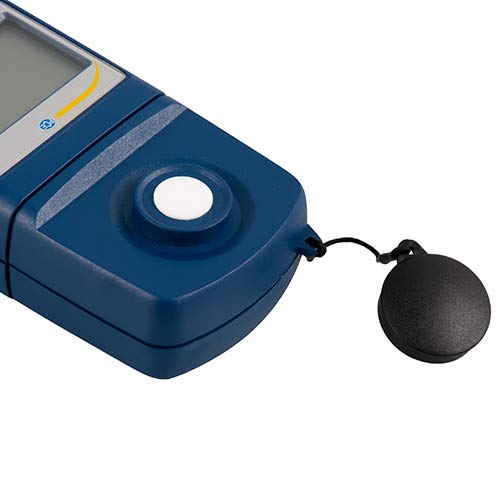
ຮູບທີ 3: ລະອຽດ view of the light sensor at the top of the device, with its protective cap removed.
4. ຕັ້ງຄ່າ
4.1 ການຕິດຕັ້ງຫມໍ້ໄຟ
- ຊອກຫາຝາປິດຊ່ອງໃສ່ຫມໍ້ໄຟຢູ່ດ້ານຫຼັງຂອງອຸປະກອນ.
- Slide the cover open or unscrew it, depending on the model.
- Insert one 9V battery, observing the correct polarity (+/-).
- ປ່ຽນຝາປິດຊ່ອງໃສ່ຫມໍ້ໄຟໃຫ້ປອດໄພ.
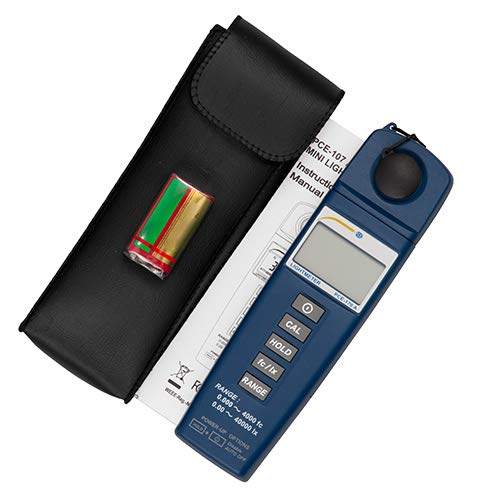
ຮູບທີ 4: The PCE-170 A Light Meter shown with its carrying case and the included 9V battery, ready for installation.
4.2 ການເປີດເຄື່ອງເບື້ອງຕົ້ນ
ກົດ ພະລັງງານ button to turn on the device. The display will illuminate and show a reading. If the battery symbol appears, replace the battery.
5. ຄໍາແນະນໍາການດໍາເນີນງານ
5.1 ການວັດແທກ
- Turn on the device using the ພະລັງງານ ປຸ່ມ.
- Ensure the light sensor is clean and unobstructed.
- Position the light sensor at the location where illuminance is to be measured. Ensure the sensor is facing the light source directly for accurate readings.
- The current illuminance value will be displayed on the LCD.

ຮູບທີ 5: A user measuring light levels in an office environment with the PCE-170 A Light Meter.
5.2 Changing Measurement Units (fc/lx)
ກົດ fc/lx button to toggle between foot-candles (fc) and lux (lx) units. The selected unit will be indicated on the display.
5.3 ຟັງຊັນຖື
ກົດ ຖື button to freeze the current reading on the display. Press it again to release the hold and resume live measurements.
5.4 Zero Adjustment (CAL)
ເພື່ອດໍາເນີນການປັບສູນ:
- Place the light sensor in a completely dark environment (e.g., cover it with the protective cap or place it in a dark box).
- ກົດ CAL button. The display should show "0.00" or a value very close to zero.
- If the display does not show zero, repeat the process.
5.5 ການເລືອກໄລຍະ
The device typically operates in auto-ranging mode. To manually select a range or cycle through available ranges, press the ຫາຍາກ button. The display will indicate the active range. Press and hold the ຫາຍາກ button to return to auto-ranging mode.
5.6 Min/Max Function (Power-Up Option)
The PCE-170 A supports Min/Max recording. To activate this feature, refer to the power-up options indicated on the device label (e.g., press and hold a specific button during power-on). This function records the minimum and maximum illuminance values detected during a measurement session.
6. ບໍາລຸງຮັກສາ
6.1 ການທໍາຄວາມສະອາດ
Wipe the device with a soft, dry cloth. Do not use abrasive cleaners or solvents. Keep the light sensor clean and free of dust or smudges, as this can affect measurement accuracy.
6.2 ການເກັບຮັກສາ
When not in use, store the PCE-170 A Light Meter in its carrying case in a cool, dry place, away from direct sunlight and extreme temperatures. Remove the battery if storing for extended periods.
7. ການແກ້ໄຂບັນຫາ
| ບັນຫາ | ສາເຫດທີ່ເປັນໄປໄດ້ | ການແກ້ໄຂ |
|---|---|---|
| ອຸປະກອນບໍ່ເປີດ. | ແບັດເຕີຣີຕາຍ ຫຼື ຕິດຕັ້ງບໍ່ຖືກຕ້ອງ. | Check battery polarity or replace with a new 9V battery. |
| ຈໍສະແດງຜົນສະແດງ "OL" (ໂອເວີໂຫຼດ). | Light intensity exceeds the current measurement range. | ປ່ຽນໄປໃຊ້ຊ່ວງການວັດແທກທີ່ສູງຂຶ້ນໂດຍໃຊ້ ຫາຍາກ button, or move to a less intensely lit area. |
| ການອ່ານບໍ່ຖືກຕ້ອງ. | Dirty sensor, incorrect zero adjustment, or sensor not facing light source correctly. | Clean the sensor, perform zero adjustment in darkness, and ensure the sensor is properly oriented. |
| ຈໍສະແດງຜົນຫວ່າງເປົ່າ ຫຼື flickering. | ແບັດເຕີຣີຕໍ່າ. | ປ່ຽນແບັດເຕີຣີ 9V. |
8. ຂໍ້ມູນຈໍາເພາະ
| ພາລາມິເຕີ | ມູນຄ່າ |
|---|---|
| ໄລຍະການວັດແທກ | 0.00 ... 40,000 lux / 0.000 ... 4000 fc |
| ຄວາມລະອຽດ | 0.01 lux / 0.001 fc |
| ຄວາມຖືກຕ້ອງ | ±3% of measurement value + 5 digits |
| ຕົວຊີ້ວັດການໂຫຼດເກີນ | "ອລ" |
| ອັດຕາການວັດແທກ | ທຸກໆ 2 ວິນາທີ |
| ອຸນຫະພູມປະຕິບັດການ | 0 ... 40°C / 32 ... 104°F |
| ເຊັນເຊີແສງ | Silicon photodiode, corrected cosine angle |
| ຈໍສະແດງຜົນ | LCD 5 ຕົວເລກ |
| ແຫຼ່ງພະລັງງານ | ຫມໍ້ໄຟ 9V (ລວມ) |
| ຂະໜາດ | 33 x 54 x 196 ມມ / 1.3 x 2.1 x 7.7 ນິ້ວ |
| ນ້ຳໜັກ | 180 g / <1 lb (approx. 9.17 ounces) |
8.1 ຂອບເຂດການຈັດສົ່ງ
The standard delivery package includes:
- 1 x PCE-170 A Lux Meter
- ແບດເຕີຣີ້ມາດຕະຖານ 1 x 9V
- 1 x ກະເປົາຖື
- 1 x ຄູ່ມືຜູ້ໃຊ້ (ເອກະສານນີ້)
9. ການຮັບປະກັນແລະການສະຫນັບສະຫນູນ
PCE Instruments provides a warranty for this product against defects in materials and workmanship. For specific warranty terms and conditions, please refer to the warranty card included with your purchase or visit the official PCE Instruments website. For technical support, service, or calibration inquiries, please contact PCE Instruments customer service.
PCE Instruments US: ເຂົ້າເບິ່ງຮ້ານຄ້າ