
1. ບົດແນະນຳ
ຂອບໃຈສໍາລັບການຊື້asing the Kaiser MSA-5708GY Professional 8-inch Amplified Wireless Speaker. This device is designed to provide high-quality audio with versatile connectivity options, including Bluetooth, USB, SD card, and AUX input. It also features a microphone input for public address or karaoke, and dynamic multicolor LED lights. Please read this manual thoroughly before operating the speaker to ensure proper use and to maximize its performance and longevity.
2. ຂໍ້ມູນຄວາມປອດໄພ
- ແຫຼ່ງພະລັງງານ: Use only the provided charging cable and adapter. Ensure the power supply matches the speaker's requirements.
- ນ້ໍາແລະຄວາມຊຸ່ມ: Do not expose the speaker to water, rain, or excessive moisture. Avoid placing liquid-filled objects on or near the speaker.
- ຄວາມຮ້ອນ: Keep the speaker away from heat sources such as radiators, heat registers, stoves, or other heat-producing appliances.
- ການລະບາຍອາກາດ: ຢ່າອຸດຕັນຊ່ອງລະບາຍອາກາດໃດໆ. ຮັບປະກັນໃຫ້ມີກະແສລົມໄຫຼວຽນພຽງພໍອ້ອມຮອບລຳໂພງ.
- ທໍາຄວາມສະອາດ: ຖອດສາຍໄຟອອກກ່ອນທຳຄວາມສະອາດ. ໃຊ້ຜ້າແຫ້ງ ແລະ ອ່ອນ. ຢ່າໃຊ້ນໍ້າຢາທຳຄວາມສະອາດ ຫຼື ນໍ້າຢາທຳຄວາມສະອາດແບບສີດ.
- ການບໍລິການ: ຢ່າພະຍາຍາມບໍລິການຜະລິດຕະພັນນີ້ດ້ວຍຕົນເອງ. ອ້າງເຖິງການບໍລິການທັງtoົດໃຫ້ກັບພະນັກງານບໍລິການທີ່ມີຄຸນວຸດທິ.
- ແບັດເຕີຣີ: The speaker contains a rechargeable battery. Do not expose the battery to excessive heat or direct sunlight. Dispose of batteries according to local regulations.
3. ເນື້ອໃນຊຸດ
ກວດສອບວ່າລາຍການທັງຫມົດແມ່ນມີຢູ່ໃນຊຸດ:
- Kaiser MSA-5708GY Ampລຳໂພງໄຮ້ສາຍທີ່ໄດ້ປັບປຸງ
- ໄມໂຄຣໂຟນທີ່ມີສາຍ
- ການຄວບຄຸມໄລຍະໄກ
- Charging Cable / Power Adapter
4. ຜະລິດຕະພັນເກີນview
Familiarize yourself with the main components and controls of your speaker.
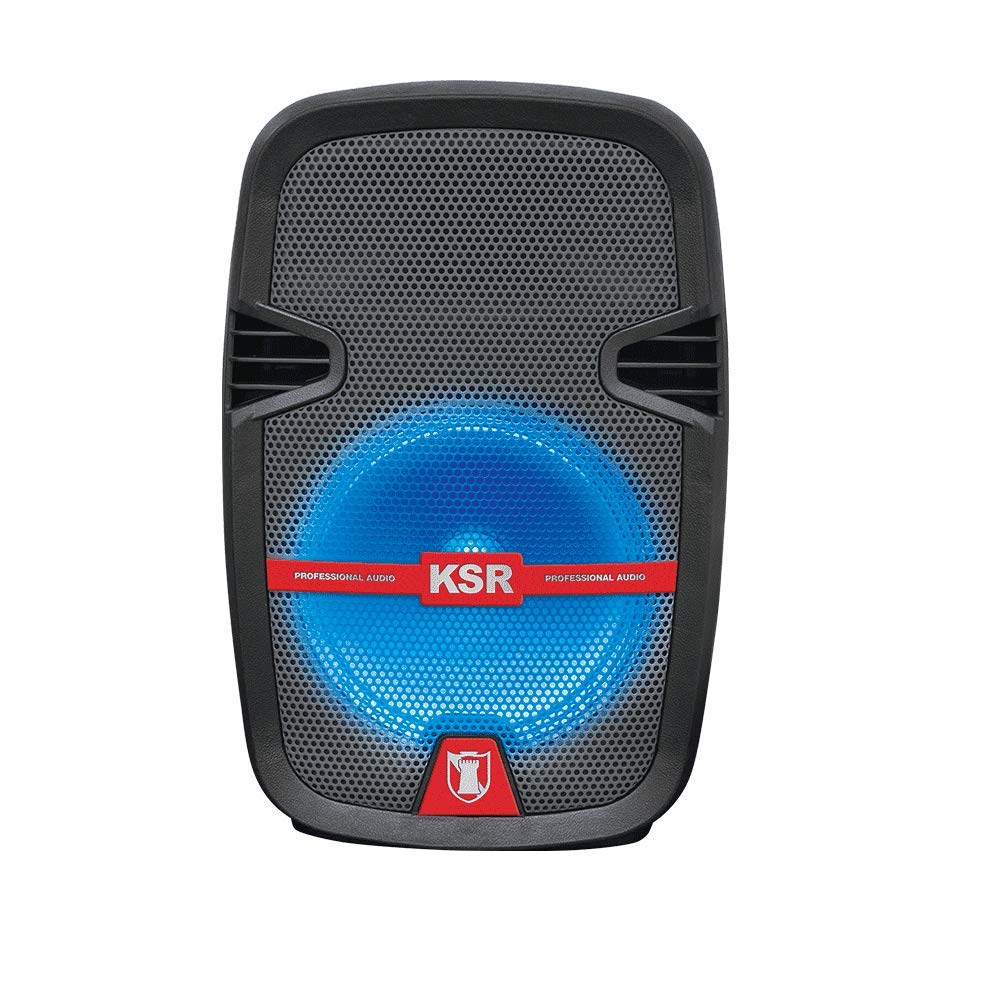
ຮູບທີ 1: ດ້ານໜ້າ view of the Kaiser MSA-5708GY speaker, showing the 8-inch woofer with multicolor LED lights and the control panel.
ຄຸນນະສົມບັດກະດານຄວບຄຸມ:
- ຈໍສະແດງຜົນ: ສະແດງໂໝດປະຈຸບັນ, ໝາຍເລກເພງ, ຫຼື ຄວາມຖີ່ FM.
- ປຸ່ມໂໝດ: Switches between Bluetooth, USB, SD, AUX, and FM Radio modes.
- ປຸ່ມຫຼິ້ນ/ຢຸດຊົ່ວຄາວ: ເລີ່ມຕົ້ນຫຼືຢຸດຊົ່ວຄາວການຫຼິ້ນ.
- ປຸ່ມທີ່ຜ່ານມາ/ຕໍ່ໄປ: ນຳທາງເພງ ຫຼື ສະຖານີ FM.
- ປຸ່ມລະດັບສຽງ: ປັບລະດັບສຽງຫຼັກ.
- ປຸ່ມປັບລະດັບສຽງໄມໂຄຣໂຟນ: ປັບປະລິມານການປ້ອນຂໍ້ມູນໄມໂຄຣໂຟນ.
- Microphone Bass/Treble Knobs: Adjusts bass and treble for the microphone input.
- ສະຫຼັບໄຟ LED: Toggles the multicolor LED lights on/off.
Rear Panel / Side Connections:
- ພອດ USB: ສໍາລັບ USB flash drives.
- ຊ່ອງໃສ່ບັດ SD: ສຳລັບກາດໜ່ວຍຄວາມຈຳ SD.
- AUX Input (3.5mm): ສຳລັບອຸປະກອນສຽງພາຍນອກ.
- ໄມໂຄຣໂຟນເຂົ້າ (6.3 ມມ): ສຳລັບເຊື່ອມຕໍ່ໄມໂຄຣໂຟນແບບມີສາຍ.
- ຊ່ອງສາກໄຟ: ສໍາລັບການເຊື່ອມຕໍ່ອະແດບເຕີພະລັງງານ.
- ສັບປ່ຽນພະລັງງານ: ເປີດ ຫຼືປິດລຳໂພງ.
- Stand Mount Socket: For mounting the speaker on a compatible stand.
5. ຕັ້ງຄ່າ
5.1 ການສາກແບັດເຕີຣີ
- ເຊື່ອມຕໍ່ສາຍສາກໄຟທີ່ໃຫ້ມາເຂົ້າກັບພອດສາກໄຟຂອງລຳໂພງ.
- ສຽບສົ້ນຂອງສາຍເຄເບິລອື່ນເຂົ້າໄປໃນປລັກສຽບໄຟທີ່ເຫມາະສົມ.
- The charging indicator light (if present) will illuminate, indicating that the battery is charging.
- Allow approximately 3-4 hours for a full charge. The indicator light may change or turn off when fully charged.
- ຖອດສາຍສາກອອກເມື່ອສາກເຕັມແລ້ວເພື່ອຮັກສາອາຍຸການໃຊ້ງານຂອງແບັດເຕີຣີ.
ໝາຍເຫດ: For optimal battery performance, fully charge the speaker before first use.
5.2 ການເປີດ/ປິດ
- To power on, locate the Power Switch on the speaker and toggle it to the "ON" position.
- To power off, toggle the Power Switch to the "OFF" position.
5.3 Mounting on a Stand
The speaker features a rear knob and a socket for mounting on a compatible speaker stand.
- Ensure the speaker stand is stable and rated for the speaker's weight (4 kg).
- Carefully place the speaker onto the stand's pole, aligning it with the stand mount socket.
- Tighten the rear knob on the speaker to secure it firmly to the stand.
6. ຄໍາແນະນໍາການດໍາເນີນງານ
6.1 ການເຊື່ອມຕໍ່ Bluetooth
- Power on the speaker. The speaker will typically enter Bluetooth pairing mode automatically, indicated by a flashing Bluetooth icon or a voice prompt. If not, press the "Mode" button until "Bluetooth" is selected.
- ໃນອຸປະກອນມືຖືຂອງທ່ານ (ໂທລະສັບສະຫຼາດ, ແທັບເລັດ, ແລະອື່ນໆ), ເປີດໃຊ້ Bluetooth ແລະຄົ້ນຫາອຸປະກອນທີ່ມີຢູ່.
- Select "MSA-5708GY" from the list of devices.
- Once paired, the speaker will confirm the connection, and the Bluetooth indicator will stop flashing.
- You can now play audio from your device through the speaker. Control playback and volume from your device or the speaker's controls.
ໝາຍເຫດ: The Bluetooth range is up to 10 meters (33 feet) in open areas.
6.2 ການຫຼິ້ນບັດ USB/SD
- Insert a USB flash drive or an SD card (pre-loaded with MP3 audio files) ເຂົ້າໄປໃນພອດ / ຊ່ອງຕາມລໍາດັບກ່ຽວກັບລໍາໂພງ.
- The speaker should automatically switch to USB or SD mode and begin playing audio. If not, press the "Mode" button to select "USB" or "SD".
- Use the Play/Pause, Previous, and Next buttons on the speaker or remote control to manage playback.
ວິທະຍຸ 6.3 FM
- Power on the speaker and press the "Mode" button until "FM" mode is selected.
- Press and hold the Play/Pause button to initiate an automatic scan for FM stations. The speaker will scan and save available stations.
- Use the Previous and Next buttons to navigate through the saved FM stations.
6.4 AUX Input
- ເຊື່ອມຕໍ່ປາຍໜຶ່ງຂອງສາຍສຽງ 3.5 ມມ (ບໍ່ລວມ) ກັບຜອດອິນພຸດ AUX ຢູ່ລໍາໂພງ.
- Connect the other end of the cable to the headphone jack or audio output of your external audio device (e.g., MP3 player, laptop).
- Press the "Mode" button until "AUX" mode is selected.
- Play audio from your external device. Adjust volume from both the external device and the speaker.
6.5 ການນຳໃຊ້ໄມໂຄຣໂຟນ
- Connect the wired microphone to the 6.3mm microphone input jack on the speaker.
- ປັບປຸ່ມ "MIC VOL" ເພື່ອຄວບຄຸມລະດັບສຽງຂອງໄມໂຄຣໂຟນ.
- Use the "MIC BASS" and "MIC TREBLE" knobs to fine-tune the microphone's sound.
6.6 ໄຟ LED ຫຼາຍສີ
The speaker features integrated multicolor LED lights that illuminate the woofer.
- To activate or deactivate the LED lights, use the dedicated LED Light Switch on the control panel.
6.7 ການດໍາເນີນງານການຄວບຄຸມໄລຍະໄກ
The included remote control allows for convenient operation from a distance. Ensure the remote control has working batteries and is pointed towards the speaker's IR receiver.
- ປຸ່ມເປີດປິດ: Turns the speaker on/off (standby).
- ປຸ່ມໂໝດ: Switches input modes.
- ປະລິມານ +/-: ປັບລະດັບສຽງຕົ້ນສະບັບ.
- ຫຼິ້ນ/ຢຸດ: ເລີ່ມ/ຢຸດການຫຼິ້ນ.
- ທີ່ຜ່ານມາ/ຕໍ່ໄປ: ຂ້າມເພງ ຫຼື ສະຖານີ FM.
- EQ: (If available) Cycles through equalizer presets.
- ປຸ່ມຕົວເລກ: (If available) Direct track selection in USB/SD mode or FM station input.
7. ບໍາລຸງຮັກສາ
7.1 ການທໍາຄວາມສະອາດ
- ຖອດລຳໂພງອອກຈາກແຫຼ່ງພະລັງງານກ່ອນທຳຄວາມສະອາດທຸກຄັ້ງ.
- ໃຊ້ຜ້າແພທີ່ອ່ອນ, ແຫ້ງ, ບໍ່ມີເສັ້ນດ່າງເພື່ອເຊັດພື້ນຜິວພາຍນອກຂອງລໍາໂພງ.
- ຢ່າໃຊ້ເຄື່ອງເຮັດຄວາມສະອາດຂັດ, ຂີ້ເຜີ້ງ, ຫຼືສານລະລາຍເພາະວ່າພວກມັນອາດຈະທໍາລາຍການສໍາເລັດຮູບ.
- ຫຼີກເວັ້ນການໄດ້ຮັບຄວາມຊຸ່ມຊື່ນເຂົ້າໄປໃນຊ່ອງເປີດໃດໆ.
7.2 ການດູແລຫມໍ້ໄຟ
- ເພື່ອຍືດອາຍຸແບັດເຕີຣີ, ຫຼີກລ່ຽງການລະບາຍແບັດເຕີຣີໃຫ້ໝົດໄປເລື້ອຍໆ.
- If the speaker will not be used for an extended period, charge it to about 50% and store it in a cool, dry place. Recharge every 3-6 months to prevent deep discharge.
- ຫ້າມເປີດແບັດໃນອຸນຫະພູມທີ່ຮຸນແຮງ.
8. ການແກ້ໄຂບັນຫາ
| ບັນຫາ | ສາເຫດທີ່ເປັນໄປໄດ້ | ການແກ້ໄຂ |
|---|---|---|
| ບໍ່ມີພະລັງງານ | Battery is drained; Power switch is off; Charging cable not connected properly. | Charge the battery; Ensure power switch is ON; Check charging cable connection. |
| ບໍ່ມີສຽງ | Volume is too low; Incorrect input mode selected; Device not connected properly (Bluetooth, AUX, USB/SD). | Increase master volume; Select correct input mode; Reconnect device or re-pair Bluetooth. |
| Bluetooth ບໍ່ເຊື່ອມຕໍ່ | Speaker not in pairing mode; Device Bluetooth is off; Speaker is too far from device; Interference. | Ensure speaker is in Bluetooth mode; Enable Bluetooth on device; Move device closer to speaker (within 10m); Avoid obstacles. |
| ການຫຼິ້ນ USB/SD ບໍ່ໄດ້ຜົນ | ບໍ່ຖືກຕ້ອງ file ຮູບແບບ; ແຜ່ນ USB/SD ເສຍຫາຍ; ເລືອກໂໝດບໍ່ຖືກຕ້ອງ. | ຮັບປະກັນ files are MP3 format; Try a different USB/SD card; Select USB/SD mode. |
| ໄມໂຄຣໂຟນບໍ່ເຮັດວຽກ | Microphone not connected; MIC VOL knob is low; Microphone is faulty. | Ensure microphone is securely connected; Increase MIC VOL; Test with another microphone if available. |
9. ຂໍ້ມູນຈໍາເພາະ
| ຕົວແບບ: | MSA-5708GY |
| ຍີ່ຫໍ້: | ໄກເຊີ |
| ພະລັງງານສຽງ: | 2,500W PMPO / 8W RMS |
| ຂະໜາດ Woofer: | 8 ນິ້ວ (20.32 ຊຕມ) |
| ການເຊື່ອມຕໍ່: | Bluetooth, USB, SD, AUX (3.5mm), Microphone (6.3mm) |
| ລະດັບ Bluetooth: | ເຖິງ 10 ແມັດ |
| ແບັດເຕີຣີ: | Rechargeable, up to 4 hours continuous music playback |
| ວິທະຍຸ: | ວິທະຍຸ FM |
| impedance: | 4 ໂອມ |
| ຂະໜາດ (L x W x H): | 30 x 44 x 25 cm |
| ນ້ຳໜັກ: | 4 ກິໂລ |
| ອຸປະກອນທີ່ເຂົ້າກັນໄດ້: | ແລັບທັອບ, ໂທລະສັບສະຫຼາດ |
10. ຂໍ້ມູນການຮັບປະກັນ
This Kaiser MSA-5708GY speaker comes with a ຮັບປະກັນ 3 ເດືອນ from the date of purchase. This warranty covers manufacturing defects under normal use. It does not cover damage caused by misuse, accidents, unauthorized modifications, or normal wear and tear. Please retain your proof of purchase for warranty claims.
11. ການຊ່ວຍເຫຼືອລູກຄ້າ
If you encounter any issues or have questions regarding your Kaiser MSA-5708GY speaker that are not addressed in this manual, please contact Kaiser customer support. Refer to the product packaging or the official Kaiser webເວັບໄຊສຳລັບຂໍ້ມູນຕິດຕໍ່ທີ່ທັນສະໄໝທີ່ສຸດ.
When contacting support, please have your product model number (MSA-5708GY) and proof of purchase readily available.