
ແນະນຳ
This manual provides comprehensive instructions for the safe and effective use of your Winplus AC55925-80 3-in-1 Emergency Socket Power Bank. This device combines a compact power bank, a USB car charger, and an emergency glass-breaking tool. Please read this manual thoroughly before operation and retain it for future reference.
ສິນຄ້າເກີນview
The Winplus 3-in-1 Emergency Socket Power Bank is designed for convenience and safety, offering multiple functionalities in a compact form factor.

Figure 1: Winplus 3-in-1 Emergency Socket Power Bank with key features highlighted.
ອົງປະກອບ:
- Compact Power Bank: Provides portable power for charging devices.
- ເຄື່ອງສາກລົດ USB: Plugs into a 12V car socket to charge devices and the power bank.
- Emergency Glass-Breaking Tool: Integrated for emergency situations.
- USB Output Port: For connecting charging cables to devices.
- ຊ່ອງສຽບ Micro USB: For charging the internal power bank.
- ຕົວຊີ້ວັດ LED: ສະແດງສະຖານະການສາກໄຟ.

ຮູບທີ 2: ລາຍລະອຽດ view of the device's ports.
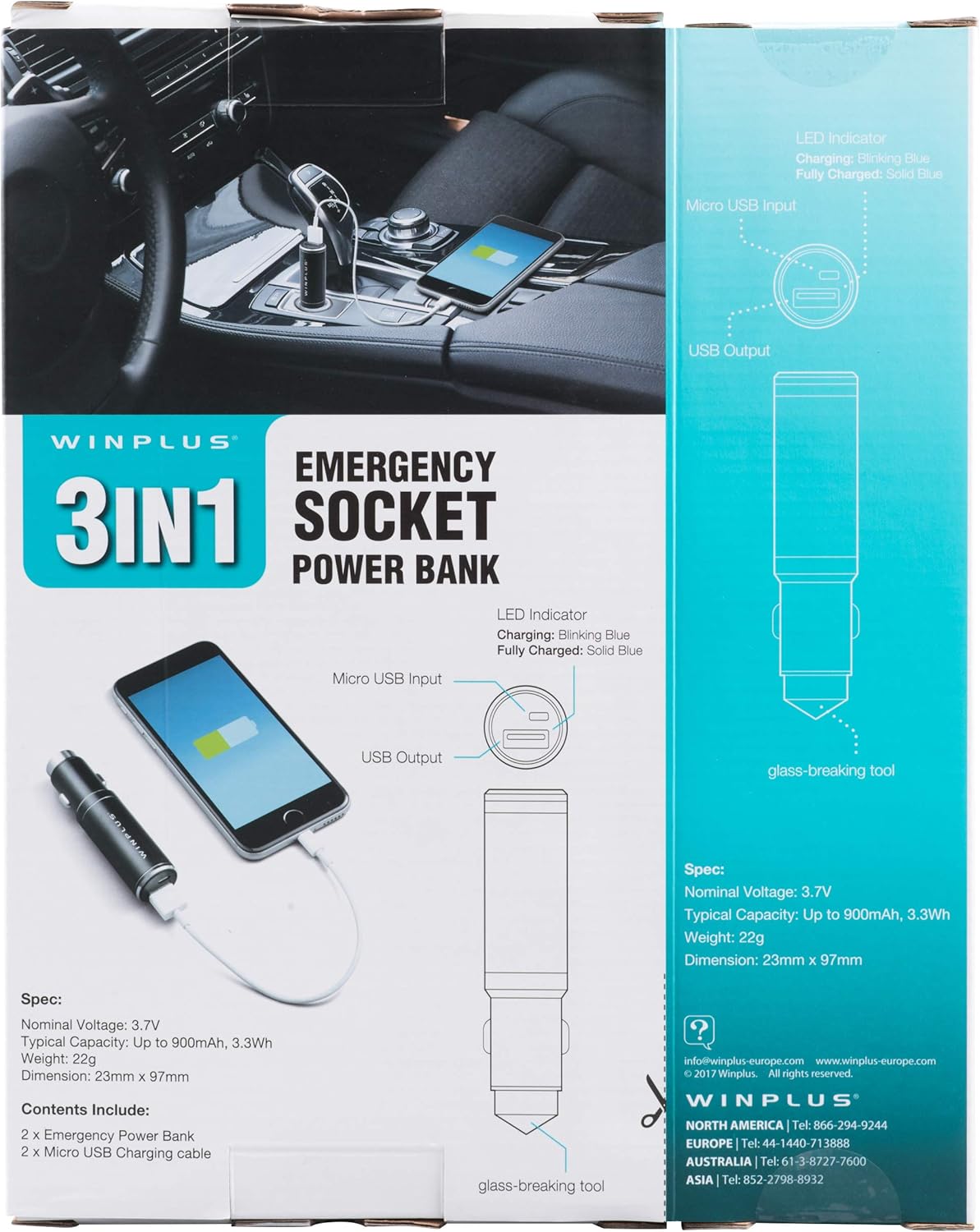
Figure 3: LED indicator status and glass-breaking tool location.
ຕັ້ງຄ່າ
ການສາກໄຟເບື້ອງຕົ້ນຂອງ Power Bank:
- Locate the Micro USB Input port on the device.
- Connect the provided Micro USB charging cable to the Micro USB Input port.
- Connect the other end of the USB cable to a standard USB power source (e.g., a computer USB port, a wall adapter, or the car's 12V socket when used as a car charger).
- The LED indicator will blink blue during charging.
- Once fully charged, the LED indicator will turn solid blue.
ໝາຍເຫດ: ແນະນຳໃຫ້ສາກໄຟ Power Bank ໃຫ້ເຕັມກ່ອນການນຳໃຊ້ຄັ້ງທຳອິດ.
ຄໍາແນະນໍາການດໍາເນີນງານ
ໃຊ້ເປັນ Power Bank ແບບພົກພາ:
- Ensure the power bank is charged (solid blue LED indicator).
- Connect your device's charging cable to the USB Output port on the power bank.
- Connect the other end of the cable to your mobile device (smartphone, tablet, etc.).
- ທະນາຄານພະລັງງານຈະເລີ່ມສາກໄຟອຸປະກອນຂອງທ່ານໂດຍອັດຕະໂນມັດ.
Using as a USB Car Charger:
- Insert the Winplus 3-in-1 device into your vehicle's 12V accessory socket (cigarette lighter socket).
- Connect your device's charging cable to the USB Output port on the Winplus device.
- ເຊື່ອມຕໍ່ອີກສົ້ນສາຍຂອງກັບອຸປະກອນມືຖືຂອງເຈົ້າ.
- Your device will begin charging. The internal power bank will also charge simultaneously if it is not full.
Using the Emergency Glass-Breaking Tool:
The emergency glass-breaking tool is located at the tip of the device, opposite the USB ports. This tool is intended for emergency use only to break vehicle side windows in situations where occupants are trapped.
- In an emergency, firmly press the tip of the tool against a corner of a side window.
- Apply steady pressure until the spring-loaded mechanism activates and shatters the glass.
- Once the glass is broken, carefully clear any remaining shards before exiting the vehicle.
ຄຳເຕືອນ: Use this tool only in genuine emergencies. Misuse can cause serious injury. Keep out of reach of children.
ບໍາລຸງຮັກສາ
- ຮັກສາອຸປະກອນໃຫ້ແຫ້ງ. ຄວາມຊຸ່ມສາມາດທຳລາຍວົງຈອນພາຍໃນໄດ້.
- ຢ່າໃຫ້ອຸນຫະພູມທີ່ຮຸນແຮງ (ຮ້ອນຫຼືເຢັນ).
- ເຮັດຄວາມສະອາດອຸປະກອນດ້ວຍຜ້າອ່ອນໆ, ແຫ້ງ. ຢ່າໃຊ້ສານເຄມີທີ່ຮຸນແຮງຫຼືເຄື່ອງເຮັດຄວາມສະອາດຂັດ.
- ເກັບຮັກສາໄວ້ໃນບ່ອນທີ່ເຢັນ, ແຫ້ງໃນເວລາທີ່ບໍ່ໄດ້ໃຊ້.
- ຫຼີກລ້ຽງການຫຼຸດລົງຫຼືການອຸປະກອນທີ່ມີຜົນກະທົບທີ່ເຂັ້ມແຂງ.
ການແກ້ໄຂບັນຫາ
| ບັນຫາ | ສາເຫດທີ່ເປັນໄປໄດ້ | ການແກ້ໄຂ |
|---|---|---|
| ອຸປະກອນບໍ່ໄດ້ສາກໄຟ. | Power bank is depleted. ສາຍເຄເບີ້ນມີຂໍ້ບົກຜ່ອງ. USB port is dirty or damaged. | ຕື່ມເງິນໃຫ້ທະນາຄານພະລັງງານ. ລອງໃຊ້ສາຍສາກໄຟແບບອື່ນ. Clean the USB ports carefully or try another port. |
| ຕົວຊີ້ວັດ LED ບໍ່ສະຫວ່າງ. | Device is not connected to a power source. Device is fully charged (if solid blue). ອຸປະກອນມີບັນຫາ. | Ensure proper connection to a power source. Check if it's already solid blue. ຕິດຕໍ່ຝ່າຍຊ່ວຍເຫຼືອລູກຄ້າຖ້າບັນຫາຍັງຄົງຢູ່. |
| ການສາກໄຟຊ້າ. | Cable is not suitable. Power source is low current. Device being charged has high power requirements. | Use a high-quality charging cable. Connect to a higher current USB adapter. This device provides 2.1A output, which is standard for fast charging most phones. |
ຂໍ້ມູນຈໍາເພາະ
- ຕົວແບບ: AC55925-80
- ປະລິມານນາມtage: 3.6V
- ຄວາມອາດສາມາດປົກກະຕິ: Up to 2500 mAh, 9 Wh
- ອົງປະກອບຂອງຈຸລັງຫມໍ້ໄຟ: ລີໂທມໂພລີເມີ
- USB Output: 5V / 2.1A
- ການປ້ອນຂໍ້ມູນ USB ຈຸນລະພາກ: 5V / 0.5A
- ຂະໜາດ: 23 ມມ x 127 ມມ (ປະມານ)
- ນ້ໍາຫນັກລາຍການ: 510 g (for the 2-pack)
- ປະເພດຕົວເຊື່ອມຕໍ່: Micro USB (Input), USB Type-A (Output)
ຂໍ້ມູນຄວາມປອດໄພ
- ຫ້າມຖອດປະກອບ, ເປີດ ຫຼື ຈີກຊຸດແບັດເຕີຣີ.
- ຢ່າວາງຊອງແບັດເຕີຣີໃສ່ຄວາມຮ້ອນຫຼືໄຟ. ຫຼີກເວັ້ນການເກັບຮັກສາໄວ້ໃນແສງແດດໂດຍກົງ.
- ຫ້າມບໍ່ໃຫ້ຊຸດແບັດເຕີລີລັດວົງຈອນ. ຫ້າມເກັບຮັກສາແບັດເຕີລີ່ໄວ້ໃນກ່ອງ ຫຼື ລີ້ນຊັກທີ່ເປັນອັນຕະລາຍຕໍ່ກັນ ຫຼື ໄຟຟ້າລັດວົງຈອນຈາກວັດຖຸໂລຫະອື່ນໆ.
- ຫ້າມບໍ່ໃຫ້ແບັດແບັດຖືກກະທົບກົນຈັກ.
- ໃນກໍລະນີທີ່ມີຫມໍ້ໄຟຮົ່ວ, ຢ່າປ່ອຍໃຫ້ຂອງແຫຼວເຂົ້າໄປໃນຜິວຫນັງຫຼືຕາ. ຖ້າມີການຕິດຕໍ່, ລ້າງພື້ນທີ່ທີ່ຖືກກະທົບດ້ວຍນ້ໍາຈໍານວນຫຼວງຫຼາຍແລະຊອກຫາຄໍາແນະນໍາຈາກແພດ.
- ຫ້າມໃຊ້ເຄື່ອງສາກໃດໆນອກເໜືອໄປຈາກທີ່ສະໜອງໃຫ້ສະເພາະກັບອຸປະກອນ.
- ຮັກສາແບັດເຕີລີ່ໃຫ້ໄກຈາກເດັກນ້ອຍ.
- ຊອກຫາຄໍາແນະນໍາທາງການແພດທັນທີຖ້າຊຸດຫມໍ້ໄຟໄດ້ຖືກກືນກິນ.
- ສະເຫມີຊື້ຊຸດຫມໍ້ໄຟທີ່ຖືກຕ້ອງສໍາລັບອຸປະກອນ.
- ຮັກສາຊຸດຫມໍ້ໄຟໃຫ້ສະອາດ ແລະແຫ້ງ.
- ຢ່າປະໄວ້ແບັດເຕີຣີໃນການສາກດົນໆເມື່ອບໍ່ໄດ້ໃຊ້.
- Dispose of battery packs properly according to local regulations.
ການຮັບປະກັນແລະການສະຫນັບສະຫນູນ
For warranty information or technical support, please contact Winplus North America Inc. directly.
- ຜູ້ຜະລິດ: Winplus North America Inc
- ຂໍ້ມູນຕິດຕໍ່: Refer to product packaging or the official Winplus webເວັບໄຊສໍາລັບລາຍລະອຽດສະຫນັບສະຫນູນໃນປະຈຸບັນຫຼາຍທີ່ສຸດ.
You can also visit the Winplus webເວັບໄຊທ໌ສຳລັບຄຳຖາມທີ່ຖືກຖາມເລື້ອຍໆ ແລະ ຂໍ້ມູນຜະລິດຕະພັນເພີ່ມເຕີມ: www.winplus-europe.com